
Detect
You have a credential and you do not know what it is.
A badge handed over at the start of an engagement, one lifted during a walkthrough, a sample posted by a client, one found in a drawer in a plant room. Nothing on the plastic tells you what is inside it. A printed logo is a purchasing decision from years ago rather than a statement about the chip, and sites routinely do not know what they issued.
The technology decides whether the credential can be read at all, written to a blank today, opened only with keys you do not have, or recovered only from a full dump.
SCAN ALL drives the Proxmark through every technology it knows, high frequency and low, and reports what answered, including when one card answers on both bands.
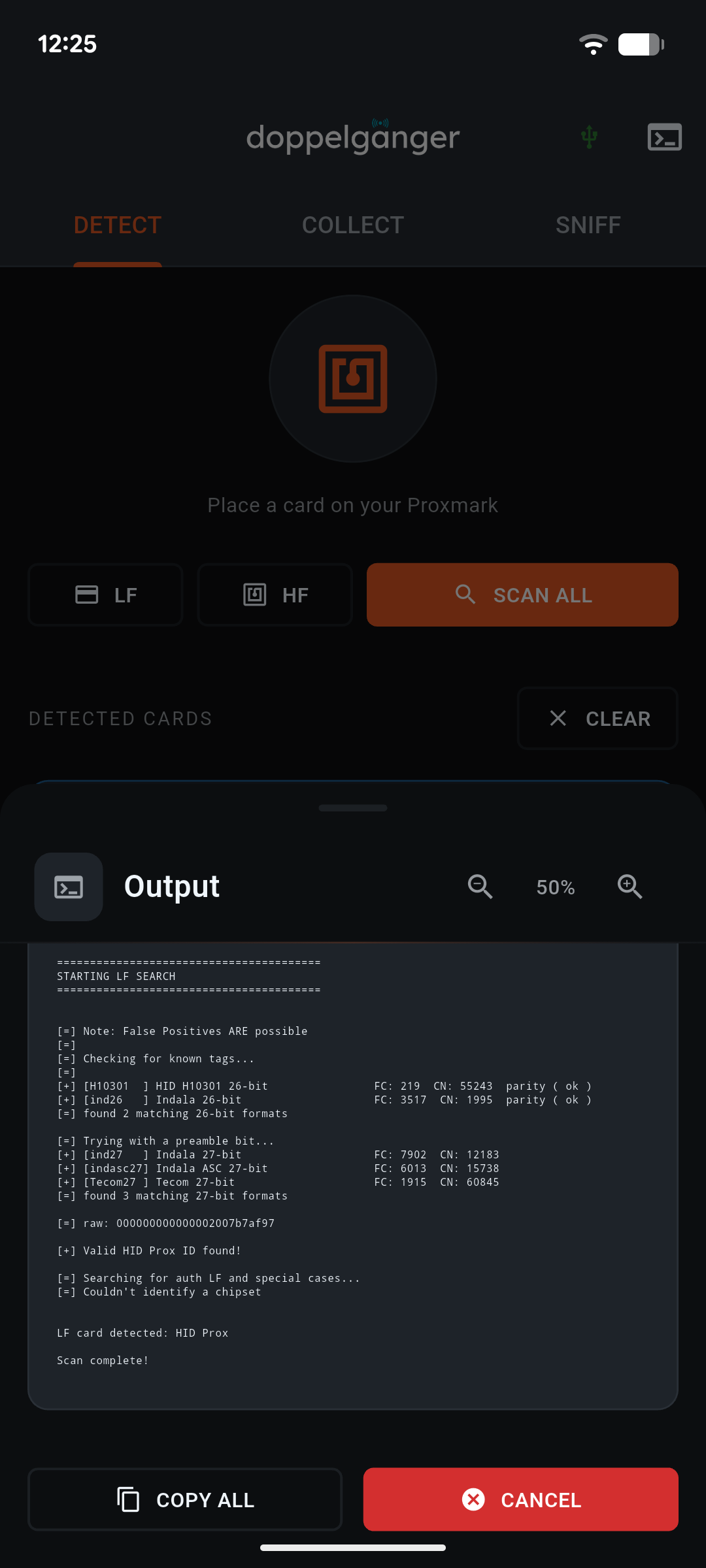
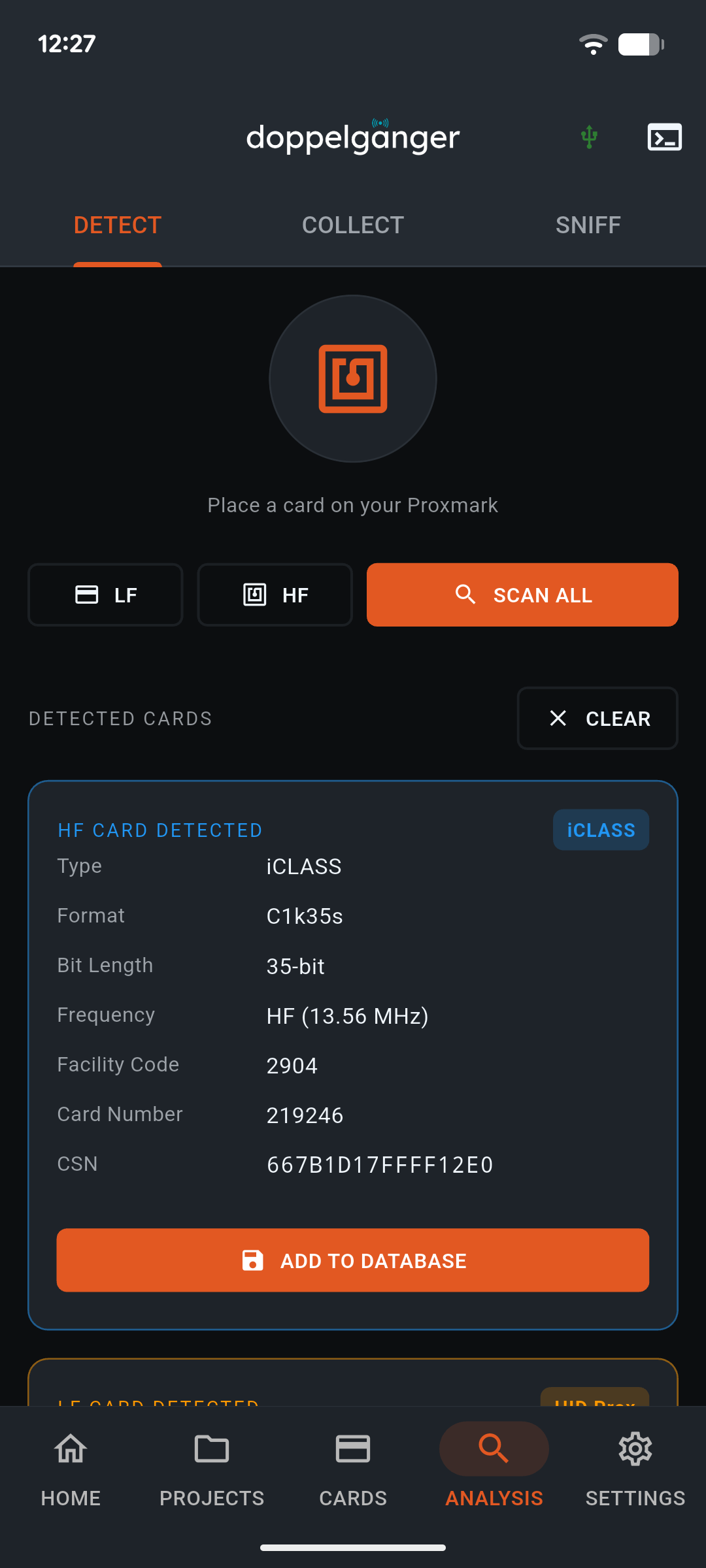
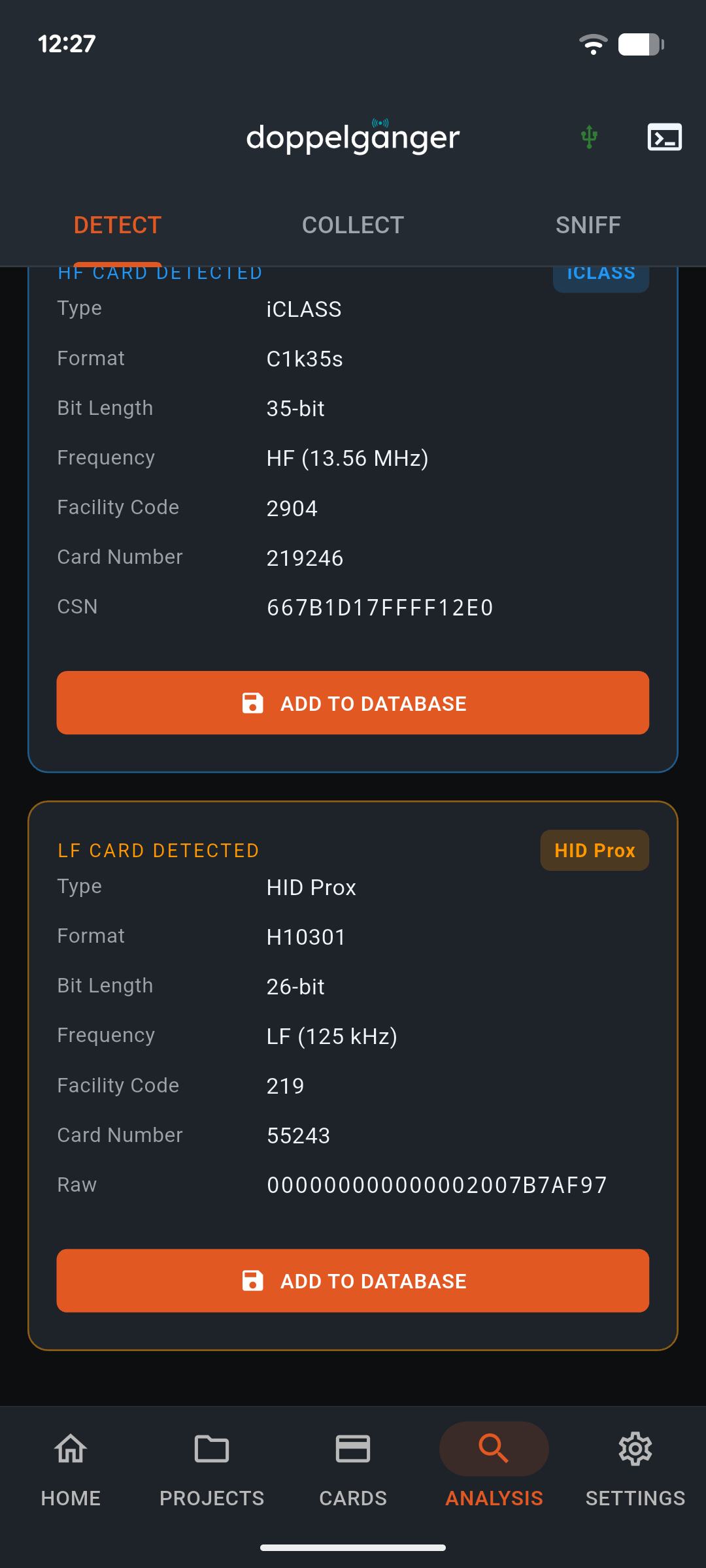
- The Output sheet opens with the scan and stays open.
- Both searches run, HF first and then LF.
- The high frequency half, found first.
- Facility code and card number, recovered from the dump.
- ADD TO DATABASE, because this one is a whole credential.
- The low frequency half, a different credential entirely.
- Its own facility code and card number.
- The raw stream, as the Proxmark read it.
What it can identify
Section titled “What it can identify”A single SCAN ALL runs the high frequency search, then the low frequency search, and puts the output through every parser the app carries. That is 24 low frequency technologies and four high frequency paths, several of which branch further once the card answers.
Low frequency, 125 kHz. Checked in this order, because some of them can be misread as each other:
| EM4100 | HID Prox | AWID | Indala |
| Pyramid | IO Prox | Gallagher | Securakey |
| PAC/Stanley | Nedap | NexWatch | G-Prox-II |
| Paradox | Viking | Keri | Motorola Flexpass |
| COTAG | Idteck | Jablotron | Noralsy |
| Presco | Visa2000 | FDX-B | Destron |
EM4100 is tested first, ahead of HID, because an EM read can otherwise be claimed by the prox parser and reported as a credential it is not.
High frequency, 13.56 MHz. Four paths, each of which pulls more once it knows what it has:
| Path | What happens after identification |
|---|---|
| iCLASS / Picopass | an authenticated dump with the standard key, then block 7 decoded to the credential |
| Seos | disambiguated from EMV by running both, then the ADF and crypto parameters read |
| EMV payment card | payment card details read |
| MIFARE family | a detail read that names the exact variant |
The MIFARE branch is the widest, naming Classic 1K, 1K CL2, 2K and 4K, Ultralight, Ultralight C and Ultralight AES, Plus, and DESFire with EV1 and EV2, plus the generation the originality signature attests to.
Three buttons, and when each is the right one
Section titled “Three buttons, and when each is the right one”| Button | Runs | Use it when |
|---|---|---|
| LF | the 125 kHz search only | you already know it is prox, and you do not want to spend a high frequency pass |
| HF | the 13.56 MHz search only | you already know it is a smartcard, iCLASS, Seos, MIFARE or DESFire |
| SCAN ALL | high frequency first, then low | you do not know |
LF and HF exist so you can skip a pass you know is pointless. On a dual technology card only SCAN ALL finds both halves.
The scan target, the output icon and CLEAR
Section titled “The scan target, the output icon and CLEAR”Six more controls and states belong to this tab, and two of them are the only route back to a scan you have already dismissed.
| Control or state | Where it is | What it does |
|---|---|---|
| NO PROXMARK DEVICE CONNECTED | directly under the header | Stands while no Proxmark answers. The three scan buttons stay drawn and go gray |
| Place a card on your Proxmark and Scanning… | under the scan target | The resting prompt and the running prompt, on the same line. Neither is drawn until a Proxmark is connected. While a scan runs the scan target turns to a progress spinner |
| No card detected with Tap terminal icon to view output | where a result would sit | Drawn after a scan that wrote output and found nothing on either band |
| the terminal icon, tooltip View Scan Output or View Last Output | the title bar, on all three Analysis tabs | Reopens the Output sheet. It appears only once a scan has written output. The tooltip reads View Scan Output while a scan is in flight and View Last Output afterward |
| CANCEL | in the Output sheet, only while a scan is in flight | Stops the scan, writes Scan canceled by user into the log, and reopens the sheet on what was captured |
| CLEAR | on the DETECTED CARDS header, once a result exists | Drops the high frequency result, the low frequency result and the output log in one press. The terminal icon goes with the log |
Dismissing the Output sheet does not throw the log away. The terminal icon is how you get it back, and CLEAR is the only thing that discards it.
What the Proxmark means by several matching formats
Section titled “What the Proxmark means by several matching formats”A 26-bit low frequency stream is just 26 bits. Several formats can be read out of the same bits, and the client says so before giving its verdict:
proxmark3 [+] [H10301 ] HID H10301 26-bit FC: 219 CN: 55243 parity ( ok )[+] [ind26 ] Indala 26-bit FC: 3517 CN: 1995 parity ( ok )[=] found 2 matching 26-bit formats...[+] Valid HID Prox ID found!The line found 2 matching 26-bit formats means the client is offering interpretations of one stream. Valid HID Prox ID found! is its verdict, and ATLAS reports the verdict.
A real Indala card produces no such line. It reads as Indala outright, which is how the two cases stay separated.
The third case, where the card answers on both formats
Section titled “The third case, where the card answers on both formats”Those two are not the whole rule. When the low frequency output carries a positive HID format line and a positive ind26 line and no found N matching N-bit formats line, ATLAS reads that as one card holding two decodes rather than one stream read two ways. It returns a single result typed HID Prox / Indala and stacks both decodes on the one card.
| Row | What it reads |
|---|---|
| Type | HID Prox / Indala, repeated in the pill on the LF CARD DETECTED header |
| Bit Length | 26-bit |
| Frequency | LF (125 kHz) |
| HID Prox | a sub-heading, then Format reading H10301, Facility Code and Card Number |
| Indala | a sub-heading, then Format reading ind26, Facility Code and Card Number |
| Raw | the stream both decodes were read out of |
| ADD TO DATABASE | offered, because the raw stream is a credential |
The two sets of numbers are different numbers. The facility code and card number under HID Prox have nothing to do with the pair under Indala, and a report that quotes one of them as the card’s identifier is quoting half of it.
LF and SCAN ALL both reach this case. The dual card draws its HID half from an H10301 line specifically, so that is the only HID format it stacks.
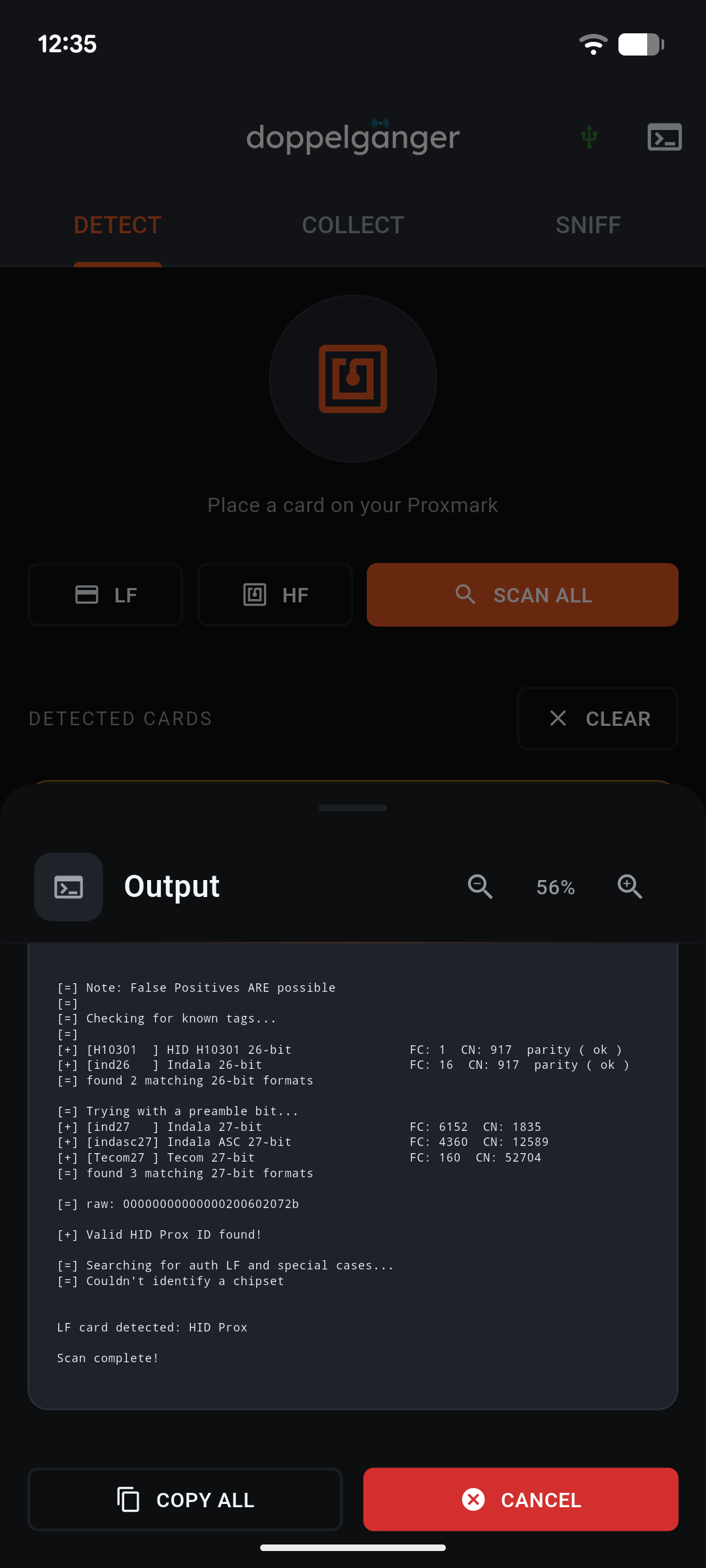
- The high frequency pass found nothing, correctly.
- Two formats offered off one 26-bit stream.
- The verdict the app reports.
What a result carries, by technology
Section titled “What a result carries, by technology”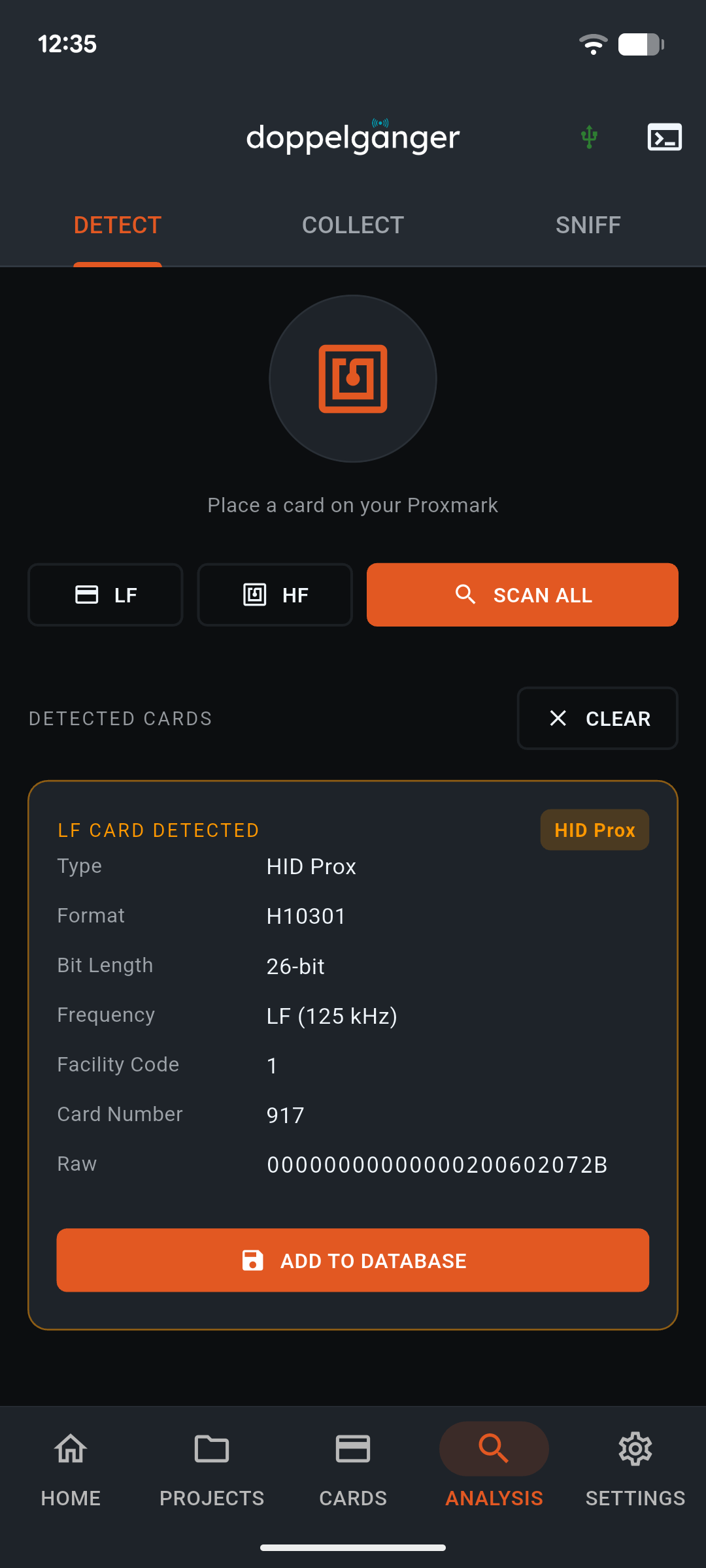
- The verdict, after the format ambiguity is resolved.
- H10301, the format the bits were read as.
- Facility code, which is the site.
- The raw stream the numbers were read out of.
- Offered, because prox is a whole credential.
Low frequency gives you the credential directly. The raw stream is the card, so format, facility code and card number come back together and there is nothing further to recover.
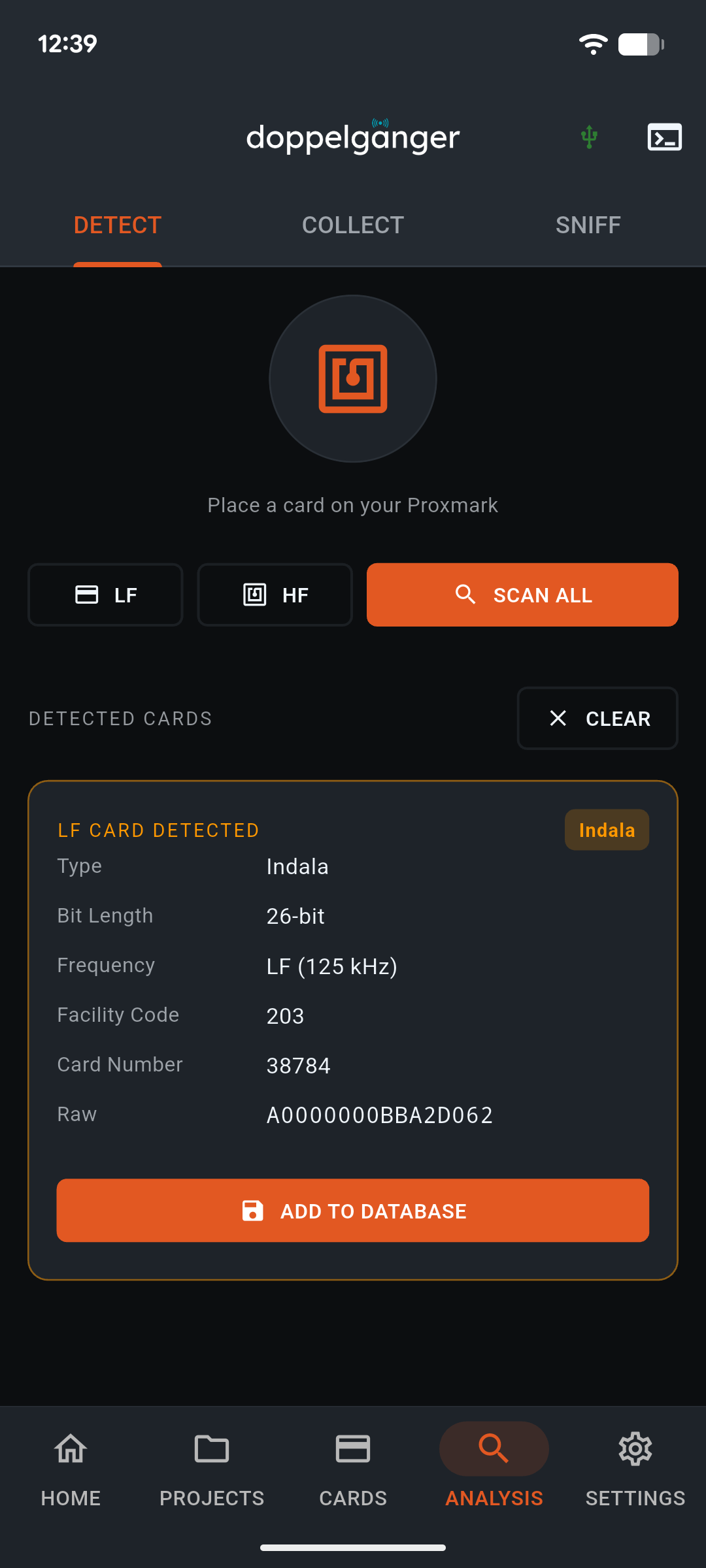
- Read as Indala outright, with no ambiguity line.
- Its own facility code and card number.
- The raw stream, 64 bits rather than 26.
iCLASS takes two steps. The scan recovers the CSN, then runs an authenticated dump with the standard key and decodes block 7 to get the credential:
proxmark3 [+] iCLASS / Picopass CSN: 66 7B 1D 17 FF FF 12 E0Dumping iCLASS card...[+] Using AA1 (debit) key[0] AE A6 84 A6 DA B2 32 78[=] ------------------------ Block 7 decoder --------------------------[+] [C1k35s ] HID Corporate 1000 35-bit std FC: 2904 CN: 219246Decrypted iCLASS card: FC: 2904, CN: 219246The dump is saved to the file manager as a .bin and a .json, both raw and decrypted, so the card is on disk as well as on screen.
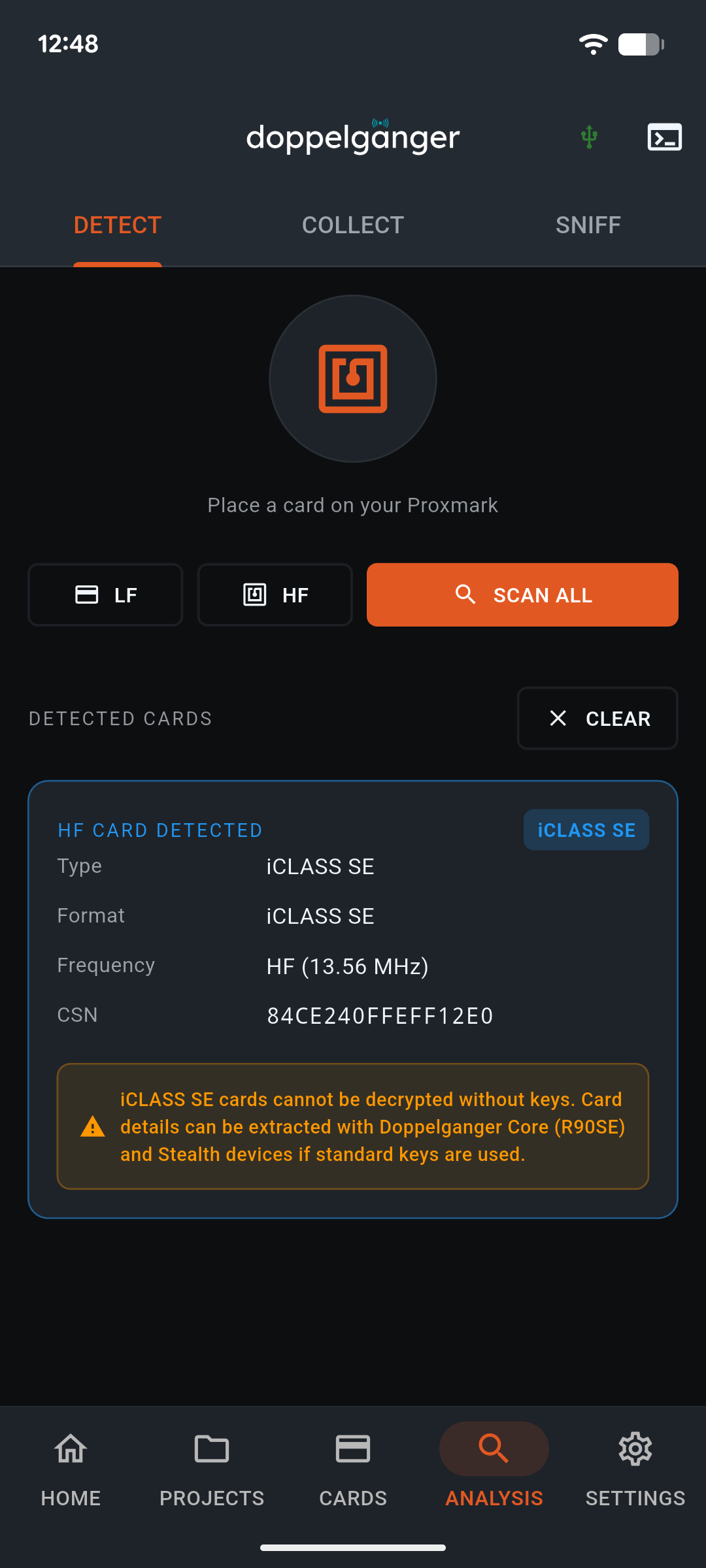
- Identified as SE rather than as a failed iCLASS read.
- The CSN, which is all the dump recovered.
- No facility code or card number, so nothing to save.
iCLASS SE stops at the serial, and the scan says why rather than failing quietly:
proxmark3 [!!] failed to communicate with cardiCLASS SE card detected. Cannot decrypt without keys.Card details can be extracted with Doppelganger Core (R90SE) and Stealthdevices if standard keys are used.The standard HID key opens iCLASS Legacy and does not open SE, so the dump stops at the serial.
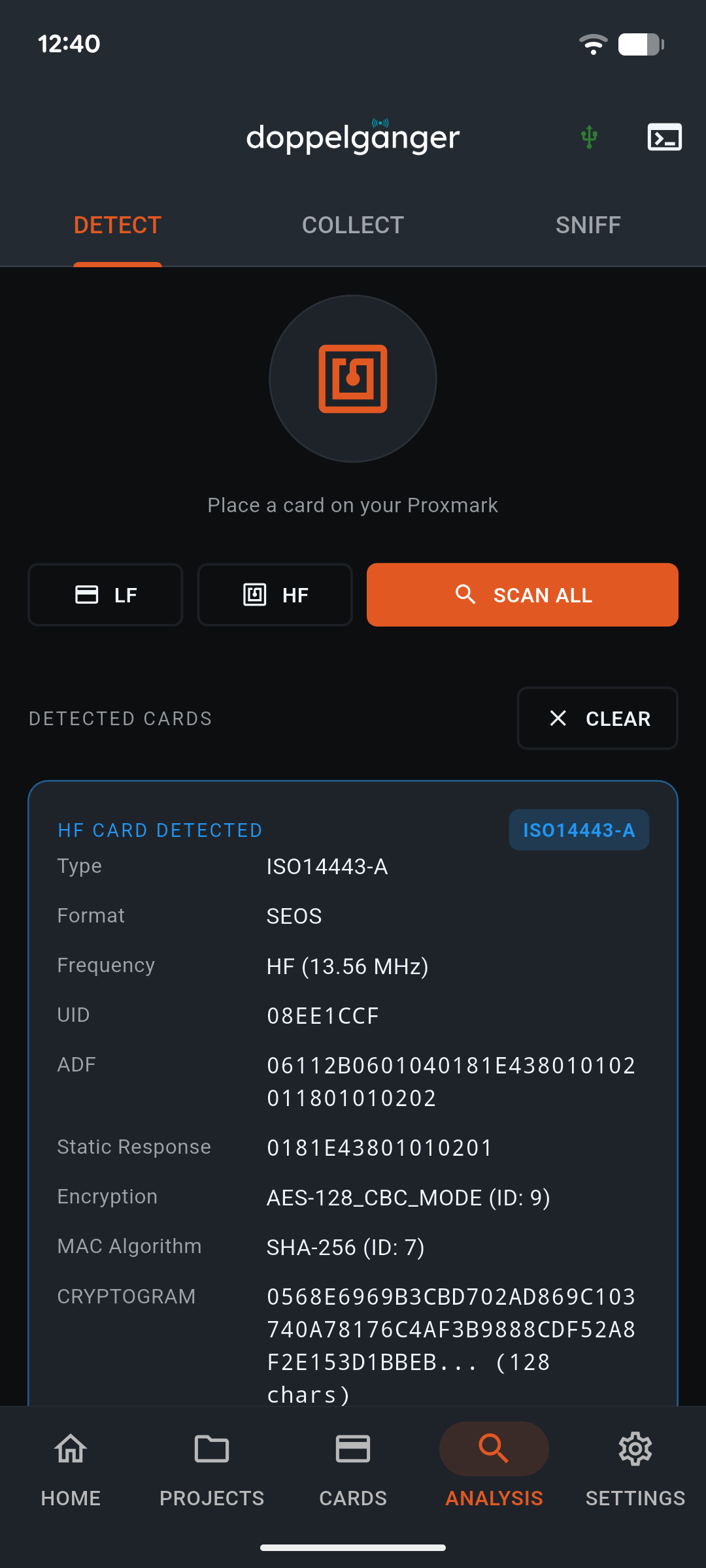
- Reported as 14443-A, with Seos as the format.
- A random UID, which changes every presentation.
- The ADF, which identifies the credential type.
- The cipher and MAC the card negotiated.
Seos is the only technology where the scan runs extra commands to decide what it is holding. A Seos card and a payment card both answer with SAK: 20, so the client lists both as possible, and ATLAS resolves it:
proxmark3 Both SEOS and EMV possible - determining actual type...Trying EMV reader... EMV reader failed (likely SEOS)Trying SEOS info... Confirmed: SEOS cardTwo details on that screen matter operationally. The UID is marked ( RID - random ID ) and changes every time the card is presented, so it identifies nothing. The challenge comes back as Static Response Detected, which is the opposite of what a challenge should be and is the handle you fingerprint on. A MAC Verification Failed line is expected without the private key.
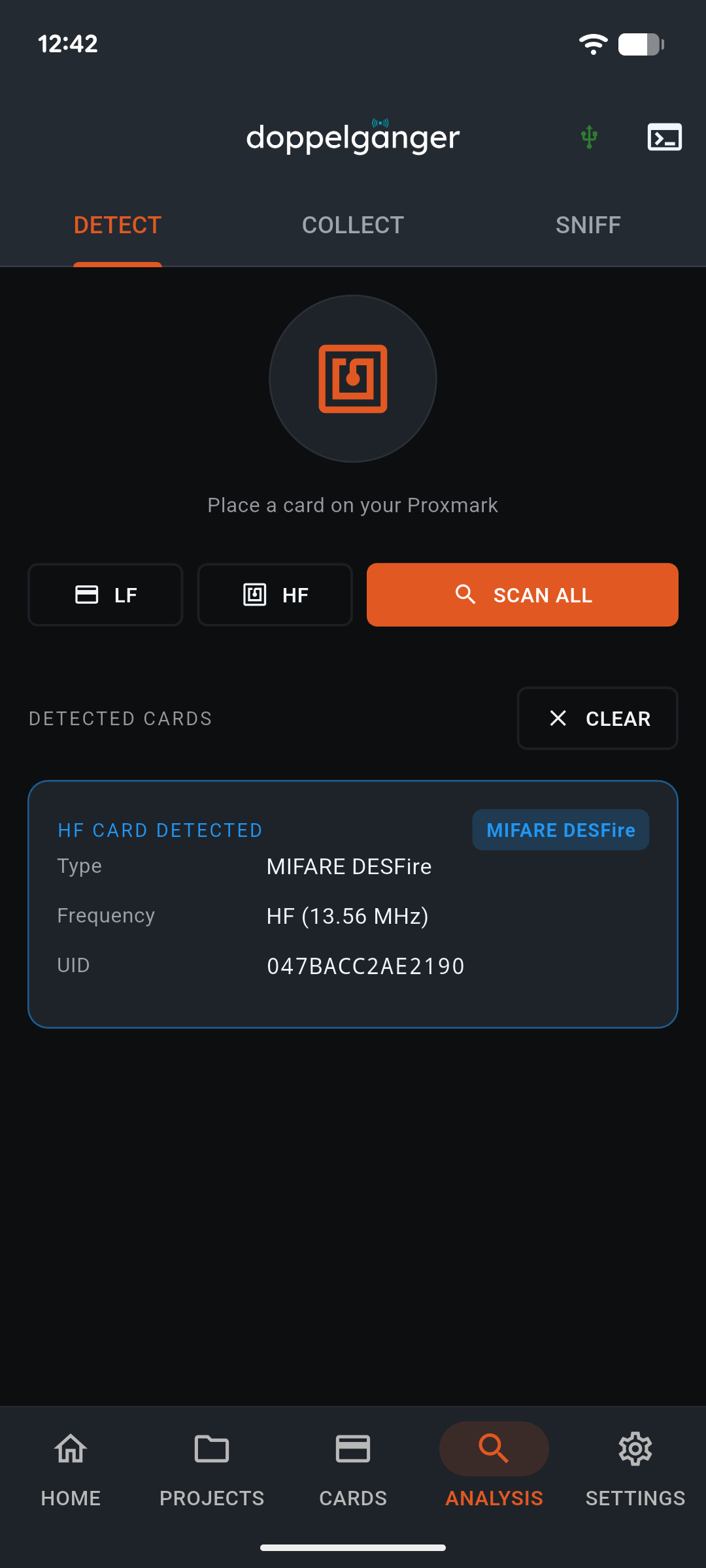
- The family, with no credential behind it.
- The UID, which is identity and not a credential.
- No ADD TO DATABASE, because there is nothing to store.
DESFire reports identity only on the card, while the scan log carries far more: vendor, hardware and software version, storage size, application count, free memory, which authentication commands the card accepts, and an originality signature checked against NXP’s public keys.
That signature is worth knowing about. The client tries every manufacturer key it holds and names the one that verified, so IC signature public key name: DESFire EV3 with Signature verification: successful is cryptographic attestation of the silicon generation, independent of the version byte. On a job that is how you demonstrate that a site’s documented card stock and its actual card stock disagree.
Which results can go to the database
Section titled “Which results can go to the database”The button appears when the result is a whole credential, and stays away when it is not.
| Result | Offered | Why |
|---|---|---|
| HID Prox, AWID, EM4100, Indala, Paxton and the other 125 kHz formats | yes | the raw stream is the credential |
| iCLASS, once facility code and card number are decoded | yes | the dump recovered the credential |
| iCLASS with only a CSN | no | the dump recovered no facility code or card number |
| iCLASS SE | no | the credential is behind keys the dump does not have |
| MIFARE Classic, Ultralight, DESFire | no | the credential lives in sectors only a full dump holds |
| Seos, PIV, EMV, plain 14443-A | no | identity and crypto parameters, with no credential |
What the answer changes
Section titled “What the answer changes”What goes in the report is what the technology means for the site.
| What came back | What it tells you about the site |
|---|---|
| EM4100 | a serial with no authentication at all, readable and writable by anyone with twenty dollars of hardware. Indefensible on a door |
| HID Prox, AWID, Indala and the rest of 125 kHz | a static number sent in the clear every presentation. Cloneable to a blank from a single read, with no key and no interaction with the reader |
| iCLASS Legacy, credential recovered | authenticated, but with keys that are not secret. The dump succeeded with the standard key, which is what you report |
| iCLASS SE, serial only | diversified keys the standard key does not open. Materially stronger than Legacy, and worth confirming rather than assuming |
| Seos | current generation. The UID is random per presentation and the challenge is static, so fingerprinting is possible where cloning is not |
| MIFARE Classic | broken cryptography with public attacks, but the credential is in sectors, so a dump is needed before anything can be said |
| DESFire EV2 and EV3 | current generation, AES, originality signature verifiable. Not a cloning target |
A dual technology card is a finding in itself. A credential carrying iCLASS on one band and 125 kHz prox on the other is only as strong as its weakest half, and the weak half is usually there because a reader fleet was never finished. Clients frequently do not know the prox side exists.
A technology nobody at the site can name is the common case with the unusual entries in that table. Documentation says one thing, the issued stock says another, and the screen settles it.
If you are running a Proxmark 5
Section titled “If you are running a Proxmark 5”A Proxmark 5 energizes an iCLASS card normally and then recovers its answer roughly one try in six, where a Proxmark3 reads it outright. ATLAS gives the read up to 6 attempts before it gives up, and then raises one of three warning toasts. Only one of them is a failure.
| What the toast reads | What happened | What to do |
|---|---|---|
| Proxmark 5 needed N attempts to read this card. | The retry worked and the credential came back. N is the attempt the serial landed on | Nothing. The facility code and card number on the result are real, however many attempts it took |
| Proxmark 5 read the serial but not the credential. Use a Proxmark3 or a Doppelganger reader. | The serial came back, the authenticated dump did not finish, so there is no facility code and no card number | Read the card again on a Proxmark3, a Doppelganger Core (R90SE) or a Stealth reader |
| Proxmark 5 could not read iCLASS. Use a Proxmark3 or a Doppelganger reader. | All 6 attempts came back with no iCLASS at all. The log reads No iCLASS after 6 attempts. | The same. A no-read here says nothing about the card |
The first row is a success notice. Reading the serial took more than one attempt, and the credential was still recovered, so the result stands. Do not discard it.
The retry runs only on a Proxmark 5. Any other Proxmark reporting no high frequency tag has genuinely not found one.
A no-read on a Proxmark 5 proves nothing about the card. Confirm anything that matters with a Proxmark3, or with a Doppelganger Core (R90SE) or Stealth reader, which recover the credential through the reader’s own key handling.