
Bluetooth
A reader on WiFi announces itself. A Core needs your phone’s hotspot up for as long as it is out, and a Stealth broadcasts an access point named doppelgänger_XXXX to anyone who opens their WiFi list in that lobby. Both are a network somebody else can see, and the hotspot is one more thing on your phone that can switch itself off while you are watching a door.
On Bluetooth there is no network at all. The reader advertises with no name, under an address that changes every 15 minutes, and it answers only a phone it was paired with. Captured cards still arrive as they are read, settings still open, and firmware still updates, all over that one link.
Bluetooth is an ATLAS feature. Nothing else pairs with a reader, and the reader’s own web pages do not mention it. It needs firmware 2.0.0 or later on the reader.
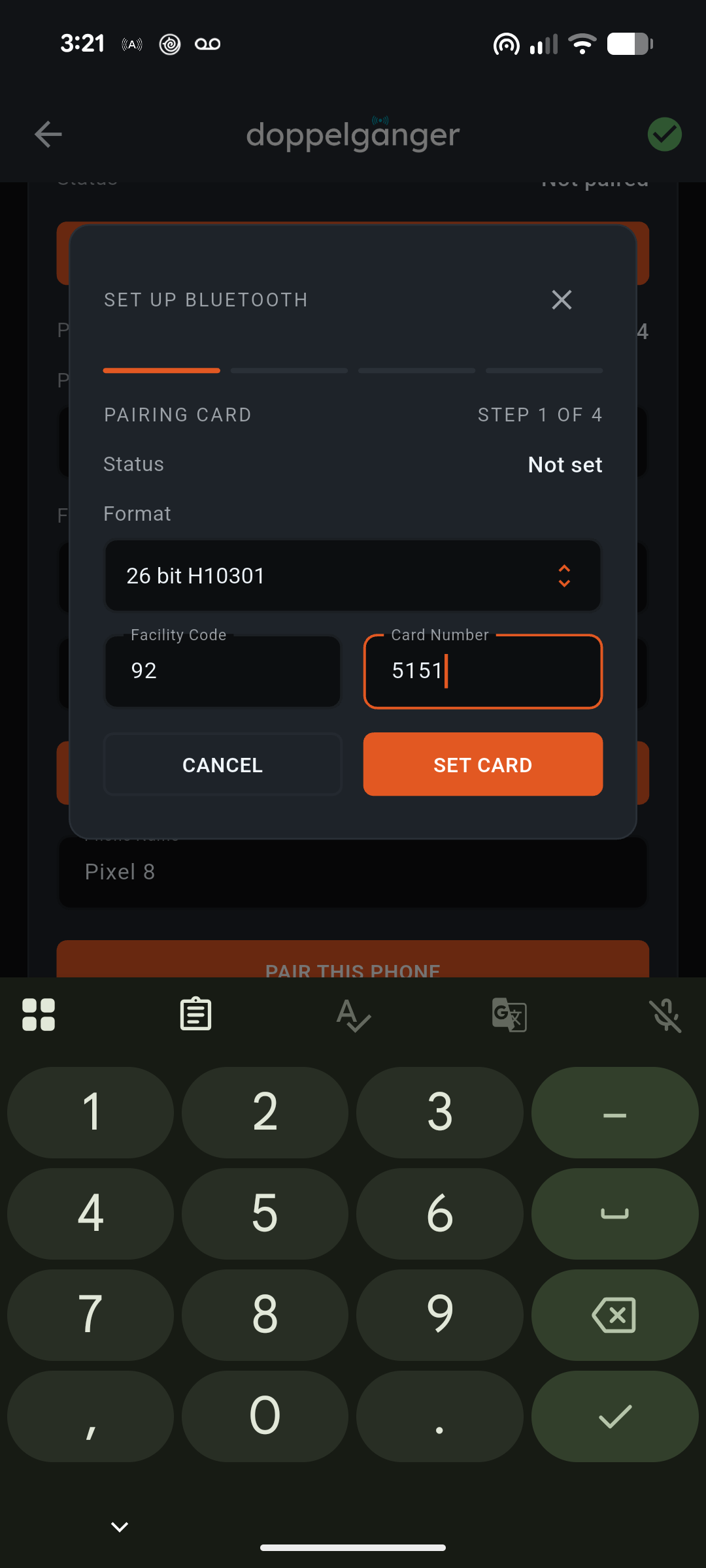
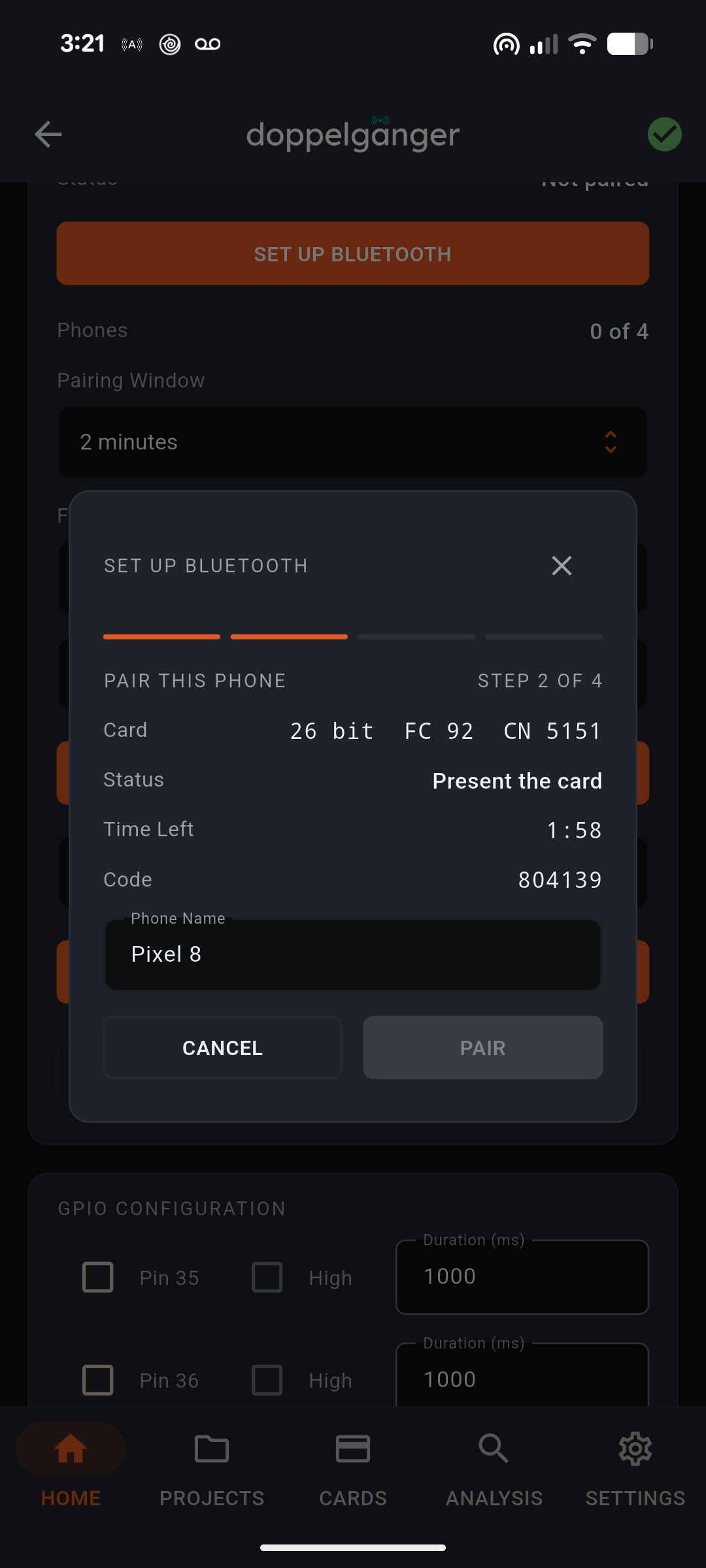
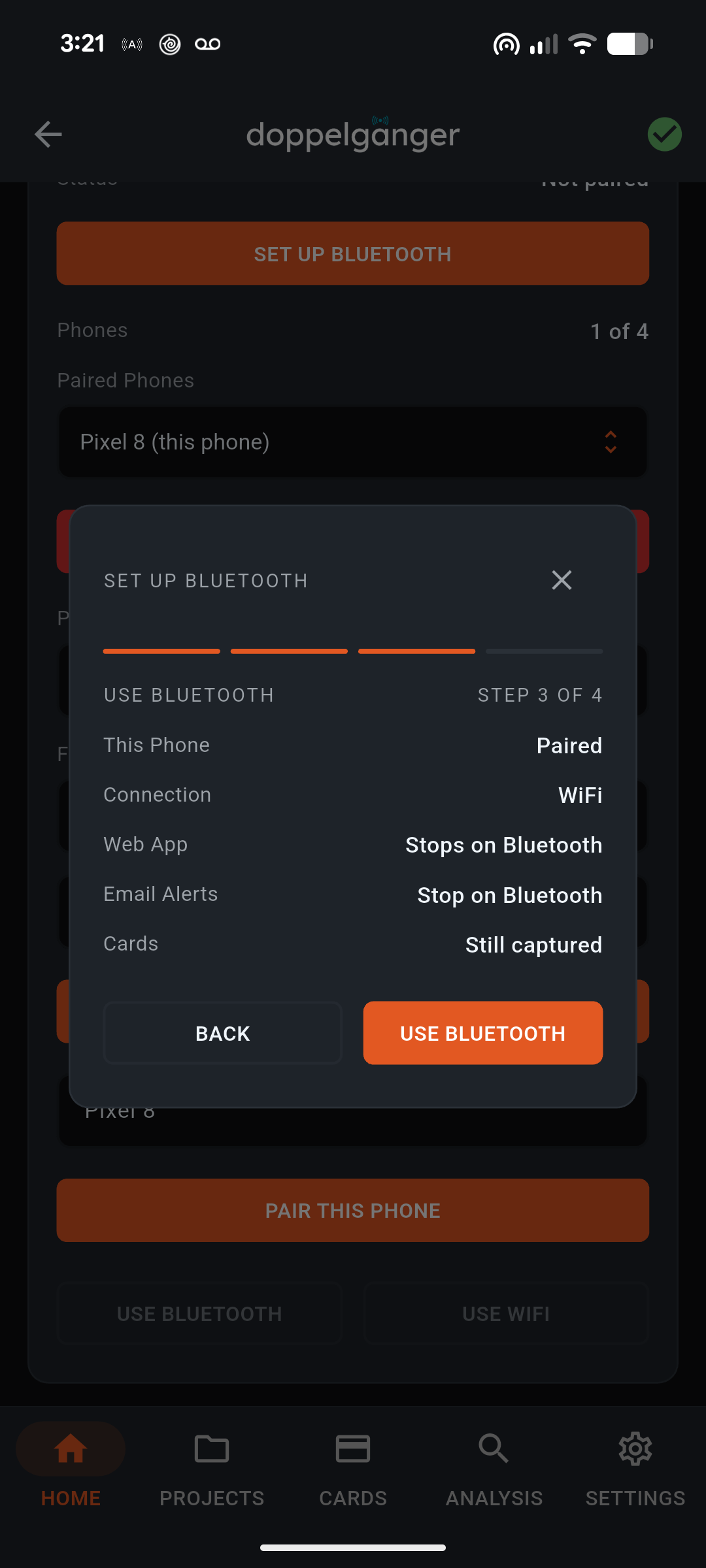
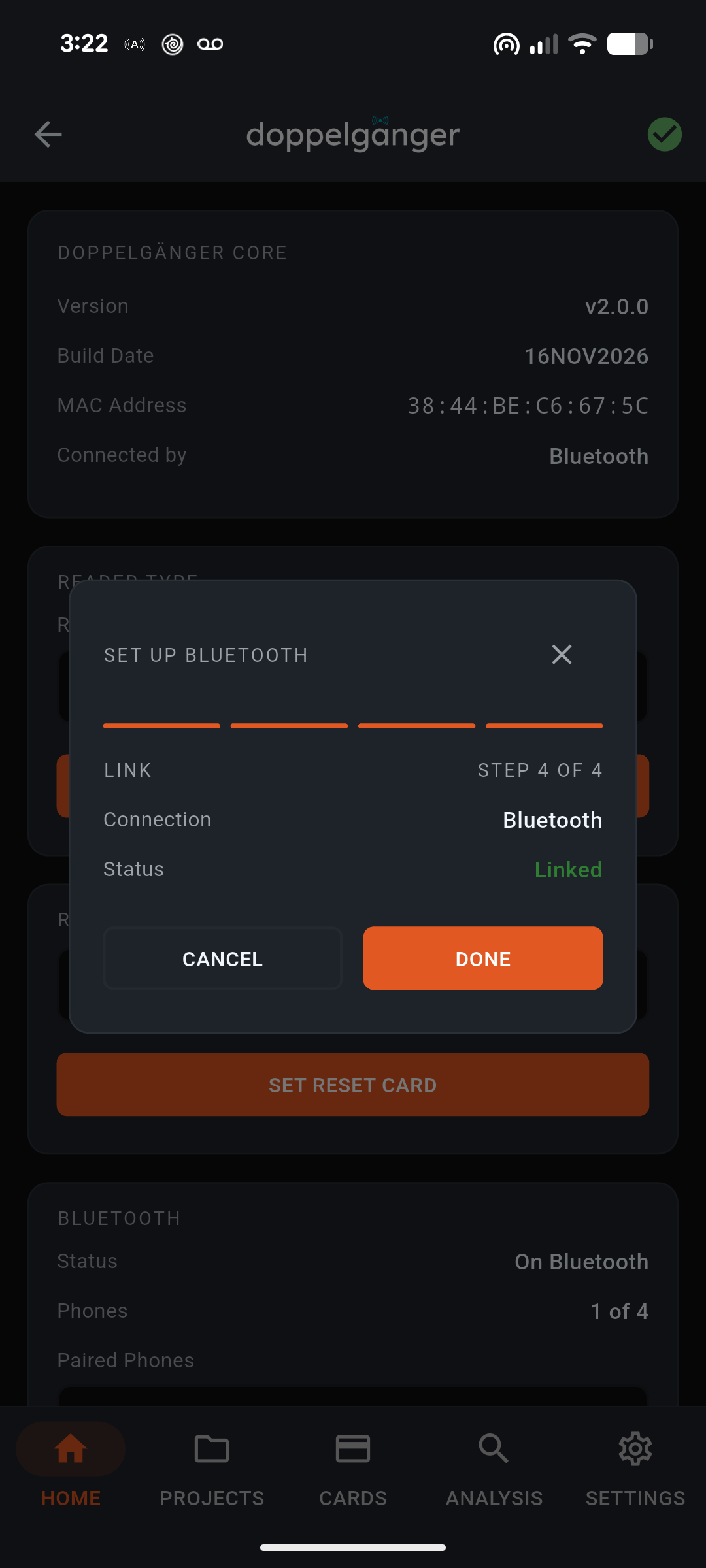
- PAIRING CARD, STEP 1 OF 4.
- Format, the kind of card you are going to carry.
- Facility Code 92 and Card Number 5151, typed.
- SET CARD sends it to the reader.
- PAIR THIS PHONE, STEP 2 OF 4.
- Present the card, with the time left under it.
- Code 804139, which the reader prints on its console too.
- Phone Name, what the reader will list this phone as.
- This Phone, Paired.
- Web App, Stops on Bluetooth.
- Cards, Still captured.
- USE BLUETOOTH restarts the reader on the other connection.
- LINK, STEP 4 OF 4.
- Status, Linked.
- DONE returns to the reader's settings, now over Bluetooth.
Why Bluetooth: what is on the air, and who can read it
Section titled “Why Bluetooth: what is on the air, and who can read it”Everything a reader transmits is something a site can find. That is the whole case for Bluetooth, so it is worth being exact about what each connection gives away.
| WiFi | Bluetooth | |
|---|---|---|
| A name on the air | yes. The phone’s hotspot name for a Core, doppelgänger_XXXX for a Stealth | no. The advertisement carries no name |
| A fixed address | yes. The reader’s MAC, for as long as it is up | no. The address is random and changes every 15 minutes |
| Shows up in | every phone’s WiFi list, and any wireless intrusion system watching for new access points | a Bluetooth scanner, as one more anonymous device among the headphones and watches |
| Can be joined by a stranger | yes, with the network password. A Stealth’s factory password is published | no. There is nothing to join |
| Pages and files served | the reader’s web application and its card log, with no login | none. The web server is not running |
| Cards in transit | plain HTTP | encrypted and authenticated, message by message |
| Who the reader answers | anything on the network | a phone it holds the key of, and nothing else |
It is quieter, not silent. A reader on Bluetooth still advertises, so a person running a Bluetooth scanner beside it sees that a device is there. What they do not get is a name, a stable address, a manufacturer, or anything that says what it is or that it has anything to do with you. The only state with nothing on the air at all is a Stealth in stealth mode.
How the link is secured
Section titled “How the link is secured”| Pairing | the phone and the reader exchange keys over WiFi, and the reader keeps the phone only when your pairing card is presented at it. Somebody who reaches the reader’s network cannot pair without the card in their hand |
| Proof at every connection | each time the phone connects, both ends prove they hold their keys before anything is sent. A phone the reader does not hold is turned away |
| Every message | encrypted and authenticated, each with its own counter, so a message cannot be read, altered, replayed or reordered |
| A removed phone | refused from then on, and told so, so it stops trying |
| One phone at a time | a reader serves one linked phone. A second paired phone sees In use by another phone and takes over when the first lets go |
| The pairing code | the six digit Code in step 2 is the same on the phone and on the reader’s console, so you can confirm you are pairing with the reader in front of you |
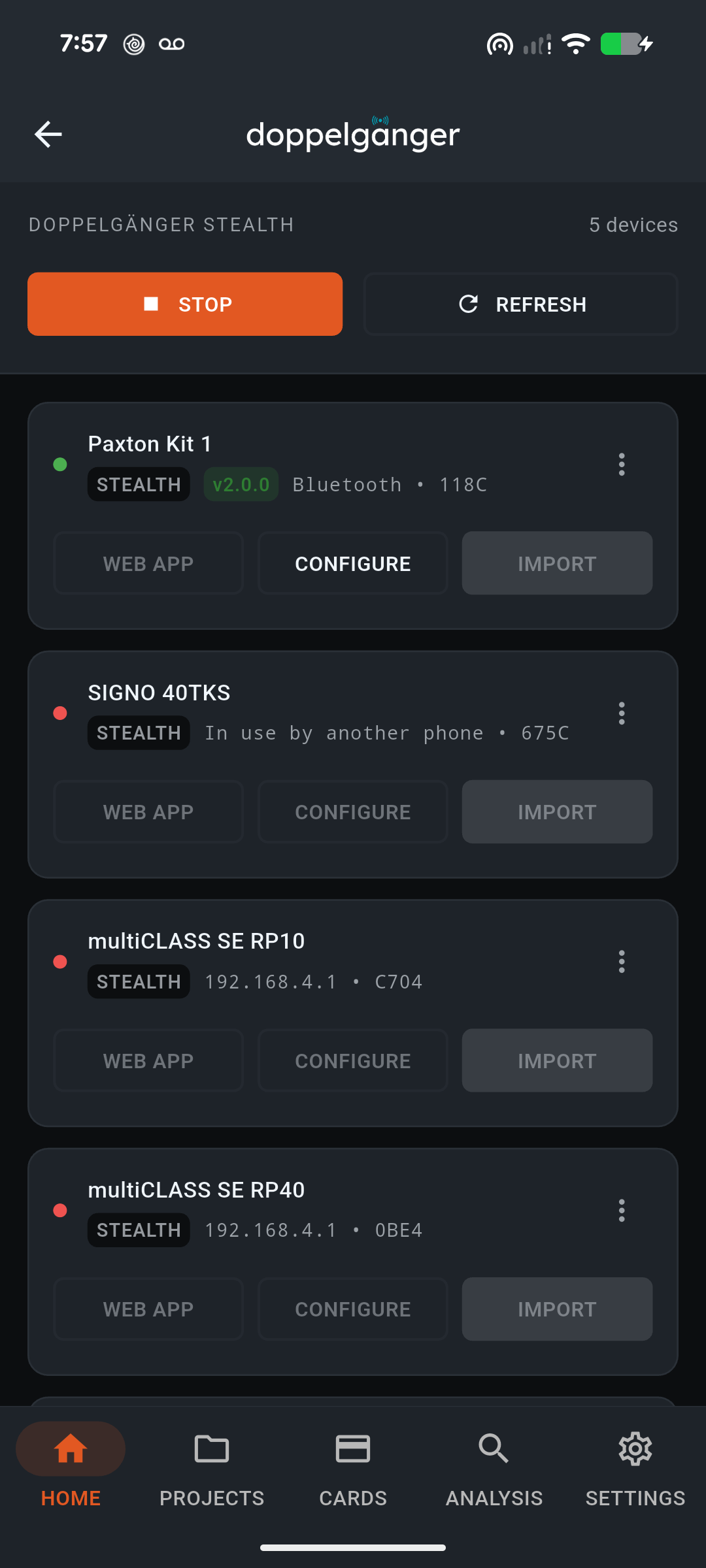
- Paxton Kit 1, linked to this phone.
- SIGNO 40TKS, with a red dot. Another paired phone has it.
- In use by another phone, and the end of its MAC.
- CONFIGURE and IMPORT are gray until this phone has the reader.
WiFi or Bluetooth, and what each costs
Section titled “WiFi or Bluetooth, and what each costs”A reader is on one or the other, never both. Pick per job.
| WiFi | Bluetooth | |
|---|---|---|
| What is on the air | a hotspot on your phone for a Core, the reader’s own access point for a Stealth | an unnamed advertisement that changes address every 15 minutes |
| What the phone has to do | keep a hotspot up, or sit on a network with no internet | keep Bluetooth on |
| Cards arriving live | yes | yes |
| Cards read while the phone was away | stay on the reader until you IMPORT | delivered by themselves when the phone links again |
| CONFIGURE | yes | yes |
| WEB APP | yes | no. The reader runs no web pages on Bluetooth |
| IMPORT | yes | no, and not needed. See the row above |
| Email alerts, Core only | yes, on a network with a route out | no. There is no network to send on |
| Firmware update from ATLAS | about 45 seconds | about two and a half minutes |
| Readers at once | several Cores, one Stealth | several of either. Three have been linked together, one Core and two Stealth |
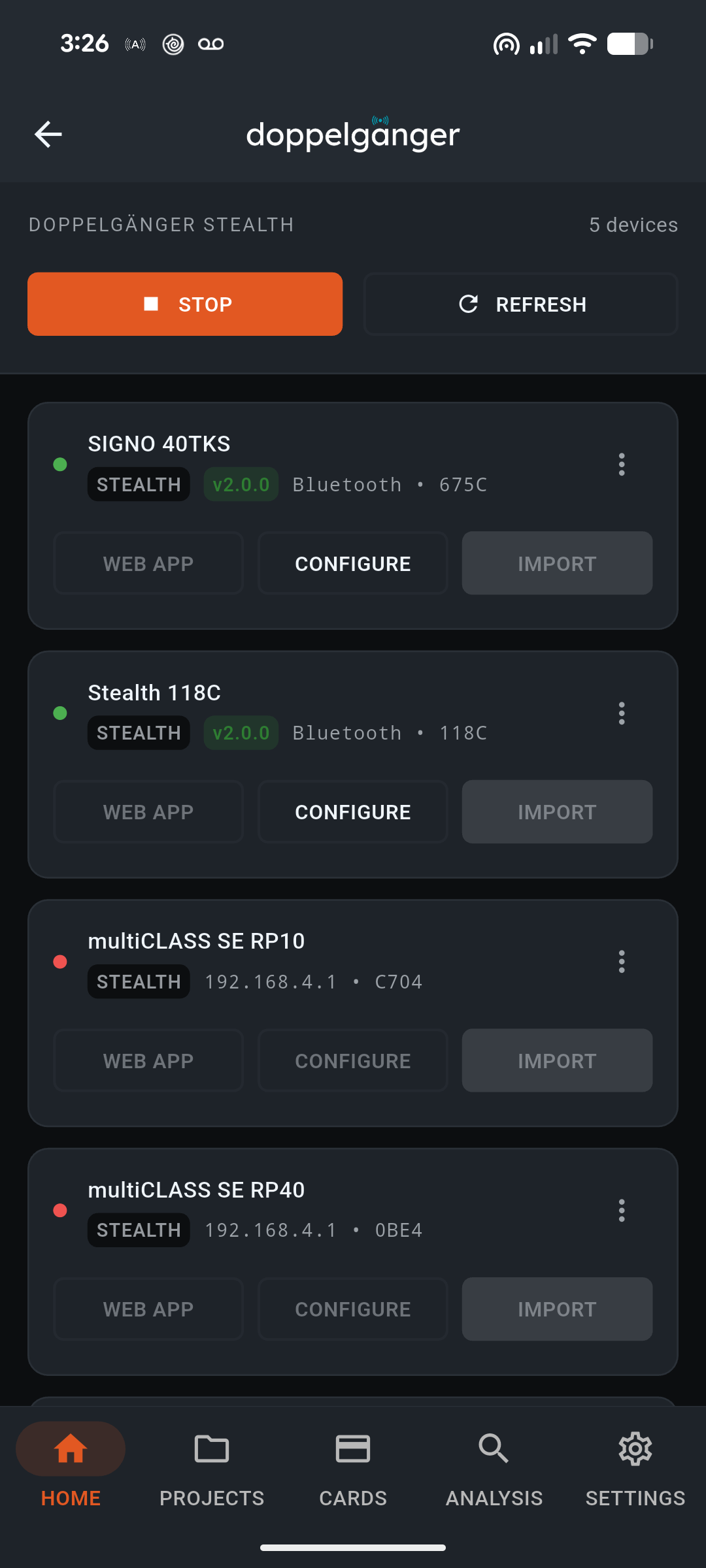
- DISCOVER, shown as STOP while it runs, and REFRESH.
- SIGNO 40TKS, a Stealth on a Signo reader, on Bluetooth.
- Only CONFIGURE is live on Bluetooth.
- Stealth 118C, a second Stealth, linked at the same moment.
- Three readers last seen on WiFi, all at the one address a Stealth answers on.
The reader list tells you which connection a reader is on
Section titled “The reader list tells you which connection a reader is on”Home, then Doppelgänger Core or Doppelgänger Stealth.
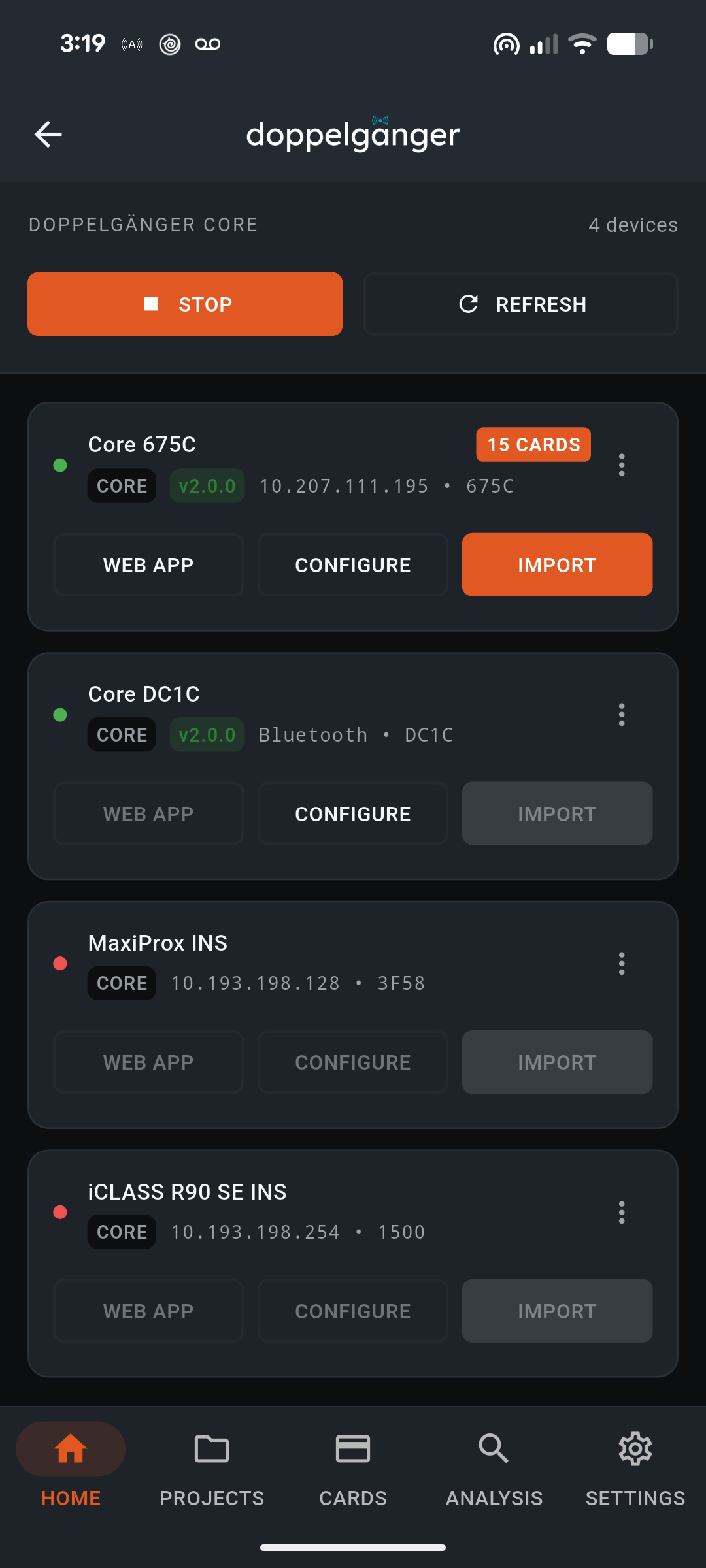
- DISCOVER, shown as STOP while it runs, and REFRESH.
- Core 675C on WiFi. Its address is on the line under the name, and its card count is beside it.
- WEB APP, CONFIGURE and IMPORT are all live on WiFi.
- Core DC1C. The line under the name reads Bluetooth where the address would be.
- On Bluetooth only CONFIGURE is live.
The line under a reader’s name carries its firmware version and then where it is.
| What that line reads | What it means |
|---|---|
| an IP address | the reader is on WiFi at that address |
| Bluetooth | this phone is linked to it over Bluetooth |
| In use by another phone | the reader is on Bluetooth and another paired phone holds the link. It serves one phone at a time, and this phone takes over when that one lets go |
| Phone Bluetooth off | the phone’s Bluetooth is switched off, so nothing can be found. Switch it on |
A reader this phone is paired with stays in the list whether it can be heard or not. A reader that has never been named shows as its product and the last four of its MAC, Core DC1C or Stealth 118C, and it shows the same name on WiFi and on Bluetooth.
Setting it up
Section titled “Setting it up”The reader has to be reachable on WiFi to be paired. That is the only time. Open CONFIGURE on the reader and tap SET UP BLUETOOTH, which is in the BLUETOOTH section.
Step 1, the pairing card
Section titled “Step 1, the pairing card”The pairing card is a card you choose and carry. The reader pairs a phone only when that card is presented at it, which is what stops somebody else’s phone from pairing with a reader they can walk up to.
| Reader Mode | What you enter |
|---|---|
| HID | Format, one of 26 bit H10301, 35 bit Corporate 1000, 37 bit H10304 and 48 bit Corporate 1000, then Facility Code and Card Number |
| PAXTON | HEX Value (10 chars), the ten hexadecimal characters of the token |
SET CARD sends it. The reader does not save it yet.
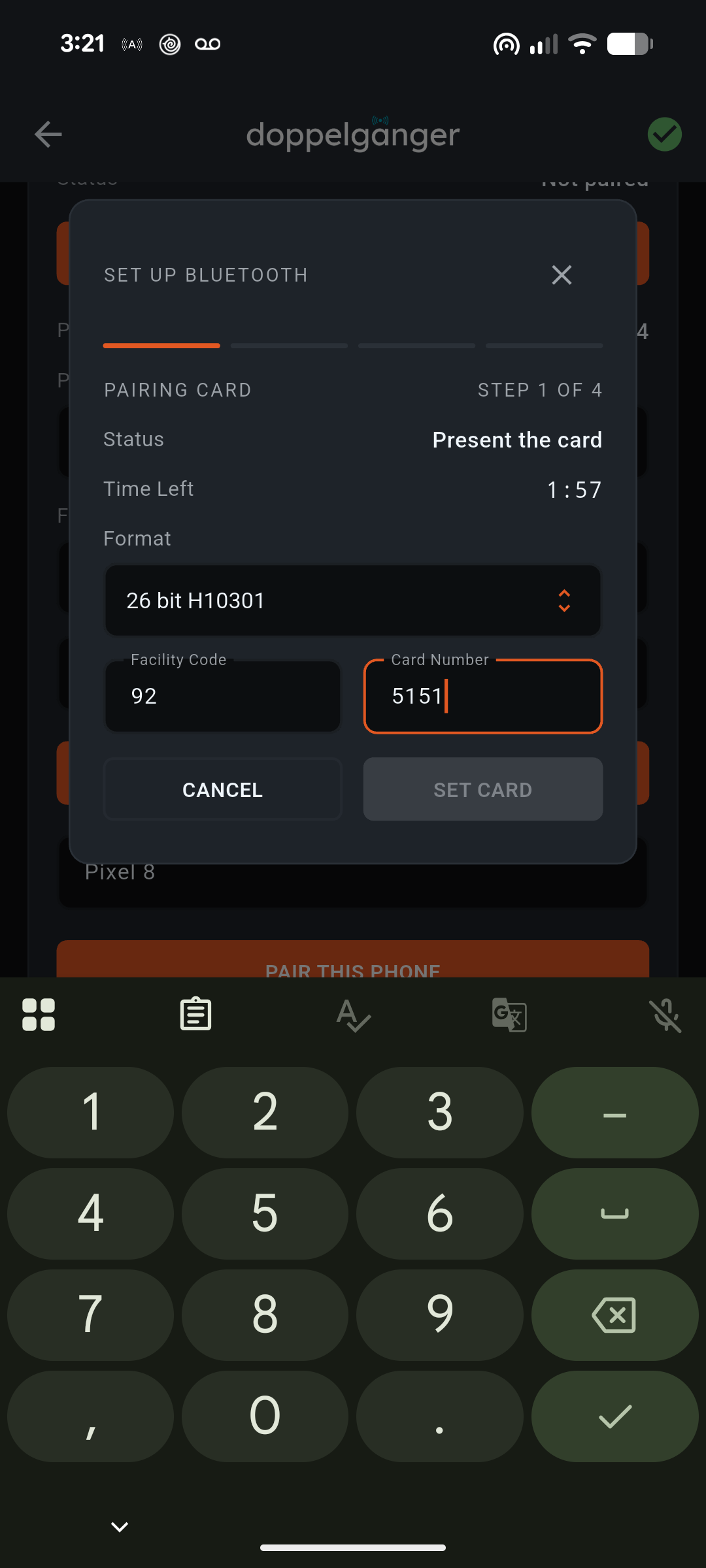
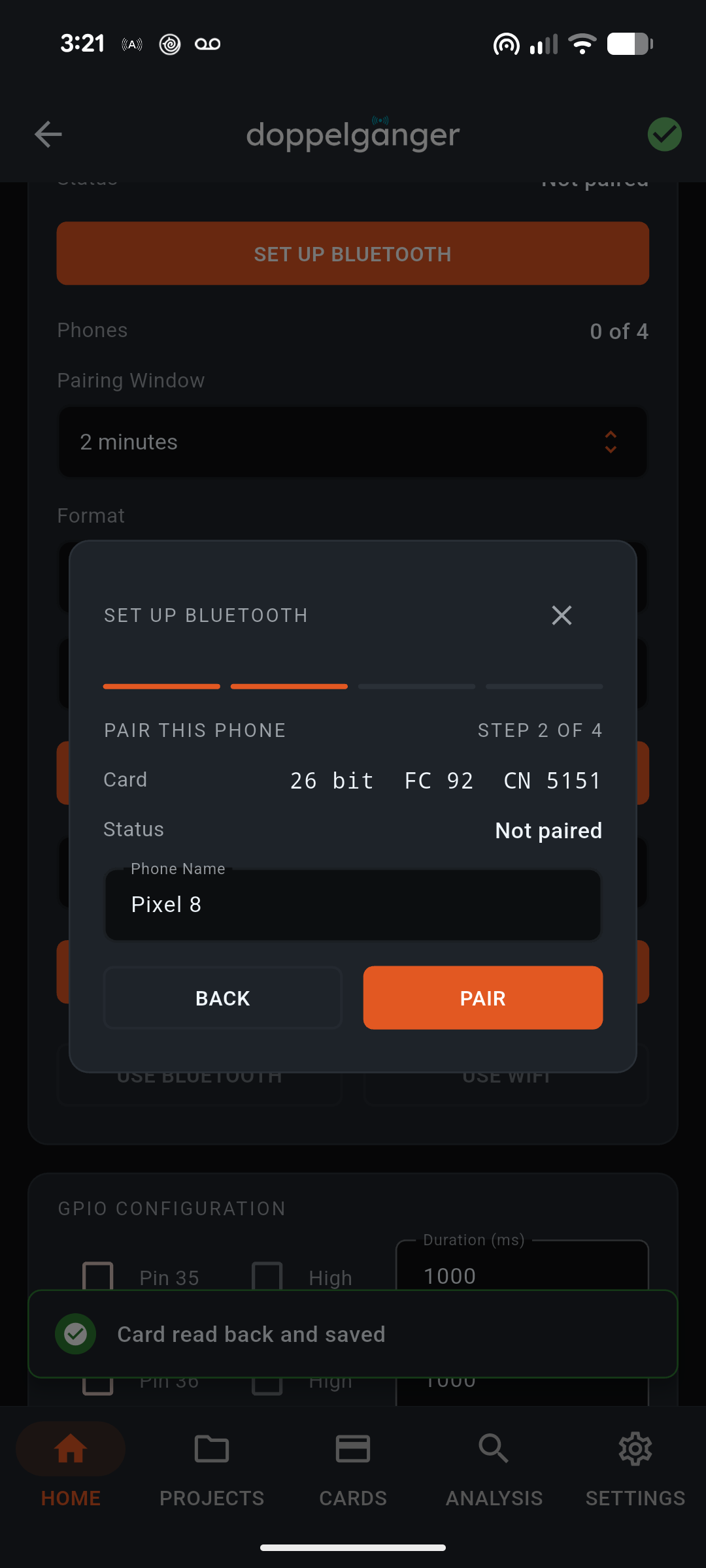
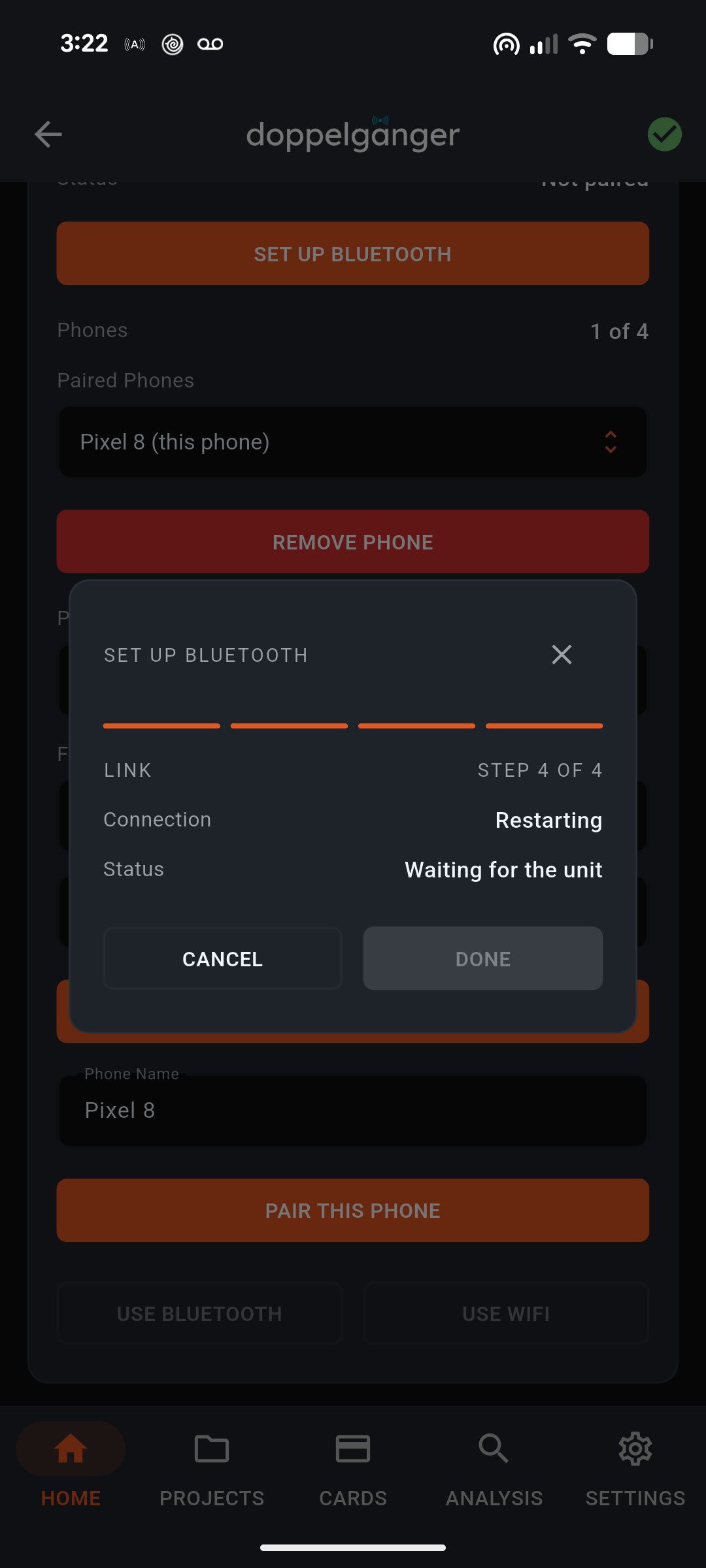
- Present the card, with Time Left counting down under it.
- The format you chose.
- The card the reader is waiting to see.
- SET CARD is off until the wait ends.
- Card, as the reader read it.
- Phone Name. Change it if you run more than one phone.
- PAIR starts the second wait.
- Card read back and saved.
- Connection, Restarting.
- DONE is off until the reader is linked.
A reader that already holds a pairing card opens this step showing it, with NEXT in place of SET CARD. Change a field and the button becomes SET CARD again.
Making the card you entered
Section titled “Making the card you entered”You need the card in your hand to present it. On the reader’s CONFIGURE screen, WRITE PAIRING CARD sits under SET PAIRING CARD and takes the values in the fields to something that can present them. WRITE RESET CARD and, on a Stealth, WRITE STEALTH CARD do the same for those cards.
| What is connected to the phone | What the button does |
|---|---|
| A Proxmark | opens CARDS, CORP with the card type, bit length, facility code and card number filled in. Pick Write to put it on a T5577, or Simulate Card to present it from the Proxmark |
| A Chameleon Ultra | asks where it goes. Chameleon Ultra slot opens ULTRA, STORE with the card filled in, and Chameleon Ultra write opens ULTRA, WRITE for a T5577 or an iCLASS card |
| Both | asks, with Proxmark as a third choice |
| Neither | Connect a Proxmark or a Chameleon Ultra first. |
The button writes nothing by itself. It fills in the page that does, and you finish there.
Step 2, this phone
Section titled “Step 2, this phone”PAIR starts a wait and shows a six digit Code. Present the pairing card again. The reader reads it, keeps the phone, and the dialog moves on with This phone is paired.
The wait is the Pairing Window, which is set in the BLUETOOTH section and offers 30 seconds, 1 minute, 2 minutes, 5 minutes and 10 minutes.
A reader holds 4 phones. The section shows the count as 1 of 4.
Step 3, the switch
Section titled “Step 3, the switch”Nothing has changed yet. The reader is paired and still on WiFi, and this step lists what USE BLUETOOTH will change before you tap it. BACK leaves it paired on WiFi, which is a fine place to stop if you only wanted the phone on record.
Step 4, the link
Section titled “Step 4, the link”The reader restarts, which takes about ten seconds, and the phone finds it. Linked in green is the end of the setup. Expect it 14 to 20 seconds after USE BLUETOOTH.
The Bluetooth section, after setup
Section titled “The Bluetooth section, after setup”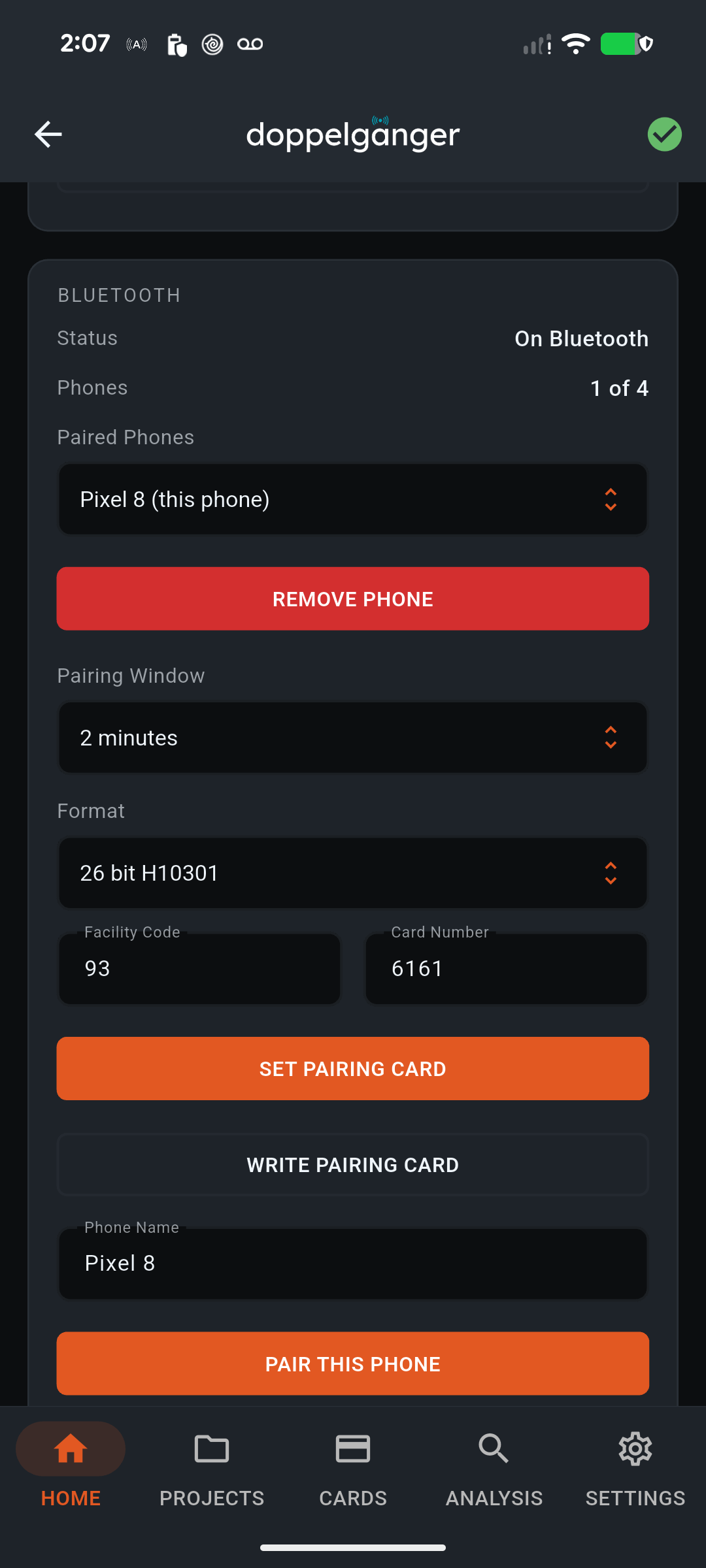
- Status, On Bluetooth, and under it Phones, 1 of 4.
- Paired Phones. This phone is marked.
- REMOVE PHONE takes the selected phone off the reader.
- Pairing Window, how long the reader waits for its card.
- The pairing card the reader holds.
- WRITE PAIRING CARD, to make that card.
- PAIR THIS PHONE, for a phone that is not on the list.
| Control | What it does |
|---|---|
| Status | Not paired, Paired when this phone is on the reader but the reader is on WiFi, or On Bluetooth |
| SET UP BLUETOOTH | the dialog above. Shown while the reader is not on Bluetooth with this phone |
| Phones | how many of the 4 places are taken |
| Paired Phones | every phone the reader holds, by the name it was paired under |
| REMOVE PHONE | removes the selected phone, after asking |
| Pairing Window | 30 seconds, 1 minute, 2 minutes, 5 minutes or 10 minutes |
| SET PAIRING CARD | names a new pairing card, kept once it is read back |
| PAIR THIS PHONE | pairs this phone without the dialog |
| USE BLUETOOTH | moves a paired reader from WiFi to Bluetooth, after asking |
| USE WIFI | moves the reader back to WiFi. The phone stays paired |
Removing a phone
Section titled “Removing a phone”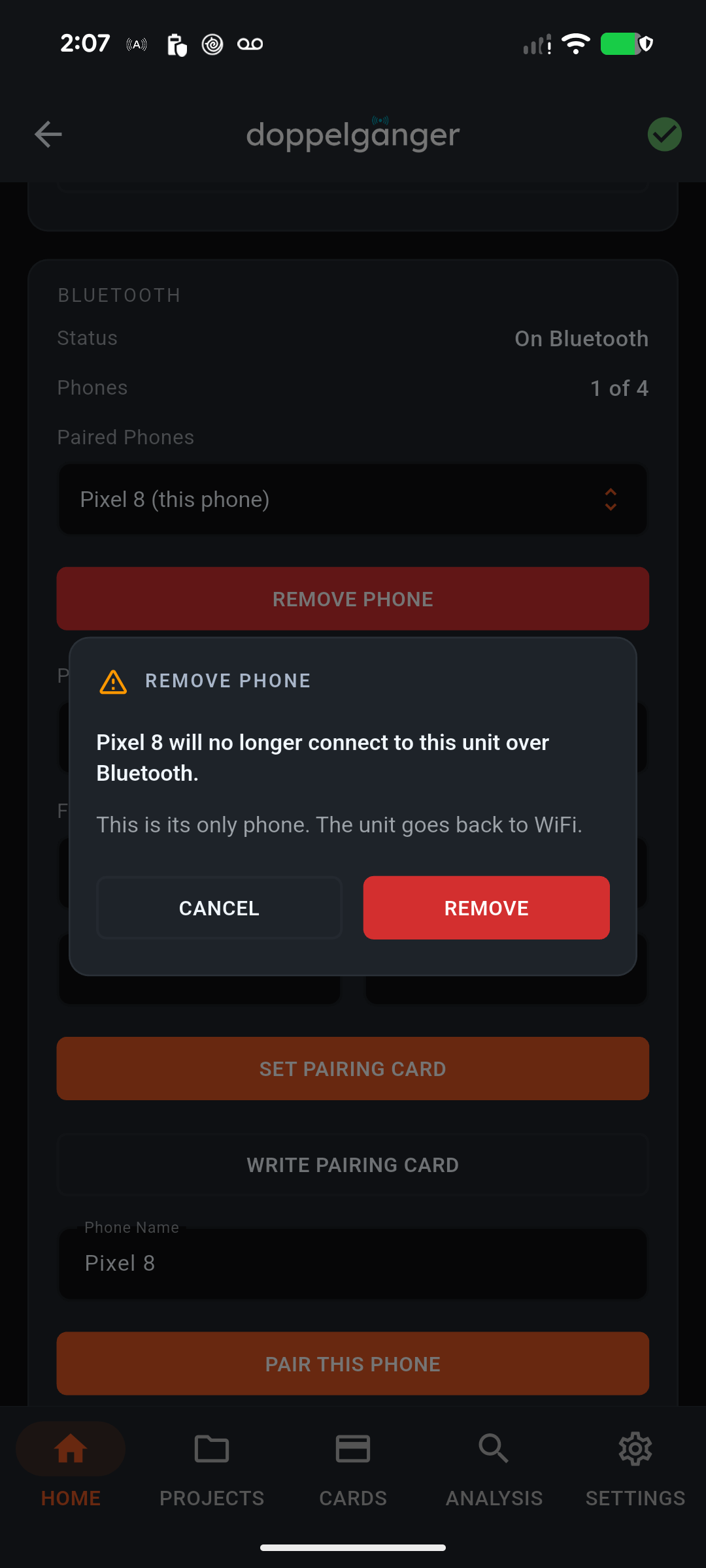
- REMOVE PHONE.
- The phone that will no longer connect.
- With no other phone paired, the reader goes back to WiFi.
- REMOVE, in red.
Removing a phone is how you take a lost or reassigned handset off a reader. The reader stops answering it, and that phone’s copy of ATLAS drops the reader from its own records the next time it tries.
Getting a reader back when the phone is gone
Section titled “Getting a reader back when the phone is gone”Two cards do this, and they are not the same.
| Present | With no phone waiting to pair | What survives |
|---|---|---|
| the pairing card | the reader leaves Bluetooth, forgets its phones, and restarts on WiFi. A Stealth also puts its access point back to the factory name and password | every other setting, and every captured card |
| the reset card | a full factory reset. Every setting, the WiFi it knew, its phones, its pairing card | the captured cards, and nothing else |
The pairing card is the gentle one, and it is the reason to carry it. The reset card is on each reader’s configuration page, Core and Stealth.
What the colors on Home mean
Section titled “What the colors on Home mean”The two DOPPELGÄNGER DEVICES cards on Home carry a colored edge while a reader is connected, and the color is the strength of the link. With two or more readers of a family the edge is split, one run for each reader, and each run carries its reader’s name written into the edge. With two, one name is on the top edge and the other on the bottom, each on its own half, so you can see which reader is falling out. A name too long for its run is shortened in the middle and keeps its start and its end.
| Readers on the card | How the edge is cut | Where the names sit |
|---|---|---|
| 1 | one unbroken edge | no name in the edge. The name is on the card |
| 2 | left half and right half | one on the top edge, one on the bottom |
| 3 | three equal runs | one centered on the top edge, two on the bottom |
| 4 | four quadrants, one corner each | the first reader top left, then top right, bottom right and bottom left |
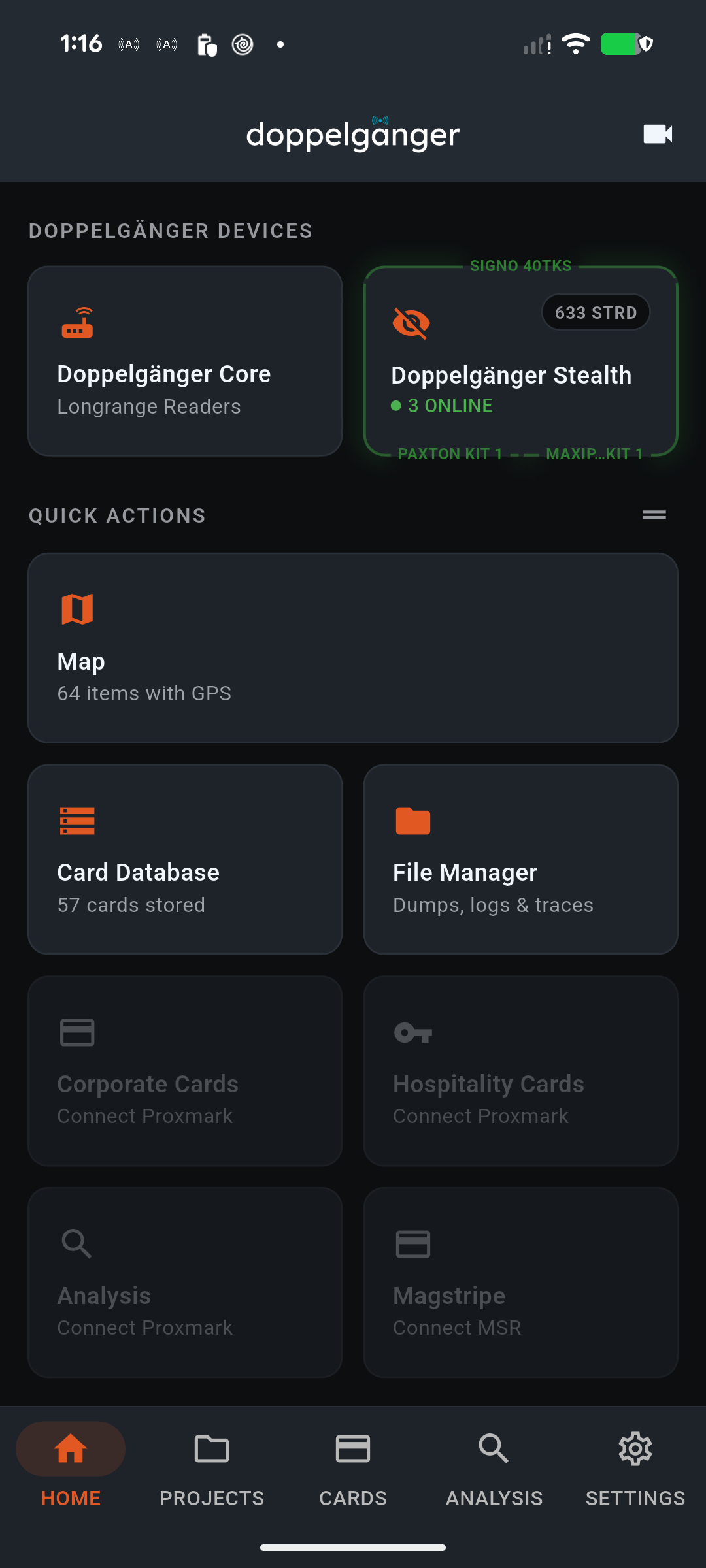
- SIGNO 40TKS, centered in the top edge.
- Doppelgänger Stealth, with 3 ONLINE under it. The edge is cut into three runs.
- PAXTON KIT 1 and MaxiProx Kit 1, shortened in the middle, in the bottom edge.
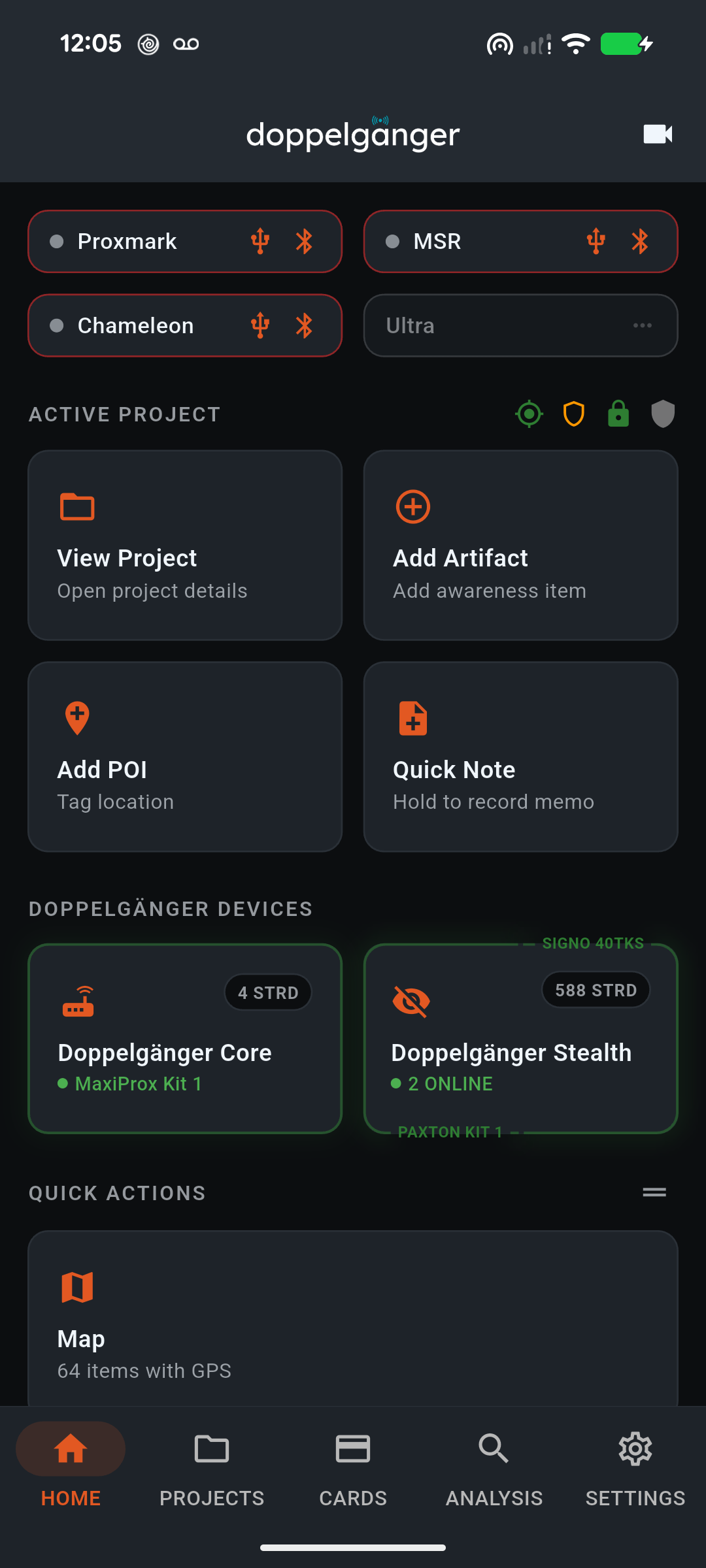
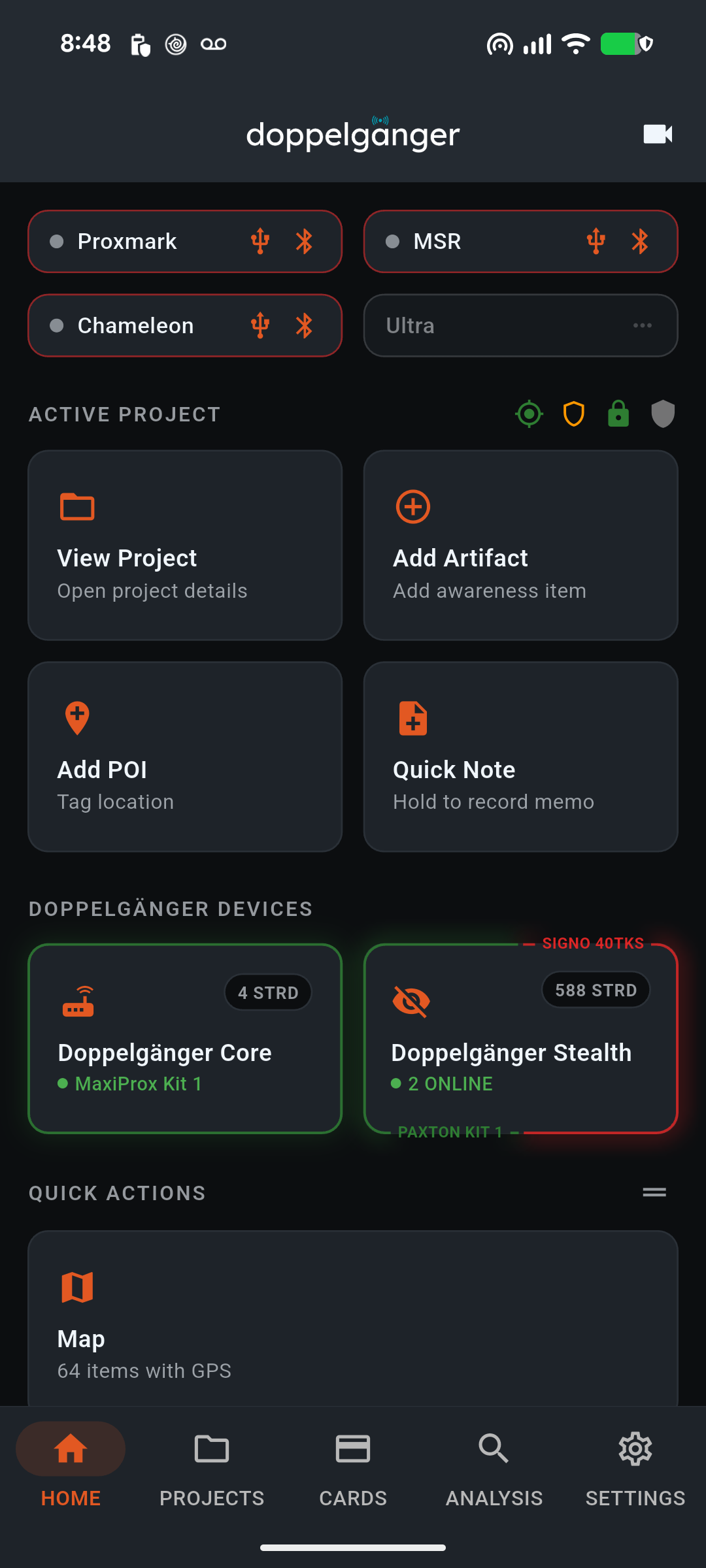
- SIGNO 40TKS, in the top edge. The right half of the edge is this reader.
- 2 ONLINE. Both halves are green.
- PAXTON KIT 1, in the bottom edge. The left half is this reader.
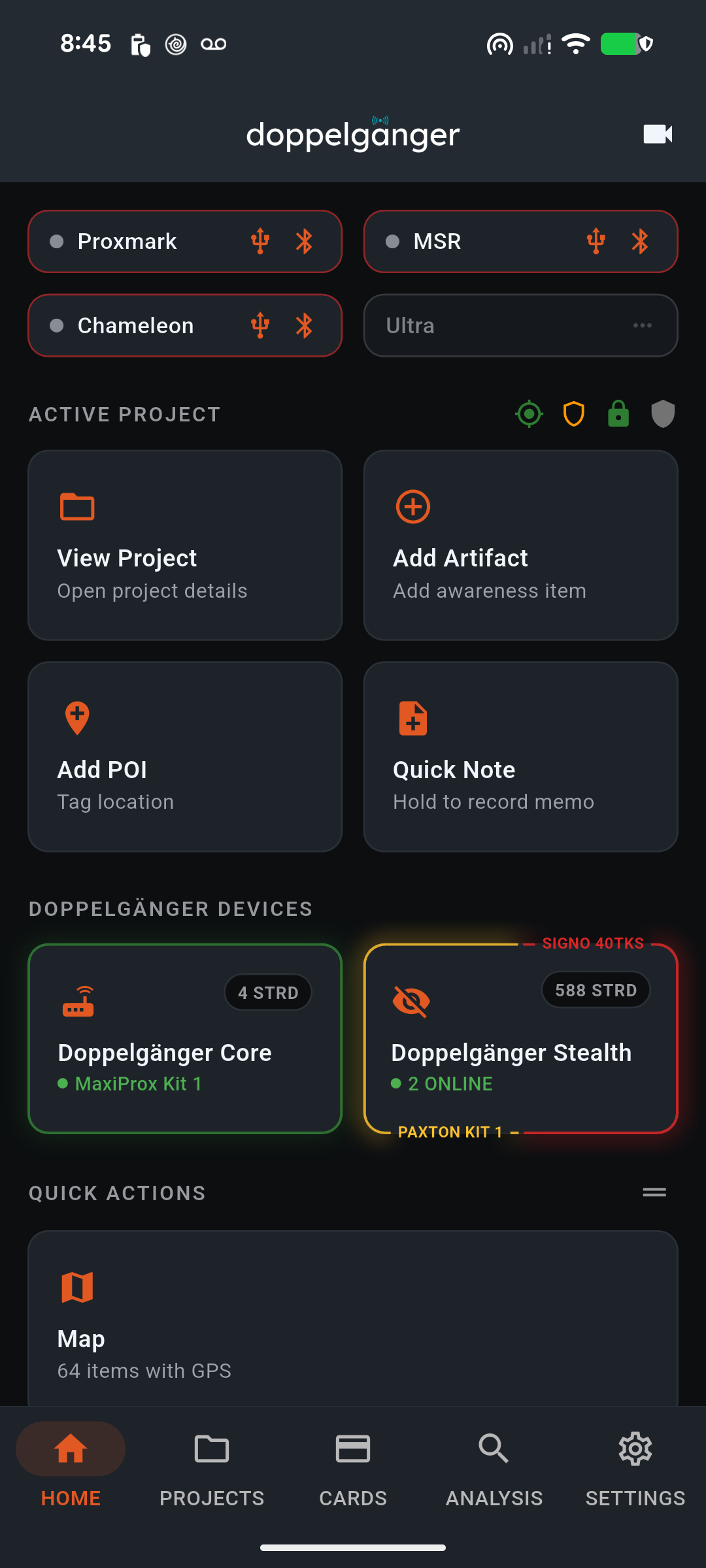
- SIGNO 40TKS is red. This reader is about to drop.
- Still 2 ONLINE. Red is a warning, not a drop.
- PAXTON KIT 1 is yellow, weaker than it was and not yet a concern.
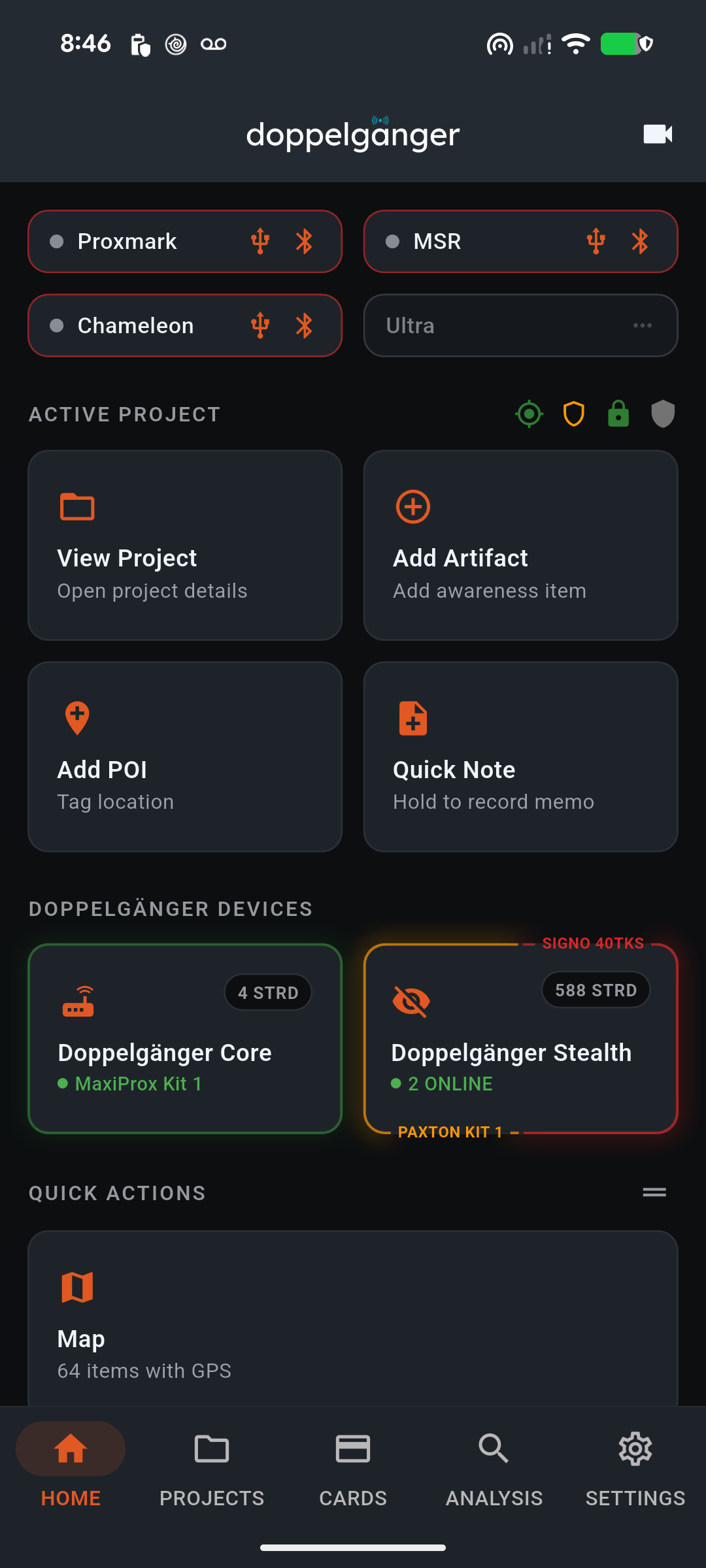
- SIGNO 40TKS is still red.
- The Core card beside it has one reader, so its edge is one unbroken color.
- PAXTON KIT 1 has gone orange. It is near the end of its range.
- SIGNO 40TKS is red.
- One card, two readers, two different links.
- PAXTON KIT 1 is back to green. Only the Signo reader needs you closer.
| Edge | Link strength | What to do |
|---|---|---|
| green | -65 dBm or stronger | nothing |
| yellow | -66 to -75 dBm | nothing yet |
| orange | -76 to -83 dBm | you are near the edge of range |
| red | weaker than -83 dBm, or a reader on WiFi that has just missed an answer | move closer, or expect the reader to drop |
| no color | no reader of that family is connected |
How the figure is taken depends on the connection.
| Connection | What is measured | How often |
|---|---|---|
| Bluetooth | the weaker of the two directions, the phone hearing the reader and the reader hearing the phone | every 3 seconds |
| WiFi on the phone’s hotspot | the reader’s own reading of the hotspot | every 5 seconds |
| WiFi on a network both have joined | the weaker of the reader’s reading and the phone’s reading of that network | every 5 seconds |
A reader is shown as disconnected only when the link has really ended. On Bluetooth that is 6 seconds with nothing heard, and on WiFi 10 seconds. A red edge is a warning, not a disconnect.
Cards on a Bluetooth reader
Section titled “Cards on a Bluetooth reader”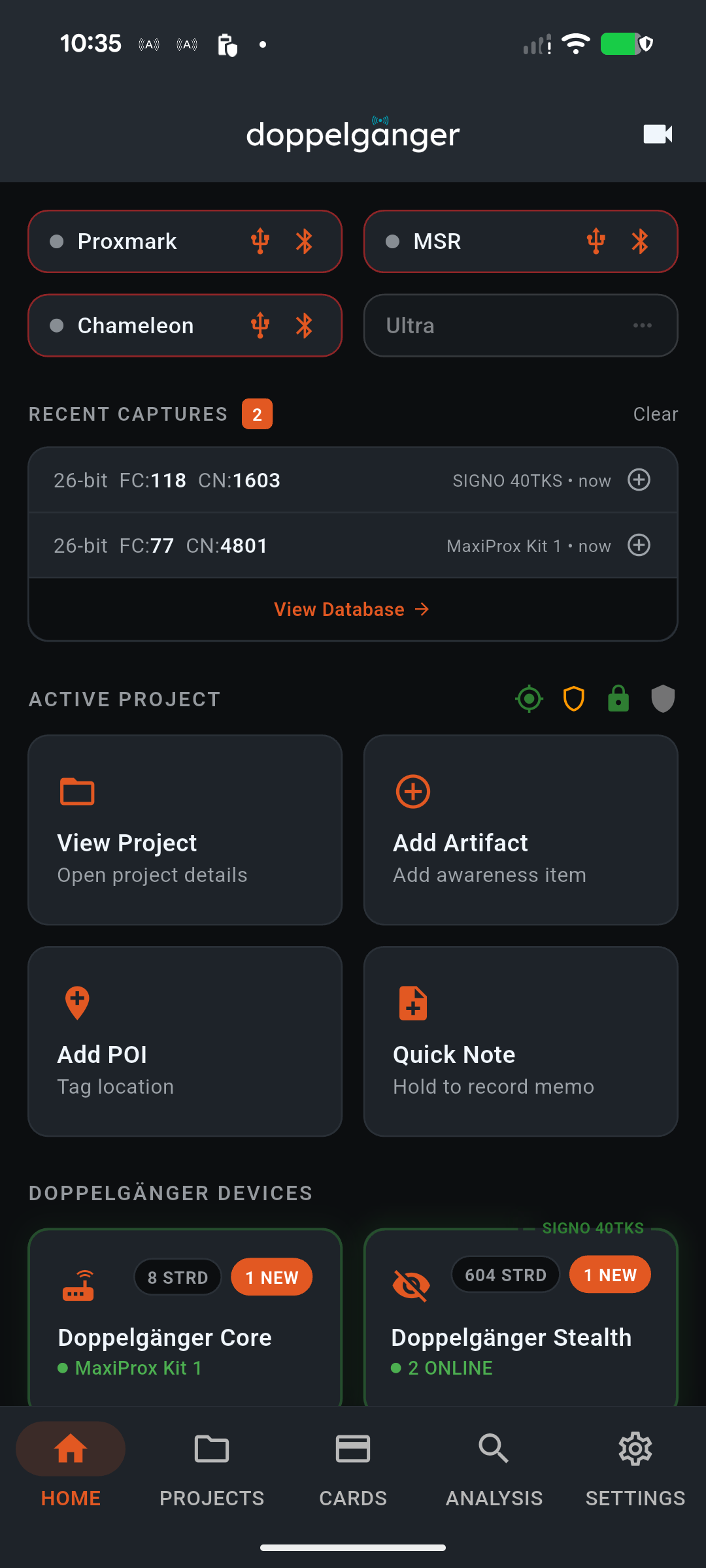
- RECENT CAPTURES, with the count.
- 26-bit FC 118 CN 1603, read by the Stealth named SIGNO 40TKS a moment ago.
- 26-bit FC 77 CN 4801, from the Core named MaxiProx Kit 1.
- DOPPELGÄNGER DEVICES.
- 1 NEW on each card, one read from each family.
- MaxiProx Kit 1 on the Core card, and 2 ONLINE on the Stealth card.
A card read on a Bluetooth reader reaches the phone as it is read, and raises the same Card Captured notification a WiFi reader does. Settings for those are on Capture alerts.
Nothing is lost while the phone is away. The reader writes every read to its own log first. When the phone links again it tells the reader how far it had got, and the reader sends everything after that. A card presented with ATLAS closed arrived when ATLAS was reopened.
Every read is its own capture. A card held against a reader is read more than once, and each read is logged and delivered. Two presentations of one card are two captures.
Going back to WiFi
Section titled “Going back to WiFi”CONFIGURE, the BLUETOOTH section, USE WIFI. The reader restarts on WiFi and the phone stays paired, so USE BLUETOOTH brings it back without the card.
The settings screen stays open across the restart and reads Waiting for the reader to reconnect until the reader is seen again.
| Reader | What it needs to come back on WiFi |
|---|---|
| Core | the hotspot it knows, switched on. A Core that starts with its hotspot off keeps looking and joins when the hotspot appears |
| Stealth | the phone joined to the reader’s own access point, the same as before Bluetooth |
A Stealth, stealth mode and Bluetooth
Section titled “A Stealth, stealth mode and Bluetooth”Stealth mode means nothing on the air, and that includes Bluetooth. Present the stealth card to a Stealth on Bluetooth and Bluetooth goes off. No advertisement, no access point. ATLAS shows it as gone, because it is.
Present the stealth card again and Bluetooth comes back on. The phone reconnects by itself about 18 seconds later, and cards read while the reader was dark are delivered then.
Updating firmware over Bluetooth
Section titled “Updating firmware over Bluetooth”A reader on Bluetooth updates from Settings, Firmware the same way a reader on WiFi does, and it does not have to leave Bluetooth to do it. The walkthroughs are on Core firmware update and Stealth firmware update.
Over Bluetooth the reader may hold at most 100 cards. Above that ATLAS sends nothing and says how many it holds. Delete cards, or update another way, none of which has a limit.
| Way to update | Card limit |
|---|---|
| Bluetooth, from ATLAS | 100 |
| WiFi, from ATLAS | none |
| USB cable from the phone, from ATLAS | none |
| Browser flasher, from a computer | none |
Limits
Section titled “Limits”| Phones per reader | 4 |
| Phones linked to a reader at once | 1 |
| Readers linked to a phone at once | 4 |
| Reader firmware | 2.0.0 or later |
| Pairing | over WiFi, from ATLAS |
| Pairing card, HID | 26, 35, 37 or 48 bit |
| Pairing card, Paxton | 10 hexadecimal characters |
| Cards held, for an update | 100 |
| Link ended after | 6 seconds with nothing heard |
| Advertised address changes | every 15 minutes |
| Long range mode | used when the handset supports it |