
LF write configuration
Writing a card in a vehicle with the engine running is not the same as writing one on a bench. The blank is in your hand, the antenna is on your knee, and whether the write takes is a matter of exactly where you are holding one against the other.
These two sliders are how many chances the write gets, and how long you have to move the card between them. Settings, then LF Write Configuration. They only affect low frequency writes, which is Prox, AWID, Indala, Avigilon and EM4100 / Net2 onto a T5577.
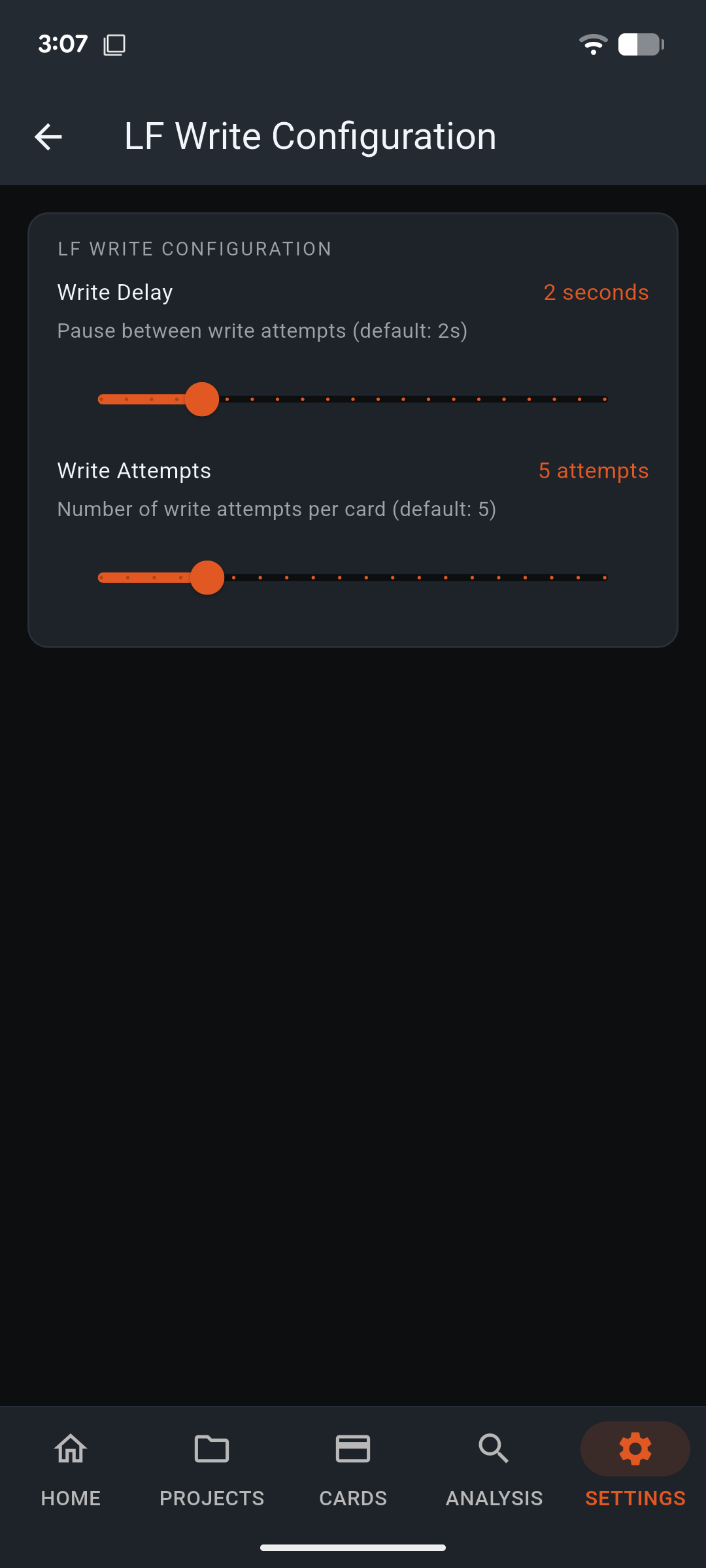
- Write Delay. The pause between attempts, 2 seconds by default.
- Write Attempts. How many times the card is written in one press, 5 by default.
Why a write happens more than once
Section titled “Why a write happens more than once”A T5577 takes the write at a particular position over the antenna, and a card laid flat is not reliably in that position. Writing five times with a pause between gives the card five chances to be in the right place, which is also why the output sheet prompts Move Card Slowly while it runs.
This is not the app being unsure. It is the physics of coupling a coil to a coil by hand.
| Setting | Range | Step | Default | Raise it when | Lower it when |
|---|---|---|---|---|---|
| Write Delay | 0 to 10 seconds | one second | 2 seconds | you are sliding the card and want more time to move it between attempts | the card is in a fixed jig and cannot move |
| Write Attempts | 1 to 20 attempts | one | 5 attempts | a card keeps coming back unwritten, usually a thick badge or one in a holder | you are writing a stack and know the position is good |
Both sliders write as you drag, so there is no save button and nothing to confirm. The value reads beside each label in whole units, 2 seconds and 5 attempts.
Write Delay has a stop halfway between each second, and letting go on one rounds up to the next whole second, so the thumb settles further along than where you left it. No half second is ever stored, shown or applied. Write Attempts moves a whole attempt at a time with no intermediate stop.
When the loop stops early, and when it cannot
Section titled “When the loop stops early, and when it cannot”The attempts are a ceiling rather than a count, but only on two of the five formats. The loop breaks the moment a pass prints the client’s Data written and verified line, and only lf awid clone and lf indala clone can print it, because only those two go through the client’s T5577 clone helper, which writes every block and then reads each one back off the tag to compare. lf hid clone, which carries both Prox and Avigilon, and lf em 410x clone print Done! instead, so on those three nothing ever breaks the loop and every configured attempt runs.
| Card type | Clone command | Can a pass end the loop |
|---|---|---|
| Prox | lf hid clone | no. Every configured attempt runs |
| Avigilon | lf hid clone | no. Every configured attempt runs |
| EM4100 / Net2 | lf em 410x clone | no. Every configured attempt runs |
| AWID | lf awid clone | yes, on the pass the tag confirms |
| Indala | lf indala clone | yes, on the pass the tag confirms |
So 20 attempts means up to twenty on AWID and Indala, where a card that couples on the second pass is written twice and no more. On Prox, Avigilon and EM4100 / Net2 it means exactly twenty, with nineteen delays between them, so raising the ceiling there is paid for in bench time on every single write.
The run is a sequence of sheets and none of them closes to tell you something worked. Each step replaces the one before it.
| Sheet title | What it means |
|---|---|
| Writing LF Card (1/5) | a pass is running, numbered out of the configured attempts |
| Move Card Slowly (1/5) | the delay between passes, with the prompt for what to do during it |
| Verifying Write… | the passes are over and the verdict is being settled |
| Card Written | one of the two checks below passed |
| Not Confirmed | neither of them did |
Two ways a write is confirmed, and they are not equal
Section titled “Two ways a write is confirmed, and they are not equal”Card Written is printed for either of two checks, and the line under the card description says which one ran.
| Explanation on the result sheet | What was checked | How strong |
|---|---|---|
| The tag confirmed it on attempt 2 of 5. Every block was read back off the card and matched. | the clone wrote every block, then read each one back off the tag and compared it. Nothing was demodulated off the antenna afterward | the stronger of the two. The numbers are the pass that took and the configured Write Attempts |
| Confirmed by reading the card back. | the tag never confirmed, so ATLAS ran a reader command and matched what came back against what you typed | weaker. A blank already carrying those bytes would pass it unchanged |
The second check is a real read, and the command it uses follows the format.
| Card type | Re-read command | Compared against |
|---|---|---|
| Prox | lf hid reader | facility code and card number |
| Avigilon | lf hid reader | facility code and card number |
| AWID | lf awid reader | facility code and card number |
| Indala | lf indala reader | facility code and card number |
| EM4100 / Net2 | lf em 410x reader | the hex ID |
Prox, Avigilon and EM4100 / Net2 can never take the first arm, so a Card Written on those three always rests on the re-read.
When it does not come back written
Section titled “When it does not come back written”| Title | Explanation | What it means |
|---|---|---|
| Not Confirmed | Ran 5 of 5 attempts and the tag never confirmed. Reposition the card on the antenna and write it again. | the card never coupled, or the blank is not a T5577. The full Proxmark transcript is appended under the explanation |
| Not Confirmed | The Proxmark connection dropped part way through, so the card may not hold this data. Reconnect and write it again. | the link went down mid run, so what is on the card is unknown |
| Write Error | the command’s own error text, under the transcript | the write never ran to completion |
If the re-read throws instead of returning a verdict, the same Not Confirmed sheet reads Ran 5 of 5 attempts and the tag never confirmed. The follow-up read also failed, with the error in parentheses, and then Reposition the card and write it again.