
Configuration and reset
Everything here is reached with CONFIGURE on the reader’s card in ATLAS. The identity block, READER TYPE, STEALTH CARD and RESET CARD are read off the reader when the page opens. WIRELESS ACCESS POINT is not, and its three controls open blank every time. Nothing in that section tells you what the reader is broadcasting right now.
Configuring it
Section titled “Configuring it”CONFIGURE on the reader’s card.
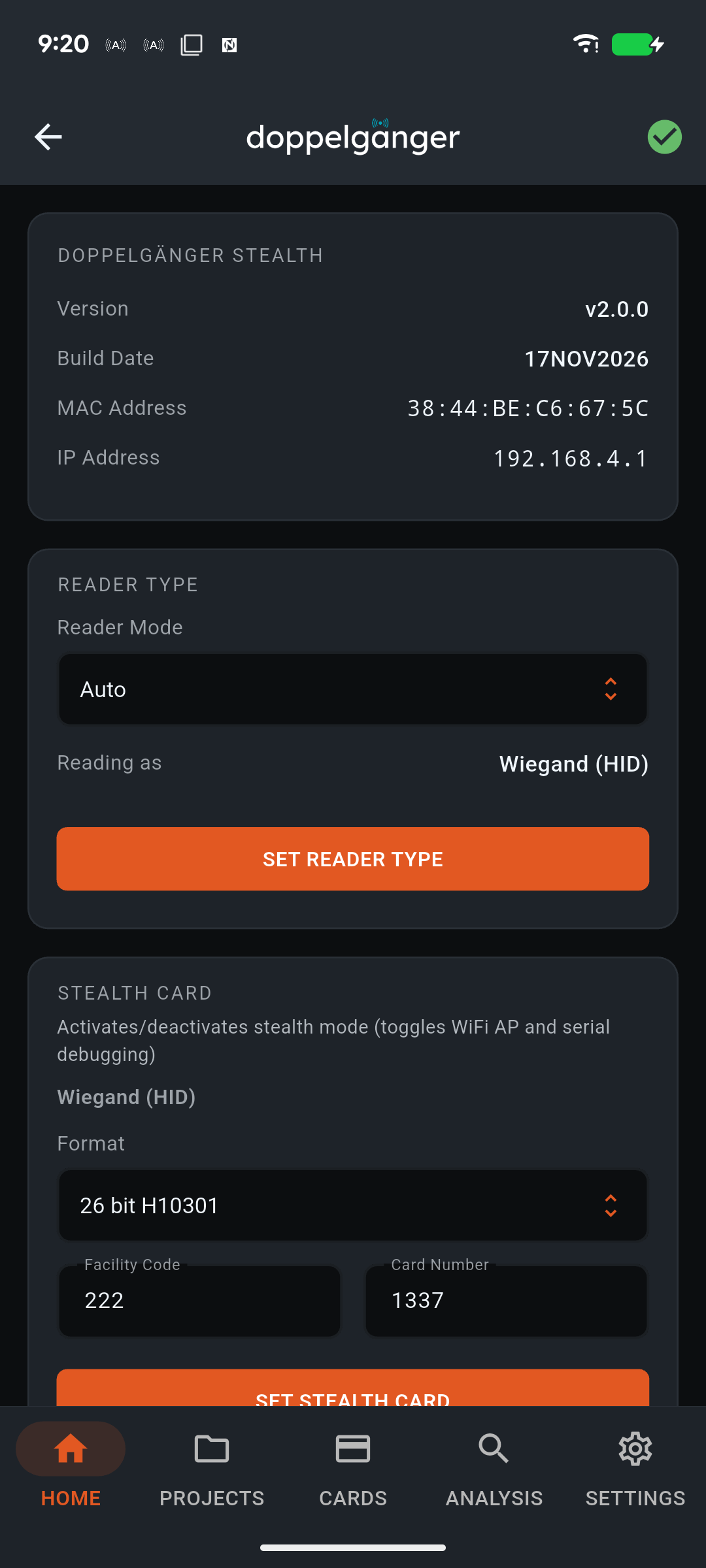
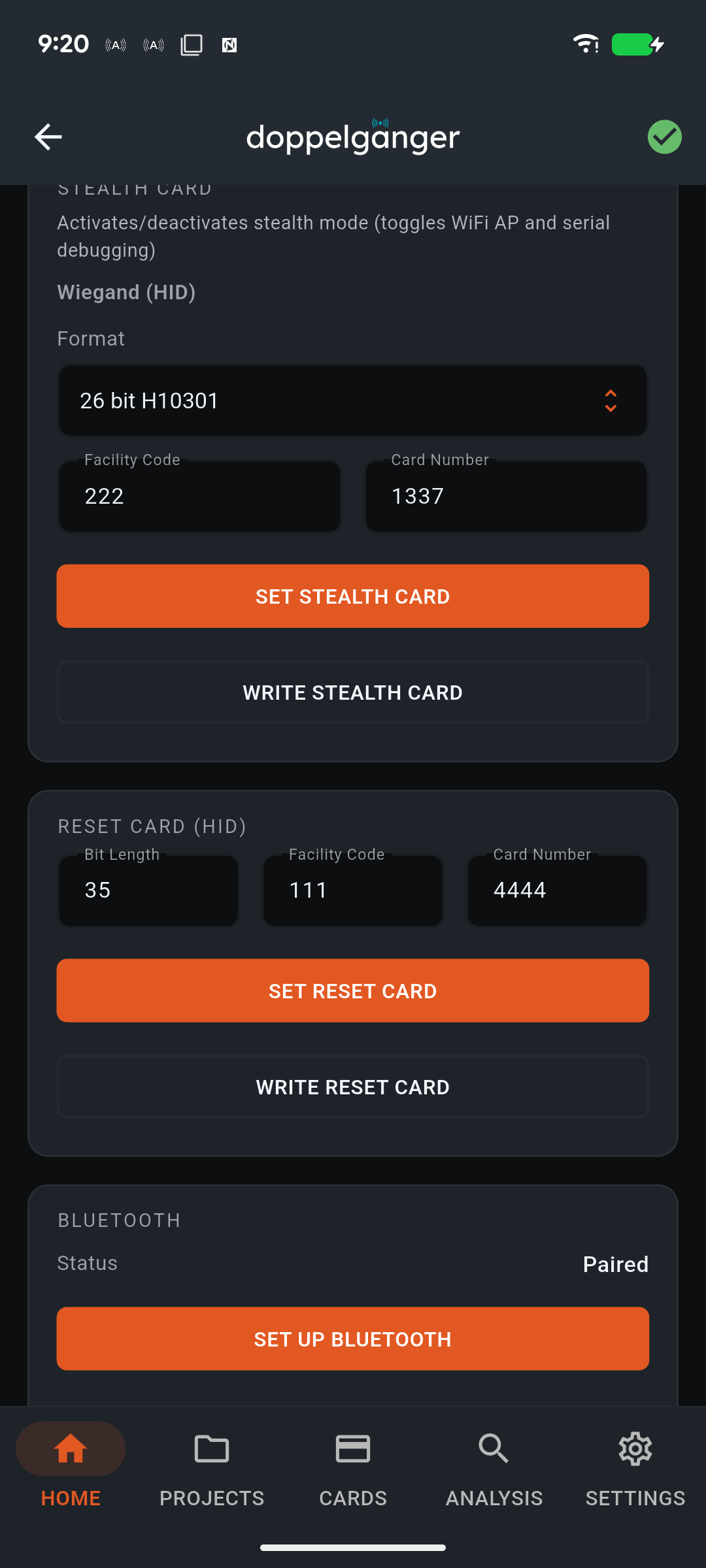
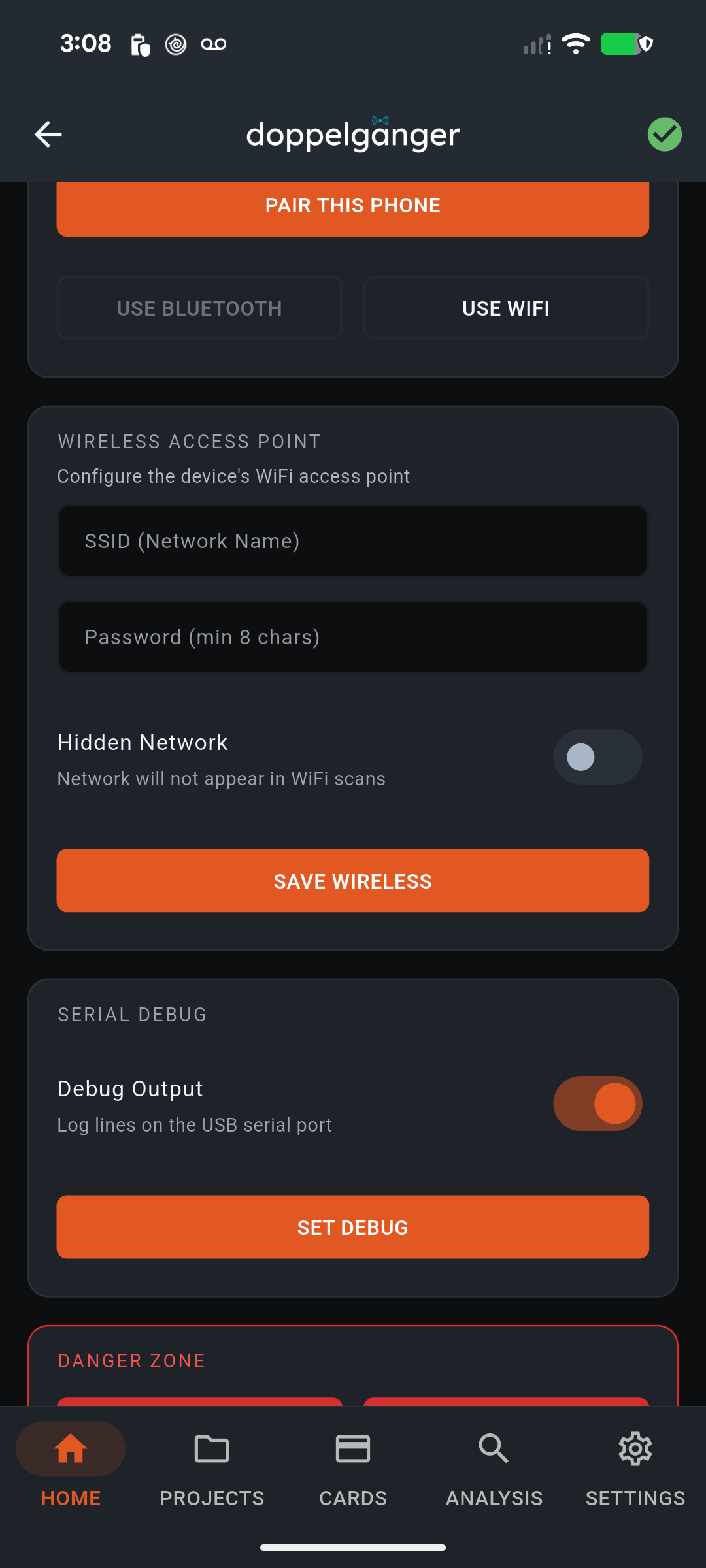
- Build Date, with the version above it.
- IP Address, on its own access point. On Bluetooth this row reads Connected by.
- Reader Mode, Auto from the factory.
- Reading as, what Auto settled on. Wiegand (HID) here.
- STEALTH CARD, and what it does.
- The card that toggles stealth mode.
- Wiegand (HID), the only form shown while the reader reads Wiegand.
- Facility Code 222 and Card Number 1337, the factory stealth card.
- SET STEALTH CARD.
- WRITE STEALTH CARD, to make that card.
- RESET CARD (HID).
- 35, 111 and 4444, the factory reset card.
- SET RESET CARD.
- WRITE RESET CARD.
- USE BLUETOOTH and USE WIFI, the end of the BLUETOOTH section.
- WIRELESS ACCESS POINT, the network the reader broadcasts on WiFi.
- SSID, blank. Both fields have to be typed before SAVE WIRELESS runs.
- Hidden Network, always drawn off here.
- SERIAL DEBUG.
- Debug Output, read from the reader. On is the factory setting.
- SET DEBUG.
- DANGER ZONE, eight buttons, each explained below.
Reader type
Section titled “Reader type”Reader Mode is how the reader on the front talks to this board. It decides how a card is read and which form of the stealth card the reader is watching for.
| Reader Mode | What it means | When to pick it |
|---|---|---|
| Auto, the factory setting | the board works it out from the first card. It reads as Wiegand until it sees clock and data, then changes itself | leave it here unless you have a reason not to. Reading as under it shows what it settled on |
| Wiegand (HID) | every bit is a pulse on one of two wires. HID readers and most others | the board is on a Wiegand reader and you want the mode fixed |
| Clock and Data (Paxton) | one wire is a clock, the other carries the bit. Paxton readers | the board is on a Paxton reader and you want the mode fixed |
SET READER TYPE commits it. A mode you set is never changed by the board afterward. Only Auto lets it change, and a factory reset puts it back to Auto.
On Auto a Paxton reader is recognized on its first card, and that card is read. A Wiegand reader needs no recognizing.
Checking the wiring
Section titled “Checking the wiring”Check the wiring with a card whose numbers you know. Present it, and compare what ATLAS shows with the facility code and card number printed on the card or recorded for it. A match proves the wiring and the mode in one read.
| What ATLAS shows | What it means |
|---|---|
| the card’s own bit length, facility code and card number | wired right, mode right |
| the right bit length with other numbers, on a Wiegand reader | the two data wires are crossed. Swap them at the board |
| nothing at all | no power to the reader, no data wires, or the wrong mode. See the Wiring row below |
Use a card of the kind the site issues. If you carry test cards, a 26 bit H10301 is the one to reach for first, being the most common format, and a 35 bit, 37 bit or 48 bit card after it if the site uses those lengths.
What the board finds by itself
Section titled “What the board finds by itself”Three faults show on the wires on a single card. A Wiring row appears under Reader Mode in orange and ATLAS raises a Reader Wiring notification.
| Wiring reads | What is wrong | What to do |
|---|---|---|
| Clock and data are swapped | a Paxton reader with its two data wires crossed. No card reads | swap the two data wires at the board |
| Reader sends clock and data | the mode is Wiegand (HID) and the reader is a Paxton | set Clock and Data (Paxton), or Auto |
| Reader sends Wiegand | the mode is Clock and Data (Paxton) and the reader is a Wiegand reader | set Wiegand (HID), or Auto |
The row goes away on the next card that reads right.
The stealth card
Section titled “The stealth card”STEALTH CARD, subtitled on screen as Activates/deactivates stealth mode (toggles WiFi AP and serial debugging). This is where you set the credential that does it. What stealth mode is, and what toggling it costs you, is on Stealth mode.
Only the form for the Reader Mode in use is shown.
| Reader Mode | Field | Factory value |
|---|---|---|
| Wiegand (HID) | Format | 26 bit H10301 |
| Wiegand (HID) | Facility Code | 222 |
| Wiegand (HID) | Card Number | 1337 |
| Clock and Data (Paxton) | HEX Value (10 chars) | 0000001337 |
SET STEALTH CARD commits it.
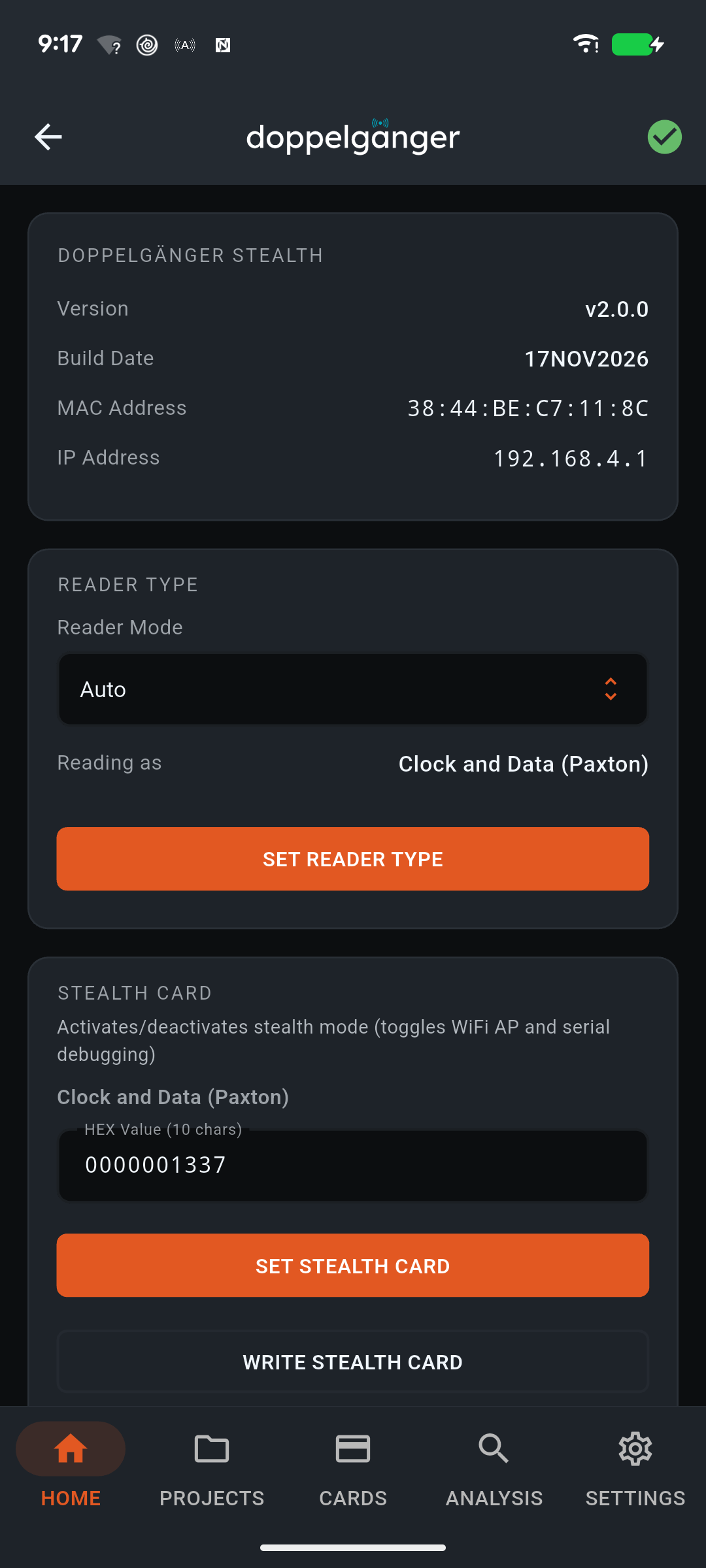
- Version v2.0.0.
- IP Address, on its own access point. On Bluetooth this row reads Connected by.
- Reader Mode, Auto.
- Reading as, Clock and Data (Paxton).
- Clock and Data (Paxton), the only stealth card form shown.
- 0000001337, the factory Paxton stealth card.
- WRITE STEALTH CARD, to make that card.
The reset card
Section titled “The reset card”New in firmware 2.0.0. A credential you carry that wipes the reader back to how it left the factory. Present it and the reader leaves stealth mode, clears every setting, puts its access point back to the factory name and password, removes every paired phone, leaves Bluetooth, and restarts.
The captured cards are the one thing it keeps.
Reader Mode goes back to Auto with everything else. A Paxton reader is recognized again on the next card presented, and that card is read.
| Reader Mode | Field | Factory value |
|---|---|---|
| Wiegand (HID) | Bit Length | 35 |
| Wiegand (HID) | Facility Code | 111 |
| Wiegand (HID) | Card Number | 4444 |
| Clock and Data (Paxton) | HEX Value (10 chars) | 0000004444 |
SET RESET CARD commits it. The factory values are the same on a Core.
It works on WiFi, on Bluetooth and in stealth mode, which is the case it exists for. A reader that is dark and will not answer its stealth card still answers this one.
The reset card can also be set from the reader’s own web page, in Reset Card Settings, and put back with Restore Default Reset Card on its reset page.
Bluetooth
Section titled “Bluetooth”The BLUETOOTH section pairs this phone with the reader and moves the reader between WiFi and Bluetooth. It has its own page, Readers on Bluetooth.
When one of these cards is read
Section titled “When one of these cards is read”The reader does not store the stealth card, the reset card and the pairing card as captures. ATLAS raises a notification that names the reader and what the card did, listed on Capture alerts.
Its own access point
Section titled “Its own access point”WIRELESS ACCESS POINT, subtitled Configure the device’s WiFi access point.
This section is a form, not a readout. The two text fields open empty and the toggle opens off, every time, whatever the reader is actually broadcasting.
| Field | How it opens | What it takes |
|---|---|---|
| SSID (Network Name) | empty | what the reader broadcasts, which is what you join. 1 to 32 bytes, and a leading or trailing space is kept |
| Password (min 8 chars) | empty | the password for it, 8 to 63 characters. UndertheRadar out of the box |
| Hidden Network | off | subtitled Network will not appear in WiFi scans |
SAVE WIRELESS commits all three at once, exactly as shown. It is refused if SSID (Network Name) is empty or whitespace, over 32 bytes, or if Password (min 8 chars) is outside 8 to 63 characters. On success it reports Wireless configuration updated. Device will restart.
| What you want | What you type |
|---|---|
| change only the name | the new SSID and the existing password, and re-tick Hidden Network if it was on |
| change only the password | the existing SSID and the new password, and re-tick Hidden Network if it was on |
| hide a visible reader | both current values, with Hidden Network on |
| unhide a hidden reader | both current values, with Hidden Network off |
Hidden Network is the setting worth thinking about. On, the reader stops appearing in a scan and you have to add the network by name on the phone. That is a real gain on a site where somebody might look, and a real cost the first time you are standing at the reader trying to remember what you called it.
Serial debug
Section titled “Serial debug”SERIAL DEBUG decides how much the reader prints on its USB port. The switch opens showing what the reader holds.
| Debug Output | What the reader’s USB port prints | When to pick it |
|---|---|---|
| off, the factory setting | its product, firmware version, board and reader type as it starts, each change of its light, update results and faults. Never a card or a PIN | on a job, where a cable plugged into the reader should get nothing it captured |
| on | all of that, plus a running log of what the reader is doing with its WiFi, its Bluetooth and its settings, and a line for every card and PIN it reads | on the bench, when you need to see why a reader is behaving as it does |
Neither setting prints a password. SET DEBUG commits the switch as drawn, and the reader acts on it at once with no restart. In Stealth mode the port prints nothing at all, and going into Stealth mode turns debug off.
Danger zone
Section titled “Danger zone”Eight buttons, each one confirming before it runs.
| Button | What it does |
|---|---|
| RESET STEALTH CARD | puts the stealth card back to the factory values |
| RESTORE RESET CARD | puts the reset card back to the factory values |
| RESET PAIRING CARD | removes the pairing card. Paired phones stay paired, and no phone can be added until a new card is set |
| REMOVE ALL PHONES | removes every paired phone. A reader on Bluetooth goes back to WiFi, and each phone is paired again with the pairing card |
| RESET WIRELESS | puts the access point back to its factory name and password |
| RESET DEBUG | puts Debug Output back to its factory value, which is off, at once |
| WIPE ALL CARDS | deletes every captured read off the reader. Import first |
| FACTORY RESET | deletes all data, all configuration, the WiFi credentials, the reset card, the pairing card and every paired phone, then restarts |
WIPE ALL CARDS is the one that costs you a job. The reads live on the reader until you import them. Wipe before importing and the capture is gone, with nothing in ATLAS to show for the time the reader spent on the wall.