
Smart Brute
Smart Brute transmits one credential after another at a reader until something opens or the limit is reached. The app raises its own warning against reaching for it first, as a toast the moment you select SMART BRUTE.
Start to finish
Section titled “Start to finish”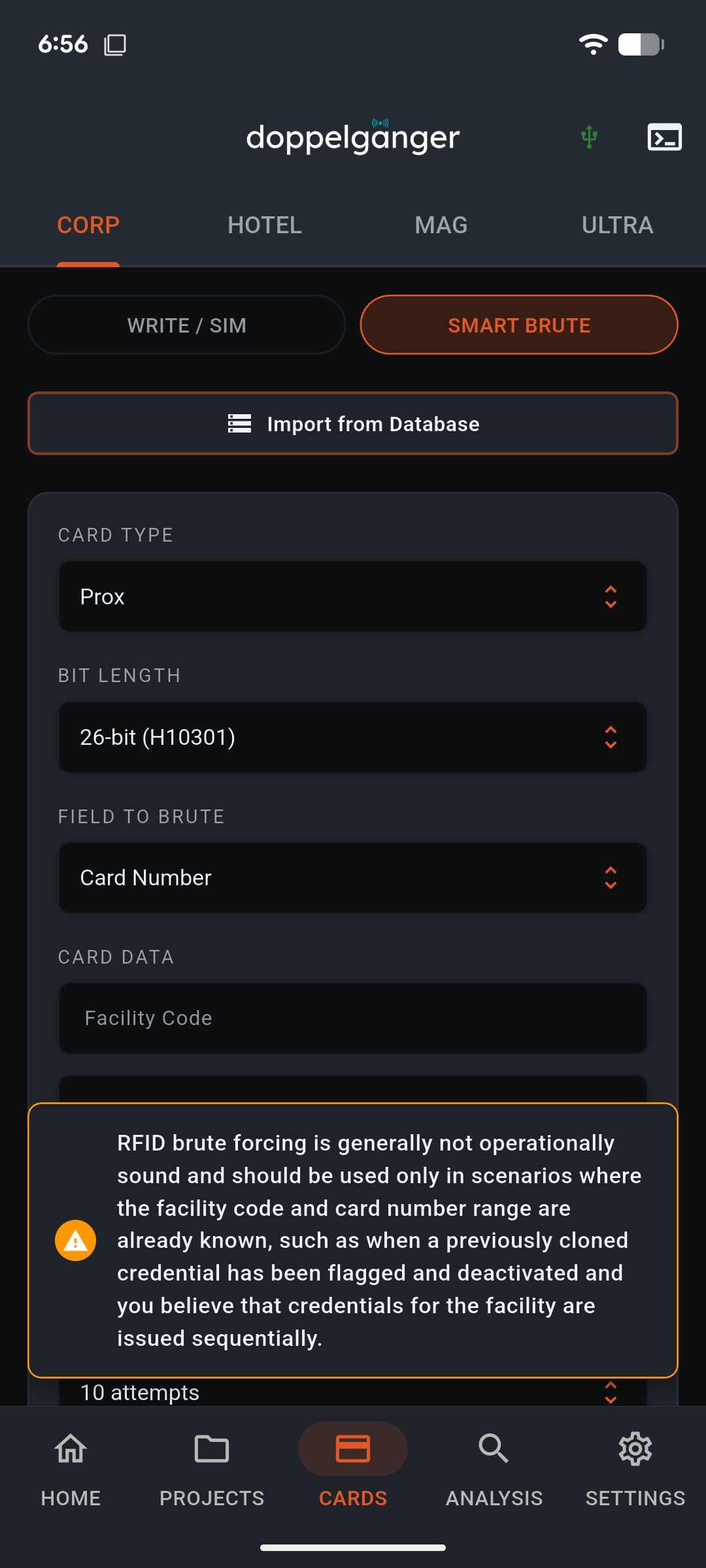
- SMART BRUTE replaces the whole Write / Sim form below it.
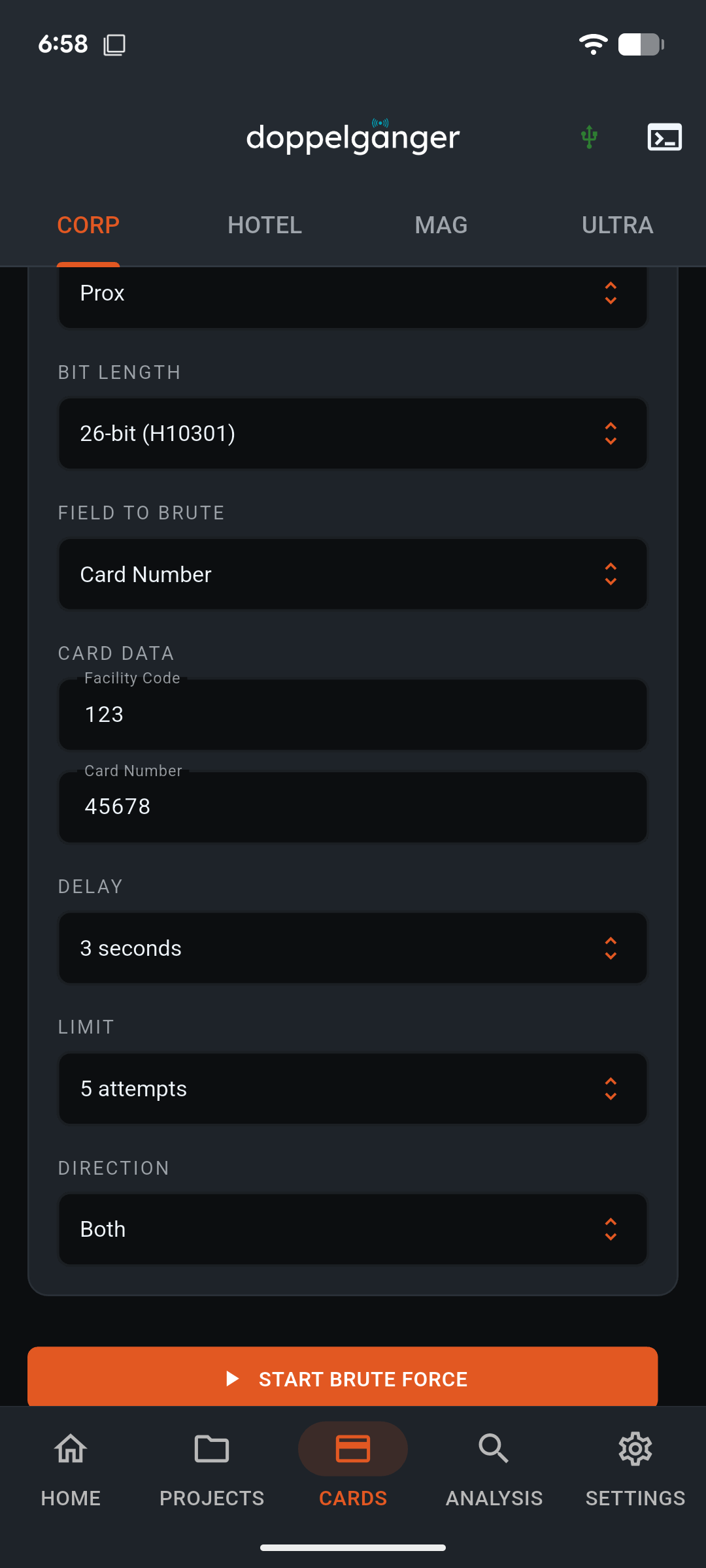
- FIELD TO BRUTE. Fix what you know, name the one you do not.
- The app's own warning, a five second toast fired on entry.
- The seed. This is the credential you already hold, not a guess.
- DELAY, the gap between attempts.
- LIMIT. One counter across both directions, not five each way.
- DIRECTION Both walks outward from the seed in each direction.
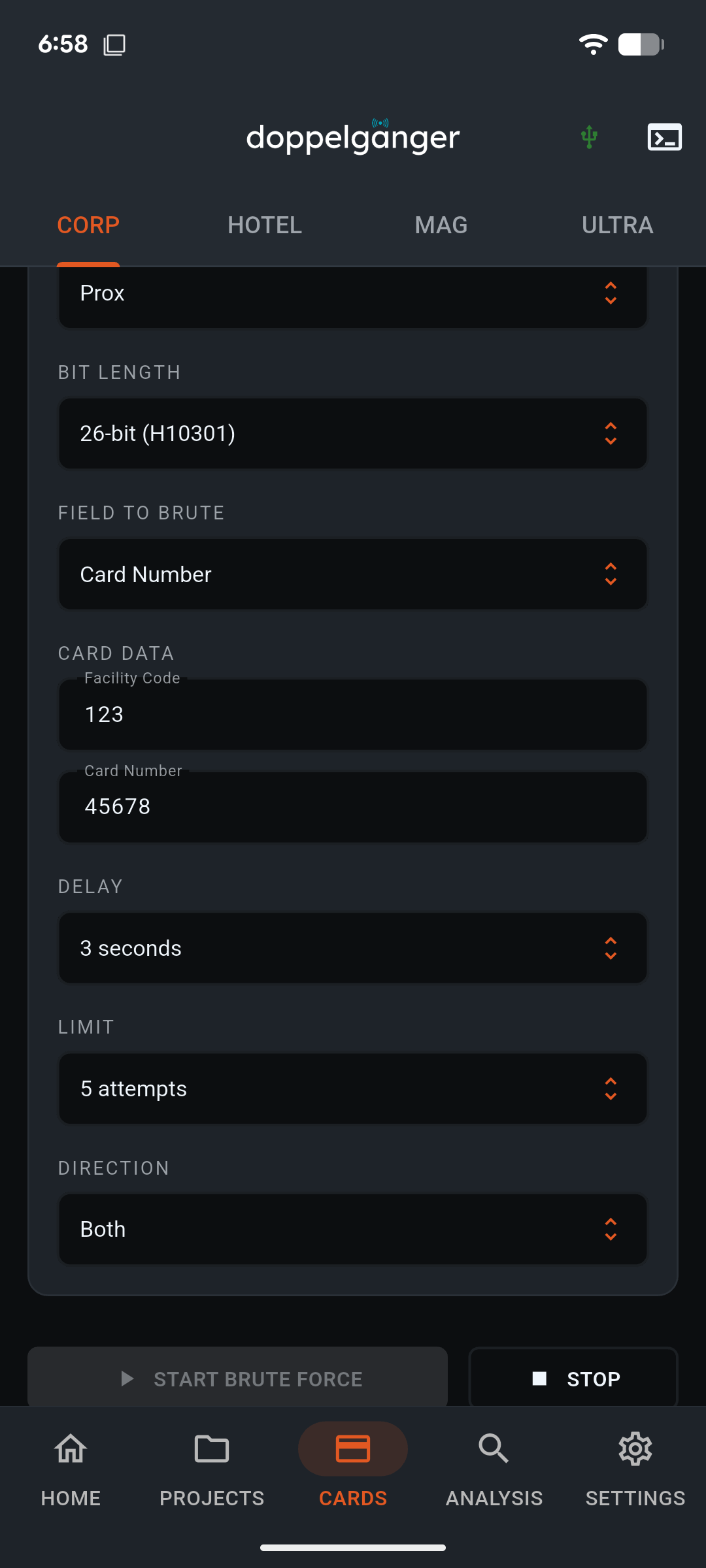
- START goes gray and STOP appears next to it for the whole run.
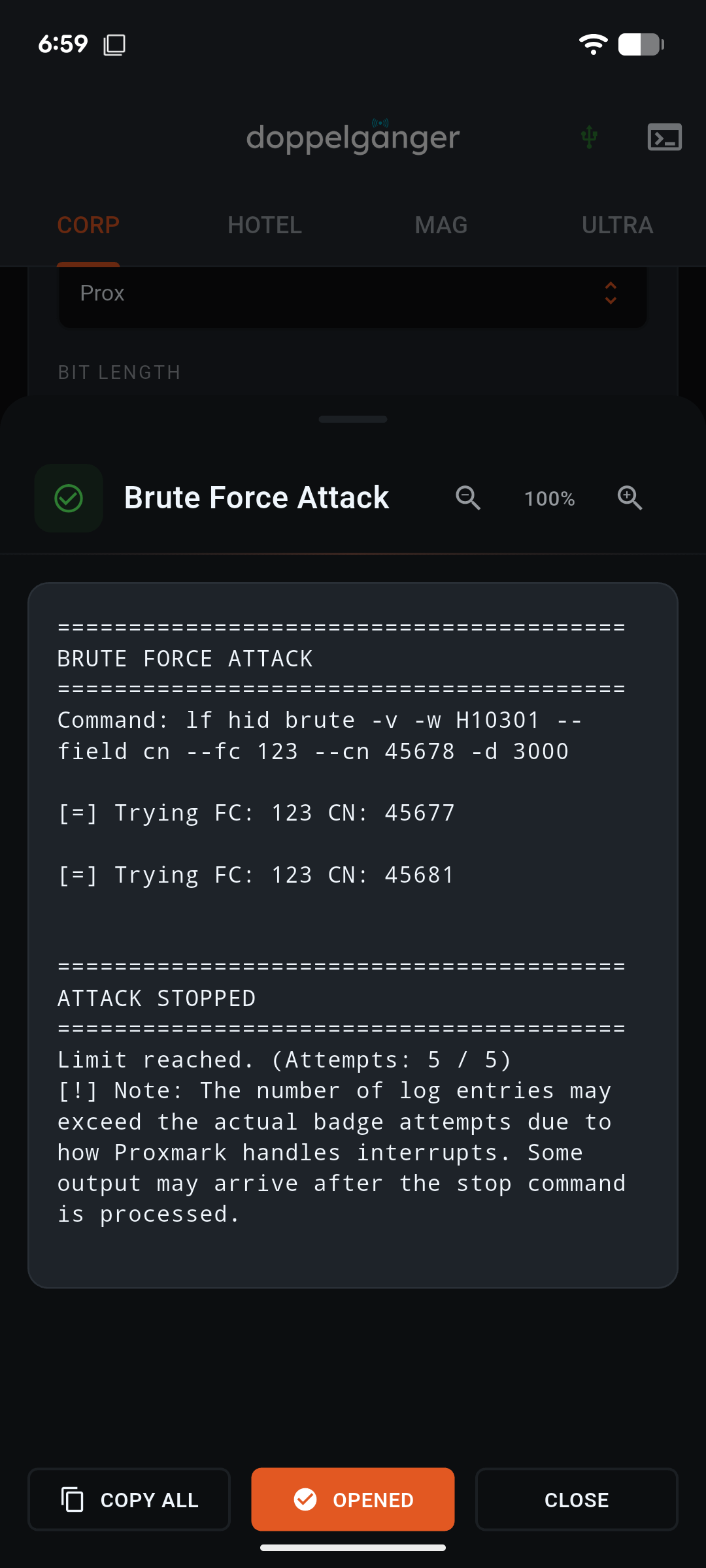
- The exact Proxmark command, including the delay in milliseconds.
- ATTACK STOPPED, with the attempt count against the limit you set.
- Why the log and the real attempt count can disagree.
Read the warning first
Section titled “Read the warning first”Tapping the SMART BRUTE chip fires a five second amber toast and nothing else. It can be swiped away sooner, it is gone long before the form is filled, and it never comes back while you sit on the form. Switching to WRITE / SIM and back to SMART BRUTE fires it again, because leaving and returning rebuilds the page.
That is why the text is reproduced here. The app will not put it back for you.
The only panel that stands on the page is NO PROXMARK DEVICE CONNECTED, above the mode chips, while no Proxmark answers.
Brute forcing a reader is loud. Every attempt is a denial in the access control log, and a run of denials against one door inside a few minutes is the single most visible thing you can do on an engagement. It is not a discovery technique. It is a narrow recovery technique for one situation.
The only situation it is for
Section titled “The only situation it is for”You cloned a working credential. That credential was noticed and deactivated. You still need in.
The bet you are making is that the site bought its cards as a batch and issued them in order, so the numbers either side of the one you held were printed at the same time and handed to people in the same intake. If that holds, a valid card is a few numbers away from the dead one.
The sweep order, measured
Section titled “The sweep order, measured”This is the Prox sweep. Seeded with Card Number 45678 and DIRECTION set to Both, the app walks outward one step at a time, alternating sides. Taken off the device:
| Attempt | Card number | Offset |
|---|---|---|
| 1 | 45678 | the seed itself |
| 2 | 45679 | +1 |
| 3 | 45677 | -1 |
| 4 | 45680 | +2 |
| 5 | 45676 | -2 |
| 6 | 45681 | +3 |
| 7 | 45675 | -3 |
It tries the seed first. If the card was deactivated rather than deleted, attempt one is the attempt that proves it, and it costs nothing against the limit.
The command it builds is visible on the output sheet:
ATLAS lf hid brute -v -w H10301 --field cn --fc 123 --cn 45678 -d 3000--field cn is FIELD TO BRUTE, --fc and --cn are the seed, and -d 3000 is DELAY in milliseconds. DIRECTION set to Up adds --up and Down adds --down, and Both is the client default, so it adds nothing.
Each card type builds its own command, and three of them are not this one:
| CARD TYPE | The command |
|---|---|
| Prox | lf hid brute -v -w H10301 --field cn --fc 123 --cn 45678 -d 3000, with the Wiegand format taken from BIT LENGTH |
| Avigilon | lf hid brute -v -w Avig56 --field cn --fc 123 --cn 45678 -d 3000 |
| AWID | lf awid brute -v --fmt 26 --fc 123 --cn 45678 --delay 3000, with no direction flag |
| Indala | lf indala brute -v --fc 123 --cn 45678 -d 3000 |
| EM4100 / Net2 | lf em 410x brute -v -f /path/to/ids.txt --delay 3000, which simulates each EM410x tag in the file in turn |
The controls
Section titled “The controls”CARD TYPE is the first control and it decides what the rest of the form holds. Five low frequency types are offered. The dropdown lists them as Prox, AWID, Indala, Avigilon and EM4100 / Net2.
DELAY and LIMIT are drawn for every type. DIRECTION is drawn for three of the five.
| Control | What it holds | How to set it |
|---|---|---|
| DELAY | 0.5 seconds, 1 seconds, 2 seconds, 3 seconds, 5 seconds, 10 seconds, 20 seconds, 30 seconds | At least as long as the reader needs to finish with one credential and arm for the next. Too short and the reader never hears a whole frame |
| LIMIT | 5 attempts, 10 attempts, 15 attempts, 25 attempts, 50 attempts, 100 attempts, Unlimited | 10, for five candidates each way. Read the arithmetic above before trusting the number |
| DIRECTION | Up, Down, Both | Both, when you are working outward from a known card. Drawn for Prox, Avigilon and Indala only |
Everything above DELAY changes with the type. Prox and Avigilon draw the same four. AWID swaps BIT LENGTH for FORMAT and loses FIELD TO BRUTE and DIRECTION. Indala loses BIT LENGTH and FIELD TO BRUTE. EM4100 / Net2 replaces the lot with a file.
| Control | Prox | Avigilon | AWID | Indala | EM4100 / Net2 |
|---|---|---|---|---|---|
| BIT LENGTH | eleven options | 56-bit (avig56), selected for you | not drawn | not drawn | not drawn |
| FORMAT | not drawn | not drawn | 26-bit or 50-bit | not drawn | not drawn |
| FIELD TO BRUTE | Facility Code or Card Number | Facility Code or Card Number | not drawn | not drawn | not drawn |
| CARD DATA | Facility Code, Card Number | Facility Code, Card Number | Facility Code, Card Number (optional) | Facility Code, Card Number (optional) | not drawn |
| EM TAG IDs FILE | not drawn | not drawn | not drawn | not drawn | File Path, read only, filled by SELECT FILE |
| DIRECTION | drawn | drawn | not drawn | drawn | not drawn |
BIT LENGTH on Prox carries eleven options, each labeled with the Wiegand format it builds. They are 26-bit (H10301), 28-bit (2804W), 30-bit (ATSW30), 31-bit (ADT31), 33-bit (D10202), 34-bit (H10306), 35-bit (C1k35s), 36-bit (S12906), 37-bit (H10304), 46-bit (H800002) and 48-bit (C1k48s).
Indala has no BIT LENGTH control, and it is not sweeping 26-bit by default either. It checks the facility code and card number you typed against the 26, 27 and 29-bit Indala formats and starts if any one of them can carry those numbers. If none can, it refuses with The card data cannot be encoded in any supported Indala format (26, 27, or 29-bit).
EM4100 / Net2 is not a seeded walk at all. There is no facility code, no card number and no direction. SELECT FILE opens the file picker filtered to .txt, titled Select EM Tag IDs File, and the app replays the IDs in that file at the reader with DELAY between them. Build the list before you go.
What START BRUTE FORCE needs before it comes live
Section titled “What START BRUTE FORCE needs before it comes live”| CARD TYPE | Required |
|---|---|
| Prox | BIT LENGTH, FIELD TO BRUTE and Facility Code |
| Avigilon | Facility Code. BIT LENGTH is set to 56-bit and FIELD TO BRUTE to Card Number for you |
| AWID | FORMAT and Facility Code |
| Indala | Facility Code |
| EM4100 / Net2 | File Path |
A Proxmark has to be connected as well. START BRUTE FORCE stays gray until the device is on the line and the required fields are filled, so it never goes live and then refuses the press. STOP appears beside it for the length of the run and is the only way to end a sweep early.
Recording the one that worked
Section titled “Recording the one that worked”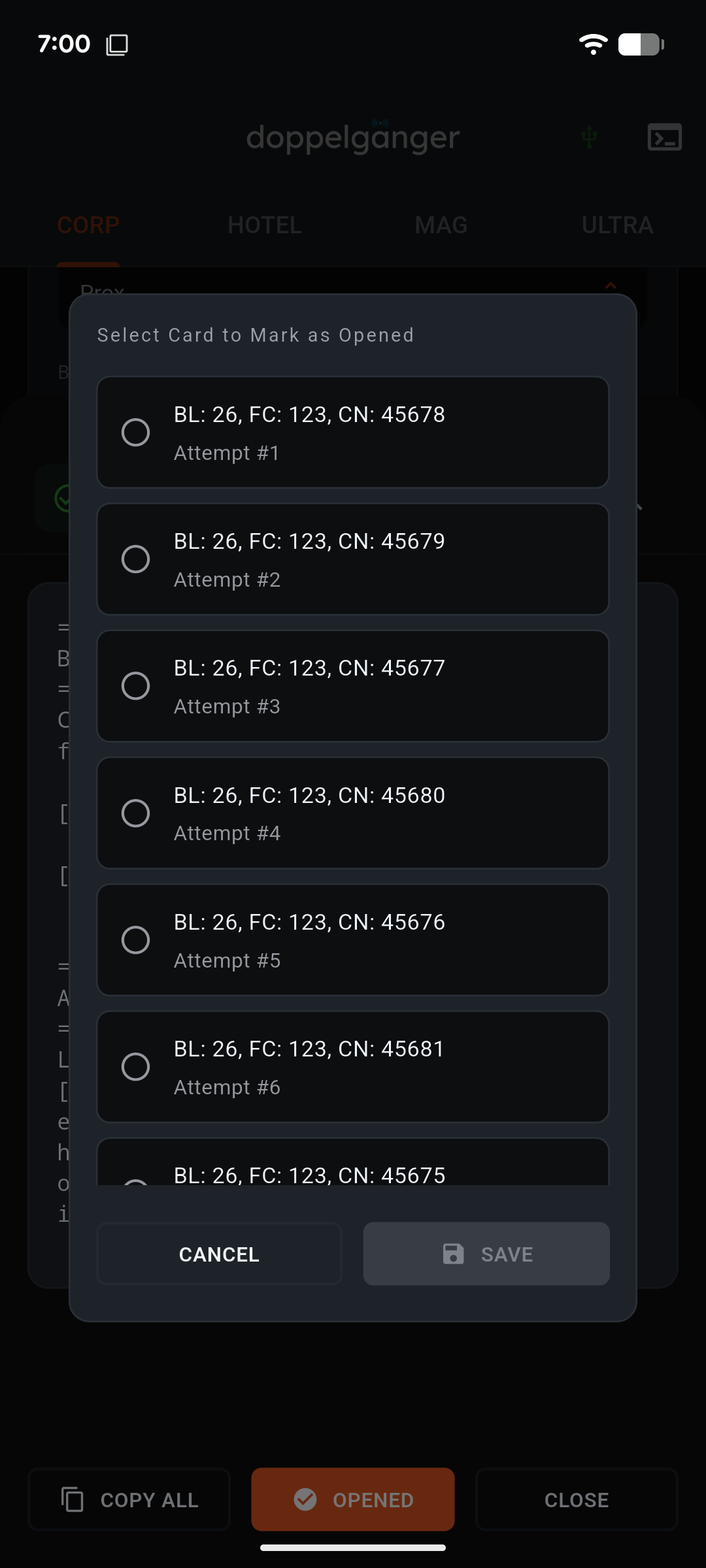
- The sweep seeds itself first, so attempt one is the card you already had.
- Then outward, alternating up and down.
- SAVE writes the chosen credential to the card database with GPS, tagged as a brute force result.
When something opens, press OPENED on the output sheet. It lists every combination the sweep produced, labeled by attempt number, and the one you pick is saved to the card database with its coordinates and a source of brute force.
Marking the hit is what turns a sweep into a finding, because it is the only thing that puts the working credential into the card database with its coordinates.
The attempts themselves are not lost either. Every sweep writes its own session log to files/pm3/brute_force_logs/, one file per attack, and those logs are encrypted at rest. Read raw off the handset a log is base64 ciphertext, not a list of card numbers, which is the right default for a file that records every credential you transmitted at someone’s door.
What to do instead
Section titled “What to do instead”Sweeping at the reader has one advantage, which is that it needs no blanks and no second visit. Take it only when the engagement is short, the log is known not to be monitored, and the facility code and range are already established.