
Project actions
Under the status row sit four cards, and they are the fastest path from noticing something to having it recorded against the engagement. They are not the quick actions further down the page, they are not reorderable, and all four act on the active project. With no active project they are not drawn.
On a walk-through the expensive part is not the capture, it is stopping, finding the right screen and remembering which project you are in. These four remove that, which is why one of them records audio without opening anything at all.
The four project actions
Section titled “The four project actions”Under the status glyphs are four cards. They are not the quick actions further down the page and they are not reorderable. All four act on the active project, and none of them is drawn until one is set.
| Card | Its line underneath | Tap | Long press |
|---|---|---|---|
| View Project | Open project details | opens the project’s own screen | |
| Add Artifact | Add awareness item | opens Add Awareness Item, which offers seven kinds | |
| Add POI | Tag location | opens the POI map editor at the project’s location | |
| Quick Note | Hold to record memo | opens the note editor, or stops a memo that is already recording | records a voice memo |
Add Artifact is the way most awareness gets recorded in the field, and the seven kinds are Security Camera, Surveillance Camera, ALPR Camera, Entry Point, Fence / Wall, Security Personnel and Badge Intel. Each opens its own editor with the fields that kind needs.
Add Artifact, and the seven kinds
Section titled “Add Artifact, and the seven kinds”Add Artifact opens the Add Awareness Item sheet, which is the single door to every site asset ATLAS records. The same sheet is used from the project screen, so there is one of it rather than two that drift.
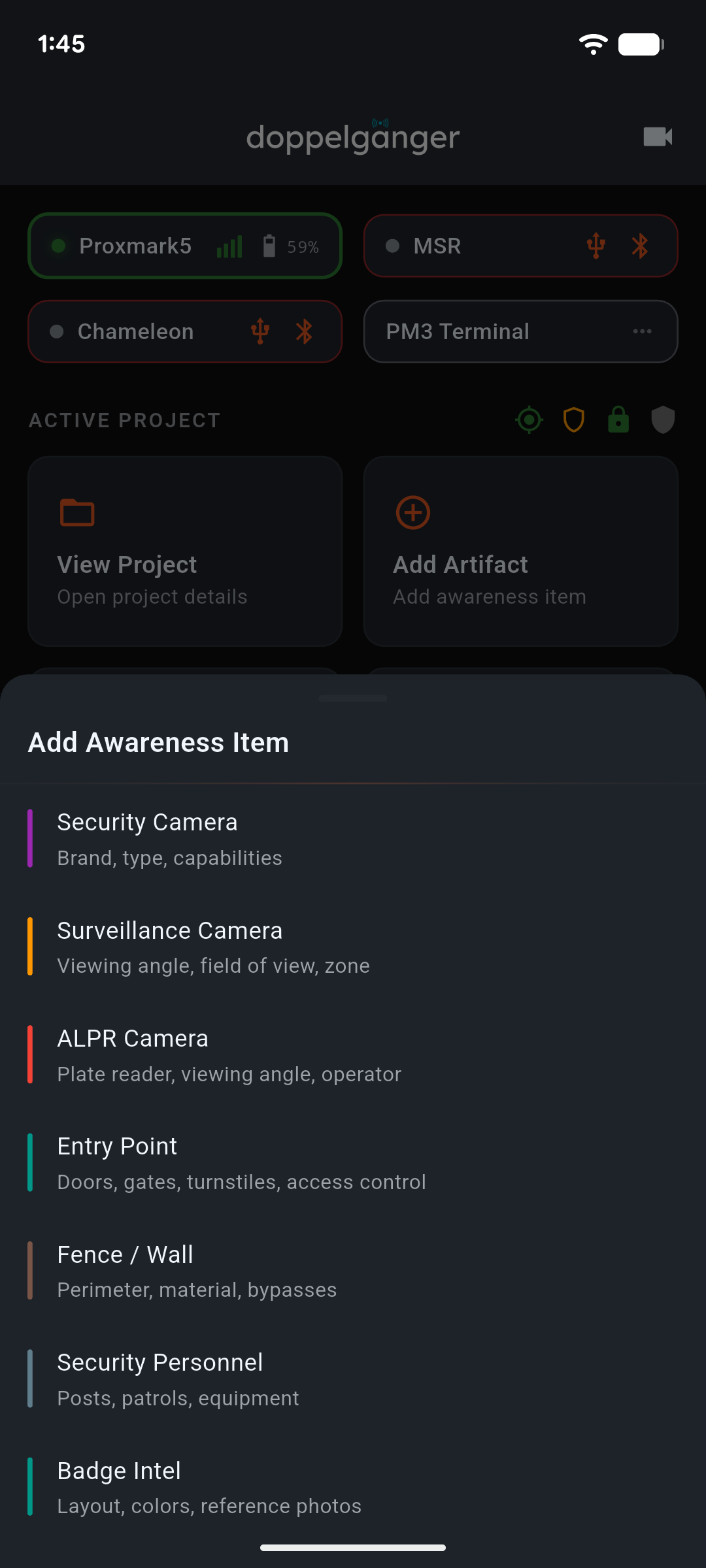
- Security Camera, for one you observed on the target.
- Surveillance and ALPR cameras, which are the OpenStreetMap backed pair.
- Entry Point, the largest form in the app by a wide margin.
- Security Personnel and Badge Intel, the two about people.
| Kind | What it records | Page |
|---|---|---|
| Security Camera | brand, type, capabilities | Security cameras |
| Surveillance Camera | viewing angle, field of view, zone | OSINT cameras |
| ALPR Camera | plate reader, viewing angle, operator | OSINT cameras |
| Entry Point | doors, gates, turnstiles, access control | Entry points |
| Fence / Wall | perimeter, material, bypasses | Barriers and perimeters |
| Security Personnel | posts, patrols, equipment | Security personnel |
| Badge Intel | layout, colors, reference photos | Badge intel |
Each row carries a colored bar, and that color follows the asset onto the operational map, so the sheet is also the map’s legend.
Add POI and Quick Note
Section titled “Add POI and Quick Note”Add POI opens the POI map editor at the project’s own coordinates, which is the fastest way to drop a point that is not one of the seven asset types.
Quick Note opens the note editor, seeded with the project’s coordinates. Holding it records a voice memo instead, which is covered on Recording from Home.