
Variants and connectivity
They are all Proxmark devices and they all do the same job. What separates them is the silicon, what each one reports about itself, and which links it can use. Everything else on this site applies to all of them.
What ATLAS has an image for
Section titled “What ATLAS has an image for”The image picker on the Firmware page is the clearest statement of the family, because each entry says what it covers.
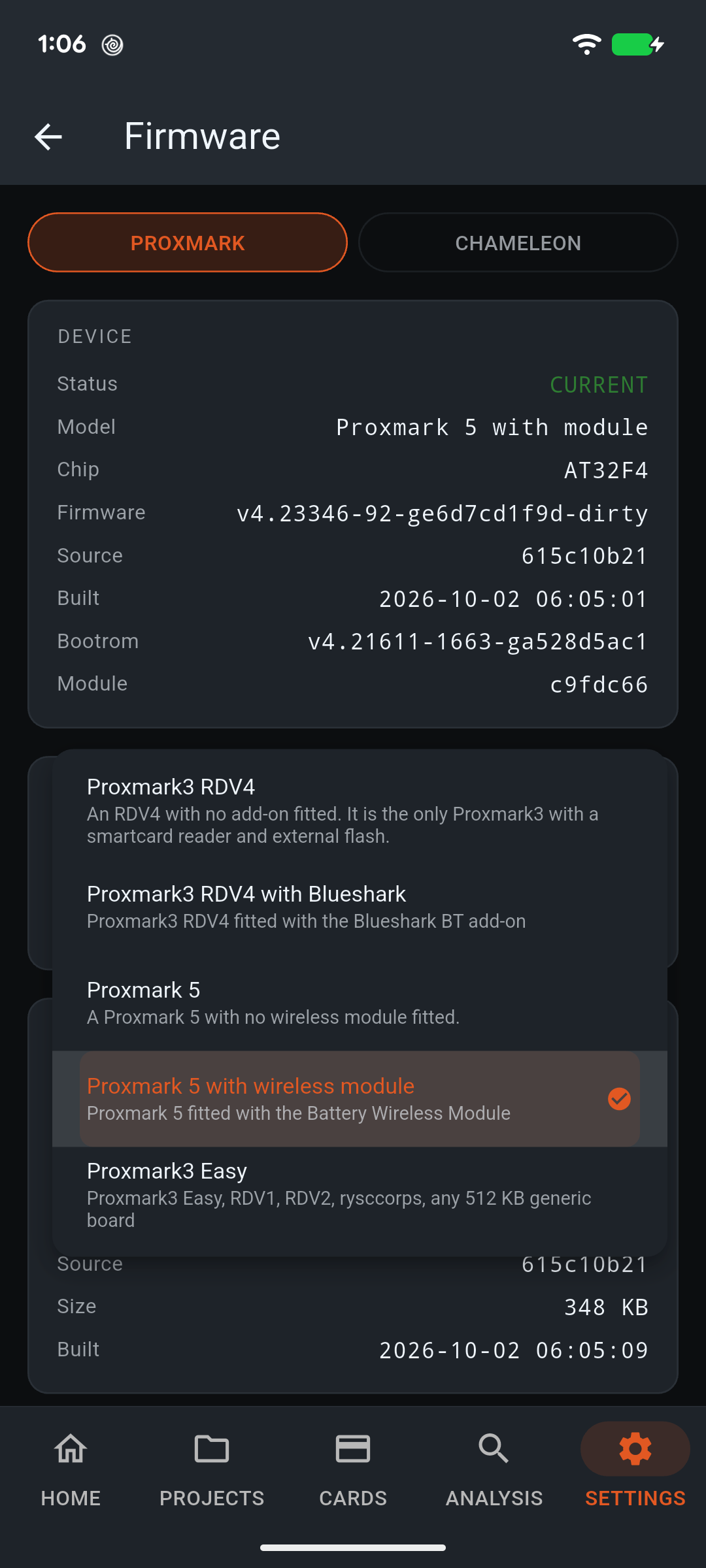
- The bundled images are the variant list. Each names the board it is for.
- A wireless variant is a separate image, because the module needs its own support.
| Image | What it covers |
|---|---|
| Proxmark3 RDV4 | An RDV4 with no add-on fitted. The only Proxmark3 with a smartcard reader and external flash |
| Proxmark3 RDV4 with Blueshark | An RDV4 fitted with the Blueshark BT add-on |
| Proxmark 5 | A Proxmark 5 with no wireless module fitted |
| Proxmark 5 with wireless module | A Proxmark 5 fitted with the Battery Wireless Module |
| Proxmark3 Easy | A Proxmark3 Easy, RDV1, RDV2, rysccorps, any 512 KB generic board |
What the hardware actually is
Section titled “What the hardware actually is”| Proxmark3 RDV4 | Proxmark3 Easy | Proxmark 5 | |
|---|---|---|---|
| Chip, as the app reports it | AT91SAM7S | AT91SAM7S | AT32F4 |
| Program memory | 512 KB | 512 KB | 1 MB |
| Smartcard reader | yes | no | no |
| External flash | yes | no | no |
| Radio add-on | Blueshark | none | Battery Wireless Module |
| Battery and power control in ATLAS | no | no | yes, with a module fitted |
The Proxmark 5 is not a revision of the Proxmark3. It is an Artery AT32F437 where the Proxmark3 line is an AT91SAM7S512, which is why it reports a different chip and gets its own battery and wireless surface.
How ATLAS decides which one you have
Section titled “How ATLAS decides which one you have”It reads the BOM tag the firmware reports and maps it to a platform.
| BOM tag | Reported as |
|---|---|
PM3RDV4 | PM3 RDV4 |
PM3EASY | PM3 Easy |
PM3GENERIC | PM3 Generic |
PM3RDVII | PM3 RDV2 |
PM5 | PM5 |
| anything else, or nothing yet | Proxmark |
On the Firmware page the Model row says it in words: Proxmark3 RDV4, Proxmark3 Easy, Proxmark 5, or Proxmark 5 with module. It separates an RDV4 from an Easy by whether the device reports a smartcard reader, which is the thing only an RDV4 has.
Connectivity, which is the real difference
Section titled “Connectivity, which is the real difference”| Cable | Radio | |
|---|---|---|
| Proxmark3 Easy, Generic, RDV2 | USB-OTG | none |
| Proxmark3 RDV4 | USB-OTG | Bluetooth Classic, with a Blueshark fitted |
| Proxmark 5 | USB-OTG | BLE, with the Battery Wireless Module fitted |
The two radios behave differently where it is felt. A Blueshark is Bluetooth Classic and has to be bonded in Android before ATLAS can open its serial port. The Proxmark 5 module is BLE, which needs no bond at all, so it is picked straight out of the scan. See Connecting Hardware.
The glyph pair on a disconnected Home tile is fixed. All three device tiles draw a USB glyph and a Bluetooth glyph whatever hardware you own, so a Proxmark3 Easy with no radio still shows a Bluetooth glyph. The pair says a cable and a radio are both ways in to that family, not that the attached device has both. Once a link is up the pair is replaced by the live link, and the Transport policy in Connection Settings decides which ATLAS reaches for.
Only the Proxmark 5 module reports a battery, so it is the only one whose Home tile carries a charge reading and the only one with the panel on Battery, charging and power.