
Flash readers from a browser
A reader on the bench and a laptop beside it. The browser flasher installs Core or Stealth firmware over the cable, from a page on this site. The firmware lives on the site, the browser writes it, and the reader comes back with its settings and every card it had captured.
Open the browser flasher. It is also Flash Readers in the bar at the top of every page.
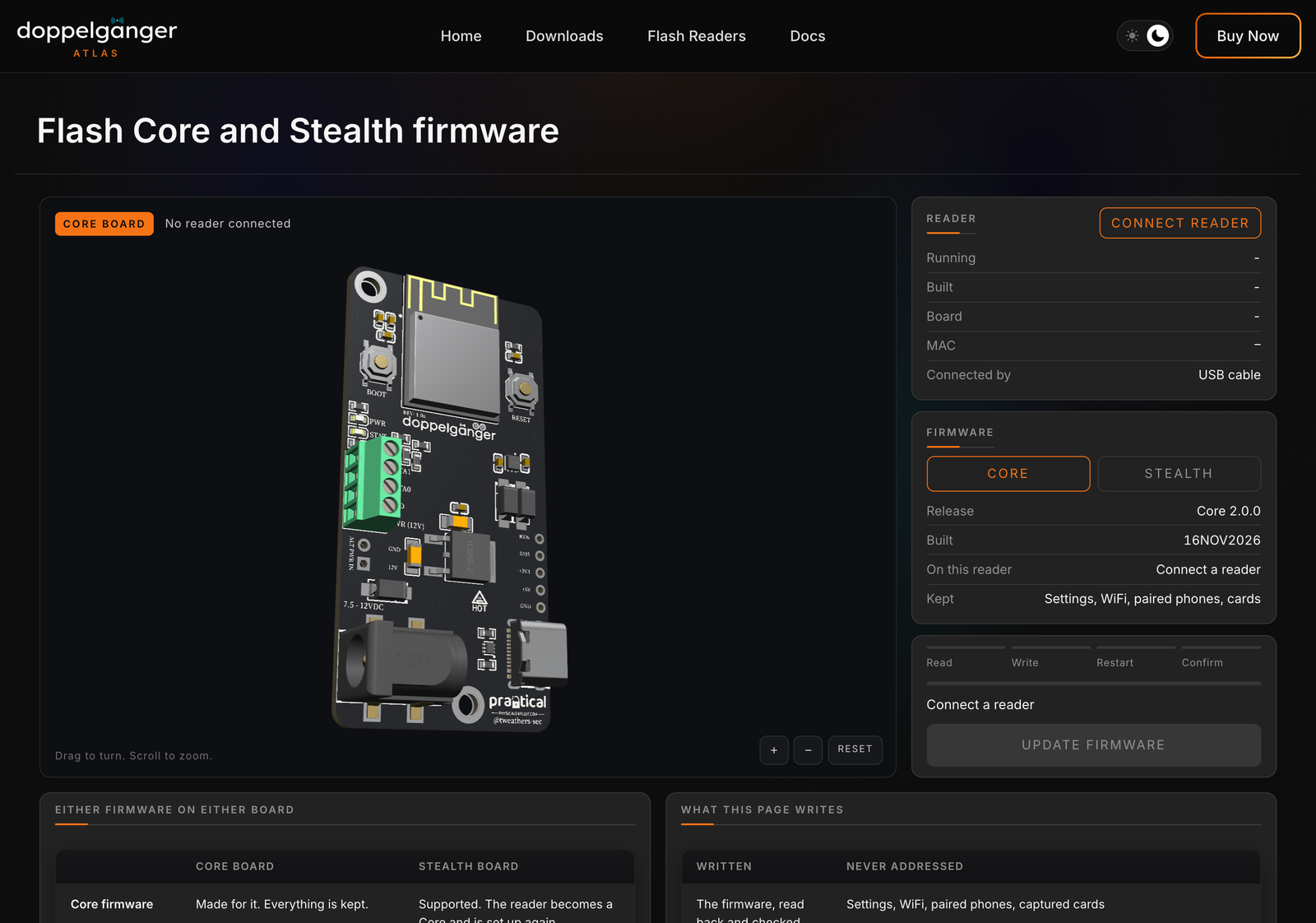
- CONNECT READER. Nothing is connected yet, and the board shown is the one the picked firmware is made for.
- CORE and STEALTH, the firmware to install.
- On this reader, waiting for a reader.
- UPDATE FIRMWARE, gray until a reader has been read.
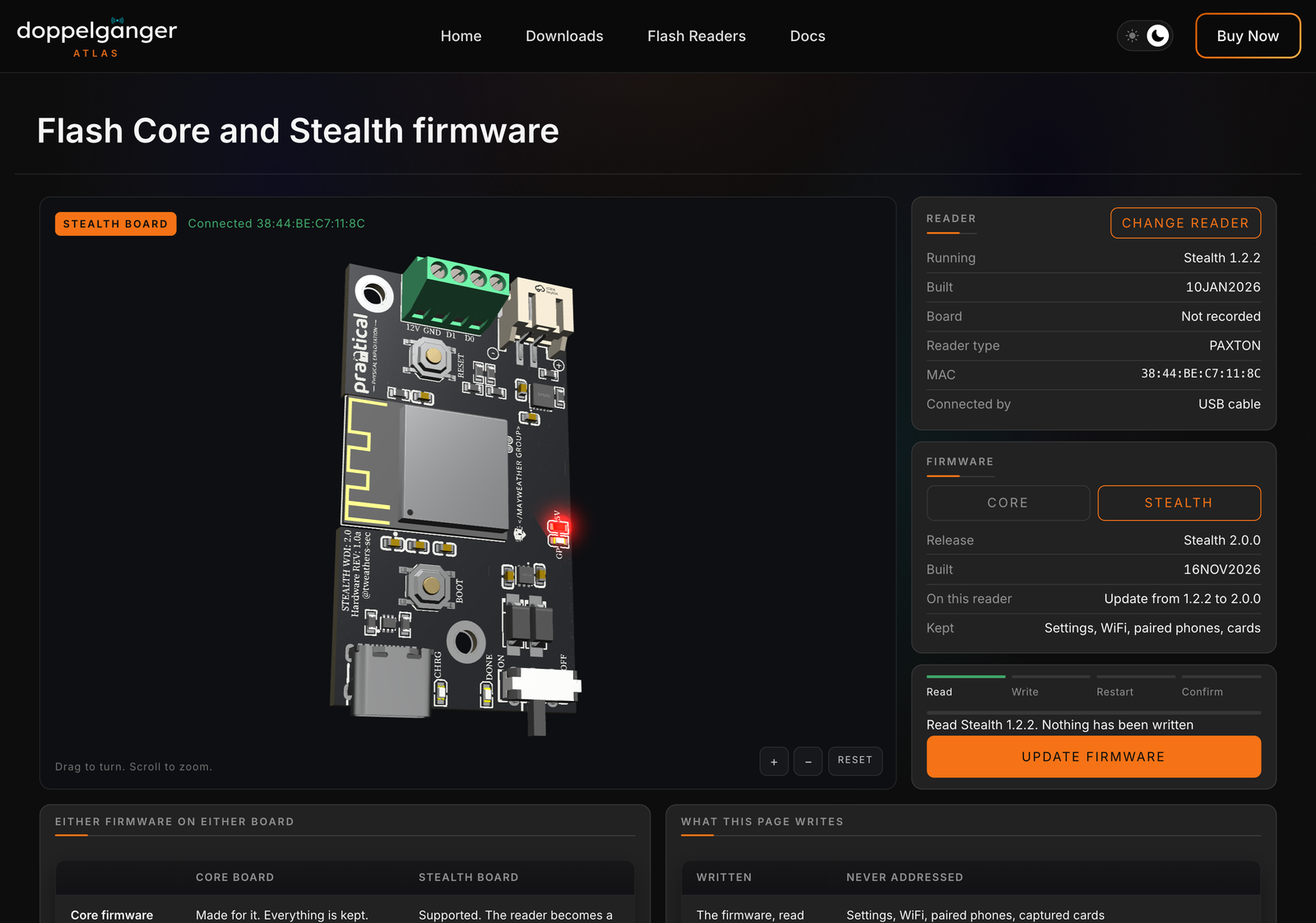
- The board is now the reader's own, with its MAC, and its power LED is lit.
- Running, Stealth 1.2.2. This reader is on old firmware.
- Board, Not recorded. Firmware before 2.0.0 does not keep it.
- MAC, which is how you tell two readers apart.
- The page picked STEALTH, because that is what the reader runs.
- On this reader, Update from 1.2.2 to 2.0.0.
- Read, and nothing has been written.
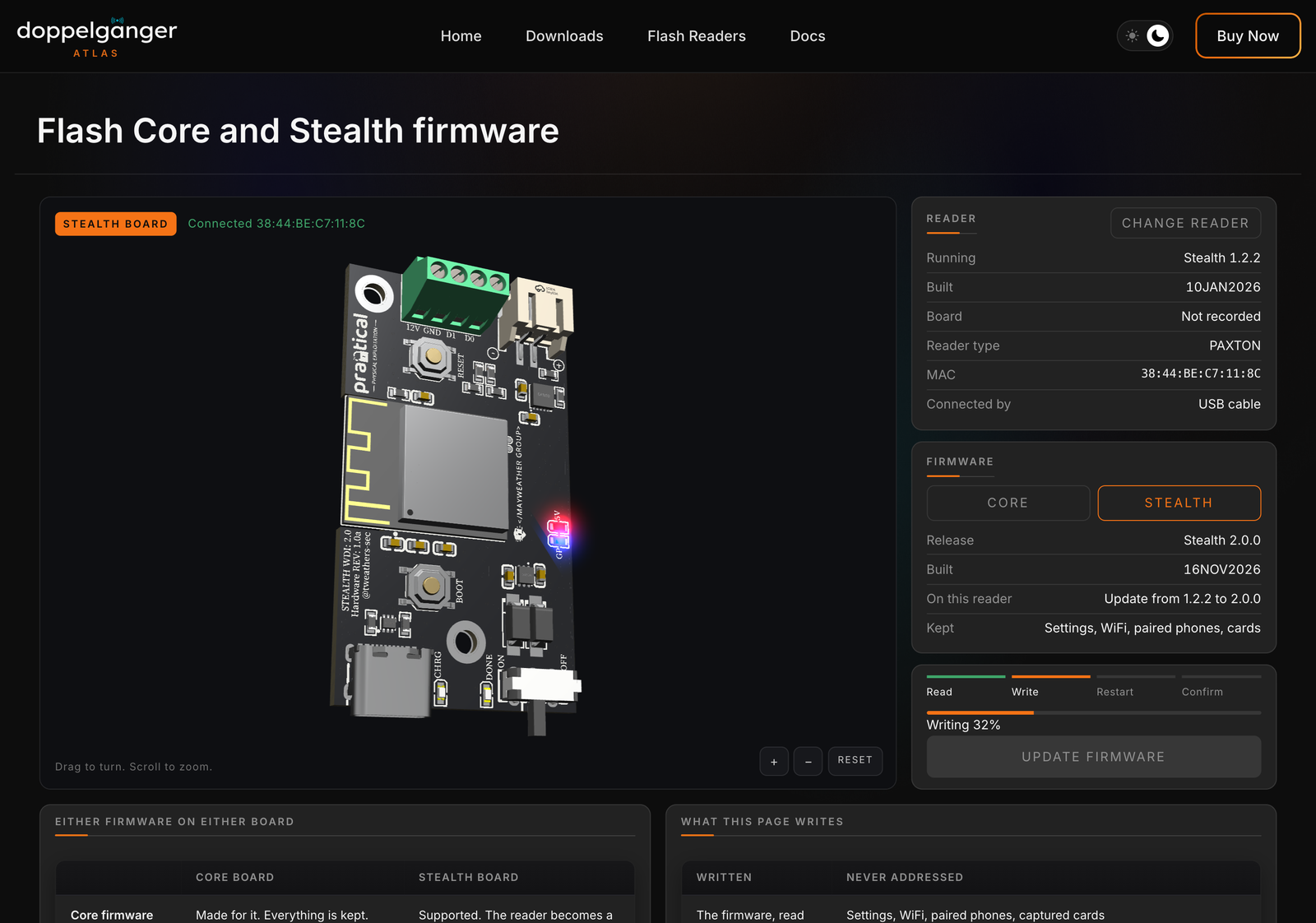
- CHANGE READER is gray while a run is in progress.
- Read is done. Write is under way.
- Writing, with a percentage.
- The button is gray until the run ends. Leave the cable alone.
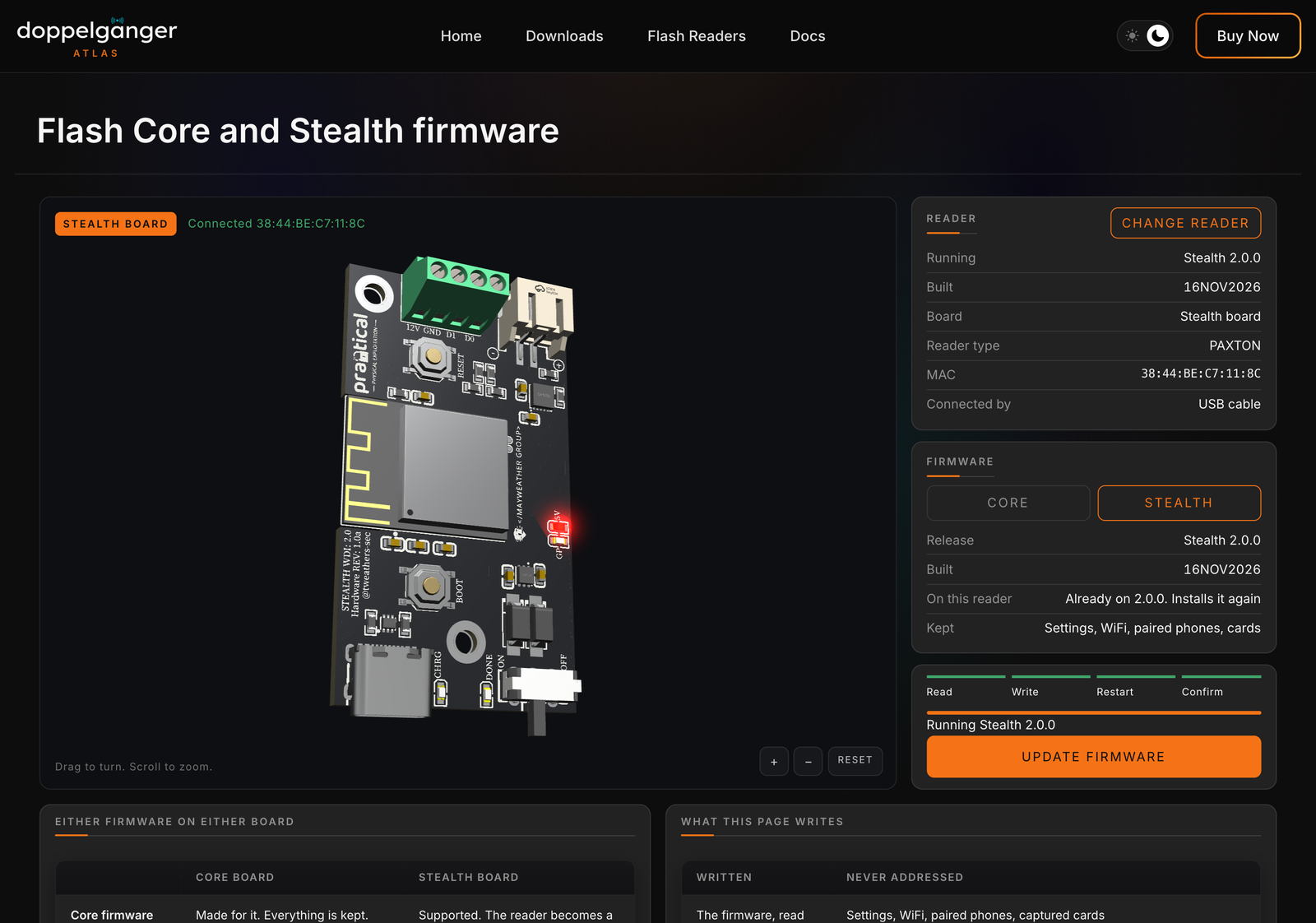
- Running, Stealth 2.0.0, read back from the reader after it restarted.
- Board, Stealth board. 2.0.0 records it.
- Reader type, still PAXTON. The settings were kept.
- All four steps green.
- Running Stealth 2.0.0. This line is the proof.
- Plug the reader into the computer with a USB-C data cable and open the flasher.
- Click CONNECT READER. The browser shows its own list of serial ports. Pick the one named USB JTAG/serial debug unit and click Connect. The page restarts the reader, reads it, and fills in Reader. This takes about ten seconds and writes nothing.
- Check Reader. Running is the firmware on it now, Board is the hardware, and MAC is the unit.
- Under Firmware, the page has already picked the product the reader runs. On this reader says what installing it would do.
- Click UPDATE FIRMWARE and leave the cable alone. The steps light in turn: Read, Write, Restart, Confirm.
- It is finished when the line under the bar reads Running Core 2.0.0 or Running Stealth 2.0.0 in green. Unplug the reader.
What you need
Section titled “What you need”| A computer | Windows, macOS or Linux |
| Chrome or Edge | the page uses Web Serial, which Firefox and Safari do not have. It says Use Chrome or Edge on a computer when it cannot run. Some Chromium browsers ship with Web Serial switched off |
| A USB-C data cable | a charge-only cable shows no reader in the browser’s list |
| The reader | a Doppelgänger Stealth v2 or a Core long range reader. On a Stealth the port is on the bottom edge beside the switch. On a Core it is behind the faceplate |
What the page tells you about the reader
Section titled “What the page tells you about the reader”Everything under Reader is read from the reader itself, before anything is written.
| Row | What it is |
|---|---|
| Running | the product and version of the firmware on it. Not a Doppelgänger reader when the board did not report as a Core or a Stealth |
| Built | that firmware’s build date |
| Board | Stealth board or Core board. This is the hardware, and it stays the same whichever firmware is installed. Not recorded on firmware older than 2.0.0, which does not keep it |
| Reader type | HID or PAXTON, when the reader reports it |
| MAC | the unit’s own address |
The board in the picture is a model of that hardware. Drag it to turn it over, scroll to zoom, and RESET to put it back.
What On this reader means
Section titled “What On this reader means”| On this reader | What will happen | What is kept |
|---|---|---|
| Update from 1.2.3 to 2.0.0 | the newer release is installed | settings, WiFi, paired phones, cards |
| Already on 2.0.0. Installs it again | the same release is written again. Useful when a reader is misbehaving | settings, WiFi, paired phones, cards |
| Changes it from Stealth to Core | the other product’s firmware is installed. See below | cards. The reader is set up again |
| Not a Doppelgänger reader. Nothing will be written | the board did not report as a Core or a Stealth. Any ESP32 answers on this cable, so the page writes only to a board whose firmware says it is one of ours | everything. Nothing is sent |
What is written, and what is not
Section titled “What is written, and what is not”| Written | Never addressed |
|---|---|
| the firmware, checked after the write | settings, the reader type and the cards the reader acts on |
| the marker that says which copy of the firmware starts | WiFi networks, or the access point name and passphrase |
| paired phones | |
| captured cards | |
| the reader’s bootloader |
The page writes to the reader whose MAC it read and to no other. Because the bootloader is never written, a run that stops halfway leaves a reader that can simply be run again.
The other product’s firmware
Section titled “The other product’s firmware”Either firmware runs on either board, with no wiring changes.
Pick the product the reader is not running and the page says so before it does anything.
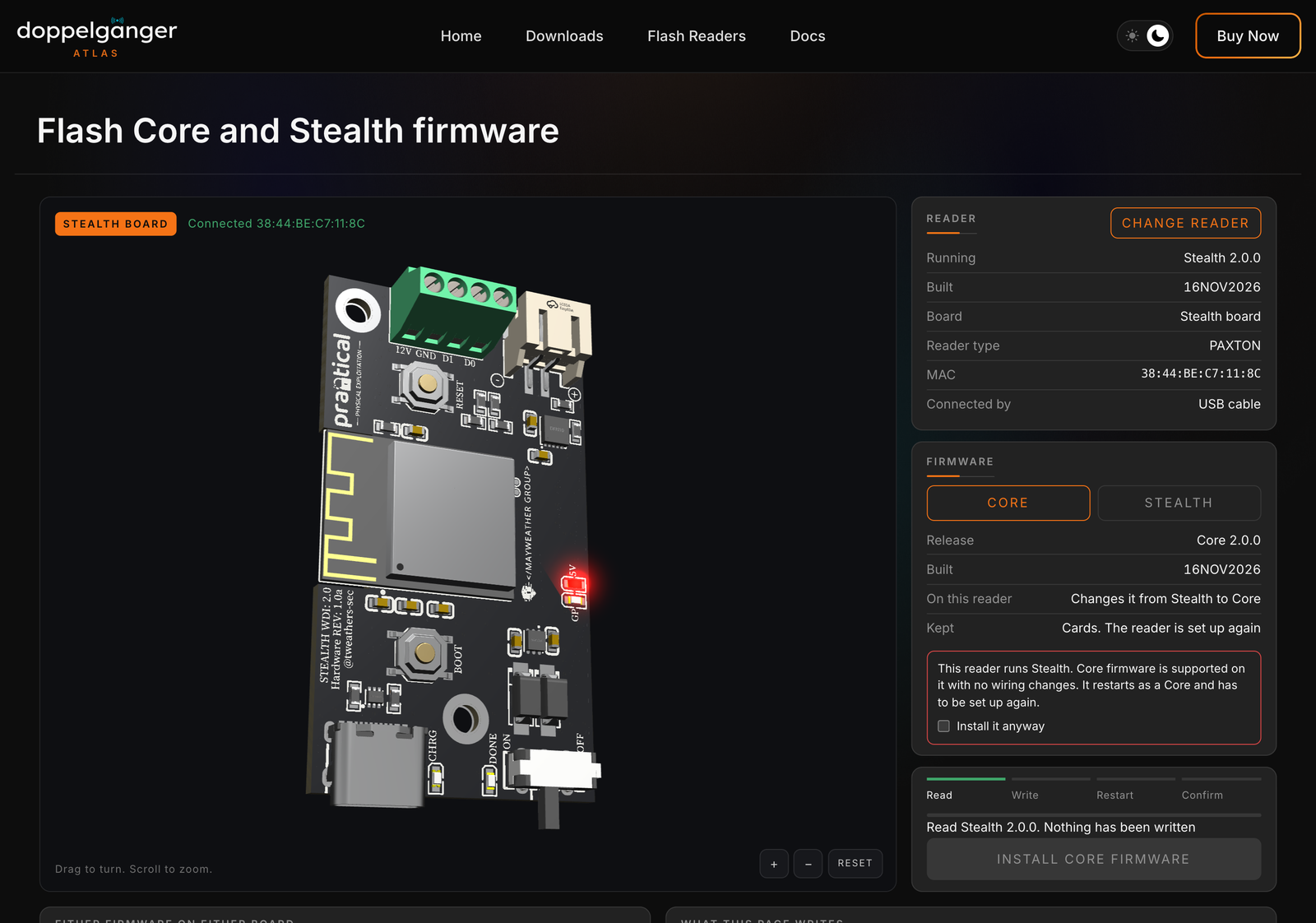
- Board, still Stealth board. That does not change.
- CORE picked, on a reader running Stealth.
- Changes it from Stealth to Core.
- Kept, cards only. The settings do not carry over.
- Install it anyway. The button stays gray until this is ticked.
- The button names the product it will install.
The first time the board starts as the other product, the firmware brings across what belongs to the board and not to the product.
| On the reader | After a change of product |
|---|---|
| Card log | carries. Cards captured as a Core are in the list as a Stealth, and the other way |
| Paired phones | carry. A phone paired over Bluetooth links to the reader under either product |
| Pairing card, reset card, Reader Mode | carry, unless the product it is changed to already holds its own |
| Wireless, GPIO, email alerts, stealth card | do not carry. Each product keeps its own |
A board on firmware older than 2.0.0 has no record of which board it is. When such a board is changed to the other product, the page first installs 2.0.0 of the product it already runs, so the record is made, and then installs the one you asked for. The bar covers both.
When it does not work
Section titled “When it does not work”| The page says | What it means | What to do |
|---|---|---|
| Use Chrome or Edge on a computer | this browser has no Web Serial | open the page in Chrome or Edge on a desktop |
| the browser’s list is empty | no reader is on the cable, or the cable is charge-only | change the cable, then the port |
| The reader could not be opened. Close any other program using its port. | something else on the computer has the reader’s port, such as a serial monitor | close it and connect again |
| The device did not enter its bootloader. | the reader did not answer on the cable | unplug it, plug it back in, and connect again |
| This board is not a Doppelgänger reader. Nothing was written. | the board on the cable is not the chip either reader is built on | nothing. Plug in the reader instead |
| This board did not report as a Doppelgänger reader. Nothing was sent. | the board started and never printed Core or Stealth with its version | if it is one of your readers, unplug it, plug it back in and connect again. A reader whose firmware no longer starts is updated by cable from ATLAS |
| More than one reader is on the cable. Leave only the one being updated plugged in. | the page cannot tell which reader came back after a restart | unplug the others |
| The reader that was read is no longer on the cable. Nothing was sent. | the reader on the cable is not the one whose MAC was read | connect the reader again |
| The board left the cable. | the reader disconnected mid-run | check the cable and run it again |
| The device read back something else. Flash it again. | what was written did not verify | run it again |
| Written and read back, but the firmware did not report in. | the write verified and the reader did not print its version in time | switch the reader off and on. It is on the new firmware |
| The board reports another version | the reader started something other than what was written | run it again |