
Configuration and reset
Everything here is reached with CONFIGURE on the reader’s card in ATLAS, and every value is read off the reader itself.
Configuring it
Section titled “Configuring it”CONFIGURE on the reader’s card.
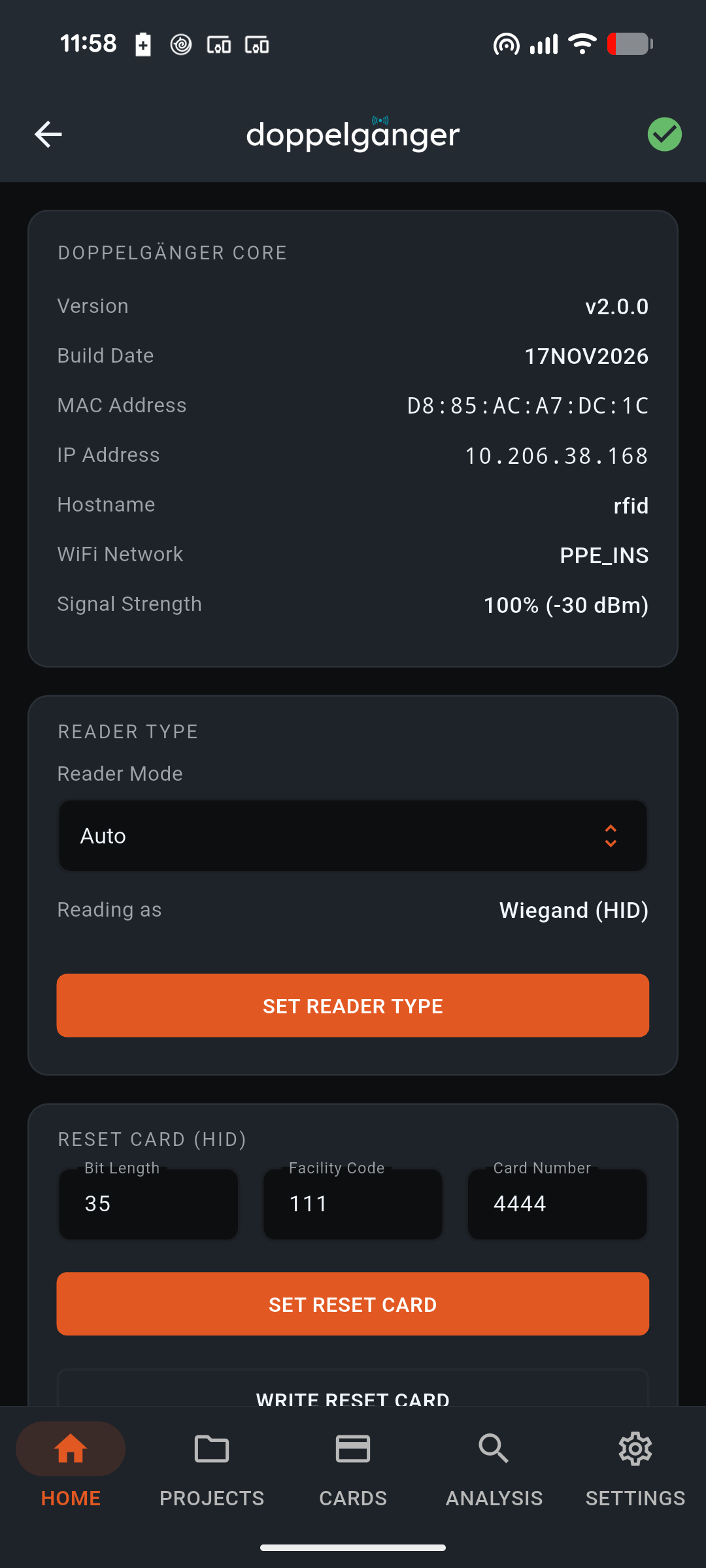
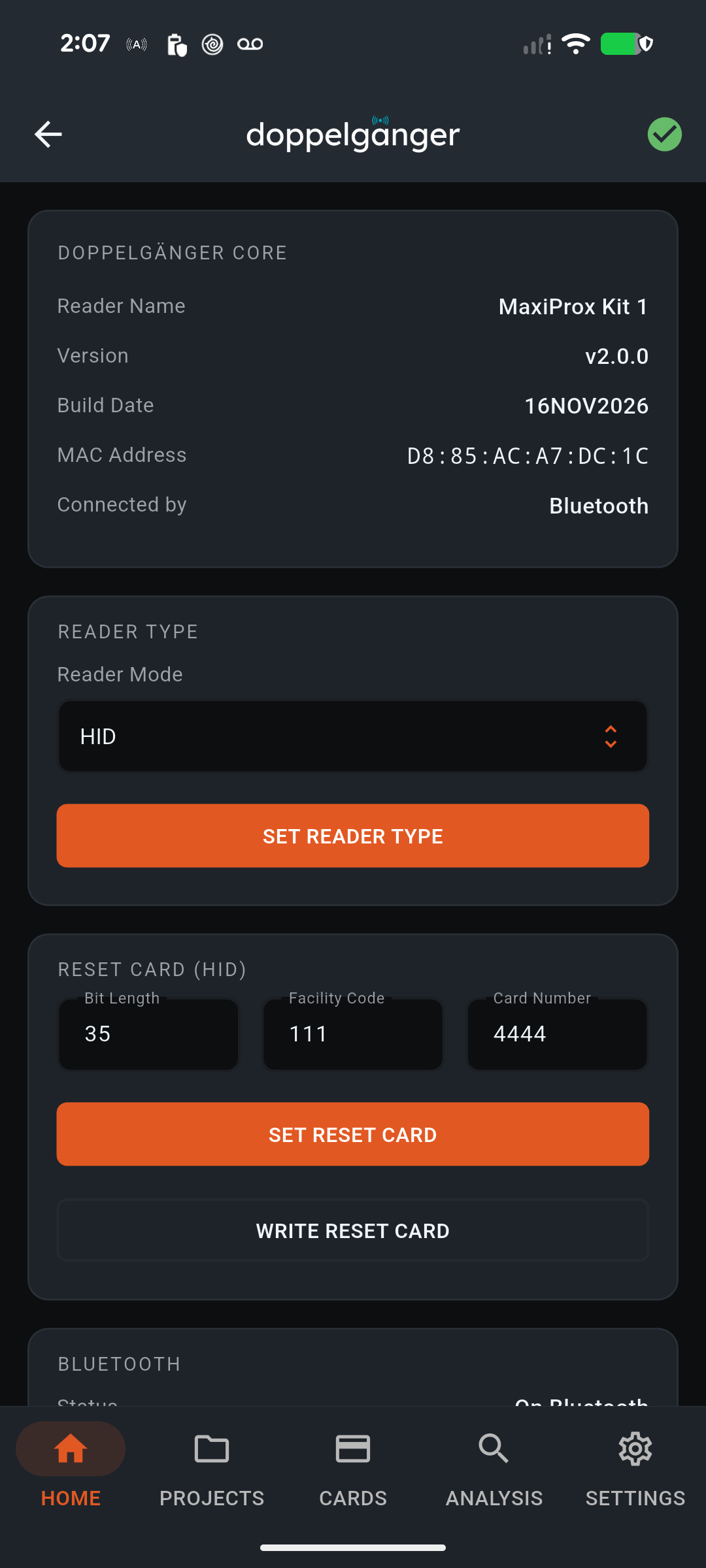
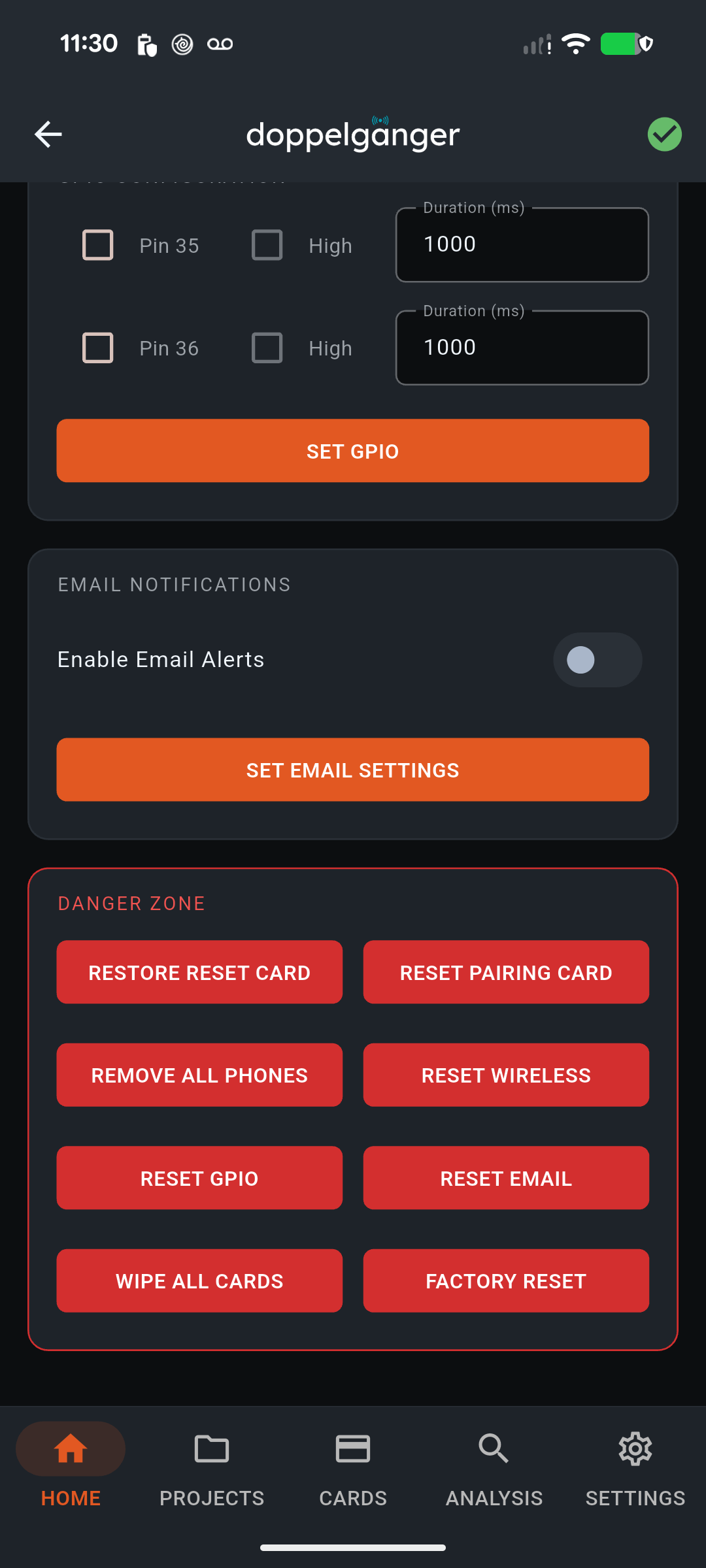
- Version, with the build date under it. Reader Name sits above them once you name the unit in ATLAS.
- IP Address, the address it took from the hotspot.
- WiFi Network, the hotspot it joined, with Signal Strength under it.
- Reader Mode, Auto from the factory.
- Reading as, what Auto settled on.
- RESET CARD (HID), the card that wipes this reader.
- SET RESET CARD.
- Version, with the build date under it, the same as on WiFi.
- Connected by, Bluetooth. The network rows are gone because there is no network.
- Reader Mode, set over Bluetooth the same way.
- The reset card, unchanged by the connection.
- BLUETOOTH, the section that follows.
- Pin 35, with its enable box, idle High box and pulse width.
- Pin 36, the same.
- Enable Email Alerts, for a reader with a route out.
- DANGER ZONE, eight buttons, each explained below.
- RESTORE RESET CARD and RESET PAIRING CARD.
- REMOVE ALL PHONES and RESET WIRELESS.
- RESET GPIO and RESET EMAIL.
- WIPE ALL CARDS and FACTORY RESET.
What the reader reports
Section titled “What the reader reports”The card at the top, headed DOPPELGÄNGER CORE, is read off the reader each time the screen opens. Nothing on it can be edited.
| Row | What it is |
|---|---|
| Reader Name | the name you gave this reader in ATLAS. Absent until you set one |
| Version | the firmware version on the reader |
| Build Date | when that firmware was built |
| MAC Address | the reader’s WiFi MAC. Its last two bytes, as four hex digits, name the doppelganger_XXXX access point it broadcasts during first time setup |
| Serial Number | shown only when the firmware reports one |
| Model | shown only when the firmware reports one |
| Hardware Version | shown only when the firmware reports one |
| IP Address | the address the reader took from the hotspot |
| Hostname | rfid, which the firmware sets on itself before it connects |
| WiFi Network | the hotspot it joined. Confirmation the reader is where you think it is |
| Signal Strength | link quality, as a percentage and the raw reading behind it |
| Connected by | Bluetooth, shown in place of the four network rows above when the reader is on Bluetooth |
When the reader cannot be reached for its network details, the card falls back to one IP Address row taken from ATLAS’s own record of the device.
Signal Strength is ATLAS’s arithmetic rather than a reading from the reader. The reader sends an RSSI in dBm and nothing else. ATLAS maps that onto a percentage, with -30 dBm and stronger at 100, -100 dBm and weaker at 0, and a straight line between the two, then prints both. 93% (-35 dBm) is one measurement written twice.
Reader type
Section titled “Reader type”Reader Mode is how the reader on the front talks to this board. It decides how a card is read and which form of the reset card the reader is watching for.
| Reader Mode | What it means | When to pick it |
|---|---|---|
| Auto, the factory setting | the board works it out from the first card. It reads as Wiegand until it sees clock and data, then changes itself | leave it here unless you have a reason not to. Reading as under it shows what it settled on |
| Wiegand (HID) | every bit is a pulse on one of two wires. HID readers and most others | the board is on a Wiegand reader and you want the mode fixed |
| Clock and Data (Paxton) | one wire is a clock, the other carries the bit. Paxton readers | the board is on a Paxton reader and you want the mode fixed |
SET READER TYPE commits it. A mode you set is never changed by the board afterward. Only Auto lets it change, and a factory reset puts it back to Auto.
On Auto a Paxton reader is recognized on its first card, and that card is read. A Wiegand reader needs no recognizing.
Checking the wiring
Section titled “Checking the wiring”Check the wiring with a card whose numbers you know. Present it, and compare what ATLAS shows with the facility code and card number printed on the card or recorded for it. A match proves the wiring and the mode in one read.
| What ATLAS shows | What it means |
|---|---|
| the card’s own bit length, facility code and card number | wired right, mode right |
| the right bit length with other numbers, on a Wiegand reader | the two data wires are crossed. Swap them at the board |
| nothing at all | no power to the reader, no data wires, or the wrong mode. See the Wiring row below |
Use a card of the kind the site issues. If you carry test cards, a 26 bit H10301 is the one to reach for first, being the most common format, and a 35 bit, 37 bit or 48 bit card after it if the site uses those lengths.
What the board finds by itself
Section titled “What the board finds by itself”Three faults show on the wires on a single card. A Wiring row appears under Reader Mode in orange and ATLAS raises a Reader Wiring notification.
| Wiring reads | What is wrong | What to do |
|---|---|---|
| Clock and data are swapped | a Paxton reader with its two data wires crossed. No card reads | swap the two data wires at the board |
| Reader sends clock and data | the mode is Wiegand (HID) and the reader is a Paxton | set Clock and Data (Paxton), or Auto |
| Reader sends Wiegand | the mode is Clock and Data (Paxton) and the reader is a Wiegand reader | set Wiegand (HID), or Auto |
The row goes away on the next card that reads right.
The reset card
Section titled “The reset card”A credential you carry that wipes the reader back to how it left the factory. Present it and the reader clears every setting, forgets its WiFi, removes every paired phone, leaves Bluetooth, and restarts as its own access point.
The captured cards are the one thing it keeps. They stay on the reader until you wipe them with WIPE ALL CARDS.
Reader Mode goes back to Auto with everything else. A Paxton reader is recognized again on the next card presented, and that card is read.
Only the card for the Reader Mode in use is shown.
| Reader Mode | Field | Factory value |
|---|---|---|
| Wiegand (HID) | Bit Length | 35 |
| Wiegand (HID) | Facility Code | 111 |
| Wiegand (HID) | Card Number | 4444 |
| Clock and Data (Paxton) | HEX Value (10 chars) | 0000004444 |
SET RESET CARD commits it. The factory values are the same on a Core and on a Stealth.
The reset card cannot be the same card as the pairing card. The reader refuses it and ATLAS shows The reset card cannot be the pairing card.
The same card can be set from the reader’s own web page, in its Reset Card section, which also shows only the card for the reader type in use.
Bluetooth
Section titled “Bluetooth”The BLUETOOTH section pairs this phone with the reader and moves the reader between WiFi and Bluetooth. It has its own page, Readers on Bluetooth.
Setup network
Section titled “Setup network”SETUP NETWORK sets how long a reader that has a saved network looks for it before it offers its own setup network, doppelganger_XXXX. It is shown for a reader whose firmware has the setting.
| Offered After | Pick it when |
|---|---|
| At Once | you are at a bench, changing networks often, and want setup the moment the saved one is missing |
| 1 Minute | the factory value. Long enough to switch a hotspot on after powering the reader |
| 3, 5 or 10 Minutes | the hotspot comes up late, and you would sooner the reader stayed quiet meanwhile |
| Never | the reader is deployed and must never announce itself. Only the reset card opens setup again |
SET SETUP NETWORK commits it. A reader with no saved network offers setup at power on whatever this says, since there is no other way to reach it. The reader reads cards throughout, whichever you pick.
When one of these cards is read
Section titled “When one of these cards is read”The reader does not store the reset card and the pairing card as captures. ATLAS raises a notification that names the reader and what the card did, listed on Capture alerts.
GPIO, for a sensor inside the reader
Section titled “GPIO, for a sensor inside the reader”GPIO CONFIGURATION, two pins, Pin 35 and Pin 36. Each has an enable box, a High box for its idle state, and a Duration (ms), 1000 out of the box.
These drive something you install inside the reader housing. The common one is a haptic buzzer, so the reader gives you a silent physical confirmation that a credential was captured, but anything that takes a pulse works.
| Field | What it means |
|---|---|
| Pin 35 / Pin 36 | enables that pin |
| High | the pin idles high instead of low. Follow whatever you wired |
| Duration (ms) | how long the pulse lasts. Between 1 and 60000 |
SET GPIO commits it. Wiring is on the Practical Physical Exploitation product documentation.
Email notifications
Section titled “Email notifications”Enable Email Alerts, off by default. On, it takes an SMTP Host, Port, Username, Password and Recipient Email, and mails on each capture.
This is for a reader that has a route to the internet, which a reader on the handset’s hotspot does not. It is for a reader left on a network that does.
Wipe it at both ends of a project
Section titled “Wipe it at both ends of a project”The reader holds everything it has ever read until somebody clears it.
| When | Why |
|---|---|
| Starting a new project | so the first import is this client’s badges and nothing else. A reader carrying reads from a previous site mixes two engagements into one card database |
| Finishing a project | so the client’s credentials are not sitting in a satchel afterward. Import, confirm the cards are in ATLAS, then wipe |
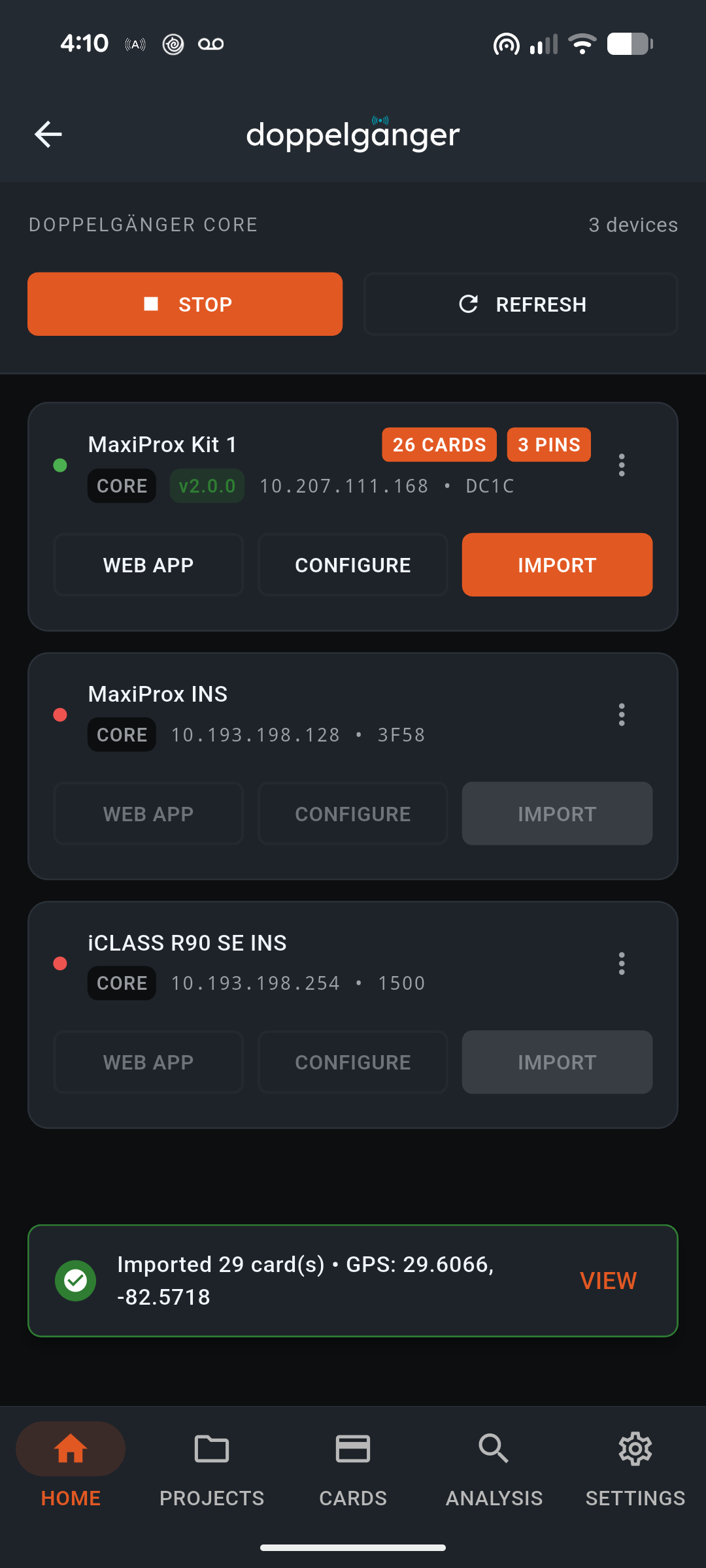
- The reader still holds its cards. An import copies, it does not move.
- IMPORT stays live. Importing again reports duplicates.
- Imported 29 card(s), the coordinate they were tagged with, and VIEW.
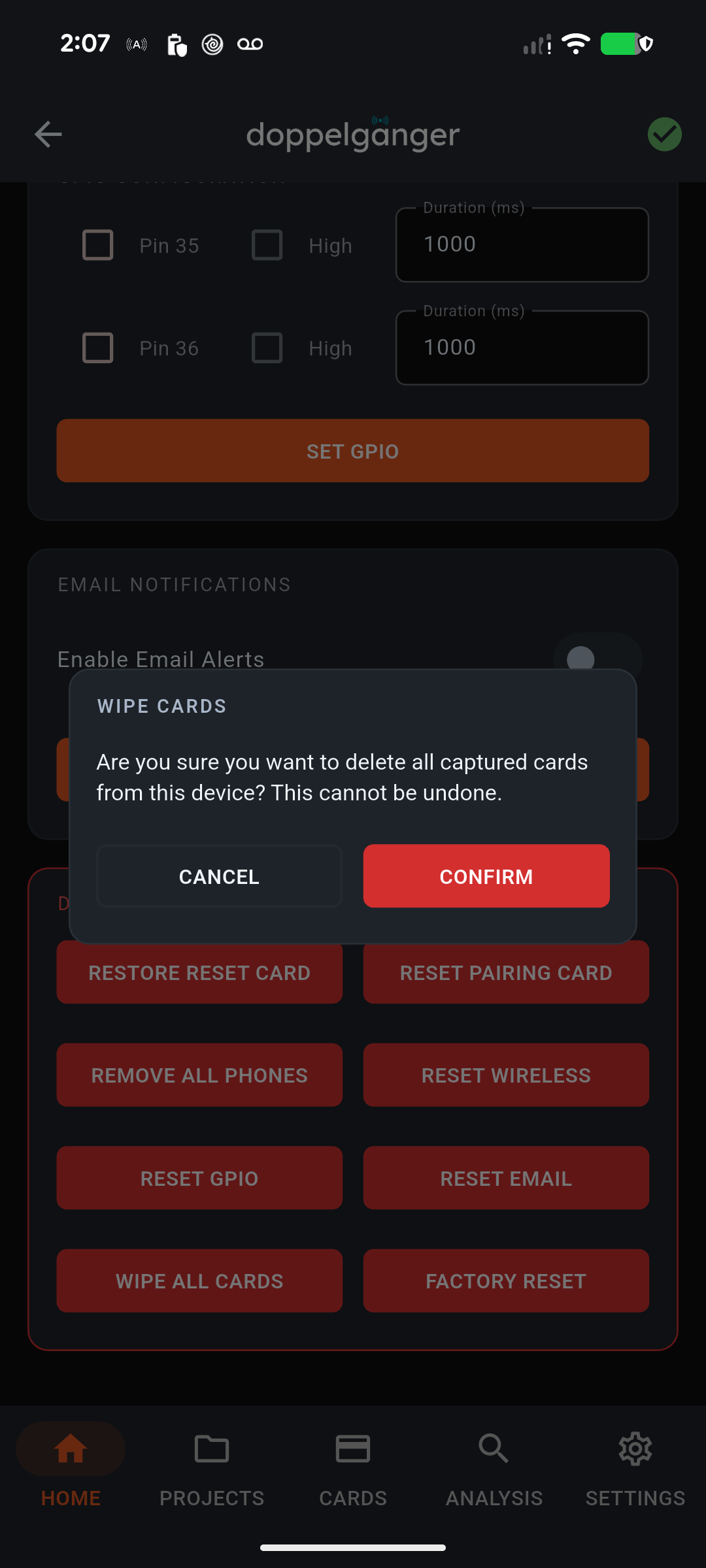
- WIPE CARDS.
- This cannot be undone. There is no copy on the reader afterward.
- CONFIRM, in red. CANCEL leaves everything where it is.
- WIPE ALL CARDS, the button that opened it.
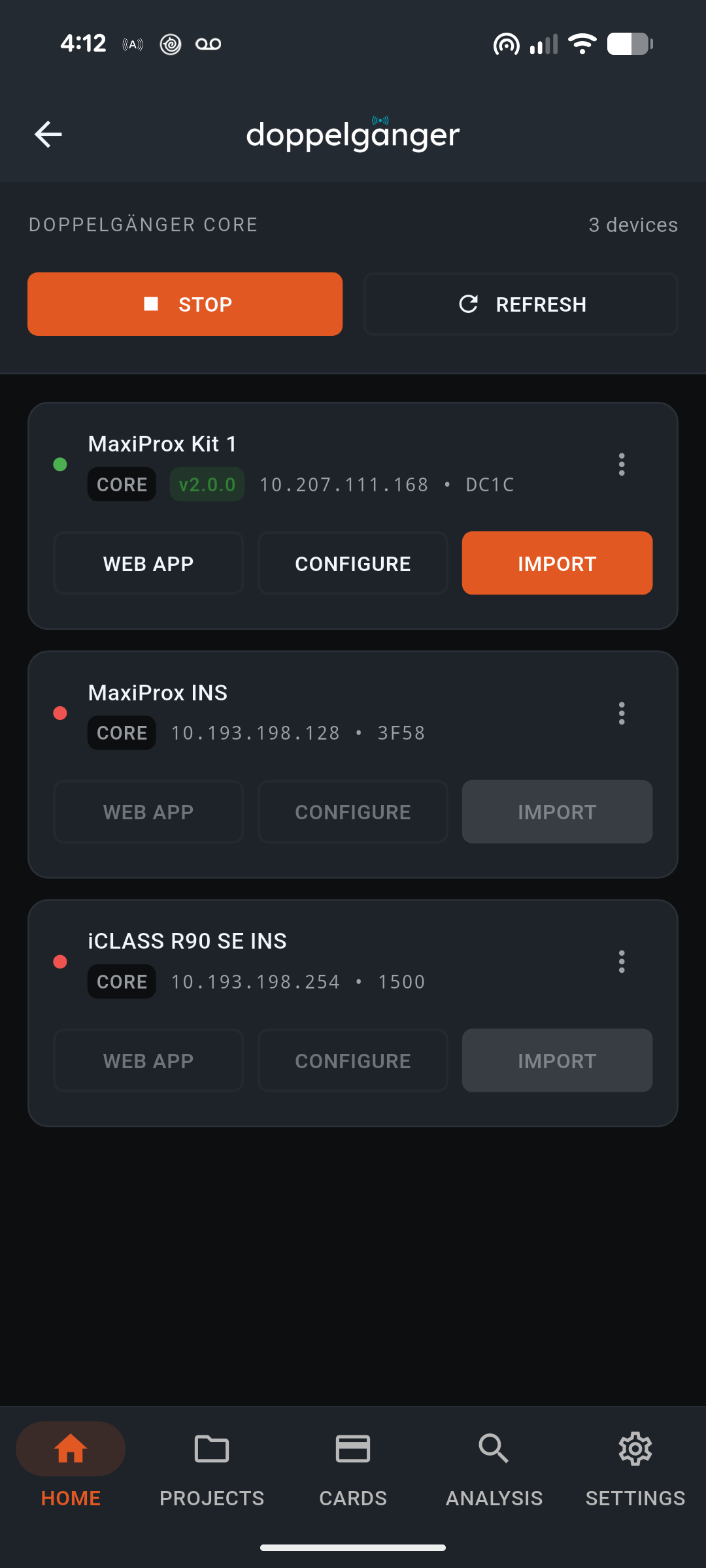
- DOPPELGÄNGER CORE, the same list.
- MaxiProx Kit 1 with no count chips. It is holding nothing.
- Still named, still green, still on the hotspot. Only the reads went.
- IMPORT, and pick the project.
- Read the confirmation and VIEW the cards if you want to be sure.
- CONFIGURE, scroll to DANGER ZONE.
- WIPE ALL CARDS, then CONFIRM.
An empty reader shows no count chip at all, which is how you tell it apart from a reader you have not checked. Everything else is untouched. It is still connected, still named, and still holding its reader type, its reset card and its GPIO settings.
Danger zone
Section titled “Danger zone”| Button | What it does |
|---|---|
| RESTORE RESET CARD | puts the reset card back to the factory values |
| RESET PAIRING CARD | removes the pairing card. Paired phones stay paired, and no phone can be added until a new card is set |
| REMOVE ALL PHONES | removes every paired phone. A reader on Bluetooth goes back to WiFi, and each phone is paired again with the pairing card |
| RESET WIRELESS | removes the saved WiFi network and restarts. A reader on WiFi comes back on its setup network |
| RESET GPIO | puts both pins back to their factory settings |
| RESET EMAIL | puts the email notification settings back to their factory values |
| WIPE ALL CARDS | deletes every captured read off the reader. Import first |
| FACTORY RESET | deletes all data, all configuration, the WiFi credentials, the pairing card and every paired phone, then restarts |