
Recover
A MIFARE Classic will not give up its contents without the keys to its sectors. RECOVER finds them, then dumps the card with them, in one run.
Everything below was done on a Classic 1K, UID 5AF70D9D, on a cabled Proxmark.
Start to finish
Section titled “Start to finish”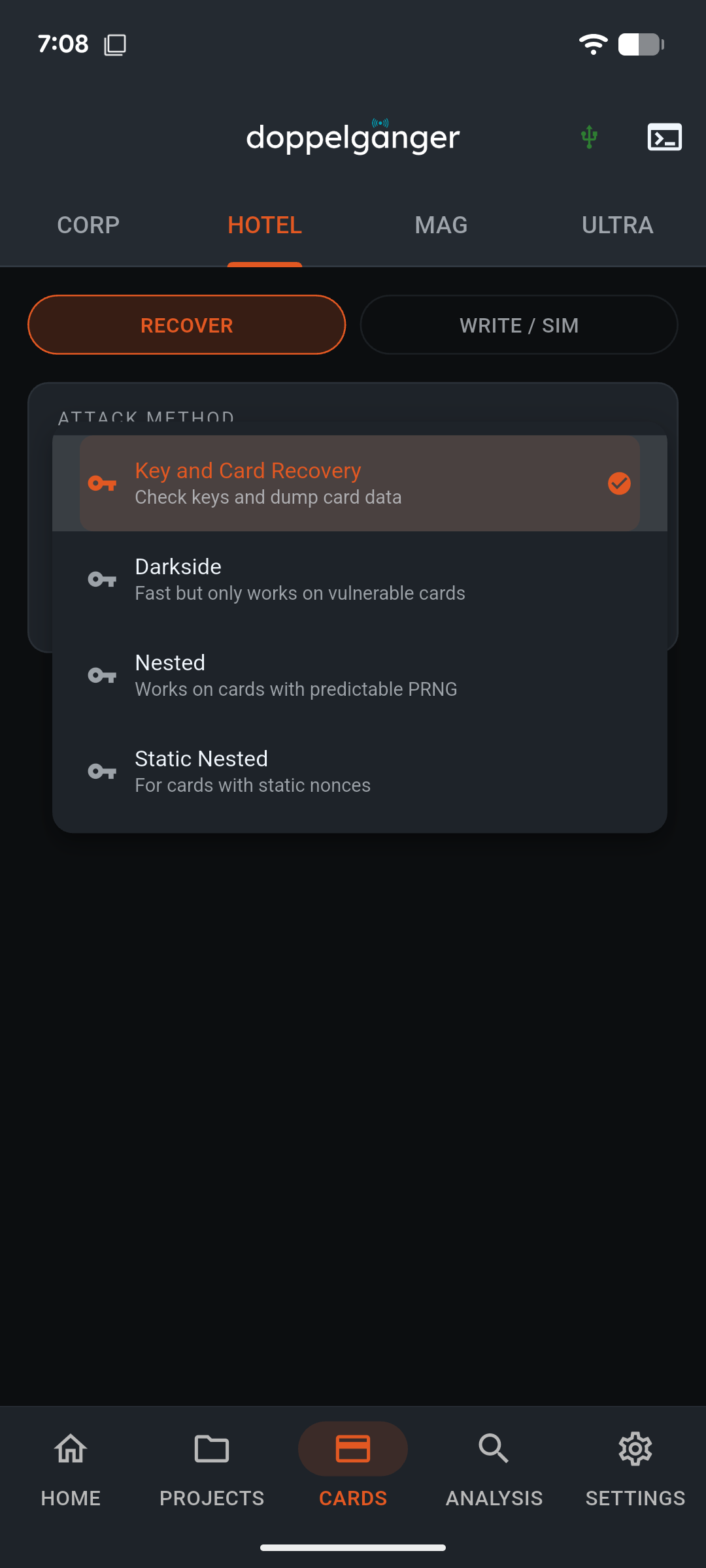
- Key and Card Recovery is first for a reason. Start here.
- Darkside, for an older card the key check did not open.
- Static Nested, for a hardened card whose nonce does not move.
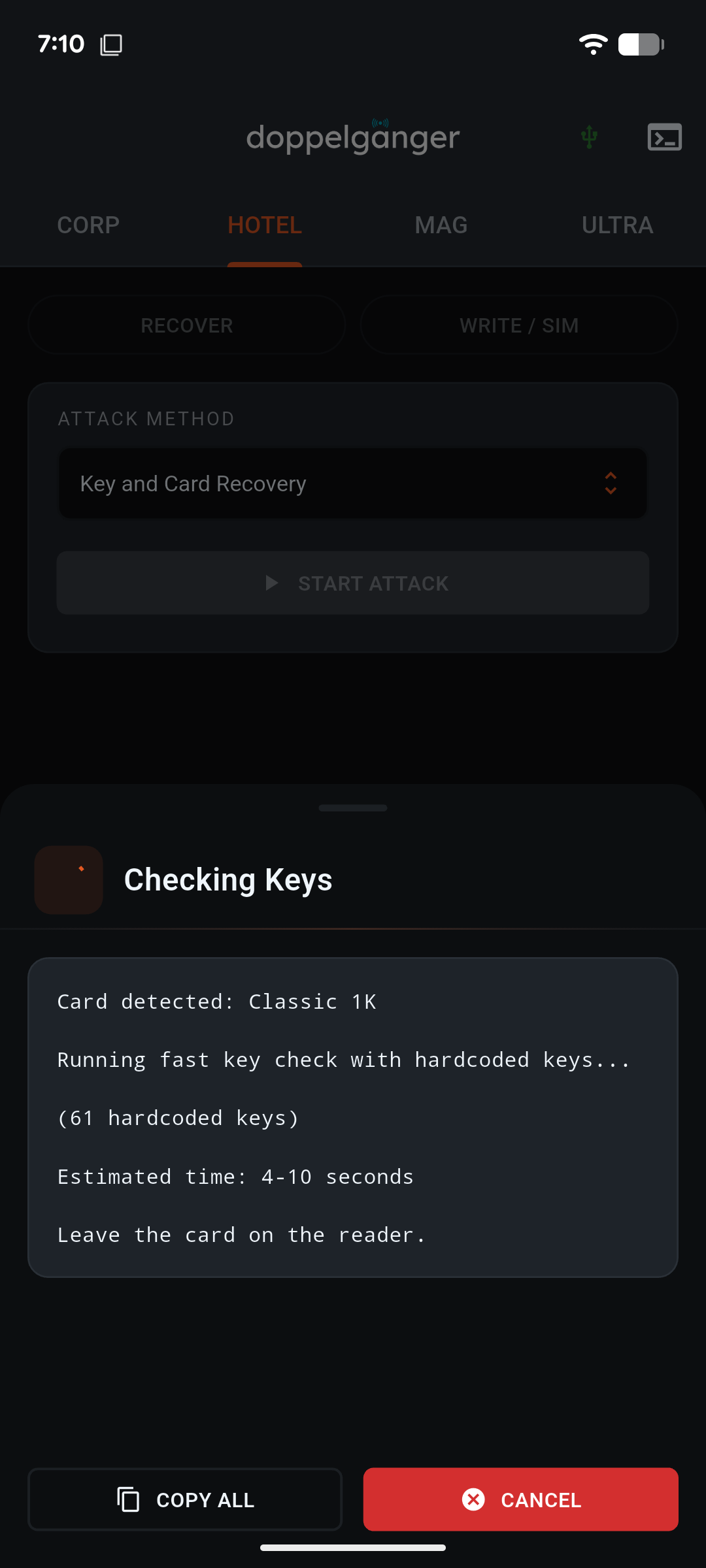
- It names the card it found before it attacks it.
- 61 hardcoded keys, and an honest time estimate.
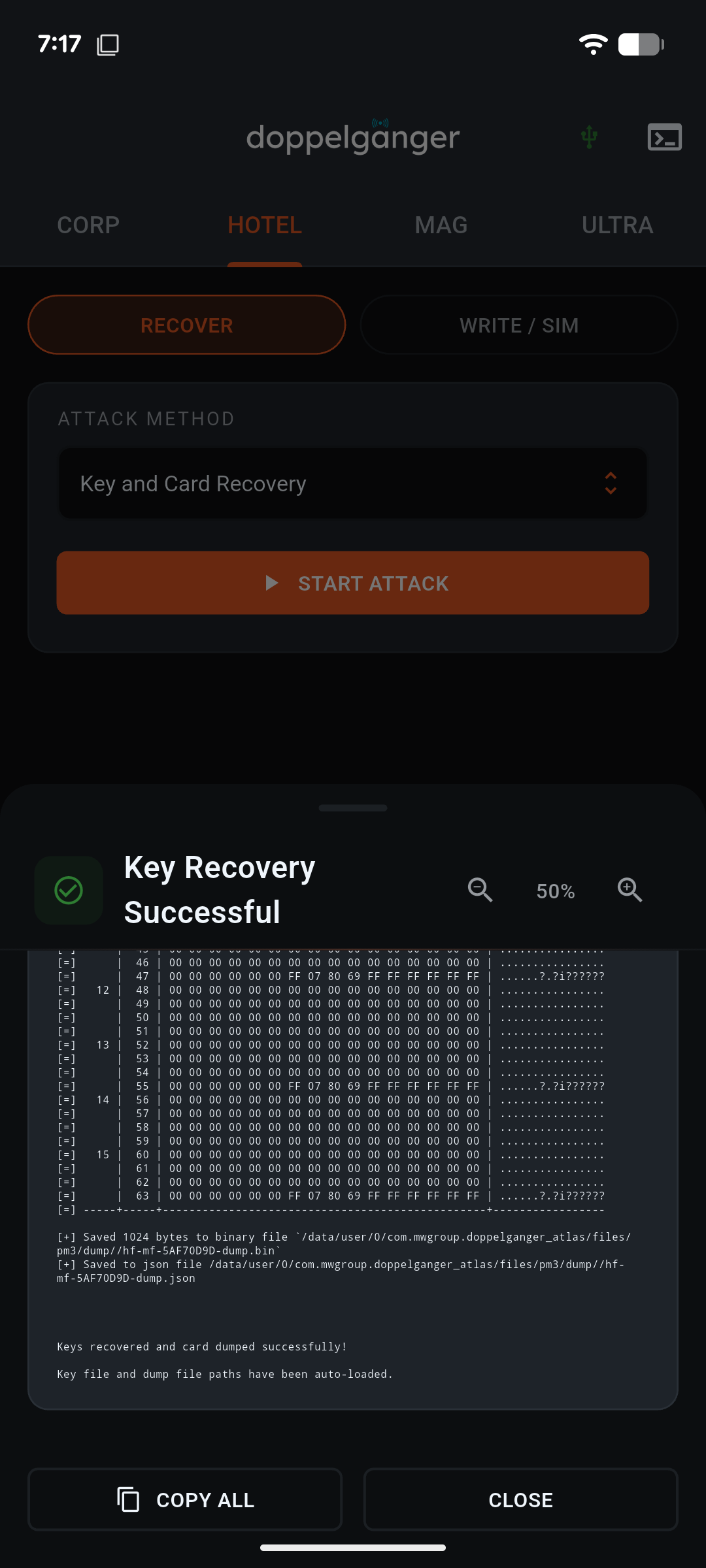
- Key Recovery Successful, with a green check.
- 1024 bytes written, as both .bin and .json.
- The paths are loaded into Write / Simulate for you.
- Put the Classic on the Proxmark antenna.
- Pick an ATTACK METHOD. Leave it on Key and Card Recovery unless you have a reason not to.
- Press START ATTACK.
- Leave the card still. The sheet says so, and it means it for the whole run, not just the key check.
- Key and Card Recovery ends in Key Recovery Successful and writes three files. The other three methods run a different attack and end in different sheets, listed further down.
Every sheet the app puts up while something is running carries a red CANCEL beside COPY ALL. The sheet at the end of the run carries CLOSE instead.
The four attacks
Section titled “The four attacks”The app states what each one is for, and the order in the list is the order to try them in.
| Attack Method | What the app says | When to pick it | What the card has to be |
|---|---|---|---|
| Key and Card Recovery | Check keys and dump card data | always first. It tries known keys, and most cards in the field still carry one | nothing. It exploits no weakness, it just tries keys |
| Darkside | Fast but only works on vulnerable cards | an older card the key check did not open | vulnerable to Darkside. The app has no test for that and will not warn you either way |
| Nested | Works on cards with predictable PRNG | the card’s PRNG moved predictably | predictable PRNG |
| Static Nested | For cards with static nonces | a hardened card, where the nonce does not move between authentications | static nonce |
Work down that table rather than starting at the bottom.
What Nested needs is a predictable PRNG, and the app says so twice. Before the run, when the hf mf info read reported otherwise, the output carries Warning: Card may not be vulnerable to Nested Attack. and Warning: PRNG is not predictable. Attack may fail. On a Fudan FM11RF08S it carries Warning: Card is not vulnerable to Nested Attack., Warning: This is an FM11RF08S card. Advanced scripted recovery requires a computer. and Warning: Continuing with selected method - may not succeed. instead. After a run that failed for that reason it carries Reason: Card PRNG is not predictable or card is not vulnerable. and Nested attacks require predictable PRNG or static nonce.
It runs anyway. The warnings do not stop it.
What Key and Card Recovery runs
Section titled “What Key and Card Recovery runs”The run opens on a sheet titled Key Recovery reading Gathering card information..., then replaces it with one titled Checking Keys reading the same thing. The card is read with hf mf info twice, once behind each sheet, before any key is tried. Leaving the card still matters from the first sheet, not from the first key check.
Then four steps, and the app decides for itself how far down them it goes. --1k becomes --4k on a 4K card, read off that card information.
| Step | Sheet title | Command | Runs when |
|---|---|---|---|
| 1 | Checking Keys | hf mf fchk --1k --dump | always. 61 keys compiled into the app |
| 2 | Checking Keys (Dictionary) | hf mf fchk --1k -f mfc_default_keys.dic --dump | any sector came back with neither key A nor key B |
| 3 | Checking Keys (Custom Dictionary) | hf mf fchk --1k -f <your file> --no-default --dump | Key File Path is not empty |
| 4 | Dumping Card | hf mf dump --1k --keys <key file> | a key file name was recovered from the output, or could be built from the card’s UID |
Step 2 is the escalation. The app counts a sector as open when either key A or key B came back found, and the moment one sector has neither it runs the whole check again against mfc_default_keys.dic, the dictionary bundled in the app. That file carries 5,928 keys against upstream’s 2,511.
Step 3 is not a fallback. It sits outside the step 2 decision, so a non-empty Key File Path adds a third pass even when step 1 already opened every sector.
Darkside, Nested and Static Nested
Section titled “Darkside, Nested and Static Nested”These three never reach the four step run above. They take one command each, then a verification dump.
| Attack | Command the app builds |
|---|---|
| Darkside | hf mf darkside --1k |
| Nested | hf mf nested --1k --blk 0 -a -k <key> |
| Static Nested | hf mf staticnested --1k --blk 0 -a -k <key> |
--blk 0 is added when the hf mf info read returned a UID. <key> is the key the app chose for itself, as described above.
The sheet while it runs is titled Key Recovery (<method name>) and carries the exact command, then whatever the read found, as a Fingerprint: line, a PRNG: line, a Static Nonce: Yes line, and the time estimate for that method and card size.
| Attack | Classic 1K | Classic 4K |
|---|---|---|
| Darkside | 1 to 5 minutes | 3 to 10 minutes |
| Nested, weak or predictable PRNG | 1 to 3 minutes | 2 to 5 minutes |
| Nested, otherwise | 2 to 5 minutes | 5 to 15 minutes |
| Static Nested | 1 to 2 minutes | 2 to 4 minutes |
When the attack recovers keys the sheet changes to Verifying Keys and the app runs hf mf dump --1k or hf mf dump --4k to read every sector back, then reports how many sectors read and which ones failed. When it recovers nothing, there is no verification and the run ends immediately.
What the key check actually does
Section titled “What the key check actually does”It runs a fast dictionary of 61 hardcoded keys against every sector and reports a table, one row per sector:
proxmark3 [+] 000 | 003 | FFFFFFFFFFFF | 1 | FFFFFFFFFFFF | 1[+] 001 | 007 | 2A2C13CC242A | 1 | FFFFFFFFFFFF | 1[+] 002 | 011 | FFFFFFFFFFFF | 1 | FFFFFFFFFFFF | 1[+] 003 | 015 | ------------ | 0 | FFFFFFFFFFFF | 1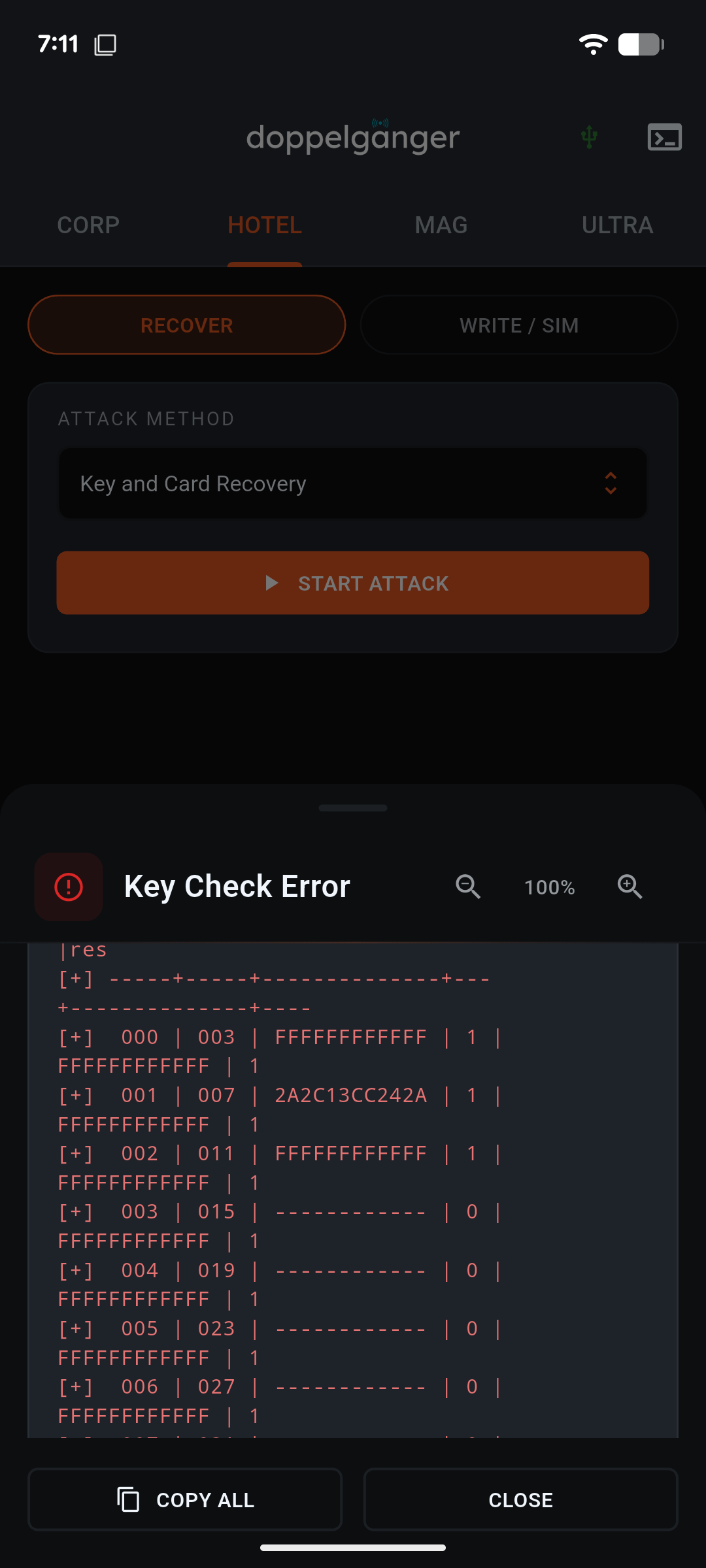
- Key Check Error in the header is the dump step, not the key check. The keys below were found.
- Sector, trailer block, then key A and key B each with a found flag.
- A non default key A the dictionary recovered.
- Dashes and a 0 are a key the dictionary did not have.
Sector, trailer block, key A and whether it was found, key B and whether it was found. 1 is found and 0 is not, and a row of dashes is a key the dictionary did not have.
On this card the dictionary found a non-default key A on sector 1, 2A2C13CC242A, and left key A unknown on the rest. Every sector still had one key, so the run went straight to the dump and printed All keys found with hardcoded keys. Skipping dictionary check.
Key File Path is an input, not just an output
Section titled “Key File Path is an input, not just an output”Key File Path sits under the WRITE / SIM chip, in the section headed WRITE / DUMP CARD DATA, so it is off screen while RECOVER is selected. It still drives step 3 of the attack.
| State of the field | What the attack does |
|---|---|
| empty | steps 1, 2 and 4 only |
| a usable path | adds hf mf fchk --1k -f <that path> --no-default --dump as step 3. --no-default narrows that pass to your file, so none of the built in keys are retried in it |
a path holding a space, a shell metacharacter or .. | the run stops dead on a Key File Not Usable sheet reading The custom dictionary was NOT checked. Steps 1 and 2 have already run by then, so a key file is on disk and no dump is |
When there is no card
Section titled “When there is no card”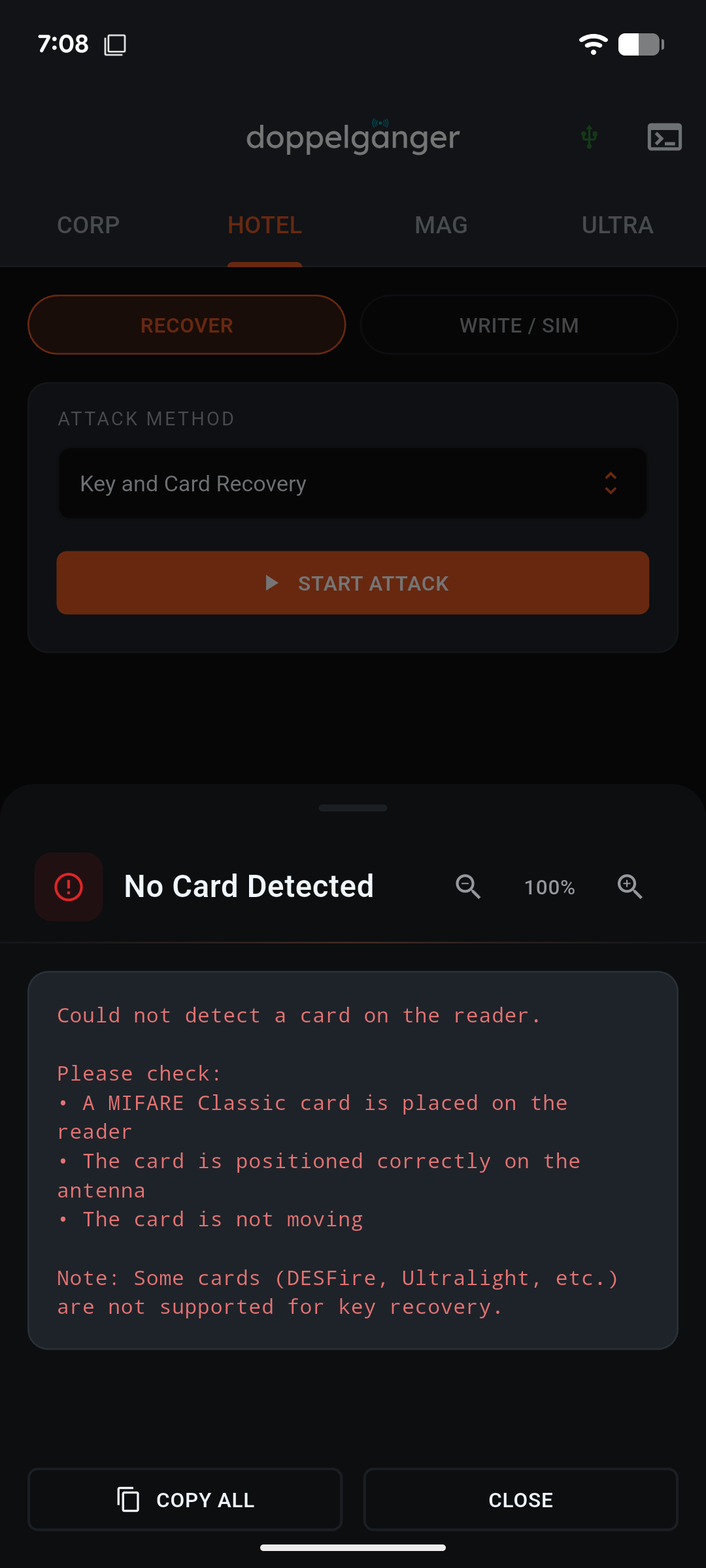
- No Card Detected, in red, with a zoom control beside it.
- Three things to check, in the order worth checking them.
- The scope of the whole tab, in the app's own words.
The sheet lists the obvious checks, then adds the one that is not obvious:
Note:
Some cards (DESFire, Ultralight, etc.) are not supported for key recovery.
If you are holding a DESFire or an Ultralight, nothing on this tab applies and no amount of repositioning will change that. See the Overview for what that means for a modern hospitality site.
Reading a long output
Section titled “Reading a long output”The output sheet sizes its own text. On the way in it measures the widest line in the output against the width it has, and draws at the largest whole percentage that fits on one line, down to a floor of 50 percent. The readout beside the title reports that fitted figure rather than 100 percent.
The minus and the plus beside it override the fit. The first tap on either hands the size to you and the sheet stops recomputing it for the rest of that sheet’s life.
| Control | What it does |
|---|---|
| minus and plus | 25 point steps, between 50 and 300 percent |
| the percentage between them | the size being drawn, fitted on open and yours after the first tap |
| COPY ALL | the full text, at any zoom |
| drag the handle | the sheet opens at half the screen and pulls up to the whole of it |
The zoom controls are drawn only once a stage has finished. While a command is running the header carries the spinner and the title alone, and the bottom of the sheet carries COPY ALL and CANCEL.
Every way a run can end
Section titled “Every way a run can end”Twelve sheets, and two of the green ones do not mean what they look like.
| Sheet | Methods | What happened |
|---|---|---|
| Not Connected | all four | no Proxmark connected. Nothing ran |
| No Card Detected | Key and Card Recovery | the hf mf info read came back empty or without a UID, a SAK or a MIFARE line |
| Unsupported Card Type | all four | the card is not a MIFARE Classic. The sheet quotes the read and suggests the client command for that card type |
| Key File Not Usable | Key and Card Recovery | Key File Path holds a space, a shell metacharacter or ... Stopped before the dump |
| Canceled | all four | CANCEL was pressed and the run reached its next checkpoint |
| Key Recovery Successful | Key and Card Recovery | keys checked and the card dumped. Green check, and it means it |
| Key Check Complete | Key and Card Recovery | the key checks ran, no key file name could be recovered or built, and the dump was skipped. Green check on a run with no dump |
| Key Check Error | Key and Card Recovery | the run threw. Red, and the output above the error is still the real output |
| Attack Successful | Darkside, Nested, Static Nested | keys recovered and read back by the verification dump |
| Keys Recovered | Darkside, Nested, Static Nested | keys recovered, but the verification dump itself threw |
| Recovery Complete | Darkside, Nested, Static Nested | the attack ran to the end and recovered nothing. Green check on an empty result |
| Recovery Error | Darkside, Nested, Static Nested | the run threw |
CANCEL stops the command that is running, and the run then ends at its next checkpoint. On the Key and Card Recovery path those sit after each of the two card reads, after each key check pass, and after the dump, so a cancel costs you the rest of the stage you are in and no more.
What you end up with
Section titled “What you end up with”Three files, named from the card’s UID, in the app’s own pm3/dump directory. Two commands write them.
| File | Written by | What it is |
|---|---|---|
hf-mf-<uid>-key.bin | the key check, step 1, 2 or 3 | the keys the check recovered |
hf-mf-<uid>-dump.bin | the dump, step 4 | the card contents, 1024 bytes for a 1K |
hf-mf-<uid>-dump.json | the dump, step 4 | the same contents with structure, readable without a hex editor |
Those are first run names. The client refuses to overwrite a key file, so a second sweep over the same card lands on hf-mf-<uid>-key-001.bin, and a second dump on hf-mf-<uid>-dump-001.bin. The app reads the last name out of the output rather than the first, so the dump always authenticates with the keys from the pass that found the most.
A completed run ends by loading the dump path, the key path and the card’s UID into Write / Simulate, so the next step needs no file picking.