
Write / Simulate
WRITE / SIM is for a credential you already know. You type the facility code and card number, then either burn it onto a blank or transmit it at a reader. Which of the two you get is decided by ACTION, and the list is filtered so it never offers something the selection cannot do.
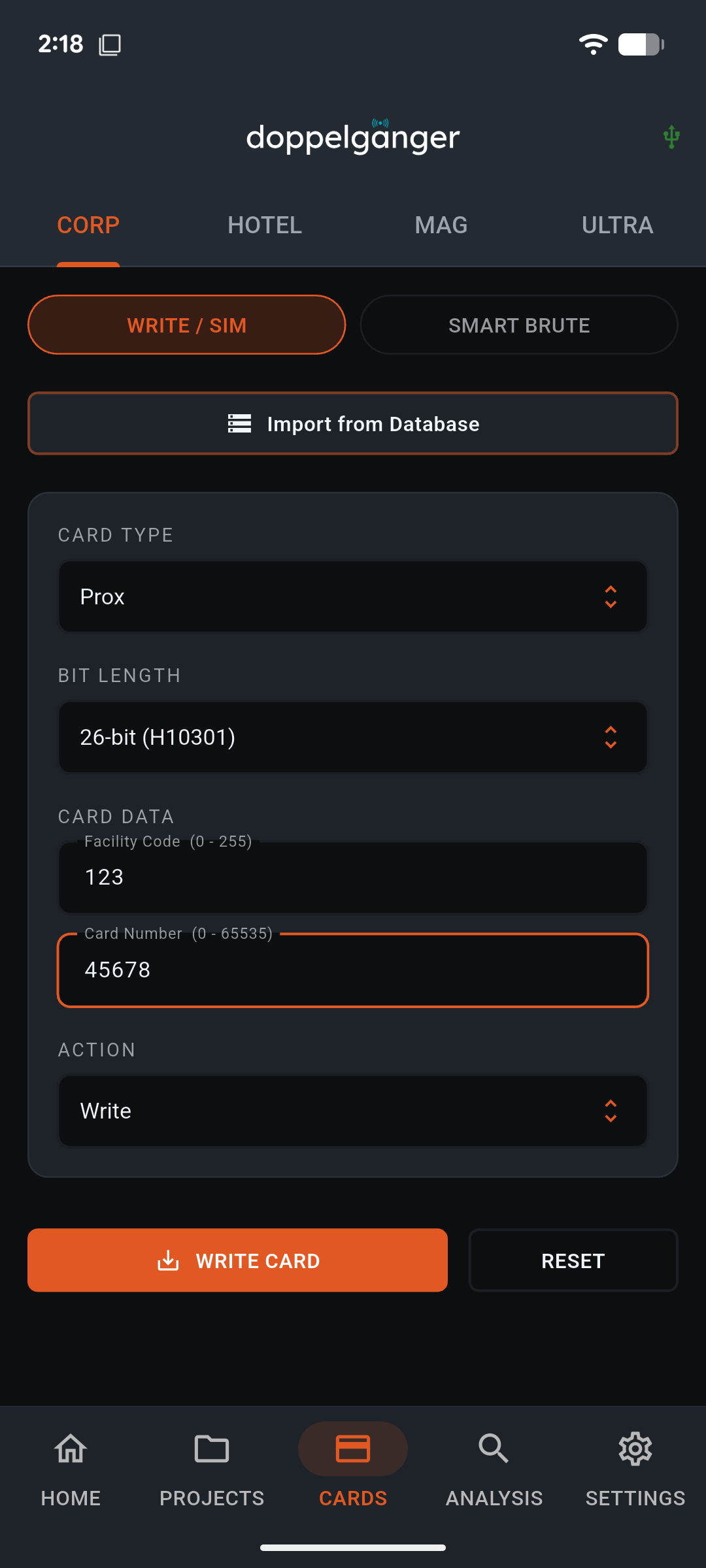
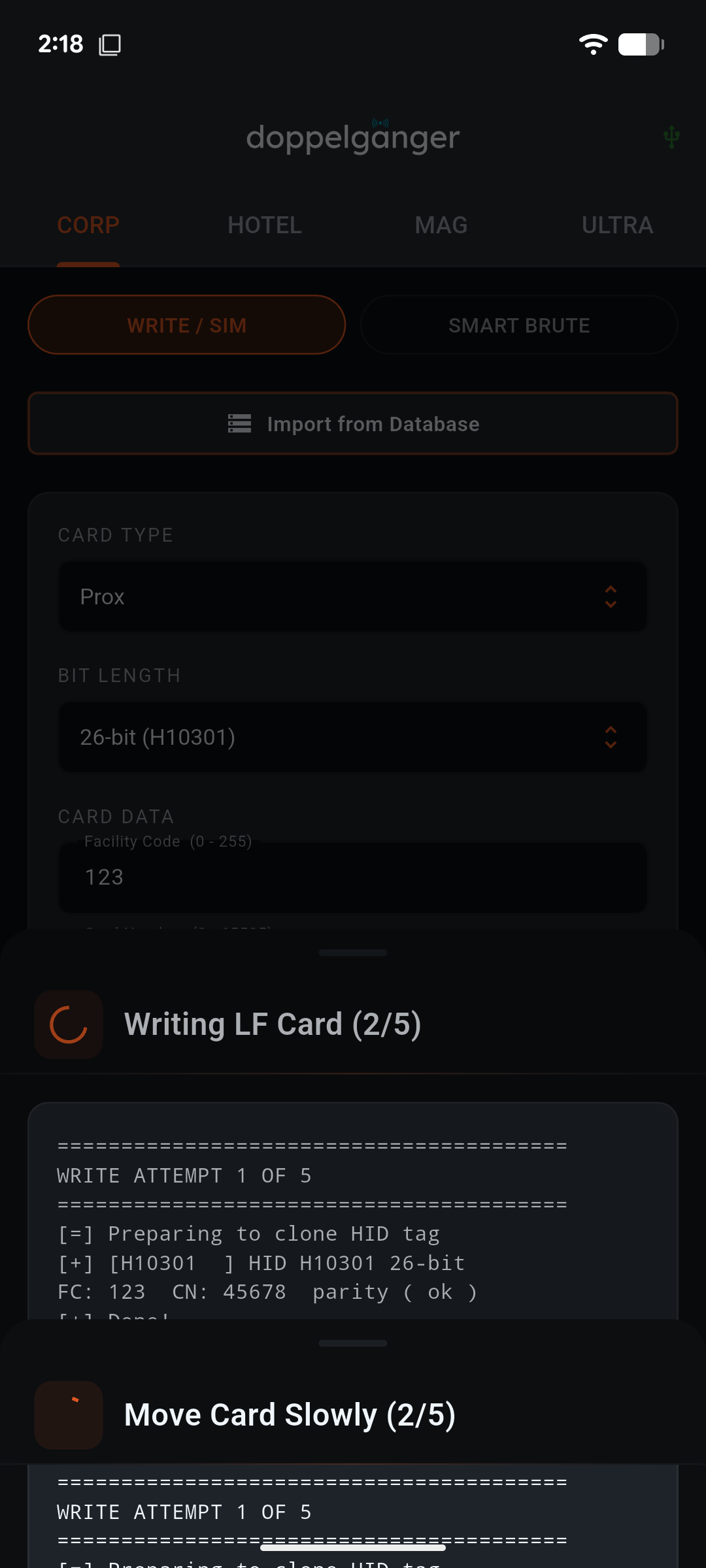
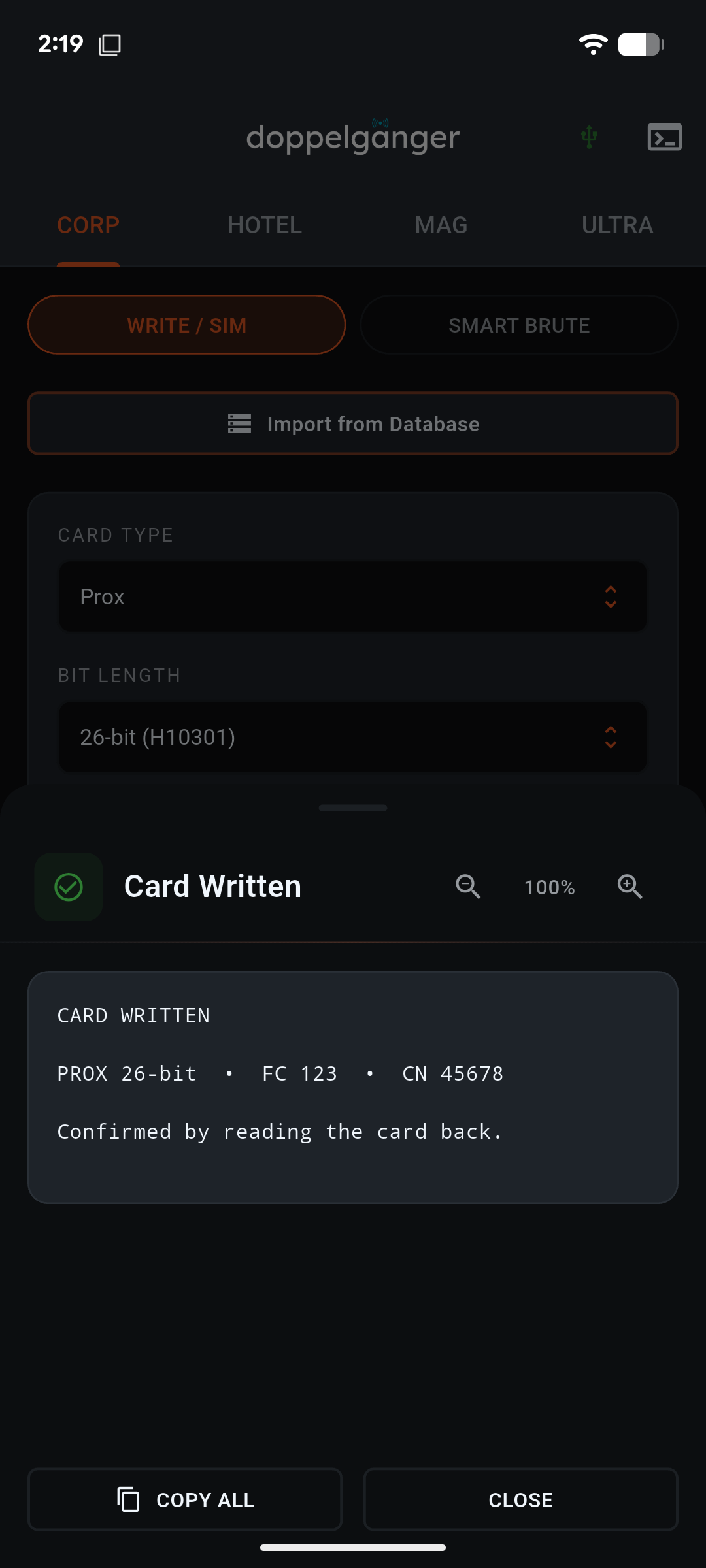
- CARD TYPE decides which fields appear below it.
- The ranges in these labels follow the bit length you picked.
- ACTION, with whatever the chosen type cannot do removed from the list.
- Writing LF Card, counting attempts out of five.
- The parity check on what is going down.
- Move Card Slowly between attempts. A T5577 takes the write at one position.
- Card Written, with a green check.
- What it says it wrote.
- Confirmed by reading the card back. The Proxmark re-read the blank and matched the facility code and card number.
- Put the blank on the Proxmark antenna. Which blank depends on the type, and the table below says which.
- Pick CARD TYPE and BIT LENGTH, then fill in CARD DATA.
- Leave ACTION on Write and press WRITE CARD.
- An output sheet opens and reports each attempt. The run above read:
ATLAS WRITE ATTEMPT 1 OF 5[=] Preparing to clone HID tag[+] [H10301 ] HID H10301 26-bit FC: 123 CN: 45678 parity ( ok )[+] Done!- It finishes Card Written, naming what it wrote, and adds Confirmed by reading the card back. That line means the Proxmark ran
lf hid readerafterward and read the facility code and card number back off the blank. It is the weaker of the two confirmations ATLAS prints, and on Prox it is the only one reachable. See LF write configuration for the stronger one and the formats that can produce it.
Start to finish
Section titled “Start to finish”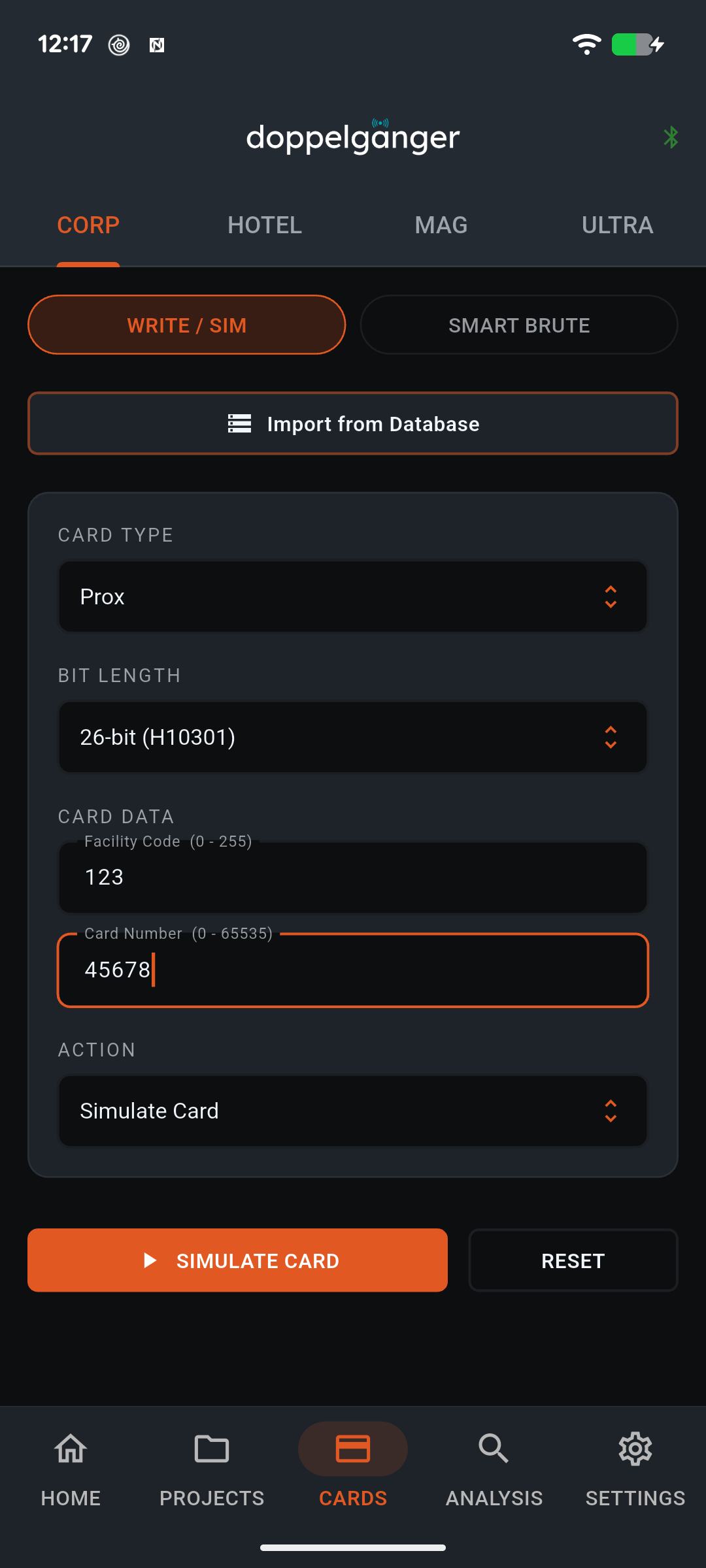
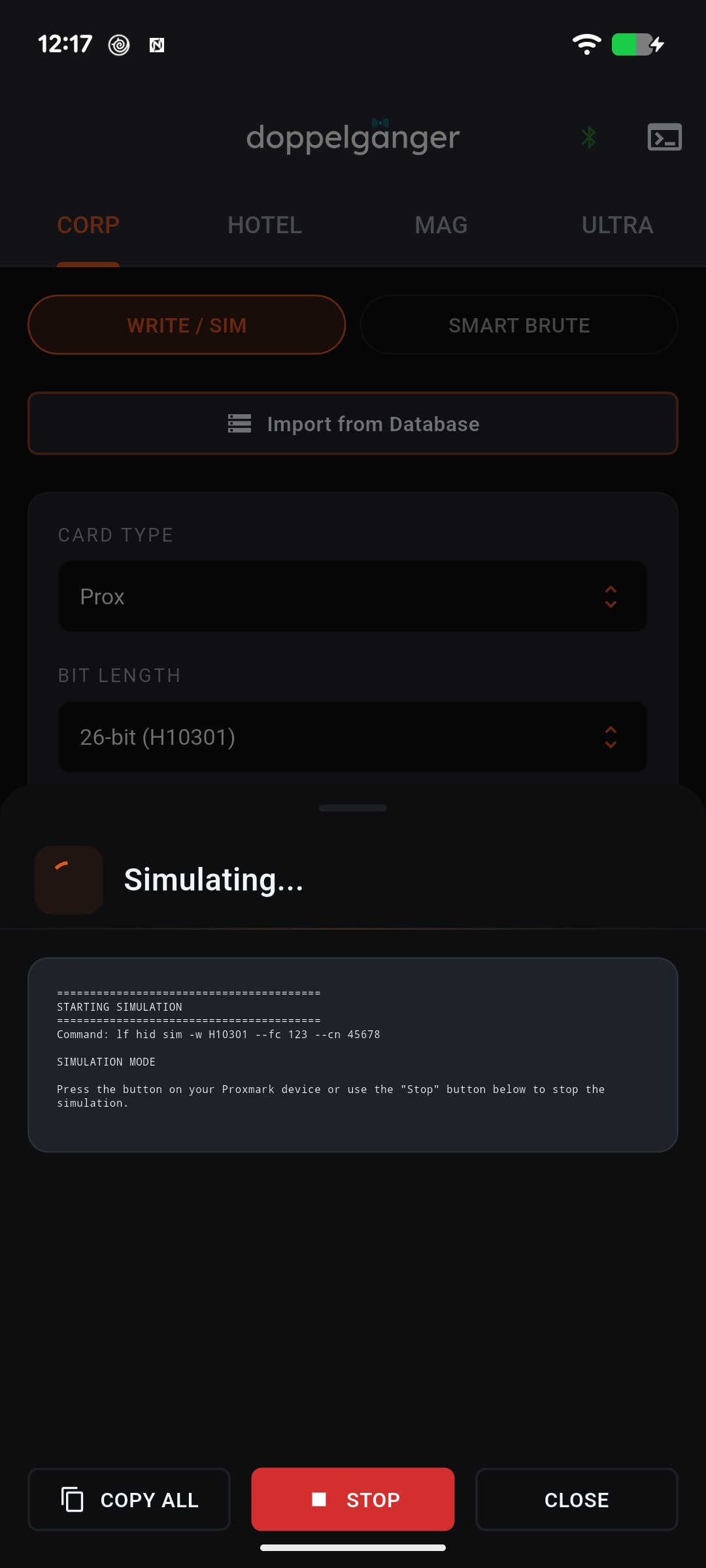
- CARD TYPE decides which fields appear below.
- BIT LENGTH names the Wiegand format, not just the number.
- The ranges in these labels move with the bit length. Read them.
- ACTION. Switching to Simulate Card changes the commit button with it.
- Simulating, with a live spinner.
- The exact Proxmark command, so the app is never a black box.
- Two ways to stop it, the device button or STOP on the sheet.
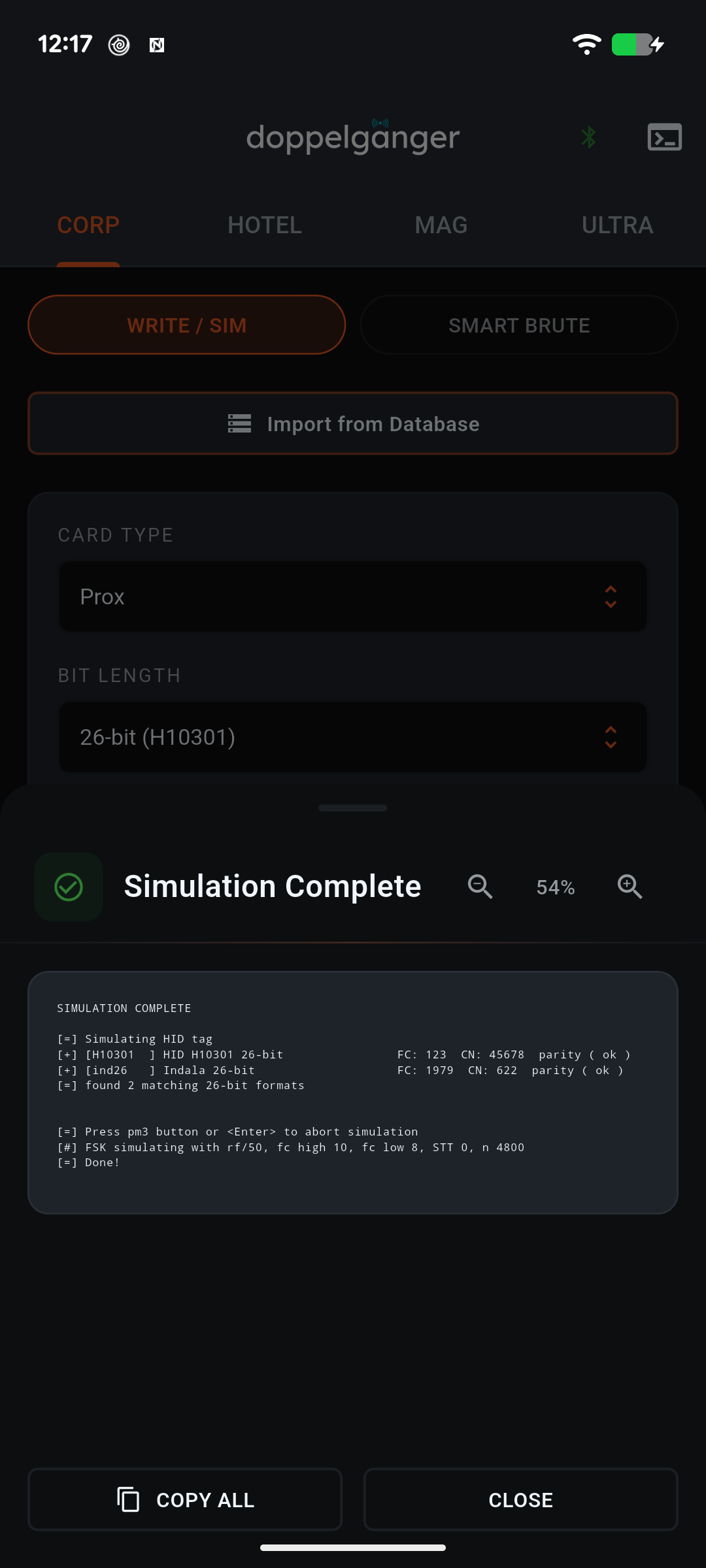
- Simulation Complete. The sheet opens sized to fit, here at 54 percent, with zoom beside it.
- The same 26 bits decode as two different formats.
- The FSK parameters the Proxmark actually transmitted with.
- Pick CARD TYPE and BIT LENGTH, then fill in CARD DATA.
- Set ACTION. The commit button follows it, reading WRITE CARD for Write and SIMULATE CARD for Simulate.
- For a write, put the blank on the Proxmark antenna first. For a simulate, present the antenna where a card would go, with no blank involved.
- Press the commit button. An output sheet opens and reports what the Proxmark did.
- Stop a simulate with STOP on the sheet or the button on the Proxmark itself. A write ends on its own.
One credential, two formats
Section titled “One credential, two formats”A simulate reports what it is transmitting, and on a 26-bit frame that is rarely one thing:
proxmark3 [=] Simulating HID tag[+] [H10301 ] HID H10301 26-bit FC: 123 CN: 45678 parity ( ok )[+] [ind26 ] Indala 26-bit FC: 1979 CN: 622 parity ( ok )[=] found 2 matching 26-bit formats[#] FSK simulating with rf/50, fc high 10, fc low 8, STT 0, n 4800The same 26 bits are a valid H10301 credential carrying FC 123 CN 45678 and a valid Indala 26-bit credential carrying FC 1979 CN 622, both with correct parity. Which one a door sees is decided by how its reader is configured, not by what you typed.
Choosing an action
Section titled “Choosing an action”ACTION holds Write and Simulate Card, and the list is filtered so that it never offers something the selection cannot do.
- Write burns the credential onto a blank. Low frequency writes go out as the Proxmark’s own clone command, which targets a writable T5577. An iCLASS write is an encode onto a writable iCLASS card using the default key. A PIV, MIFARE Classic 1K, MIFARE Classic 4K or MIFARE Mini write puts the UID and nothing else onto a Gen1a magic card, which is its own section below.
- Simulate Card transmits the credential from the Proxmark antenna, with no blank involved. Present the antenna where a card would go, and stop it with the Proxmark button or the on screen Stop.
Three selections take an option away, and each refusal is a real limit rather than a missing feature.
| Selection | What you get | Why |
|---|---|---|
| iCLASS | Write only | the firmware encodes iCLASS onto a card, and does not transmit it |
| Indala 27-bit and 29-bit | Simulate Card only | the firmware transmits these layouts but can only encode the 26-bit one onto a tag |
| MIFARE Ultralight, Ultralight EV1 / NTAG215, DESFire | Simulate Card only | these carry a 7 byte UID, and writing 7 bytes over a Gen1a’s block 0 lands on the check byte and the SAK, after which the card stops answering at all |
The commit button reads Write Card when the action is Write and Simulate Card when it is Simulate. Reset beside it clears the form without touching the device.
Writing a UID onto a magic card
Section titled “Writing a UID onto a magic card”Seven card types put a CARD UID field on the form, and the field is the whole payload. Nothing else is copied.
| Card type | Write | Simulate |
|---|---|---|
| PIV | yes, as a 4-byte UID with the magic card’s own SAK left alone | yes |
| MIFARE Classic 1K | yes, UID plus SAK 08 | yes |
| MIFARE Classic 4K | yes, UID plus SAK 18 | yes |
| MIFARE Mini | yes, UID plus SAK 09 | yes |
| MIFARE Ultralight | no. Simulate only | yes |
| MIFARE Ultralight EV1 / NTAG215 | no. Simulate only | yes |
| MIFARE DESFire | no. Simulate only | yes |
The field is labeled UID (8 or 14 hex) and hints e.g., 04A2B3C4. It accepts hex digits, spaces and colons, and the spaces and colons are stripped before anything is done with them. Under it the form states what the write will and will not achieve.
UID only, to a magic card. Will not open a door whose decision needs keys you do not have.
What the form refuses, and in which order
Section titled “What the form refuses, and in which order”| What you did | What you get |
|---|---|
| Left CARD UID empty | a Validation Error sheet reading Enter the card UID. |
| Typed anything other than 8 or 14 hex characters | a Validation Error sheet reading UID must be 8 or 14 hex characters (4-byte or 7-byte). 12 entered., with your own count in it |
| Typed 14 hex characters with ACTION on Write | a Cannot Build Command sheet reading MIFARE Classic 1K takes a 4-byte UID, 8 hex characters. 7 bytes entered., naming the type you picked |
| Picked a simulate-only type and left ACTION on Write | a Cannot Build Command sheet reading MIFARE Ultralight is simulate only. It cannot be written to a magic card. |
The field takes 14 hex characters because Simulate Card transmits a 7-byte UID without complaint. A write of one is refused, because a 7-byte UID laid into a Gen1a’s block 0 overruns the check byte, the SAK and the low ATQA byte, after which the card answers nothing at all. ACTION has already removed Write for the three families that only carry 7-byte UIDs, so the refusal is reachable only by typing fourteen characters into a 4-byte family.
After the write
Section titled “After the write”The sheet is headed Complete and opens COMMAND COMPLETE, then the client’s own last line, then the full PROXMARK OUTPUT. A warning also appears across the bottom of the screen.
UID only. Opens a door only where the serial is the credential.
Appended to the transcript, under a UID-ONLY WRITE heading, are five rows. They are there rather than in the toast so they are still readable when you write the finding up.
| Row | What it says |
|---|---|
| WROTE | UID only. No keys, no sector data, no application data. |
| OPENS | Doors whose decision resolves to the card serial: CSN mode, a serial enrolled at the head end, a secure read that falls back to CSN, or a lock whitelisting serials. |
| DENIED | Doors enrolled on an authenticated payload: Seos, SIO, DESFire AES, PIV. Serial reading is often on anyway, so expect a read followed by a deny. |
| MUST MATCH | The enrolled number, not just the UID. Classic CSN is 32 bits, DESFire EV1 is 56. A 7-byte source may not present the number that was enrolled. |
| ALSO FAILS | Readers that probe the magic backdoor, or that check ATQA, SAK and ATS against the card type. |
Writing iCLASS, and reading the result properly
Section titled “Writing iCLASS, and reading the result properly”An iCLASS write is a different command. It encodes onto the card using the default key rather than cloning a tag, and it reports one line per block.
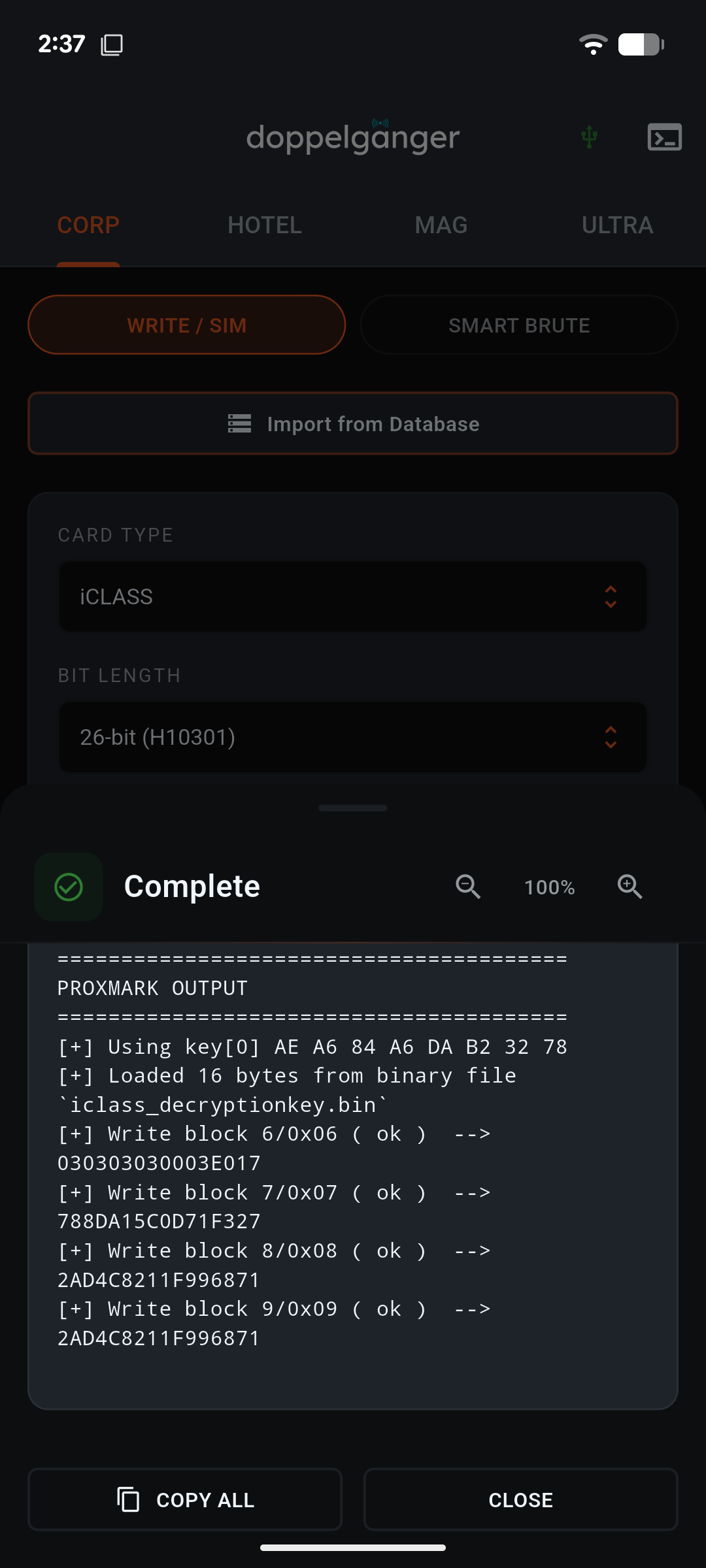
- Complete, not Card Written. An iCLASS encode reports differently.
- One line per block, and every one has to read ( ok ).
proxmark3 [+] Using key[0] AE A6 84 A6 DA B2 32 78[+] Write block 6/0x06 ( ok ) --> 030303030003E017[+] Write block 7/0x07 ( ok ) --> 788DA15C0D71F327[+] Write block 8/0x08 ( ok ) --> 2AD4C8211F996871[+] Write block 9/0x09 ( ok ) --> 2AD4C8211F996871A bad write looks almost the same at a glance and is completely different.
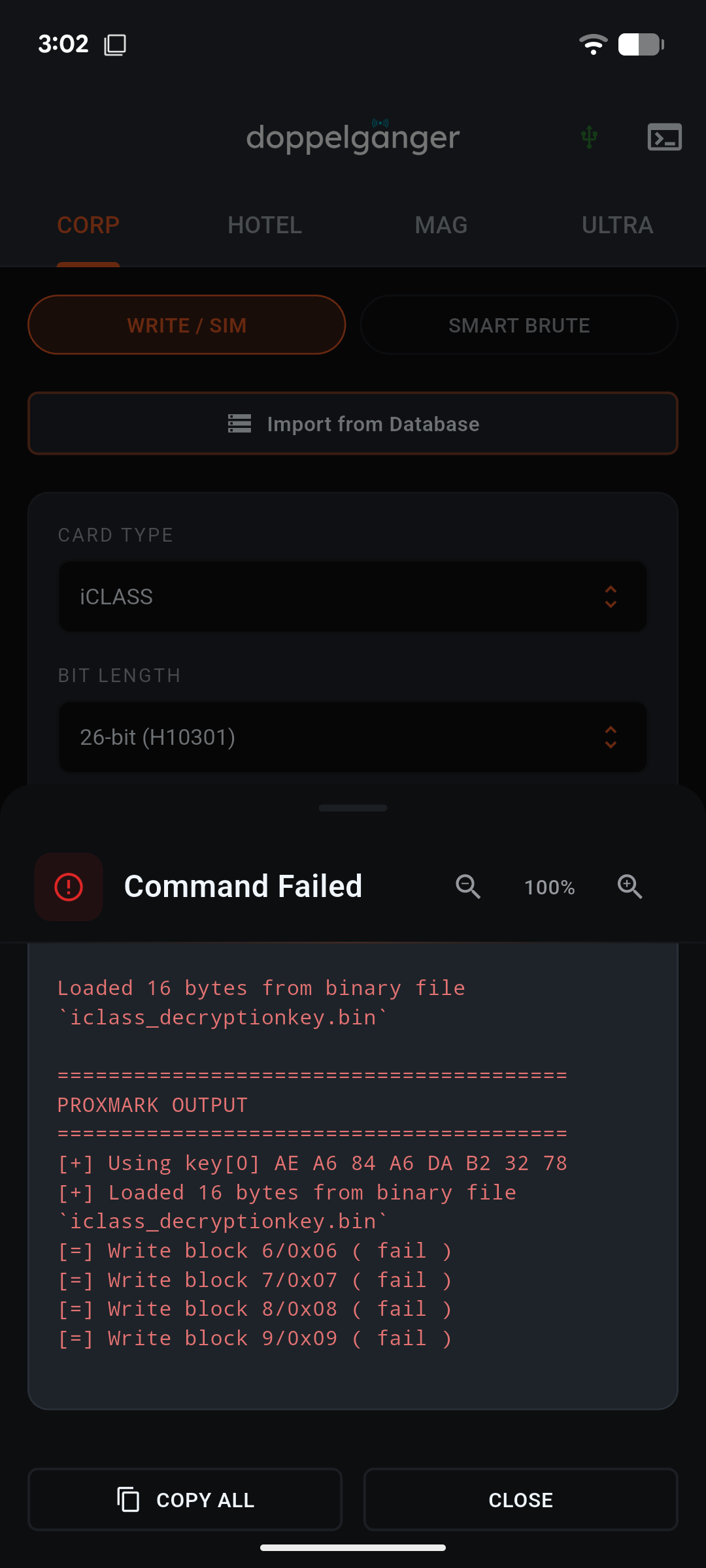
- Command Failed, in red.
- Every block ( fail ). The card never coupled and nothing went down.
proxmark3 [=] Write block 6/0x06 ( fail )[=] Write block 7/0x07 ( fail )[=] Write block 8/0x08 ( fail )[=] Write block 9/0x09 ( fail )