
Store
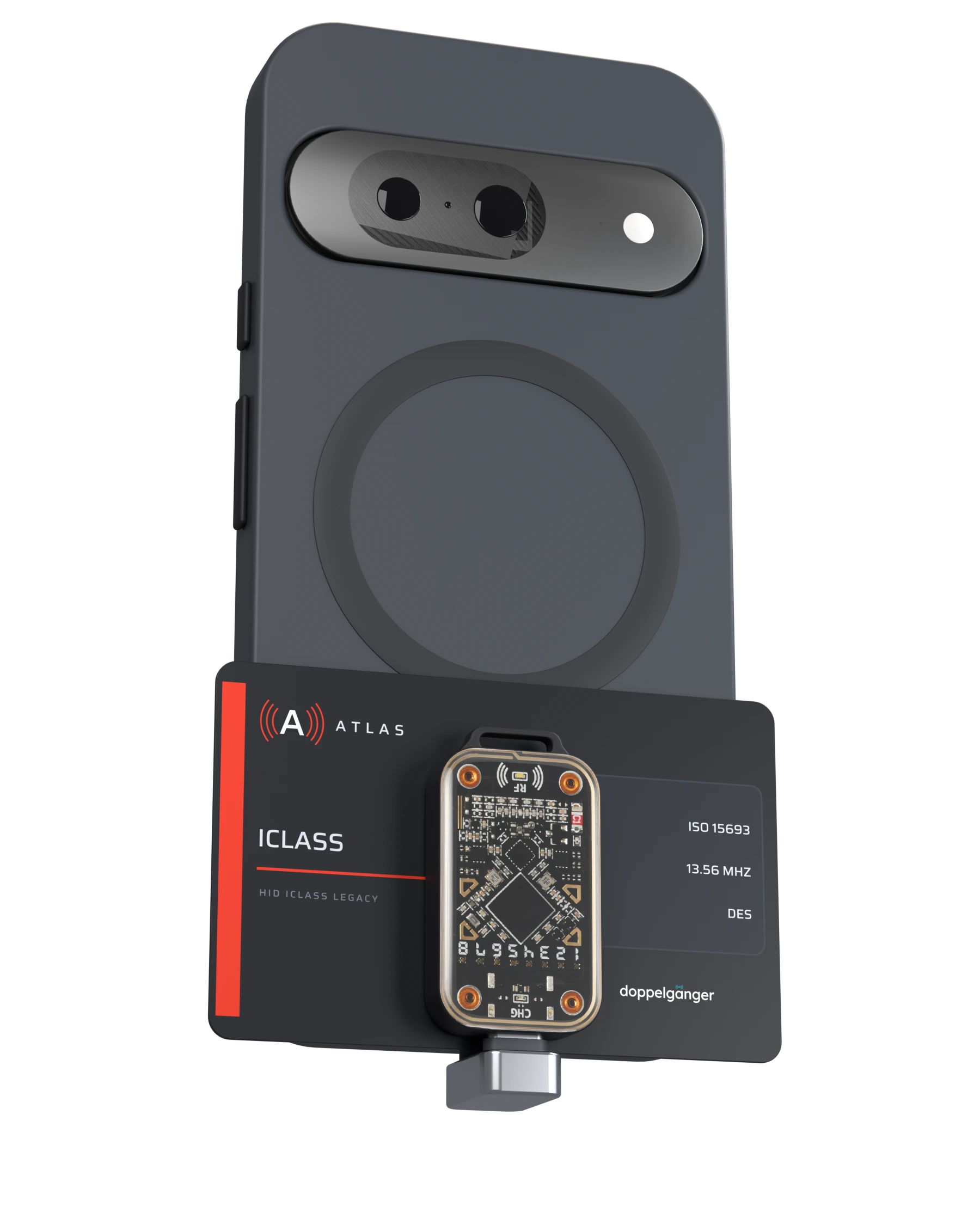
A long range reader in a bag caught a 26-bit badge in the parking lot yesterday. Today that credential has to reach the turnstile, and the old way is a Proxmark, a card to write and a desk, followed by a white card with no print on it held up in front of a guard. STORE is the short way. The credential goes into a slot on the ATLAS Chameleon Ultra, the ATLAS Chameleon Ultra sits behind the handset or in a palm, and what the reader sees is a card.
It also covers the other case, the badge that is in your hand for a minute. Slide it between the handset and the ATLAS Chameleon Ultra, tap READ CARD, and the form fills from the card itself.
What it costs is that the ATLAS Chameleon Ultra is now carrying a client credential, and for LF and HF it is on the air the moment the store finishes. Plan the slot and the moment.
Cards, then the ULTRA tab, then the STORE chip.
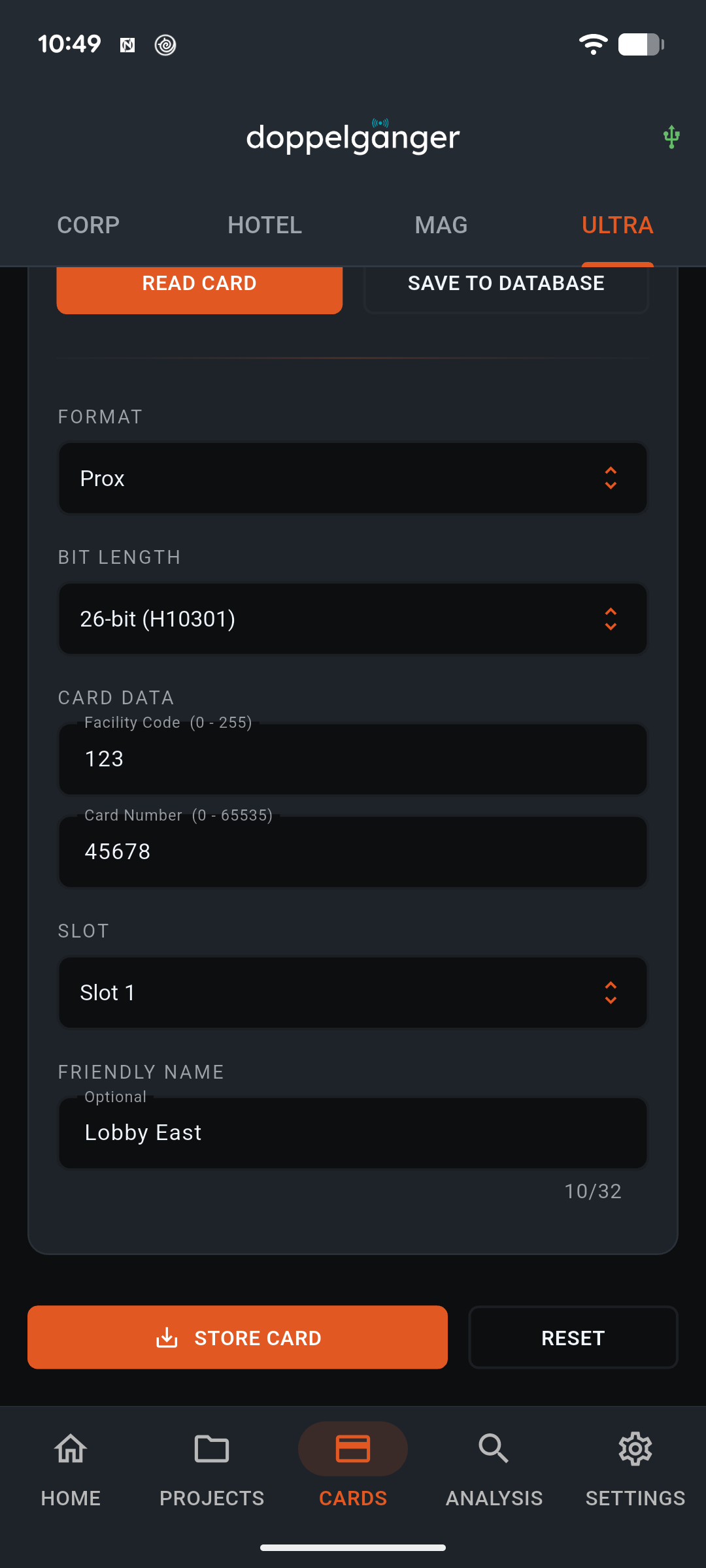
- FORMAT, the card family.
- BIT LENGTH, the exact format.
- Facility Code, with its range in the label.
- Card Number, the same.
- SLOT, Slot 1 to Slot 8.
- FRIENDLY NAME, written to the device with the card.
- STORE CARD commits it.
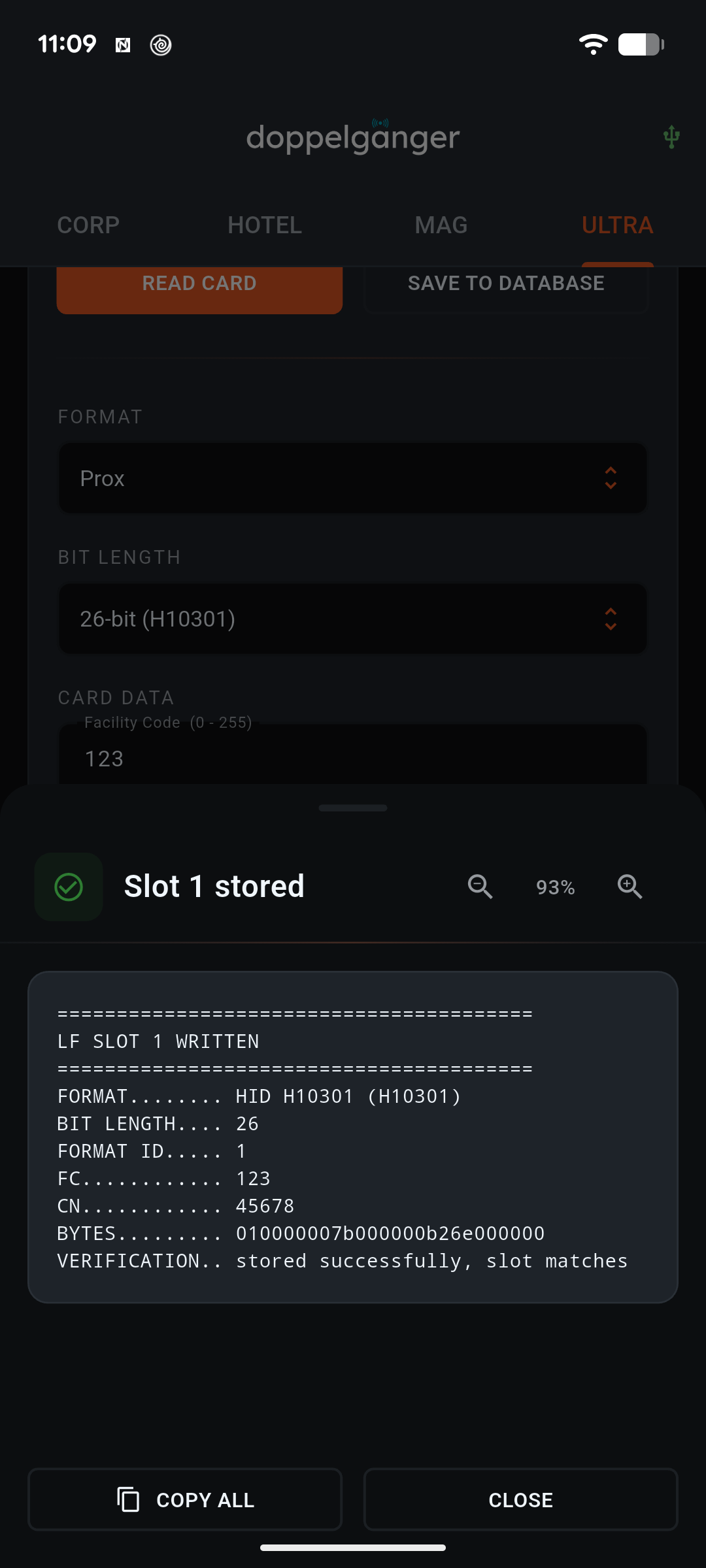
- Slot 1 stored.
- The format written.
- FC and CN, as typed.
- VERIFICATION, read back off the slot.
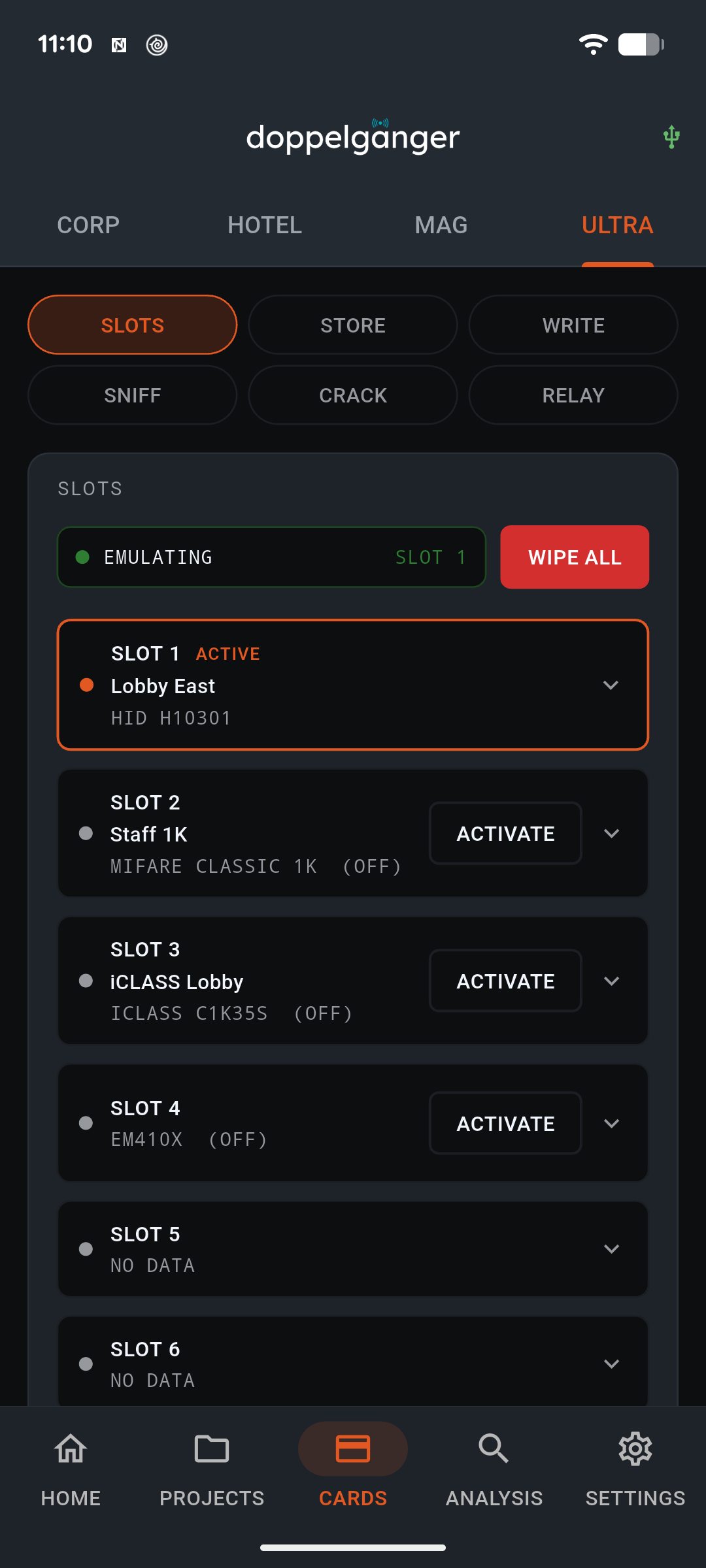
- EMULATING, SLOT 1. The ATLAS Chameleon Ultra is answering readers with it.
- SLOT 1, ACTIVE, under its name.
Three ways to fill the form, one way to commit
Section titled “Three ways to fill the form, one way to commit”Everything on this page ends at the same control, STORE CARD, and the same checks run whichever way the form was filled.
| You have | Use | What it fills |
|---|---|---|
| the numbers, from a photo of a badge or a report | type them in | whatever you type |
| the card, in your hand | READ CARD | the format and card data, read off the card by the ATLAS Chameleon Ultra |
| a capture already in ATLAS | Import from Database | the format, card data and a name, from the record |
CARD TYPE at the top of the card decides which form is drawn under it.
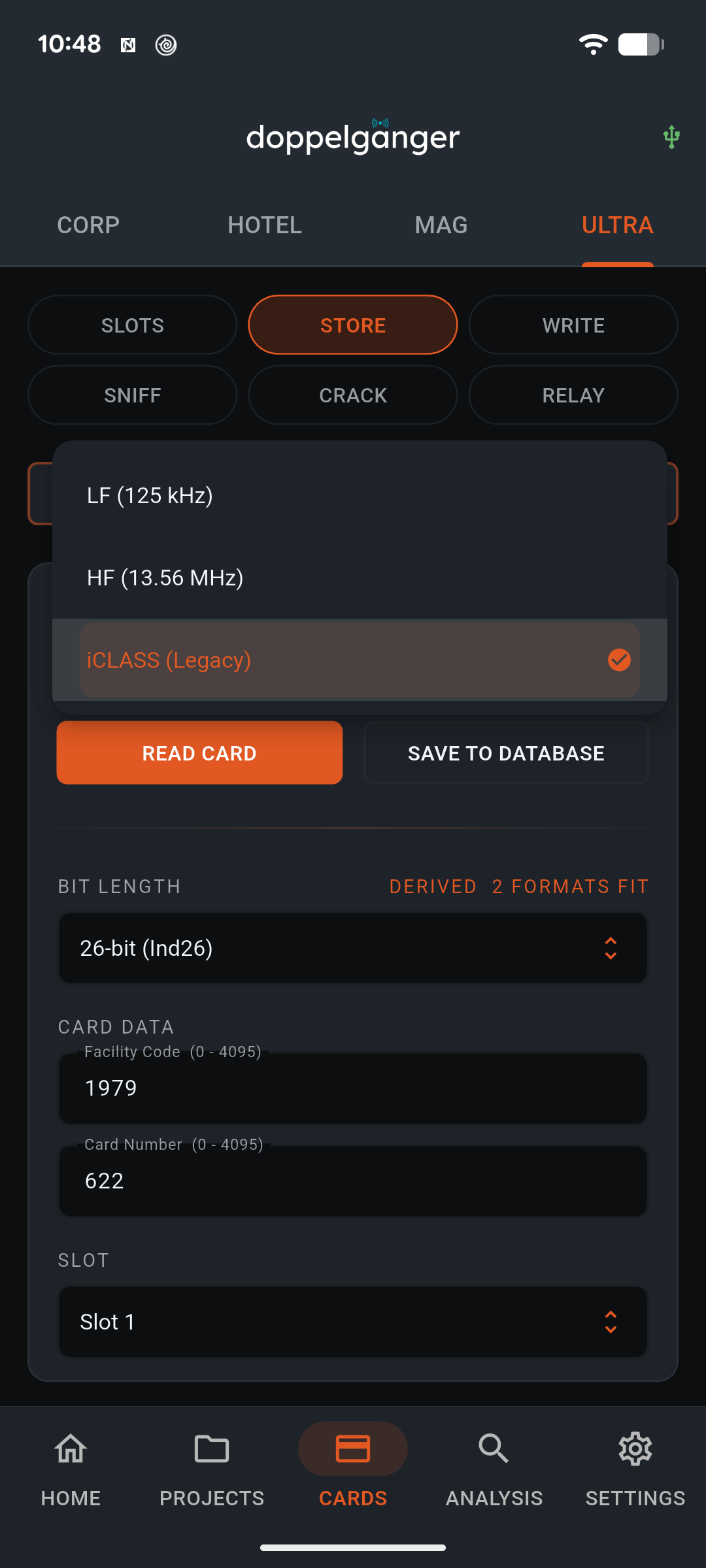
- LF (125 kHz), prox credentials.
- HF (13.56 MHz), an identity by UID or a MIFARE Classic dump.
- iCLASS (Legacy).
| CARD TYPE | For | The form asks for |
|---|---|---|
| LF (125 kHz) | prox credentials | FORMAT, BIT LENGTH, CARD DATA, SLOT, FRIENDLY NAME |
| HF (13.56 MHz) | an identity by UID, or a full MIFARE Classic dump | TAG TYPE, UID, SLOT, FRIENDLY NAME, and IMPORT DUMP |
| iCLASS (Legacy) | a Wiegand credential carried on an iCLASS Legacy card | BIT LENGTH, CARD DATA, SLOT |
The page opens on LF (125 kHz), Prox, 26-bit (H10301), Slot 1, with every box empty.
Storing an LF credential you already know
Section titled “Storing an LF credential you already know”- Leave CARD TYPE on LF (125 kHz).
- Pick FORMAT, the card family, then BIT LENGTH, the exact format inside it.
- Fill CARD DATA. Each label carries the range the chosen format accepts, for example Facility Code (0 - 255) and Card Number (0 - 65535).
- Pick the SLOT, Slot 1 to Slot 8.
- Give it a FRIENDLY NAME if you want one on the slot. The field is labeled Optional and takes 32 characters.
- Tap STORE CARD. The control reads STORING while it works.
- If the slot already holds something, confirm or cancel the overwrite. See below.
- Read the sheet that opens, headed Slot 1 stored.
The sheet is a fixed width report of what went to the device:
| Line | Carries |
|---|---|
| FORMAT | the format’s full name and short name, for example HID H10301 (H10301) |
| BIT LENGTH | the frame length |
| FORMAT ID | the format’s number on the device |
| FC and CN | the facility code and card number sent |
| VERSION | shown for IO Prox only |
| RAW | shown in place of FC and CN for a raw hex format |
| BYTES | the bytes written to the slot |
| VERIFICATION | stored successfully, slot matches |
VERIFICATION is a real check. After the write, ATLAS reads the slot’s contents back off the device and compares them byte for byte with what it sent. A mismatch stops the store and reports Encode failed, so a truncated credential is caught here and not at a reader.
Every LF format STORE offers
Section titled “Every LF format STORE offers”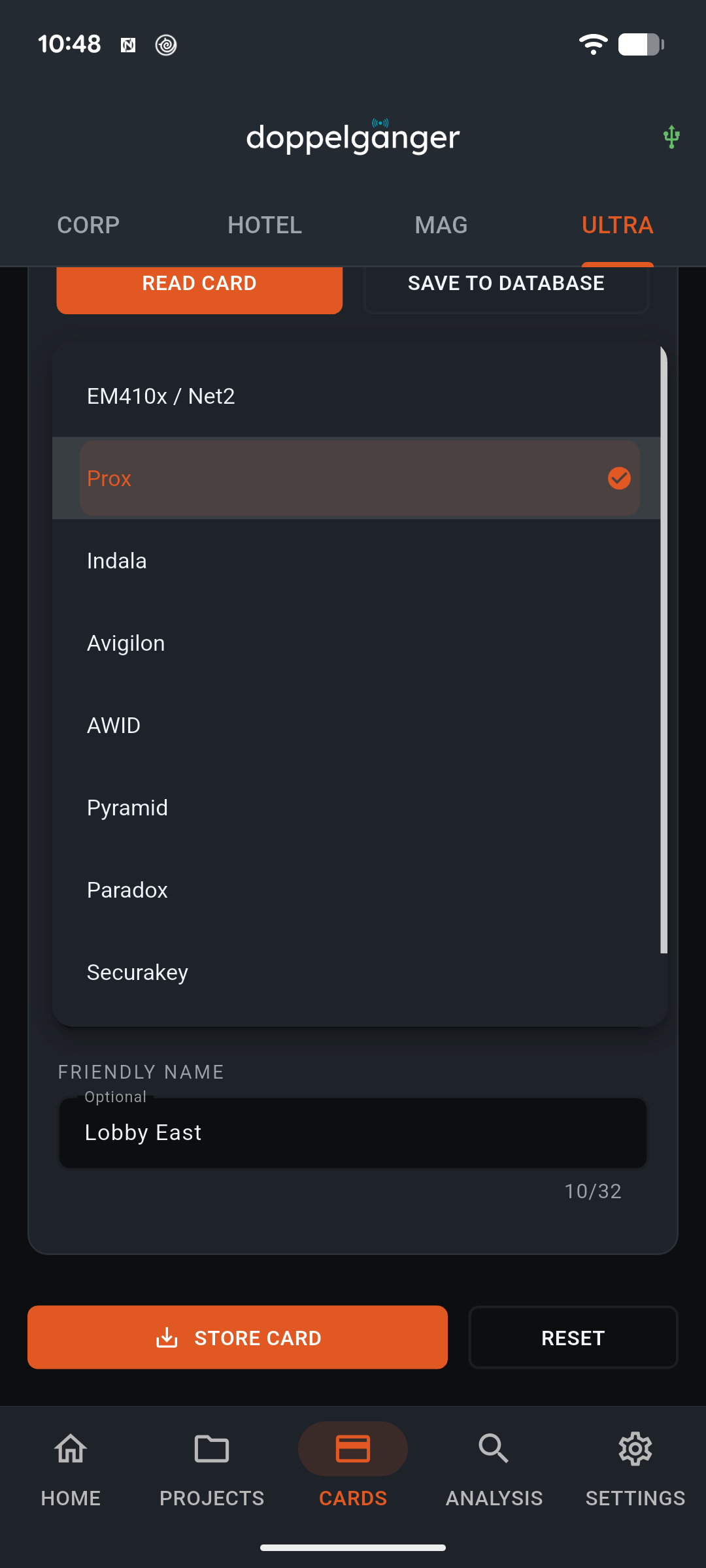
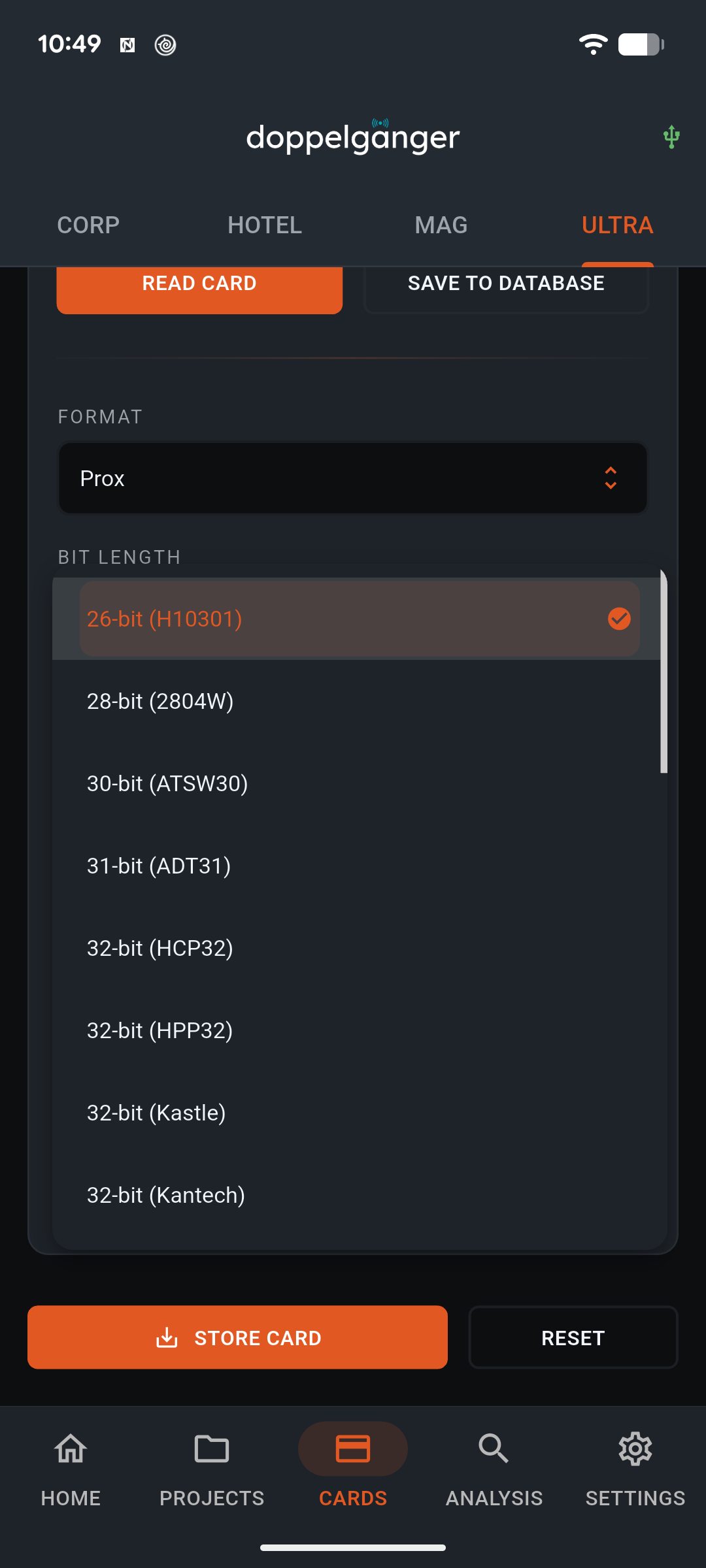
- EM410x / Net2, first.
- Prox, the default.
- Securakey, then IO Prox at the foot.
- 26-bit (H10301), the default.
- Each row names its Wiegand format.
- The menu scrolls for the rest.
This is every format, in the order the FORMAT and BIT LENGTH menus show them, with the range each accepts.
| FORMAT | BIT LENGTH | Full name | Facility Code | Card Number |
|---|---|---|---|---|
| EM410x / Net2 | 40-bit (EM410x) | EM410x / Net2 (5-byte raw hex) | raw hex, 5 bytes, 10 characters | |
| Prox | 26-bit (H10301) | HID H10301 | 0 - 255 | 0 - 65535 |
| Prox | 28-bit (2804W) | 2804W | 0 - 255 | 0 - 32767 |
| Prox | 30-bit (ATSW30) | ATS-W | 0 - 4095 | 0 - 65535 |
| Prox | 31-bit (ADT31) | ADT 31-bit | 0 - 15 | 0 - 8388607 |
| Prox | 32-bit (HCP32) | HCP 32-bit | not used | 0 - 16383 |
| Prox | 32-bit (HPP32) | HPP 32-bit | 0 - 4095 | 0 - 524287 |
| Prox | 32-bit (Kastle) | Kastle 32-bit | 0 - 255 | 0 - 65535 |
| Prox | 32-bit (Kantech) | Kantech 32-bit | 0 - 255 | 0 - 65535 |
| Prox | 32-bit (Wie32) | Wiegand 32-bit | 0 - 4095 | 0 - 65535 |
| Prox | 33-bit (D10202) | D10202 | 0 - 127 | 0 - 16777215 |
| Prox | 34-bit (H10306) | HID H10306 | 0 - 65535 | 0 - 65535 |
| Prox | 34-bit (N10002) | N10002 | 0 - 65535 | 0 - 65535 |
| Prox | 34-bit (Optus) | Optus 34-bit | 0 - 2047 | 0 - 65535 |
| Prox | 34-bit (SMP) | SMP 34-bit | 0 - 8191 | 0 - 65535 |
| Prox | 34-bit (BQT) | BQT 34-bit | 0 - 255 | 0 - 16777215 |
| Prox | 35-bit (C1k35s) | HID Corporate 1000 (35-bit) | 0 - 4095 | 0 - 1048575 |
| Prox | 36-bit (C15001) | C15001 | 0 - 255 | 0 - 65535 |
| Prox | 36-bit (S12906) | S12906 | 0 - 255 | 0 - 16777215 |
| Prox | 36-bit (Sie36) | Siemens 36-bit | 0 - 262143 | 0 - 65535 |
| Prox | 37-bit (H10320) | HID H10320 (BCD) | not used | 0 - 99999999 |
| Prox | 37-bit (H10302) | HID H10302 (no FC) | not used | 0 - 34359738367 |
| Prox | 37-bit (H10304) | HID H10304 | 0 - 65535 | 0 - 524287 |
| Prox | 37-bit (P10004) | P10004 | 0 - 8191 | 0 - 262143 |
| Prox | 37-bit (HGen37) | HID 37-bit Generic | not used | 0 - 4294967295 |
| Prox | 37-bit (MDI37) | MDI 37-bit | 0 - 15 | 0 - 536870911 |
| Prox | 46-bit (H800002) | HID 800002 | 0 - 16383 | 0 - 1073741823 |
| Prox | 48-bit (C1k48s) | HID Corporate 1000 (48-bit) | 0 - 4194303 | 0 - 8388607 |
| Indala | 26-bit (Ind26) | Indala Wiegand 26-bit | 0 - 4095 | 0 - 4095 |
| Indala | 27-bit (Ind27) | Indala 27-bit | 0 - 8191 | 0 - 16383 |
| Indala | 27-bit (IndASC27) | Indala ASC 27-bit | 0 - 8191 | 0 - 16383 |
| Indala | 27-bit (Tecom27) | Tecom 27-bit | 0 - 2047 | 0 - 65535 |
| Indala | 29-bit (Ind29) | Indala 29-bit | 0 - 8191 | 0 - 65535 |
| Avigilon | 56-bit (avig56) | Avigilon 56-bit (20+34) | 0 - 1048575 | 0 - 17179869183 |
| AWID | 26-bit (AWID26) | AWID 26-bit | 0 - 255 | 0 - 65535 |
| AWID | 34-bit (AWID34) | AWID 34-bit | 0 - 255 | 0 - 16777215 |
| AWID | 37-bit (AWID37) | AWID 37-bit | 0 - 8191 | 0 - 262143 |
| AWID | 50-bit (AWID50) | AWID 50-bit | 0 - 65535 | 0 - 4294967295 |
| Pyramid | 26-bit (Pyr26) | Pyramid Farpointe 26-bit | 0 - 255 | 0 - 65535 |
| Paradox | 26-bit (Para26) | Paradox FSK 26-bit | 0 - 255 | 0 - 65535 |
| Securakey | 96-bit (SecKey) | Securakey (12-byte raw hex) | raw hex, 12 bytes, 24 characters | |
| IO Prox | 64-bit (XSF) | IO Prox XSF 64-bit | 0 - 255 | 0 - 65535, and Version 0 - 255 |
On a format whose facility code column reads not used, the box is labeled Facility Code (not used) and is disabled. A raw hex format replaces the two boxes with one, labeled Raw hex (5 bytes / 10 chars) for EM410x / Net2 or Raw hex (12 bytes / 24 chars) for Securakey. Spaces and colons are accepted in it and ignored.
Reading a card straight into the form
Section titled “Reading a card straight into the form”READ CARD and SAVE TO DATABASE sit at the top of the LF (125 kHz) and iCLASS (Legacy) forms. Both run the same read. They differ in where the result goes.
| Control | The read goes to | Then |
|---|---|---|
| READ CARD | this form | you review it and tap STORE CARD |
| SAVE TO DATABASE | the SAVE CARD TO DATABASE dialog | SAVE files it under the active project, SKIP drops it, and no slot is touched |
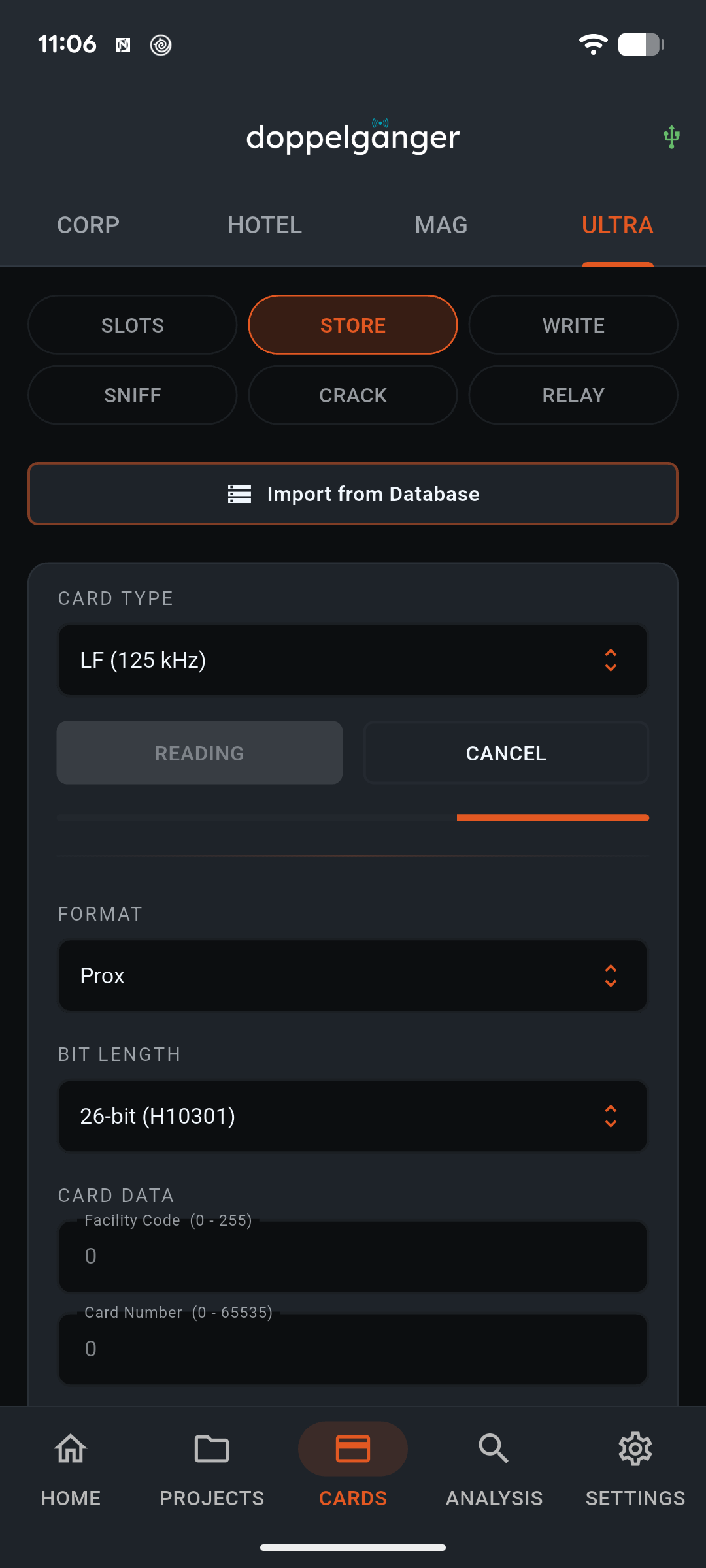
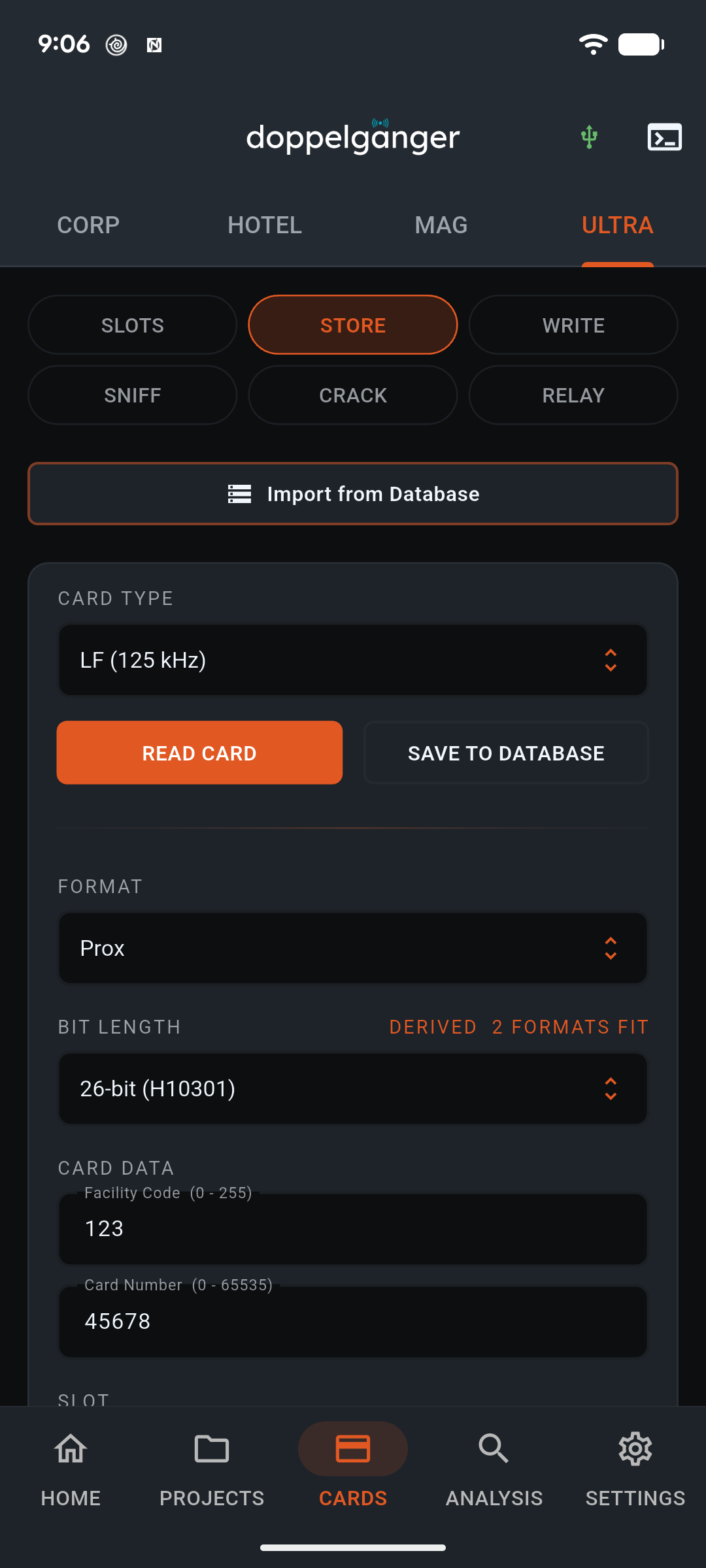
- CARD TYPE, LF (125 kHz).
- READING, with CANCEL beside it.
- FORMAT and the rest fill when a card answers.
- READ CARD.
- FORMAT, read off the card.
- BIT LENGTH, read off the card. DERIVED 2 FORMATS FIT says the same bits are another format too.
- Facility Code 123.
- Card Number 45678.
- Tap READ CARD. It reads READING, a progress bar runs, and the control beside it becomes CANCEL.
- Slide the card between the handset and the ATLAS Chameleon Ultra until it meets the adapter. See where a card goes.
- The form fills and the bar stops. Check the values against the card if it is printed.
- Pick the SLOT and tap STORE CARD.
The read keeps going until a card answers, so a card presented after the tap is still read. It gives up after 2 minutes. One LF pass with no card in the field takes about 19 seconds, and CANCEL does not wait for the pass to finish.
| The read ends with | Meaning |
|---|---|
| the form filled, no message | read and decoded |
| No LF card found | LF, nothing answered inside 2 minutes |
| Blank or unreadable card | LF, a card answered and holds nothing readable, a blank T5577 for one. WIPE CARD on the Write page leaves a card like this |
| a format name followed by read, not storable | LF, the card was read and is one of the families the ATLAS Chameleon Ultra cannot emit |
| No iCLASS card found | iCLASS, nothing answered |
| Read not complete, try again | iCLASS, a card answered and the read did not finish |
| iCLASS SE card | iCLASS, the card is SE, so its credential is not readable this way |
| Card is not on the standard key | iCLASS, the card answered and is not on the standard key, so its credential is not readable this way |
| No credential decoded | iCLASS, the card opened and held nothing this page can store |
| Read failed | the device did not complete the command |
An LF card that carries a single identifier and no facility code, an EM410x for one, fills the raw hex box and leaves the facility code and card number empty.
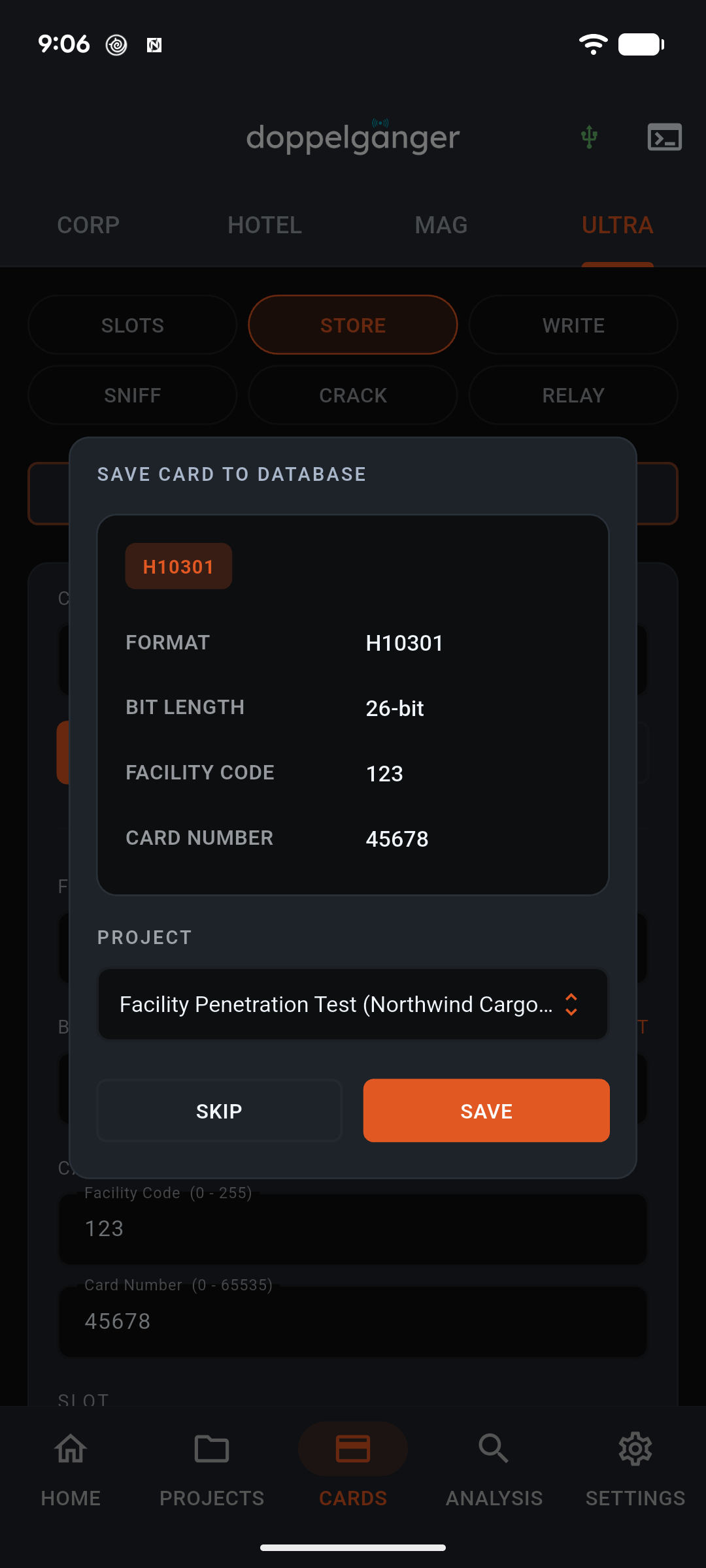
- SAVE CARD TO DATABASE.
- The card it is about to file.
- PROJECT, the active one.
- SKIP drops it, SAVE files it.
A card that fits more than one format
Section titled “A card that fits more than one format”Formats that share a bit length can share a card. The same 26 bits are a valid H10301 credential and a valid Ind26 credential, each with its own facility code and card number. A read keeps every format the card fits, and it lists first the format a Doppelganger reader names for that length, so a card read here and a card captured at a reader come out under the same name.
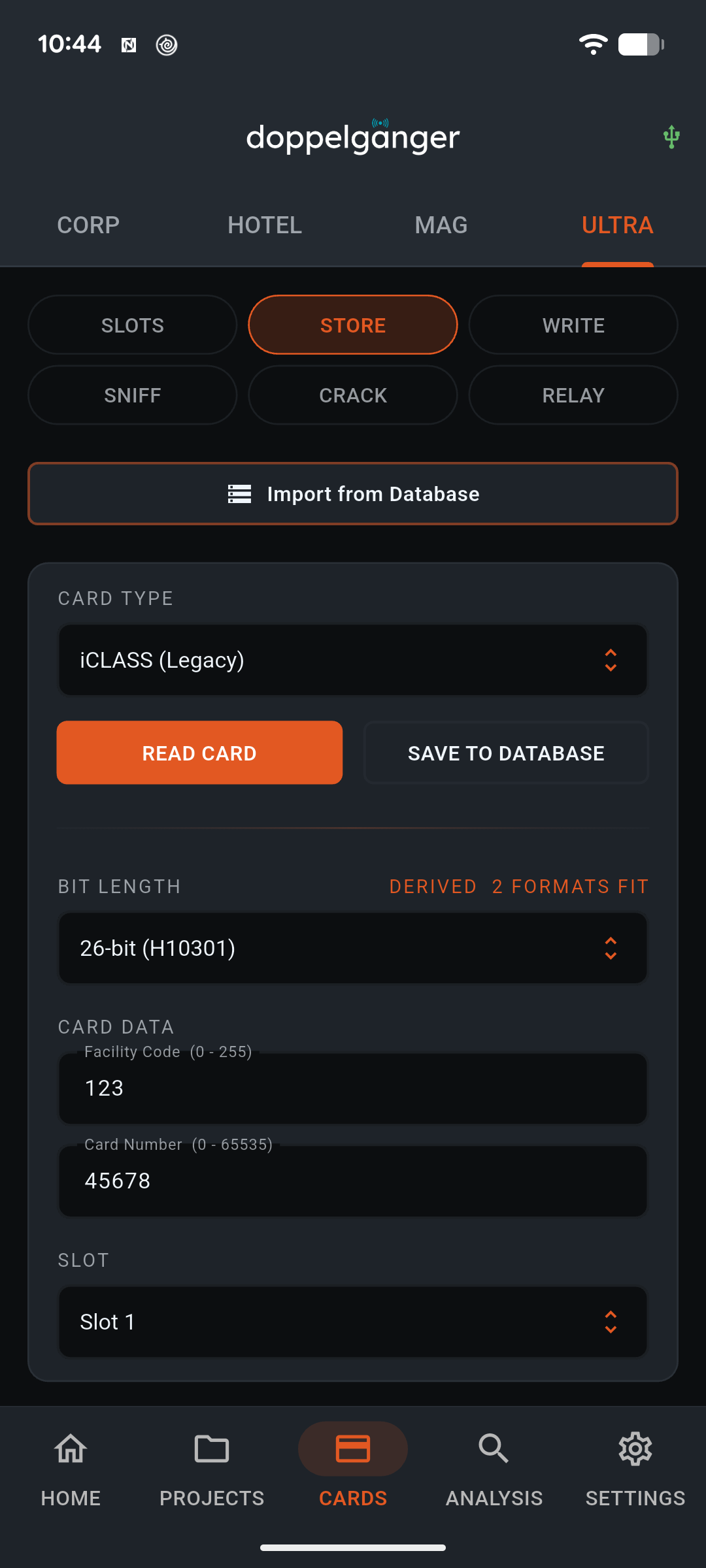
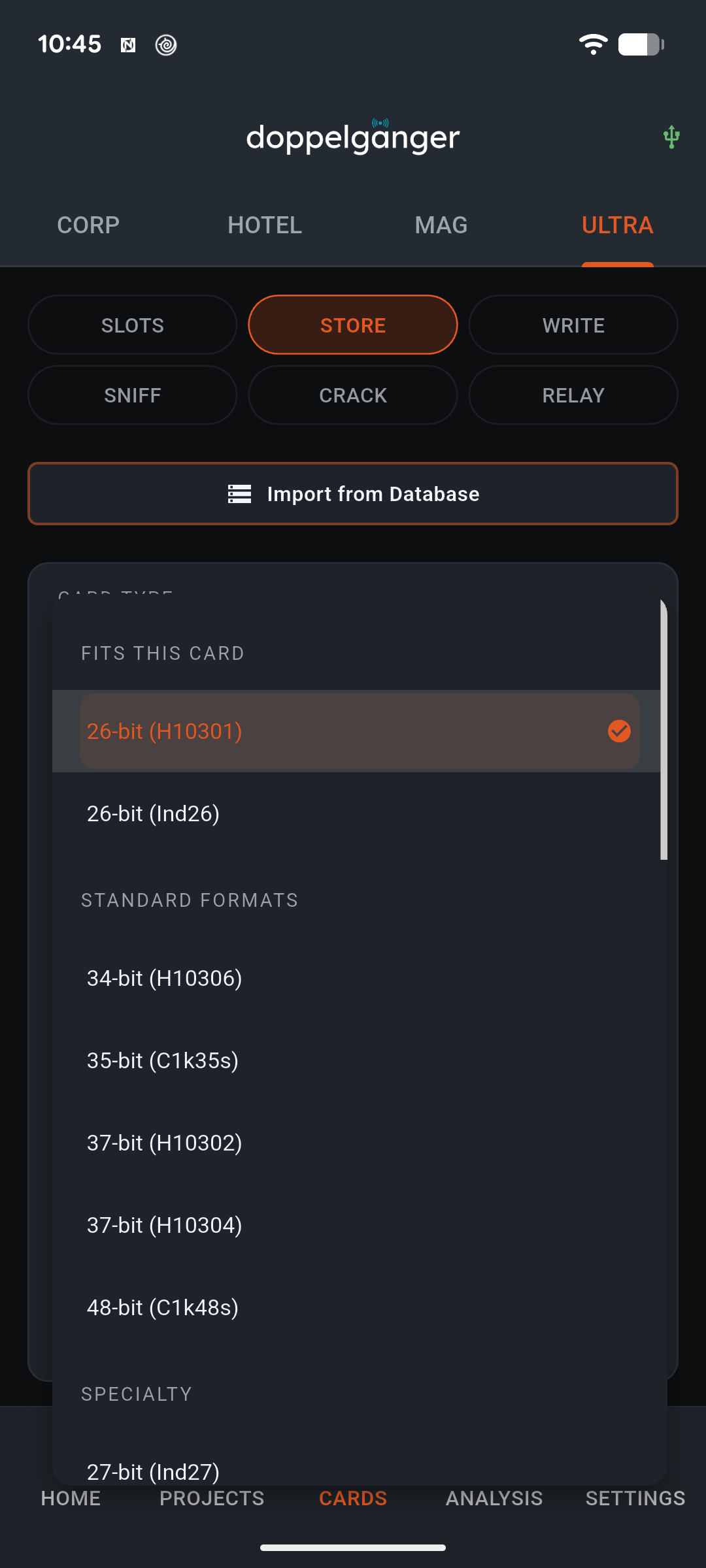
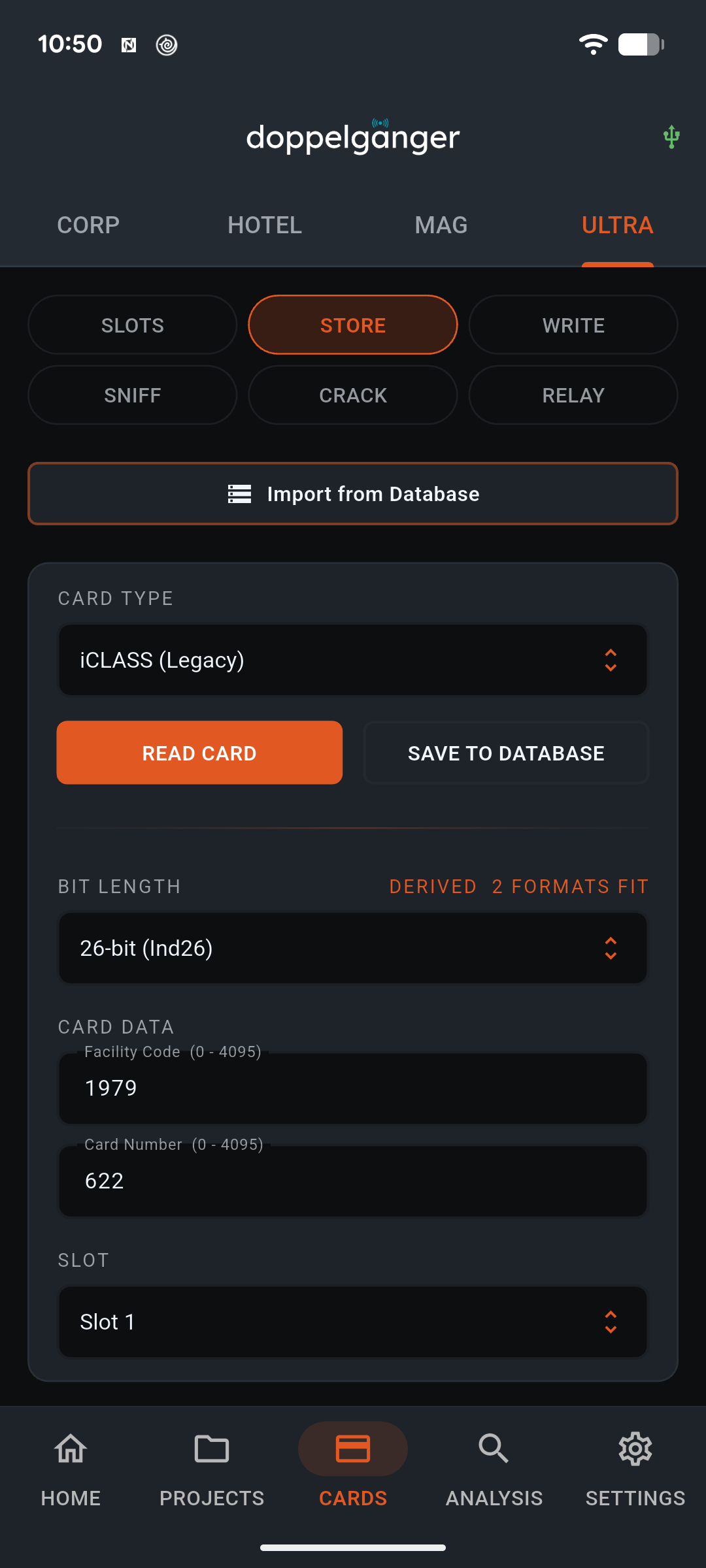
- READ CARD and SAVE TO DATABASE.
- DERIVED, 2 FORMATS FIT.
- 26-bit (H10301), the format listed first.
- Facility Code 123.
- Card Number 45678.
- FITS THIS CARD.
- 26-bit (H10301), the one in use.
- 26-bit (Ind26), the same bits read another way.
- STANDARD FORMATS, every other format.
- DERIVED, 2 FORMATS FIT, still.
- 26-bit (Ind26), chosen from the menu.
- Facility Code 1979, the same bits read as Ind26.
- Card Number 622.
| On the form | What it means |
|---|---|
| DERIVED and a count beside BIT LENGTH | the card that was read fits that many formats. With one, nothing is shown |
| FITS THIS CARD, at the top of the BIT LENGTH menu | the formats this card is a valid credential of |
| Choosing another format under FITS THIS CARD | the form takes that format’s facility code and card number for the same bits |
| STORE CARD and SAVE TO DATABASE | use the format chosen. SAVE TO DATABASE reads the card again and files the chosen format only when the bits are the same |
A hand edit of either number, an import, or a format the card does not fit lets go of the read, and the form is then what you typed. This works for an iCLASS (Legacy) read and for an LF Prox read.
Pulling a capture out of the database
Section titled “Pulling a capture out of the database”Import from Database is above the card and stays live with no device connected, because it reads the handset’s own records.
- Tap Import from Database. The card database opens with its own filter chips.
- Tap the record.
- ATLAS switches CARD TYPE to LF (125 kHz) or HF (13.56 MHz) to match the record and fills the form, then reads Loaded followed by the record’s format and review fields and STORE.
- Review, pick the SLOT, and tap STORE CARD.
A record is never imported into iCLASS (Legacy). To store an iCLASS Legacy credential, type its numbers into that form or read the card with READ CARD.
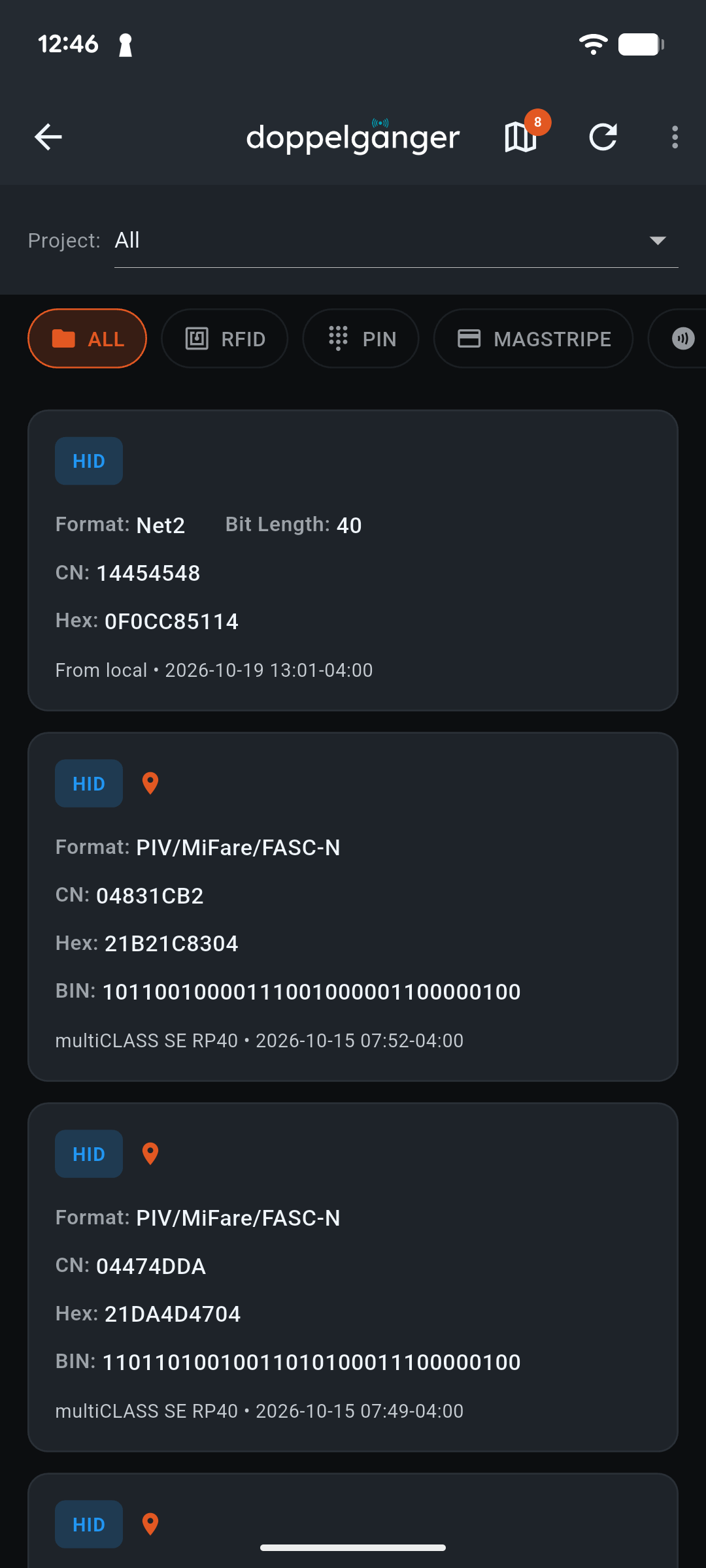
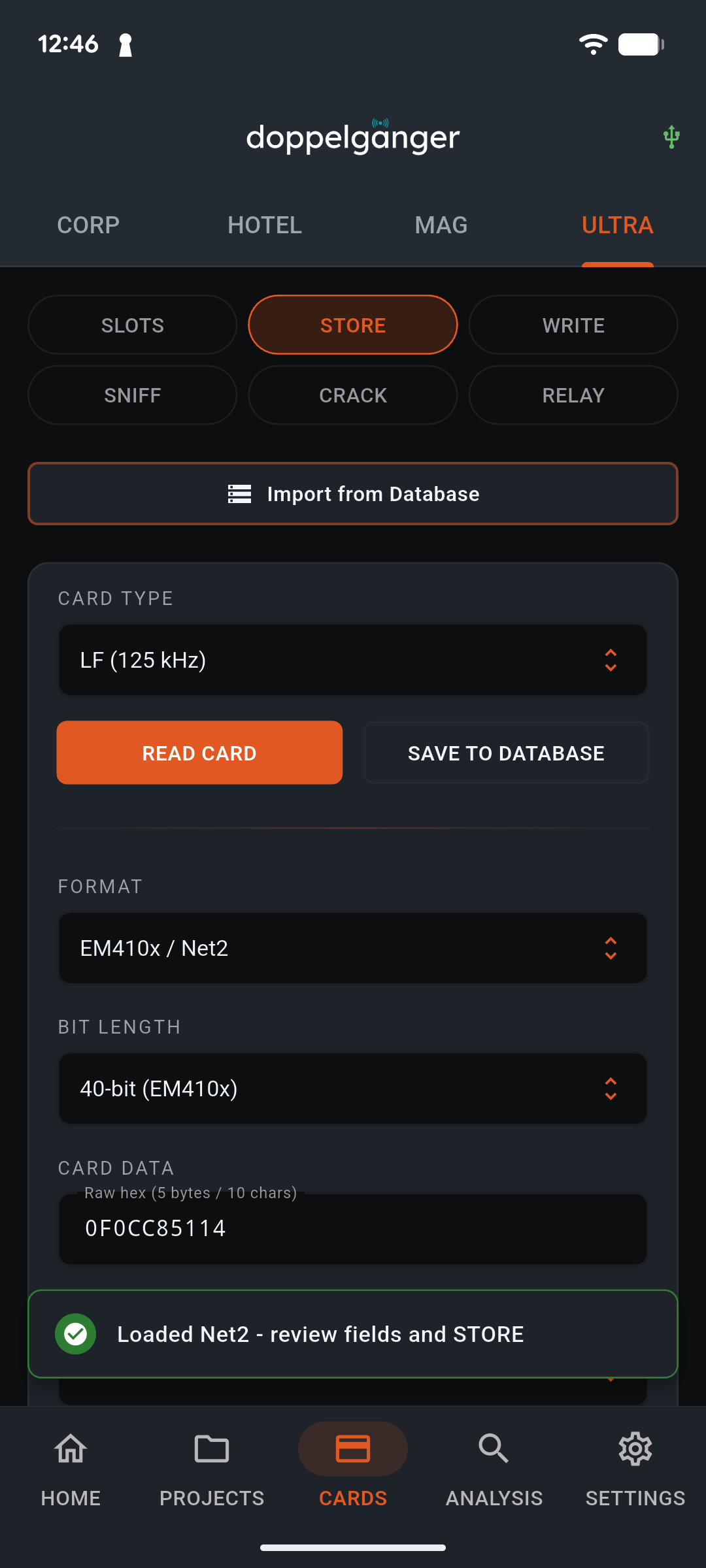
- Project, which project to list.
- The filter chips.
- An LF record, Net2 40-bit.
- An HF record, PIV/MiFare.
- CARD TYPE, switched to match.
- FORMAT, from the record.
- BIT LENGTH, from the record.
- The raw hex.
- Loaded Net2 - review fields and STORE.
| The record is | What is filled |
|---|---|
| an LF credential | FORMAT and BIT LENGTH matched from the record’s format and bit length, then Facility Code and Card Number. An IO Prox record also fills Version, and a raw hex record fills the hex box |
| an HF card | TAG TYPE and UID |
| either | FRIENDLY NAME, from the client name of the record’s project, or the project title when there is no client name |
A record ATLAS cannot place on the ATLAS Chameleon Ultra is refused with the reason, for example Indala64 cannot be emulated.
Storing an HF identity by UID
Section titled “Storing an HF identity by UID”Some readers decide on the UID alone. For those, an identity is the whole credential.
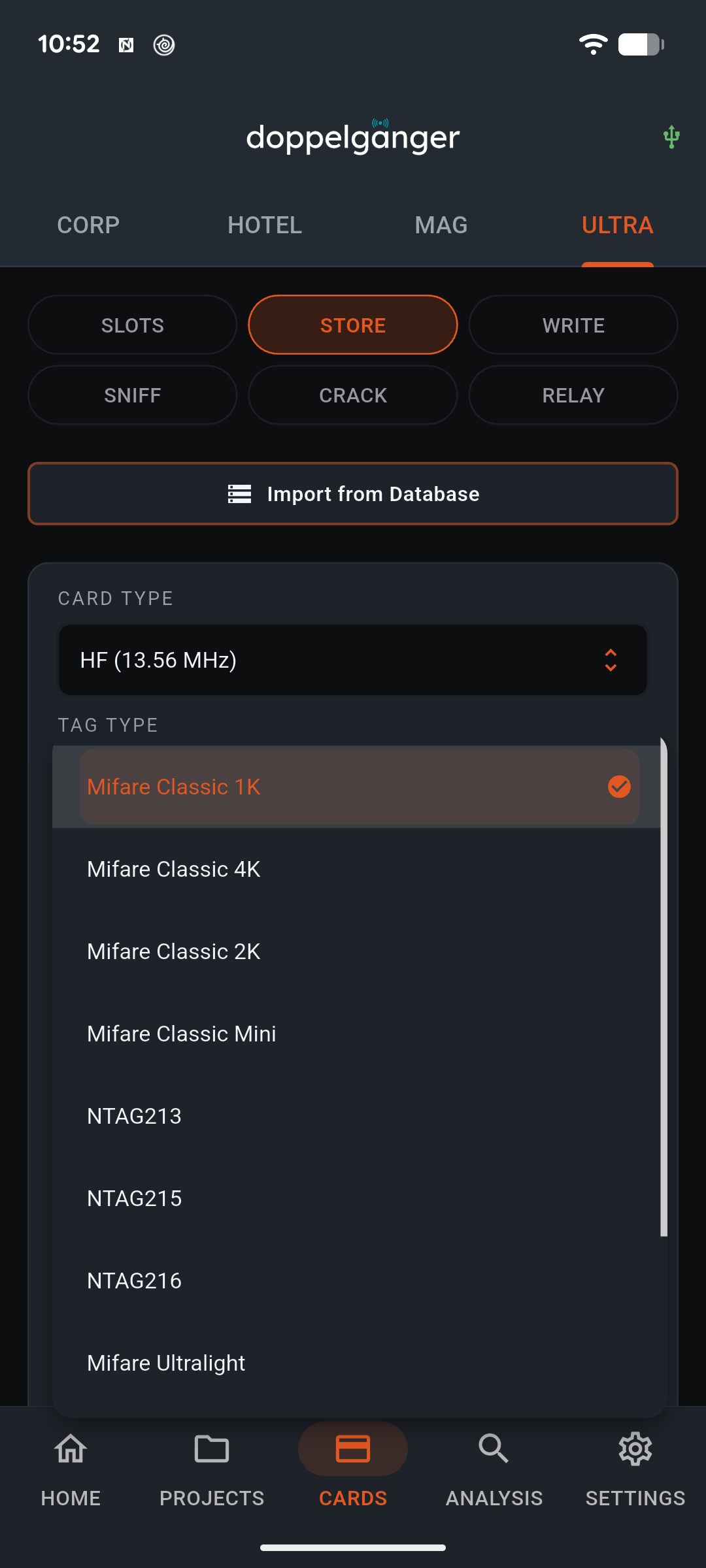
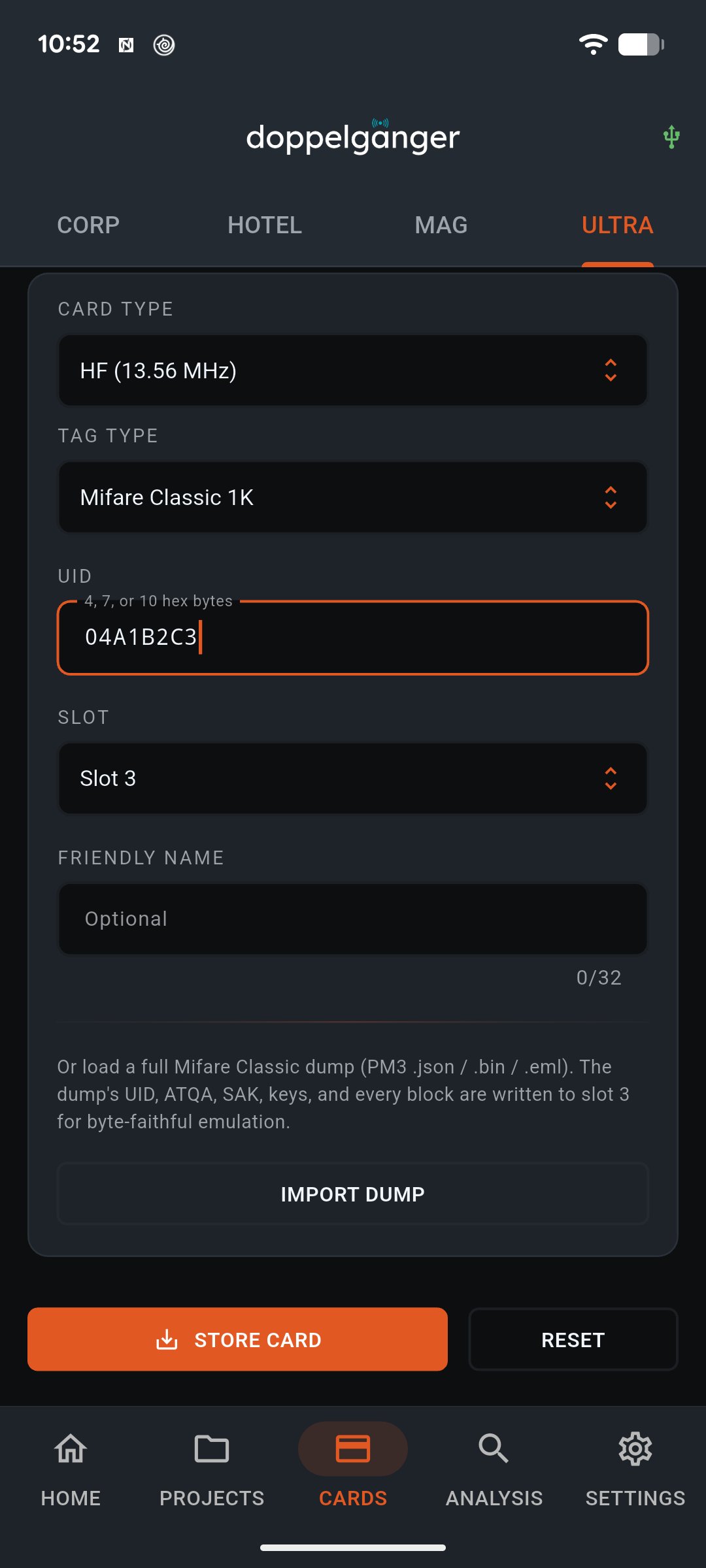
- Mifare Classic 1K, the default.
- The NTAG group.
- The menu scrolls for the rest.
- TAG TYPE, what the reader is told the card is.
- UID, 4, 7 or 10 hex bytes.
- SLOT.
- IMPORT DUMP, for a full MIFARE Classic dump instead.
- STORE CARD.
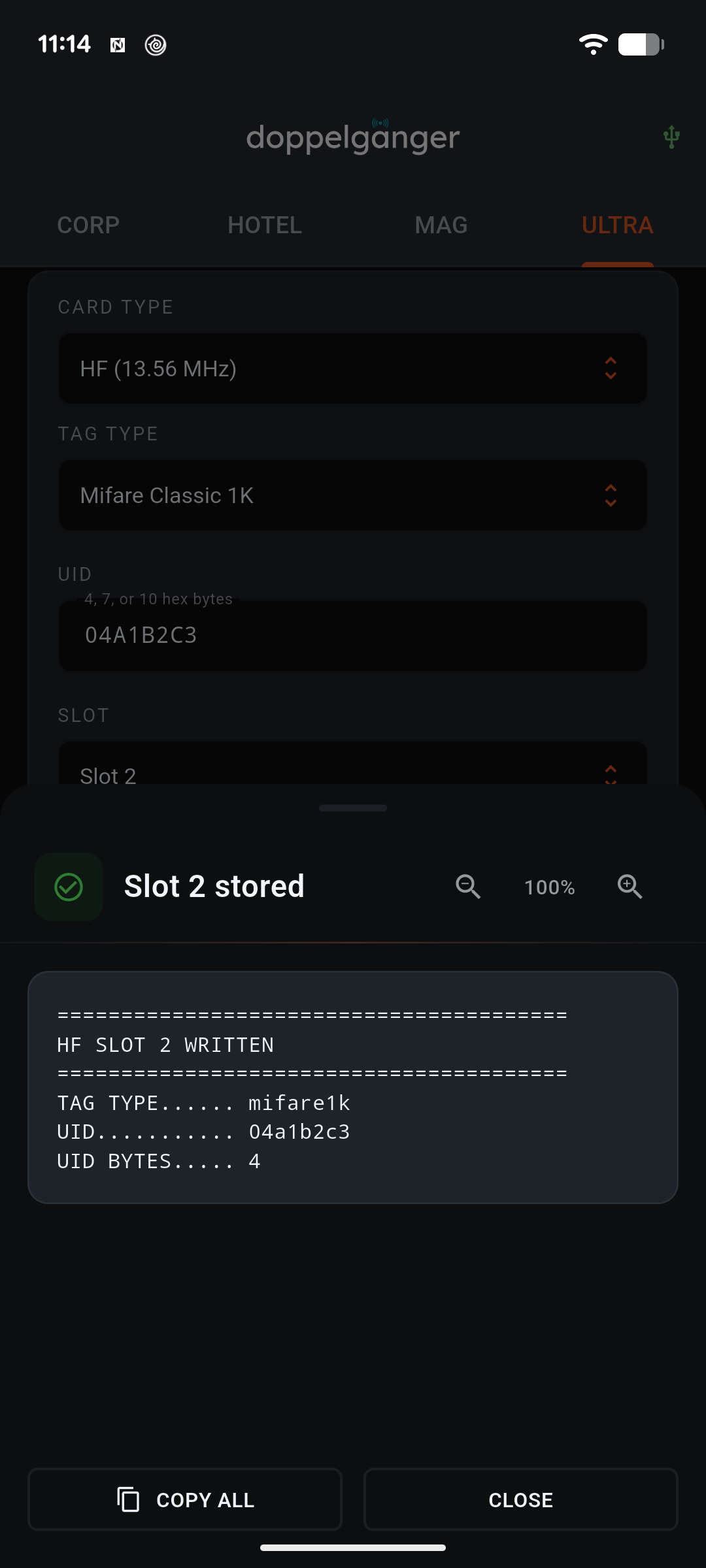
- Slot 2 stored.
- HF SLOT 2 WRITTEN.
- The UID, as stored.
- Set CARD TYPE to HF (13.56 MHz).
- Pick TAG TYPE.
- Type the UID. The field is labeled 4, 7, or 10 hex bytes and accepts spaces and colons.
- Pick the SLOT and, if wanted, a FRIENDLY NAME.
- Tap STORE CARD.
The TAG TYPE is what the ATLAS Chameleon Ultra tells the reader it is, so a 4K stored as a 1K is a 1K to the reader.
| TAG TYPE | Pick it for |
|---|---|
| Mifare Classic 1K | the default, and the common case |
| Mifare Classic 4K | a 4K card |
| Mifare Classic 2K | a 2K card |
| Mifare Classic Mini | a Mini |
| NTAG213 | an NTAG213 |
| NTAG215 | an NTAG215 |
| NTAG216 | an NTAG216 |
| Mifare Ultralight | a plain Ultralight |
| Mifare Ultralight C (UL11) | the device’s UL11 type |
| Mifare Ultralight EV1 (UL21) | the device’s UL21 type |
| ISO 14443-4 Generic (DESFire/SEOS/EMV) | an ISO 14443-4 identity with no application behind it |
A UID of any other length is refused with Validation Error, reading UID must be 4, 7, or 10 hex bytes and what was typed. The success sheet is headed Slot 1 stored and lists TAG TYPE, UID and UID BYTES.
Loading a complete MIFARE Classic dump
Section titled “Loading a complete MIFARE Classic dump”Under the HF form a line reads Or load a full Mifare Classic dump (PM3 .json / .bin / .eml). It names the slot the dump will go to, so set SLOT first.
- Set CARD TYPE to HF (13.56 MHz) and pick the SLOT.
- Tap IMPORT DUMP. The ATLAS file picker opens, titled IMPORT DUMP.
- Pick the dump.
- The sheet Slot 1 stored reports SOURCE
Proxmark dump, TAG TYPE and CONTENTfull dump.
The dump’s UID, ATQA, SAK, keys and every block are written, and the tag type is taken from the dump’s size, not from the TAG TYPE menu.
| Dump size | Stored as |
|---|---|
| 64 blocks | Mifare Classic 1K |
| 128 blocks | Mifare Classic 2K |
| 256 blocks | Mifare Classic 4K |
| anything else | refused, Unsupported dump size with the block count |
A file that will not parse, or a size outside the table, opens a Dump import failed sheet with the reason.
Storing a Wiegand credential as an iCLASS Legacy card
Section titled “Storing a Wiegand credential as an iCLASS Legacy card”The site issues iCLASS and the reader has been shown to take Legacy. The facility code and card number are the same ones a prox card would carry. Here they are stored as an iCLASS Legacy card instead.
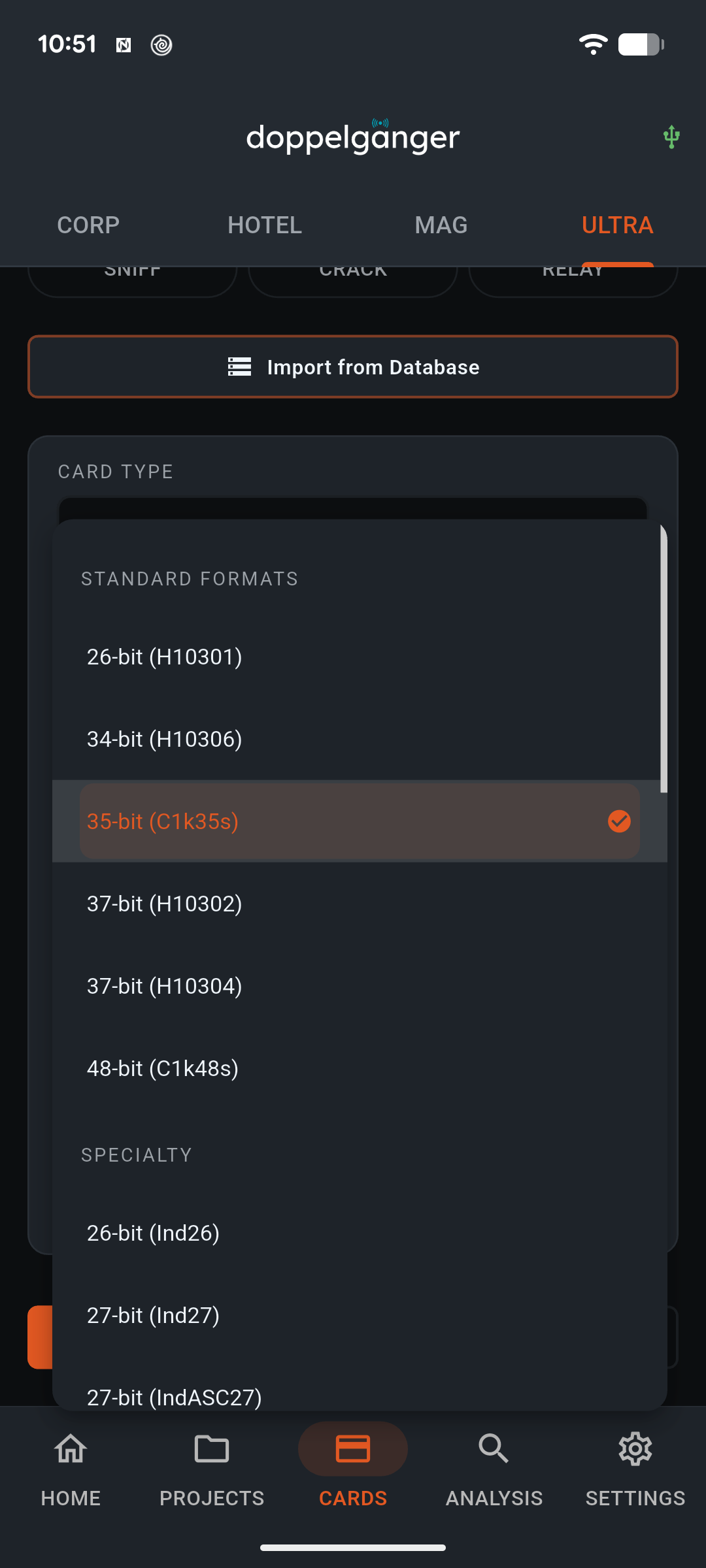
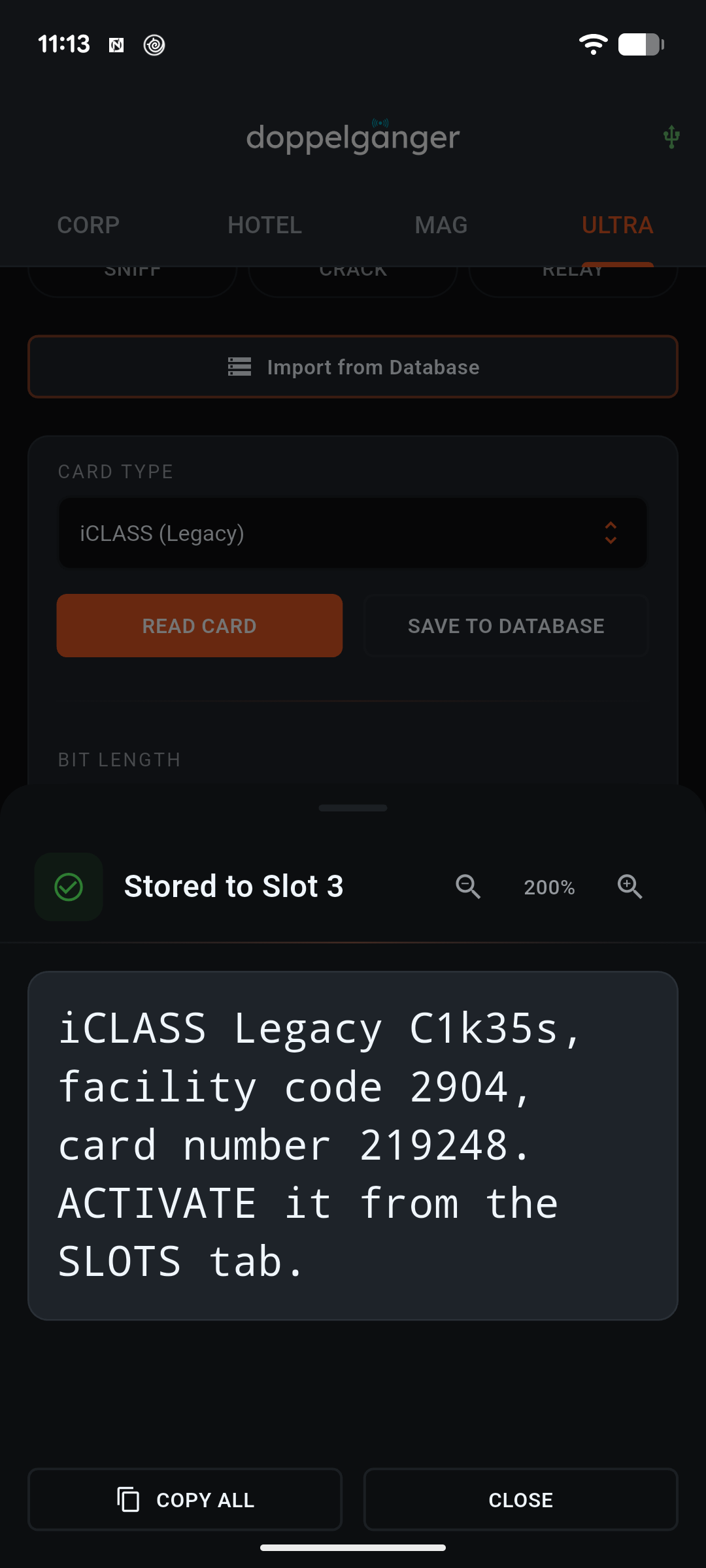
- STANDARD FORMATS, the formats HID issues iCLASS in.
- 35-bit (C1k35s), HID Corporate 1000.
- SPECIALTY, every other format, for credential stuffing.
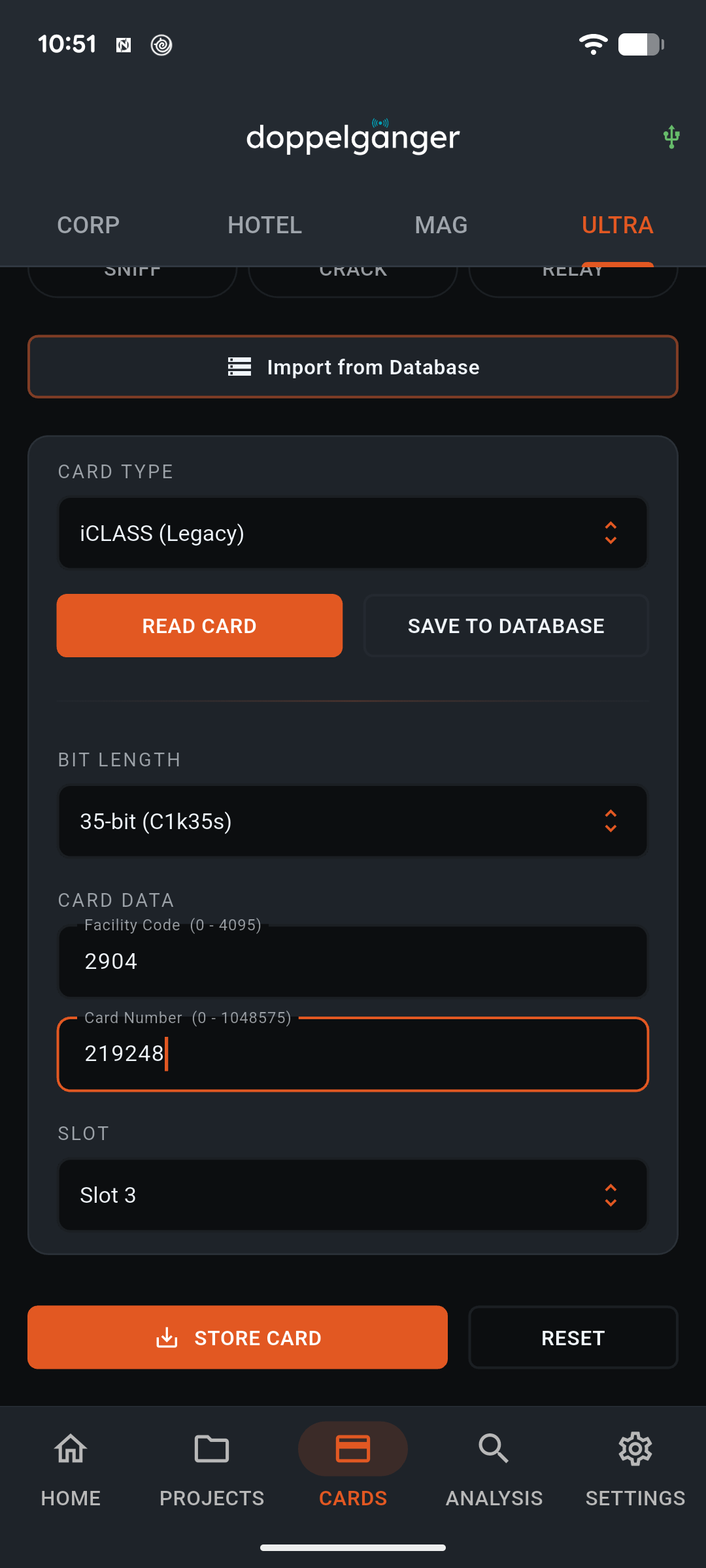
- CARD TYPE, iCLASS (Legacy).
- BIT LENGTH, 35-bit (C1k35s).
- Facility Code 2904, inside 0 - 4095.
- Card Number 219248.
- SLOT, Slot 3.
- STORE CARD.
- Stored to Slot 3.
- iCLASS Legacy C1k35s, with the numbers stored.
- ACTIVATE it from the SLOTS tab. An iCLASS store does not go on the air by itself.
- Set CARD TYPE to iCLASS (Legacy).
- Pick BIT LENGTH. The menu has two headings, STANDARD FORMATS and SPECIALTY.
- Fill Facility Code and Card Number.
- Pick the SLOT and tap STORE CARD.
- The sheet Stored to Slot 1 names the format, the facility code and the card number, and ends ACTIVATE it from the SLOTS tab.
There is no FRIENDLY NAME on this form. Name the slot from Slots.
STANDARD FORMATS
Section titled “STANDARD FORMATS”The formats HID issues iCLASS credentials in.
| BIT LENGTH | Full name | Facility Code | Card Number |
|---|---|---|---|
| 26-bit (H10301) | HID H10301 | 0 - 255 | 0 - 65535 |
| 34-bit (H10306) | HID H10306 | 0 - 65535 | 0 - 65535 |
| 35-bit (C1k35s) | HID Corporate 1000 (35-bit) | 0 - 4095 | 0 - 1048575 |
| 37-bit (H10302) | HID H10302 (no FC) | not used | 0 - 34359738367 |
| 37-bit (H10304) | HID H10304 | 0 - 65535 | 0 - 524287 |
| 48-bit (C1k48s) | HID Corporate 1000 (48-bit) | 0 - 4194303 | 0 - 8388607 |
SPECIALTY
Section titled “SPECIALTY”Every other format. These are for credential stuffing, where another vendor’s facility code and card number ride on an iCLASS card.
| BIT LENGTH | Full name | Facility Code | Card Number |
|---|---|---|---|
| 26-bit (Ind26) | Indala Wiegand 26-bit | 0 - 4095 | 0 - 4095 |
| 27-bit (Ind27) | Indala 27-bit | 0 - 8191 | 0 - 16383 |
| 27-bit (IndASC27) | Indala ASC 27-bit | 0 - 8191 | 0 - 16383 |
| 27-bit (Tecom27) | Tecom 27-bit | 0 - 2047 | 0 - 65535 |
| 28-bit (2804W) | 2804W | 0 - 255 | 0 - 32767 |
| 29-bit (Ind29) | Indala 29-bit | 0 - 8191 | 0 - 65535 |
| 30-bit (ATSW30) | ATS-W | 0 - 4095 | 0 - 65535 |
| 31-bit (ADT31) | ADT 31-bit | 0 - 15 | 0 - 8388607 |
| 32-bit (HCP32) | HCP 32-bit | not used | 0 - 16383 |
| 32-bit (HPP32) | HPP 32-bit | 0 - 4095 | 0 - 524287 |
| 32-bit (Kastle) | Kastle 32-bit | 0 - 255 | 0 - 65535 |
| 32-bit (Kantech) | Kantech 32-bit | 0 - 255 | 0 - 65535 |
| 32-bit (Wie32) | Wiegand 32-bit | 0 - 4095 | 0 - 65535 |
| 33-bit (D10202) | D10202 | 0 - 127 | 0 - 16777215 |
| 34-bit (N10002) | N10002 | 0 - 65535 | 0 - 65535 |
| 34-bit (Optus) | Optus 34-bit | 0 - 2047 | 0 - 65535 |
| 34-bit (SMP) | SMP 34-bit | 0 - 8191 | 0 - 65535 |
| 34-bit (BQT) | BQT 34-bit | 0 - 255 | 0 - 16777215 |
| 36-bit (C15001) | C15001 | 0 - 255 | 0 - 65535 |
| 36-bit (S12906) | S12906 | 0 - 255 | 0 - 16777215 |
| 36-bit (Sie36) | Siemens 36-bit | 0 - 262143 | 0 - 65535 |
| 37-bit (H10320) | HID H10320 (BCD) | not used | 0 - 99999999 |
| 37-bit (P10004) | P10004 | 0 - 8191 | 0 - 262143 |
| 37-bit (HGen37) | HID 37-bit Generic | not used | 0 - 4294967295 |
| 37-bit (MDI37) | MDI 37-bit | 0 - 15 | 0 - 536870911 |
| 46-bit (H800002) | HID 800002 | 0 - 16383 | 0 - 1073741823 |
| 56-bit (avig56) | Avigilon 56-bit (20+34) | 0 - 1048575 | 0 - 17179869183 |
What is live when the store finishes
Section titled “What is live when the store finishes”This is the part that decides whether you store in the car or at the bench.
| You stored | When the sheet opens, the slot is | To present it |
|---|---|---|
| an LF credential | the active slot, switched on, and answering readers | nothing more |
| an HF identity or dump | the active slot, switched on, and answering readers | nothing more |
| an iCLASS Legacy credential | holding the card, silent | ACTIVATE it on Slots |
An LF or HF store selects the slot it wrote to. Whatever slot was live before is no longer the one answering.
When the slot is already holding something
Section titled “When the slot is already holding something”A slot holds one credential, whichever band it is on. Storing into an occupied slot replaces what is there, and a typed or read store asks first.
The dialog is headed OVERWRITE SLOT 3. Its first line names what is at stake, Slot 3 already holds a credential. for an unnamed slot, or the slot’s name in quotes for a named one. Its second reads Storing replaces it. Pick another slot to keep both, or wipe this one from the SLOTS page first.
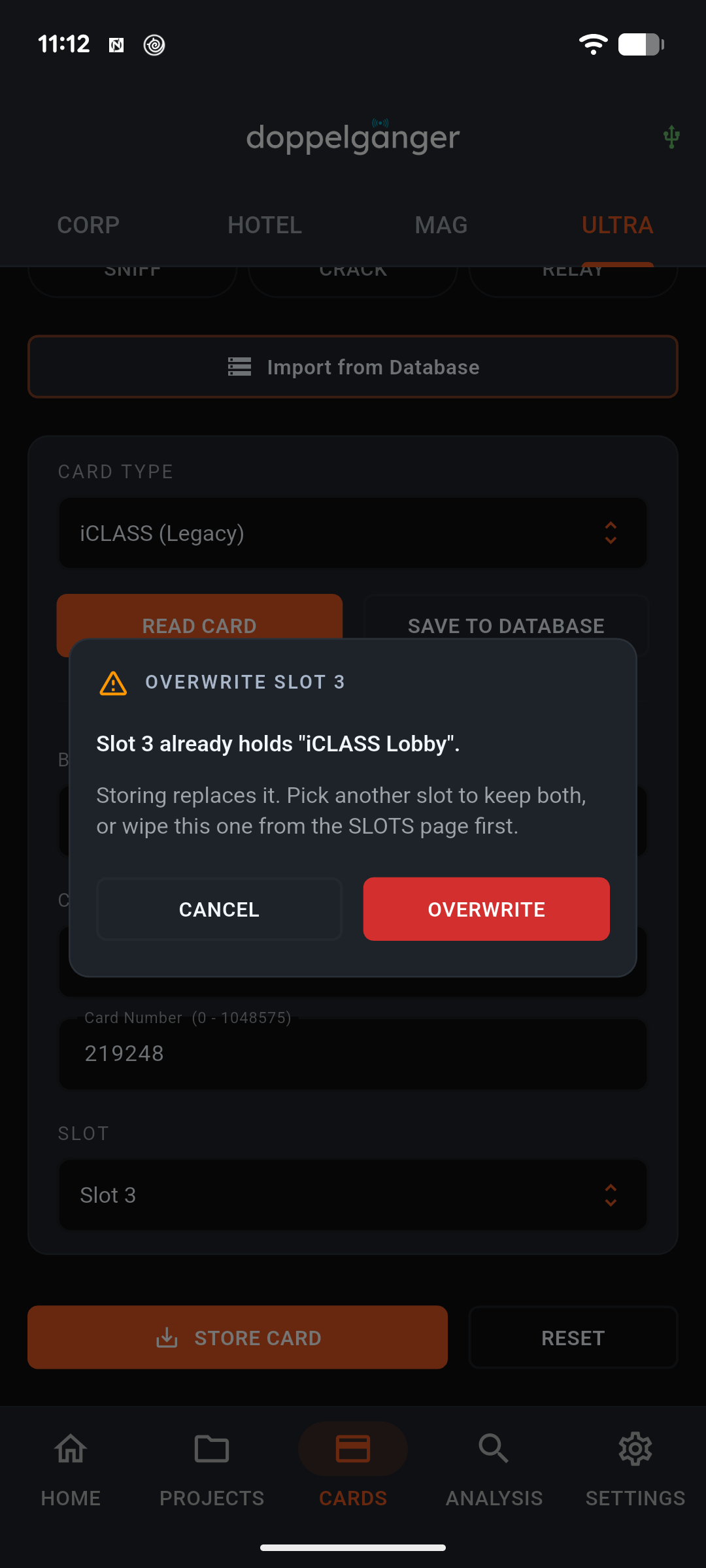
- OVERWRITE SLOT 3.
- What is at stake, and what to do instead.
- CANCEL, or OVERWRITE to replace it.
| Choice | Result |
|---|---|
| CANCEL | nothing is written |
| OVERWRITE | the new credential replaces the old one, on whichever band the old one was |
Storing an iCLASS credential into a slot that held an LF or HF card removes that card, and storing an LF or HF card into a slot that held an iCLASS card removes the iCLASS card.
RESET, beside STORE CARD, returns the whole page to what it opens on: LF (125 kHz), Prox, 26-bit (H10301), Slot 1, every box on all three forms empty. It changes nothing on the device. It is gray while a store or a read is running.
What STORE refuses, and the words it uses
Section titled “What STORE refuses, and the words it uses”A refusal before anything is sent opens a Validation Error sheet.
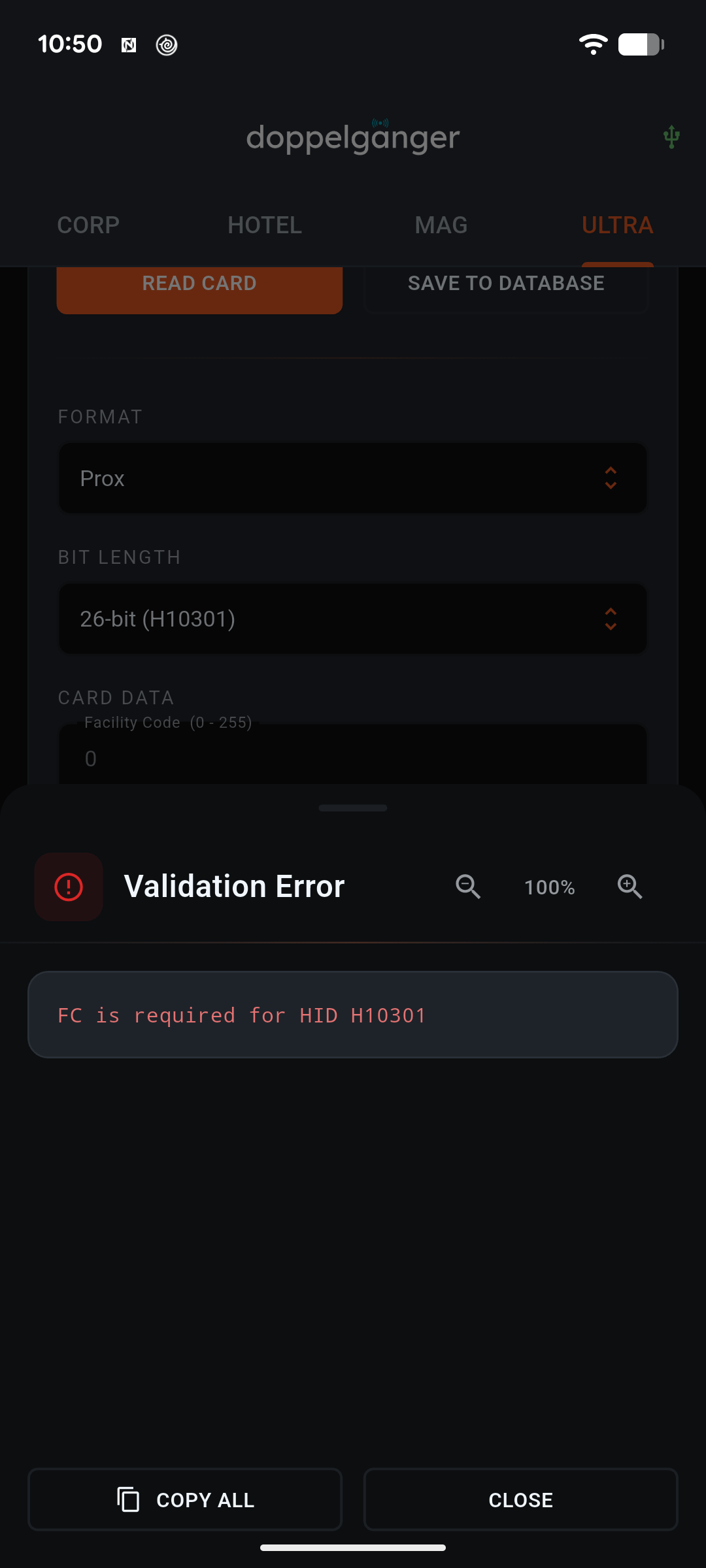
- Validation Error.
- FC is required for HID H10301.
- CLOSE, then fill the box.
| The sheet reads | Cause |
|---|---|
| FC is required for the format | the facility code box is empty on a format that uses one |
| CN is required for the format | the card number box is empty |
| Version is required for the format | the version box is empty on IO Prox |
| FC must be a whole number, CN must be a whole number or Version must be a whole number | the box holds something that is not a number |
| FC must be 0 - the maximum, with the field’s width in bits | the facility code is above the format’s range |
| CN must be 0 - the maximum, with the field’s width in bits | the card number is above the format’s range |
| Version must be 0 - 255 (8 bits) | the version is above the range |
| the format, then needs a 5-byte hex value or needs a 12-byte hex value | the raw hex box is empty |
| Hex must be exactly 10 characters (5 bytes) or Hex must be exactly 24 characters (12 bytes) | the raw hex is the wrong length |
| Hex contains non-hex characters | the raw hex holds something outside 0 to 9 and A to F |
| UID must be 4, 7, or 10 hex bytes | the HF UID is the wrong length or empty |
A failure after the store started opens Encode failed for an LF or HF store, Dump import failed for a dump, and Store Failed for iCLASS, each with the device’s reason.
Limits
Section titled “Limits”| Item | Value |
|---|---|
| Slots offered | Slot 1 to Slot 8 |
| Credentials per slot | 1 |
| HF UID length | 4, 7 or 10 bytes |
| Dump sizes accepted | 64, 128 or 256 blocks |
| Dump file types named on the page | PM3 .json, .bin, .eml |
| Friendly name | 32 characters |
| Read window | 2 minutes |
| One LF read pass with no card | about 19 seconds |
| iCLASS issue level and OEM code | not asked for, written as zero |
| With no device connected | Import from Database and the form work, READ CARD, SAVE TO DATABASE and STORE CARD are gray |
Where to go next
Section titled “Where to go next”| You want | Page |
|---|---|
| To see what is in each slot and which one is answering | Slots |
| To put the credential on a physical card instead | Write |
| To recover a MIFARE Classic card’s keys and contents | Crack |
| To learn what the reader accepts | Sniff and reader fingerprint |