
Capture alerts
A planted reader only earns its place if you know the moment it catches something. A decoy on a wall by a door, or a longrange unit in a bag by a turnstile, is collecting whether you are watching it or not, and the difference between a useful plant and a wasted one is whether you were told in time to do something with what it caught.
These settings govern the Doppelgänger readers, the Core longrange units and the Stealth decoys. ATLAS polls them for new captures and tells you when one lands.
Nothing here affects a Proxmark or an MSR. Those you are holding, so there is nothing to be notified about.
The group
Section titled “The group”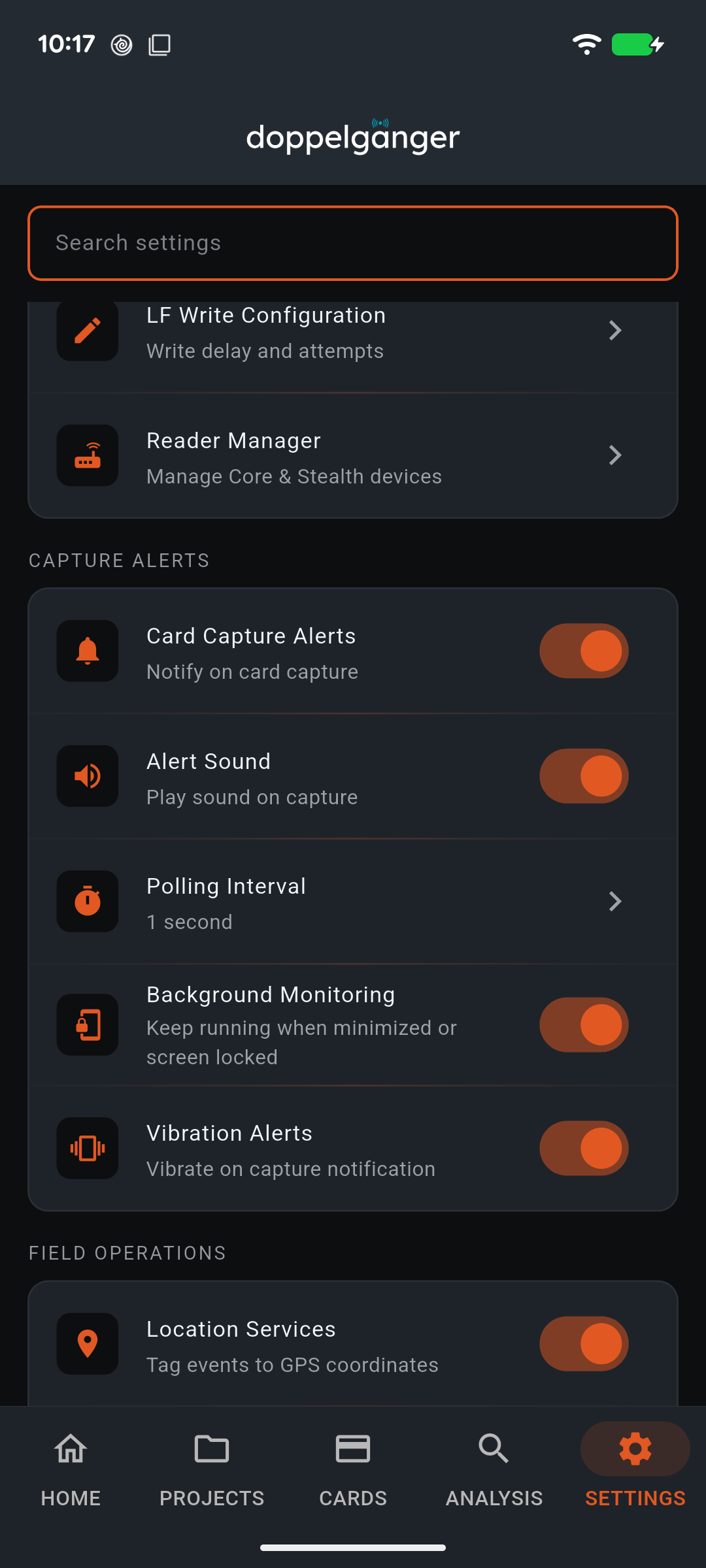
- Card Capture Alerts, which shows or hides the four rows below it.
- Alert Sound, which is the one to think about before a covert job.
- Polling Interval, how often the readers are asked.
- Background Monitoring, which keeps polling when the phone is away.
- Vibration, the quiet alternative to sound.
| Setting | Subtitle | What it decides |
|---|---|---|
| Card Capture Alerts | Notify on card capture | whether the four rows below it are shown. It does not currently suppress the notification |
| Alert Sound | Play sound on capture | whether the phone makes a noise |
| Polling Interval | how often the readers are asked for new captures | |
| Background Monitoring | Keep running when minimized or screen locked | whether the foreground service is started at the moment you flip it |
| Vibration Alerts | Vibrate on capture notification | the silent alternative |
The four rows under the master only exist while Card Capture Alerts is on. Turn the master off and the group collapses to that one row, which is also why a setting you changed last week can look as though it has vanished.
Polling interval
Section titled “Polling interval”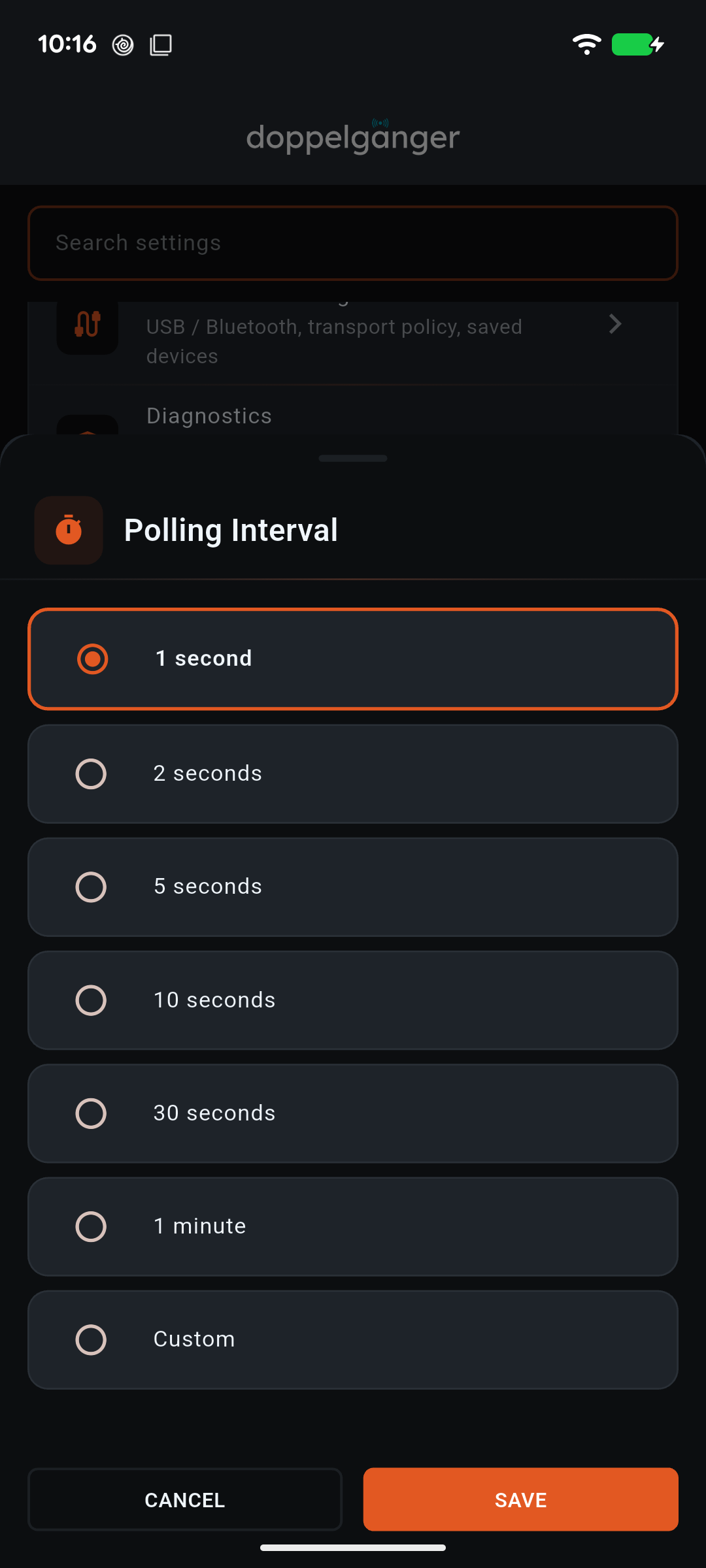
- The sheet is a radio list, and it does not apply until SAVE.
- 1 second, the default, and the right answer while you are watching a door.
- Longer intervals for a reader left running across hours.
- Custom, for an interval the list does not offer.
| Interval | Use it for |
|---|---|
| 1 second | the default. An active test where you want the hit immediately |
| 2 to 10 seconds | a reader you are near but not watching |
| 30 seconds to 1 minute | a reader left in place for hours, where battery matters more than latency |
| Custom | anything the list does not cover, 1 to 3600 seconds |
Custom opens a number field. A value outside 1 to 3600, or anything that is not a whole number, is refused on save with a message naming the range, and the setting is left as it was. Nothing is silently rounded.
A capture is not missed by a long interval. The reader holds it and ATLAS collects it on the next poll, so the interval sets how late you hear, not whether you hear.
Background monitoring
Section titled “Background monitoring”Turning Background Monitoring on starts an Android foreground service of the connected device type. Turning it off stops it, immediately, from the same switch.
What an alert actually looks like
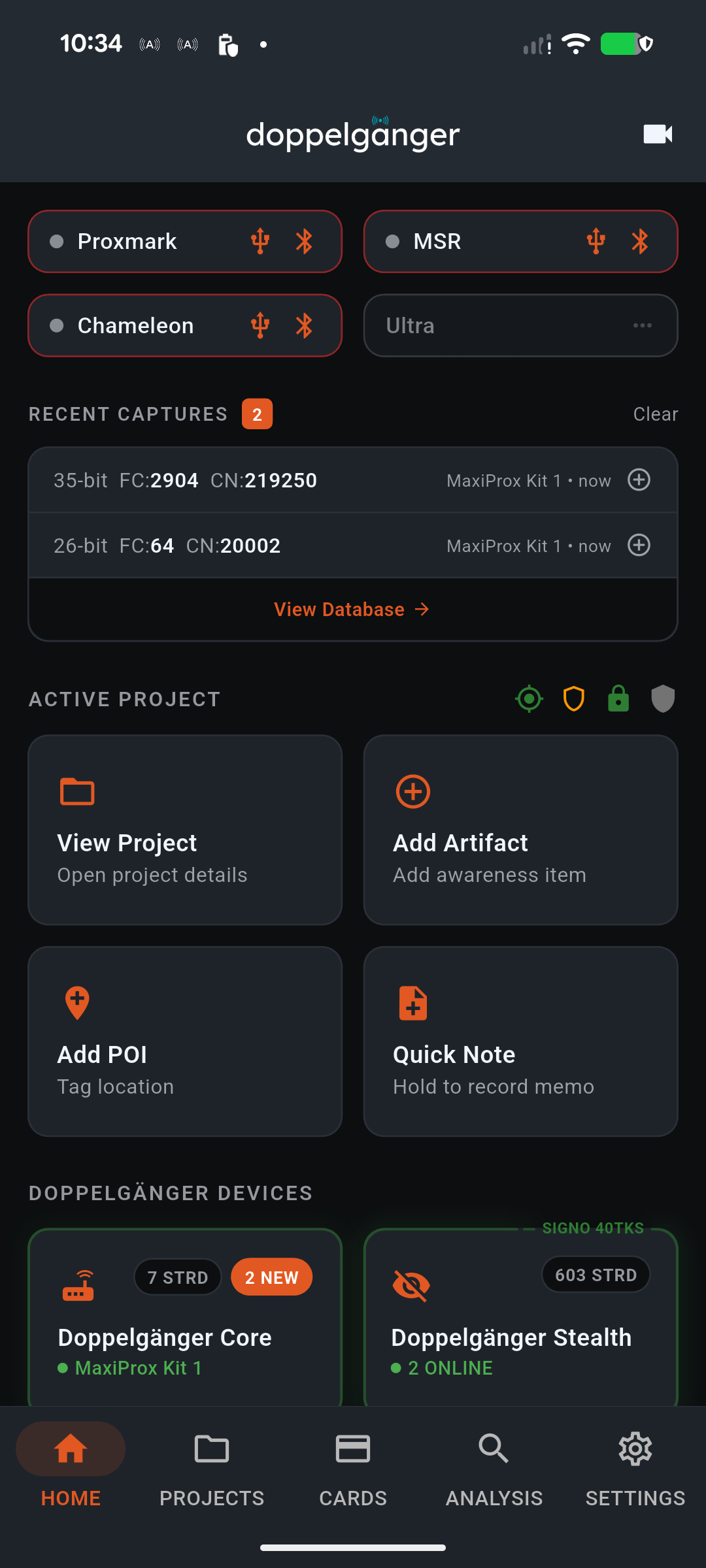
Section titled “What an alert actually looks like”The settings above are the behavior. This is the result, from a Core on a long range reader named MaxiProx Kit 1 with two credentials presented to it.
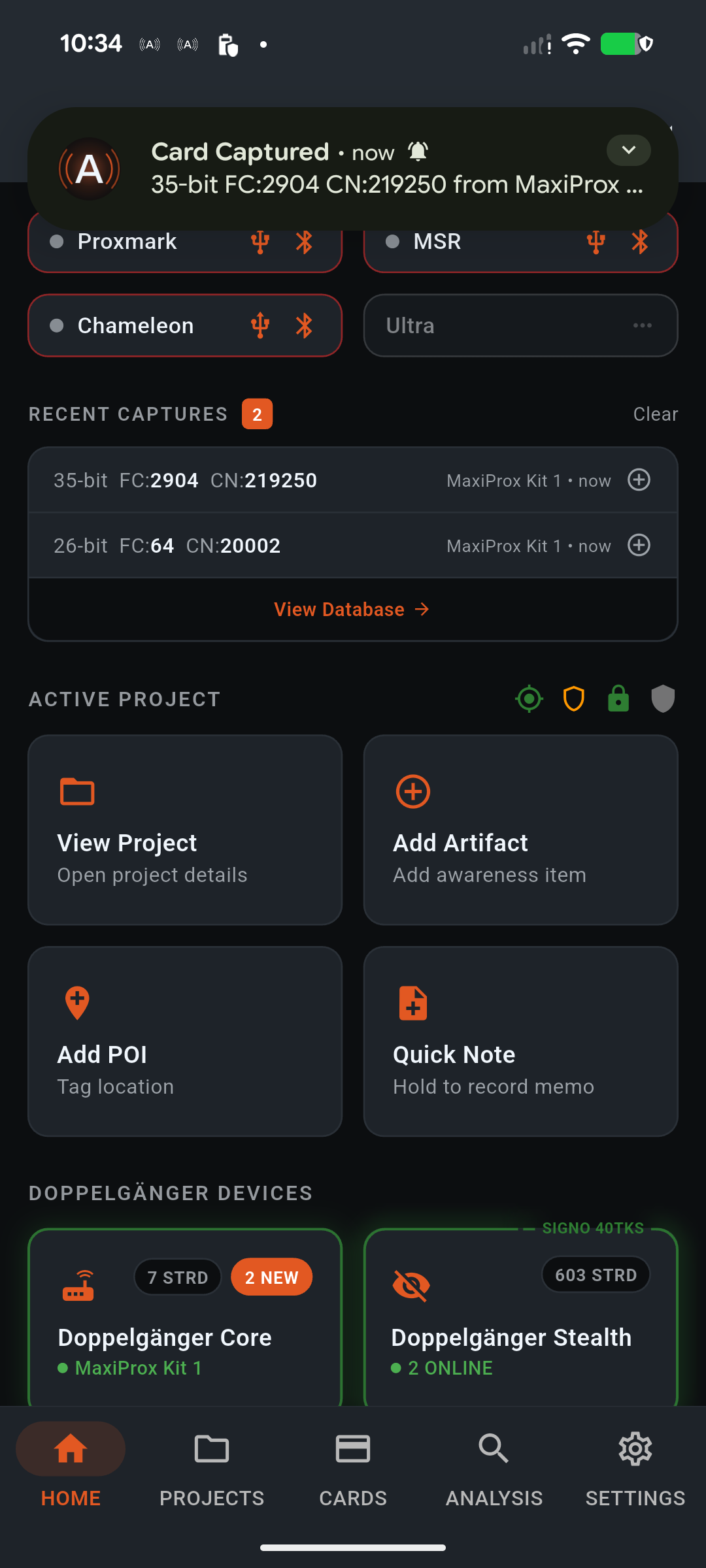
- Card Captured, over whatever is on screen.
- The bit length, FC and CN, then from MaxiProx Kit 1.
- RECENT CAPTURES, with a count of 2.
- The read the alert is for, already listed.
- 7 STRD and 2 NEW on the Core tile.
- RECENT CAPTURES, with a count, and Clear on the right.
- A 35 bit read, with its facility code and card number. The newest is on top.
- A 26 bit read off the same reader.
- View Database opens the full list.
- 2 NEW on the tile of the reader that read them.
| Capture | Notification title | Body |
|---|---|---|
| A badge | Card Captured | the bit length, facility code and card number, then from the reader’s name |
| A keypad entry | PIN Captured | PIN: the whole sequence, then from the reader’s name. Only a decoy with a keypad on it produces these |
The reader’s name is in every notification. That is the argument for naming a reader after the reader on its front rather than leaving it as rfid or Stealth. With two plants running, the name is the only thing in a locked-screen notification that tells you which door just got used.
It also tells you what the credential is. The two reads above are 26 bit and 35 bit, which on their own say nothing about technology. Off a reader you named for what it is, you know what card to write either one back to.
When a reset, pairing or stealth card is read
Section titled “When a reset, pairing or stealth card is read”A reader’s own three cards are never stored as captures, so they do not appear in RECENT CAPTURES or in the reader’s card list. ATLAS raises a notification instead, with the reader’s name first in the body.
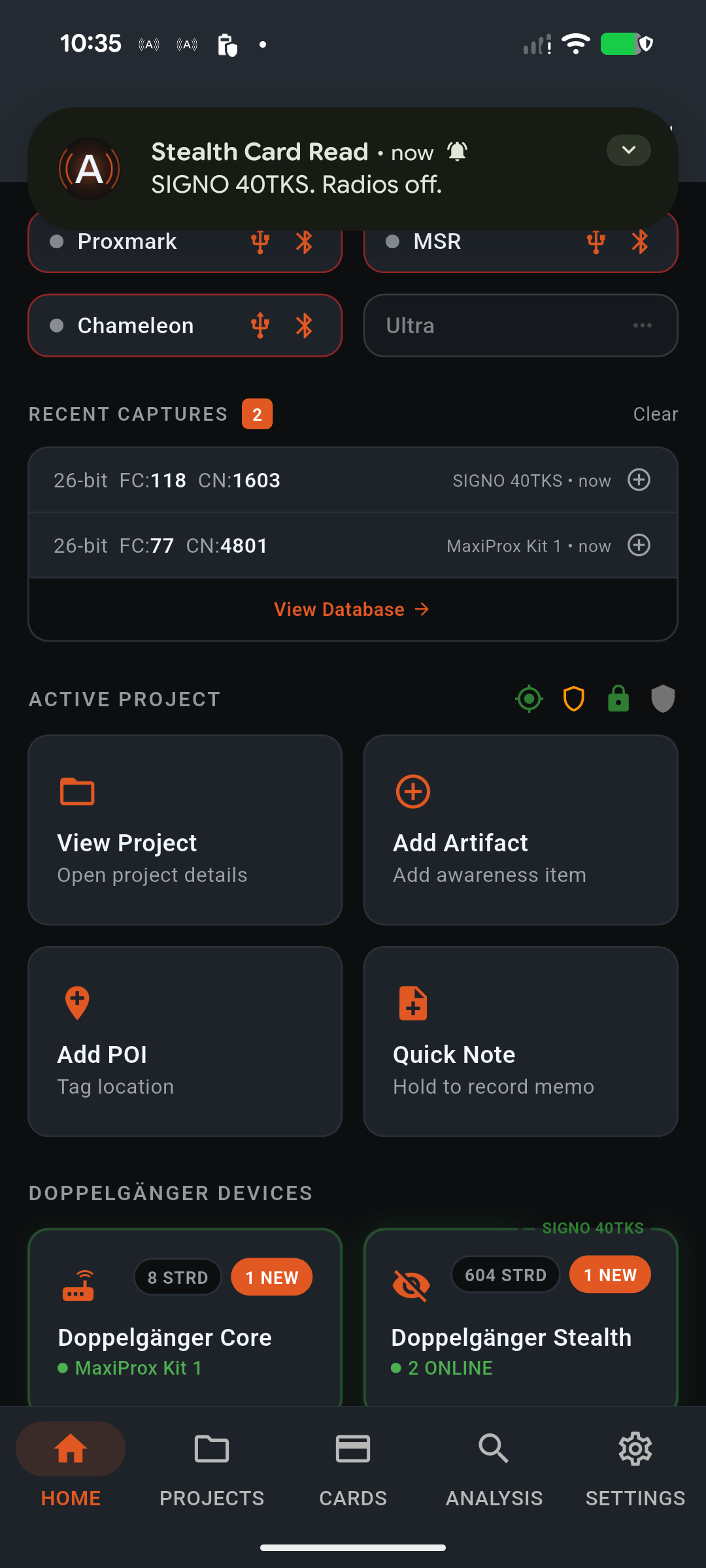
- Stealth Card Read, over whatever is on screen.
- SIGNO 40TKS, the reader the card was read at, then what it did. Radios off.
- RECENT CAPTURES still holds 2. The stealth card is not a capture.
- The Stealth card a moment before SIGNO 40TKS drops off it.
| Card read at the reader | What the reader did | Notification title | Body, after the reader’s name |
|---|---|---|---|
| Reset card | restored factory defaults | Reset Card Read | Factory defaults restored. Captured cards kept. |
| Pairing card, just set from ATLAS | saved it as the pairing card | Pairing Card Saved | Read back and saved. |
| Pairing card, with a phone waiting | paired that phone | Pairing Card Read | A phone was paired. |
| Pairing card, on Bluetooth with no phone waiting | went back to WiFi | Pairing Card Read | Back on WiFi. Paired phones removed. |
| Stealth card, radios on | went dark | Stealth Card Read | Radios off. |
| Stealth card, radios off | came back | Stealth Card Read | Radios back on. |
| When the phone is | The notification arrives |
|---|---|
| connected over Bluetooth as the card is read | at once |
| not connected, or the reader has just gone dark | the next time the phone links to the reader. The reader remembers the last card that acted |
| on WiFi with the reader | within about 30 seconds |
Reader firmware 2.0.0 is needed for these.
When a reader is wired or set wrong
Section titled “When a reader is wired or set wrong”A Core or Stealth on firmware 2.0.0 watches its two data wires on every card. When they show a Paxton reader with its wires crossed, or a reader of the other kind than the board is set for, ATLAS raises Reader Wiring with the reader’s name and what it found.
| Notification reads | What is wrong |
|---|---|
| Clock and data are swapped | a Paxton reader with its two data wires crossed |
| Reader sends clock and data | the reader is a Paxton and Reader Mode is Wiegand (HID) |
| Reader sends Wiegand | the reader is a Wiegand reader and Reader Mode is Clock and Data (Paxton) |
No Reader Wiring notification is not proof the wiring is right. Crossed data wires on a Wiegand reader raise nothing, because the board cannot see them. The proof is a card whose numbers you know, read back correctly. It is raised once, when the fault first shows, not on every card. On Bluetooth it arrives as the card is read. On WiFi it follows within about ten seconds. The fix for each is on the reader’s configuration page, Core and Stealth.
Location on a capture
Section titled “Location on a capture”Directly underneath, in FIELD OPERATIONS, Location Services reads Tag events to GPS coordinates. With it on, a card caught by a reader is stamped with where the phone was when it arrived.