
Relay
A site that has moved to DESFire EV3 or Seos has a credential that cannot be copied, and a report that stops there tells the client nothing about the door. The open question is whether the reader will accept the real card answering from somewhere else: a badge on a desk, in a jacket on a chair, in a pocket in the lobby queue. A relay puts one handset beside the card and one at the reader and carries the conversation between them, and whether the door opens is the measurement.
The reader at the door asks, the genuine credential answers, and the two handsets carry the exchange between them.
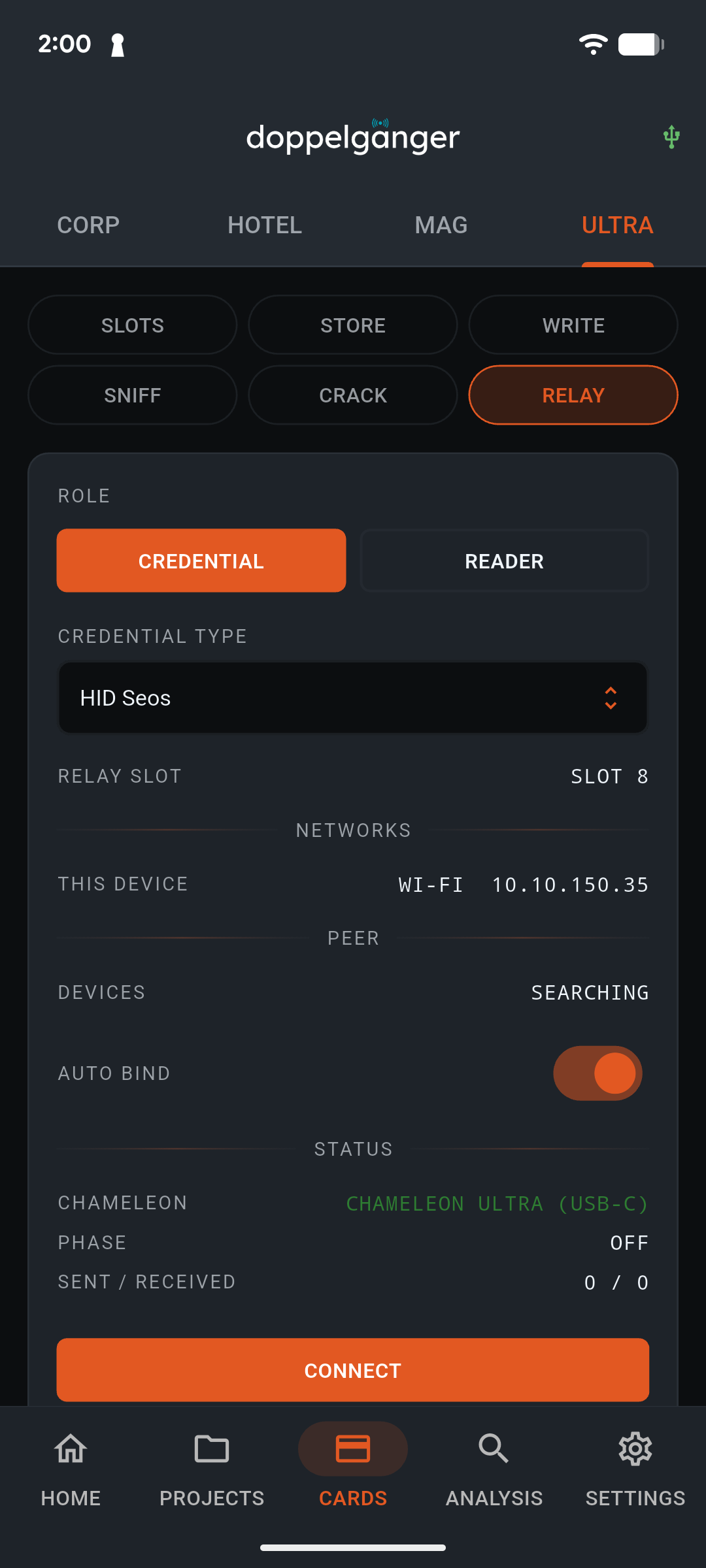
Cards, then the ULTRA tab, then the RELAY chip, the last of the six.
Two handsets, two ATLAS Chameleon Ultras
Section titled “Two handsets, two ATLAS Chameleon Ultras”A relay is run by two handsets, each with its own ATLAS Chameleon Ultra. The two ATLAS Chameleon Ultras carry out the card conversation between themselves, and the handsets pass their messages across the network. One handset takes each side, chosen under ROLE.
| ROLE | That handset and its ATLAS Chameleon Ultra are | The ATLAS Chameleon Ultra’s lights show |
|---|---|---|
| CREDENTIAL | with the genuine card | light 1, red, while a relay is running |
| READER | at the door | light 8, green, while a relay is running |
Each ATLAS Chameleon Ultra has to be on its handset’s USB cable. CONNECT is gray with no ATLAS Chameleon Ultra connected, and with the unit on Bluetooth and no cable plugged in it refuses with The relay runs on the USB cable only. Connect the Chameleon on the cable and start again.
The role lights can be switched off for a unit that must stay dark, with Relay lights in ATLAS Chameleon Ultra Settings.
What can be relayed
Section titled “What can be relayed”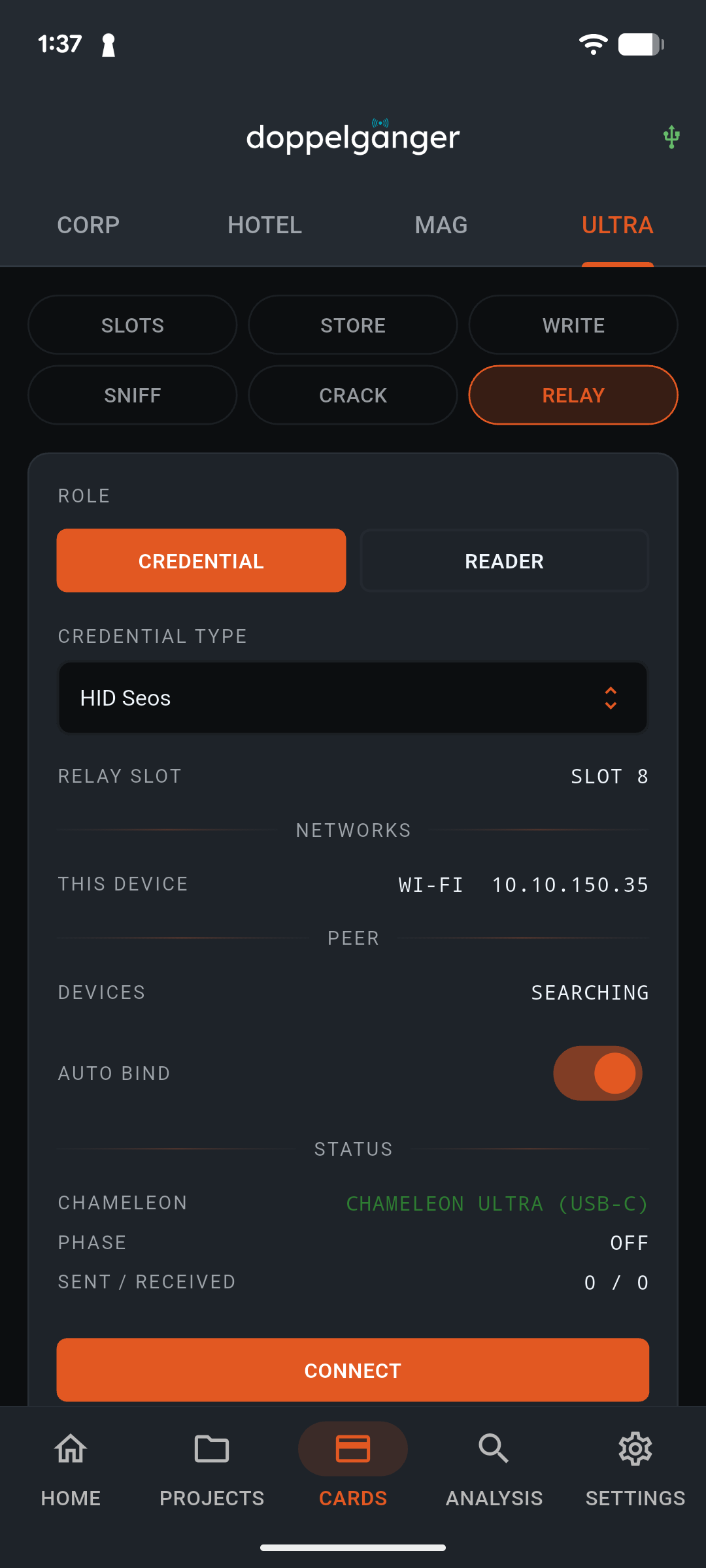
- ROLE, CREDENTIAL or READER.
- CREDENTIAL TYPE.
- RELAY SLOT, SLOT 8.
- THIS DEVICE, the address the peer dials.
- PEER, DEVICES, SEARCHING.
- STATUS of the ATLAS Chameleon Ultra in the relay.
- CONNECT.
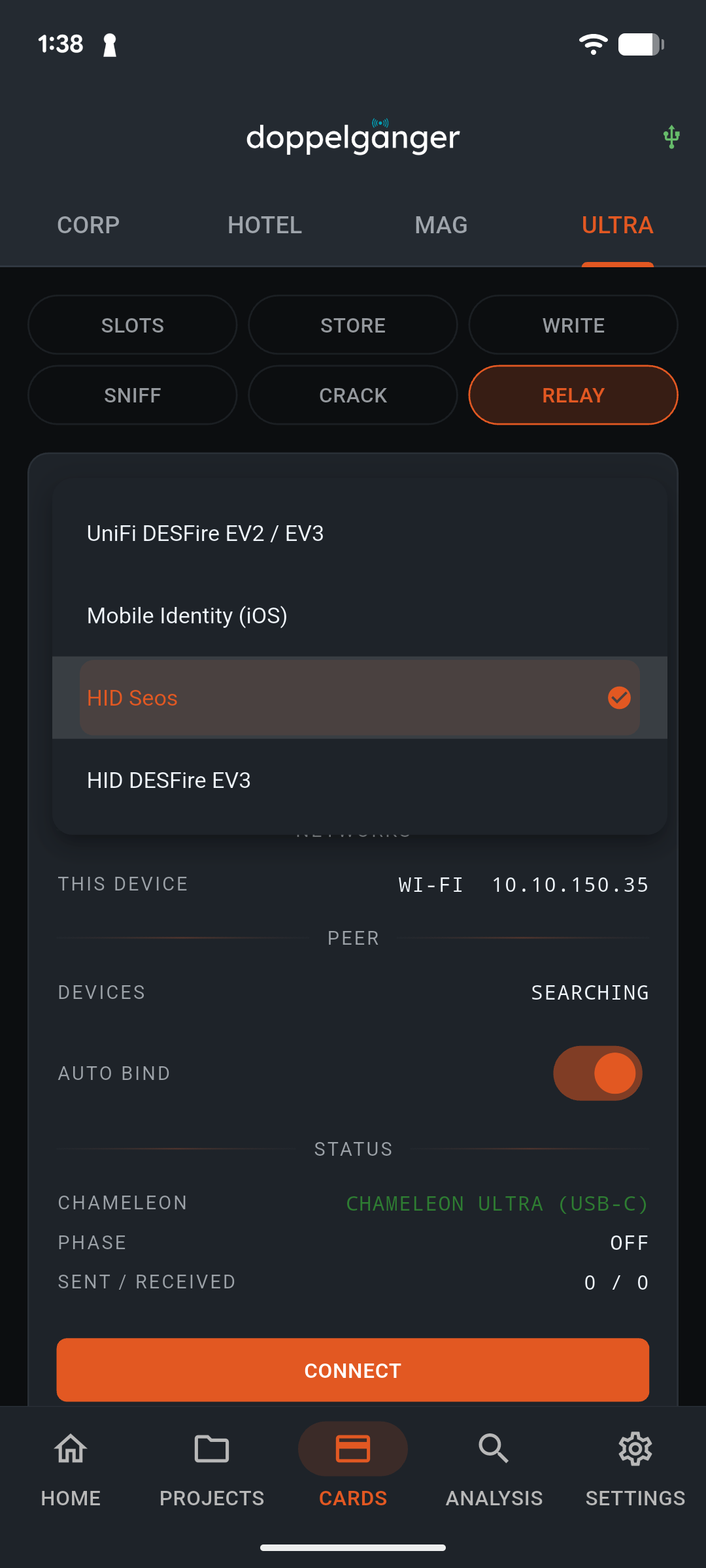
- UniFi DESFire EV2 / EV3.
- Mobile Identity (iOS).
- HID Seos.
- HID DESFire EV3.
CREDENTIAL TYPE names the kind of credential. Set it on the handset you press CONNECT on, and the other handset takes the same one.
| CREDENTIAL TYPE |
|---|
| UniFi DESFire EV2 / EV3 |
| Mobile Identity (iOS) |
| HID Seos |
| HID DESFire EV3 |
A mobile credential in an Android wallet is not on the list.
Running one
Section titled “Running one”- Put each ATLAS Chameleon Ultra on its handset’s USB cable, and switch each handset’s own NFC off.
- On one handset, set ROLE and CREDENTIAL TYPE. The other handset does not need setting. It takes the opposite role and the same type when the first one starts.
- Read NETWORKS on both. The two handsets have to hold an address on the same network.
- Put the genuine card on the CREDENTIAL unit.
- Tap CONNECT on either handset. One press starts both. The button reads CONNECTING, then STOP.
- Watch PHASE under STATUS.
- Tap STOP on either handset. It stops both.
CONNECT waits up to 10 seconds for the other handset to answer.
| What it says | Which handset | What happened |
|---|---|---|
| The other phone has not answered, still listening | CREDENTIAL | nothing answered in the 10 seconds. This handset goes on listening, so the other one can still start the relay from its side |
| The other phone has not answered | READER | nothing answered in the 10 seconds, and nothing was started |
| The other handset is on an older build and cannot say which relay it started. Update it, or start both by hand on the same one. | either | the other handset runs an older ATLAS than this one |
| The other handset asked for a relay this build does not have. Update both handsets. | either | this copy of ATLAS does not have the relay the other handset asked for |
NETWORKS, both handsets side by side
Section titled “NETWORKS, both handsets side by side”NETWORKS lists every address this handset holds, one THIS DEVICE row each, as the kind of network and the address. Once the other handset is found its addresses follow as PEER rows, and the one the relay is using is picked out in the accent color.
| Row | Reads |
|---|---|
| THIS DEVICE | one row for each address, or NO INTERFACE with no network at all |
| PEER | one row for each address the other handset holds |
| LINK | the delay to the other handset, as an average in milliseconds and a peak when the two differ. Shown once ATLAS has a figure |
Two handsets on one network name can still sit on different subnets, and this is where it shows: no THIS DEVICE address shares a network with any PEER address.
PEER and AUTO BIND
Section titled “PEER and AUTO BIND”AUTO BIND decides who picks the other handset.
| AUTO BIND | The PEER card shows | When to use it |
|---|---|---|
| on | DEVICES, SEARCHING until a handset answers, then PEER with that handset’s name | two handsets and nobody else running ATLAS on the network |
| off | a dropdown reading SELECT A HANDSET, listing every handset answering by name with its role and credential type, then PEER ADDRESS and BIND ADDRESS | several handsets on one network, or a handset that is not being found |
AUTO BIND only ever chooses. It never starts a relay, and CONNECT stays a deliberate press.
PEER ADDRESS takes the other handset’s address as four numbers, and BIND ADDRESS commits it, answering Bound to and the address. Anything else is refused with Not an IPv4 address. Both controls are hidden while a relay runs.
STATUS
Section titled “STATUS”| Row | Reads |
|---|---|
| CHAMELEON | the connected unit by name, in green |
| PHASE | where the relay is, in the table below |
| READS | a count, on the credential types that report one |
| SENT / RECEIVED | messages passed to the other handset and taken from it |
| RADIO | ENERGIZING, shown only while the unit is energizing its field |
| PHASE | Seen on | What it means |
|---|---|---|
| OFF | either | no relay is running |
| WAITING FOR PEER | either | this handset is up and the other has not linked yet |
| SEEKING CREDENTIAL | CREDENTIAL | the unit is looking for the card. A number in brackets counts its tries |
| AWAITING CREDENTIAL | READER | linked, and holding off until the other side has the card |
| ARMING | READER | the card is found and the unit is not on the air yet. This takes seconds |
| RELAYING | either | both units are up and messages are passing |
| COMPLETE | either | the transaction ended. The unit at the door has stood down |
| NO CREDENTIAL | CREDENTIAL | the unit never found the card. A number in brackets counts its tries |
The slot it takes
Section titled “The slot it takes”RELAY SLOT is a reading, not a setting, and it reads SLOT 8. A relay session always runs in that slot. See Slots for why door credentials are better kept in SLOT 1 to SLOT 7.
The phone’s own NFC gets in the way
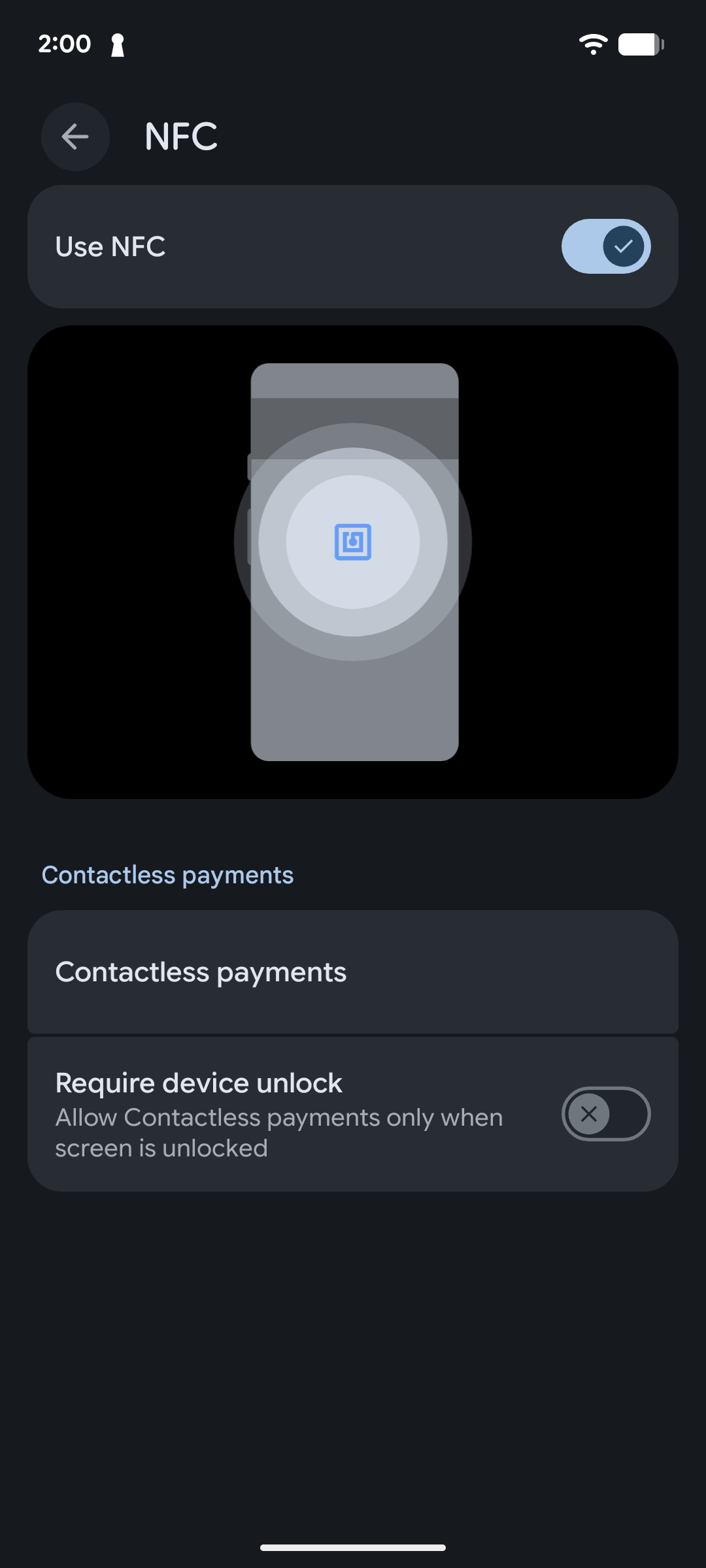
Section titled “The phone’s own NFC gets in the way”On this chip only, the tab’s banner can read PHONE NFC IS ON - TAP TO TURN IT OFF. The handset and its ATLAS Chameleon Ultra sit a few centimeters apart, and a handset whose own NFC radio is on picks the ATLAS Chameleon Ultra up and interferes with the session. ATLAS cannot switch that radio itself. Tapping the banner opens Android’s NFC settings, and the banner clears within about two seconds of the radio going off.
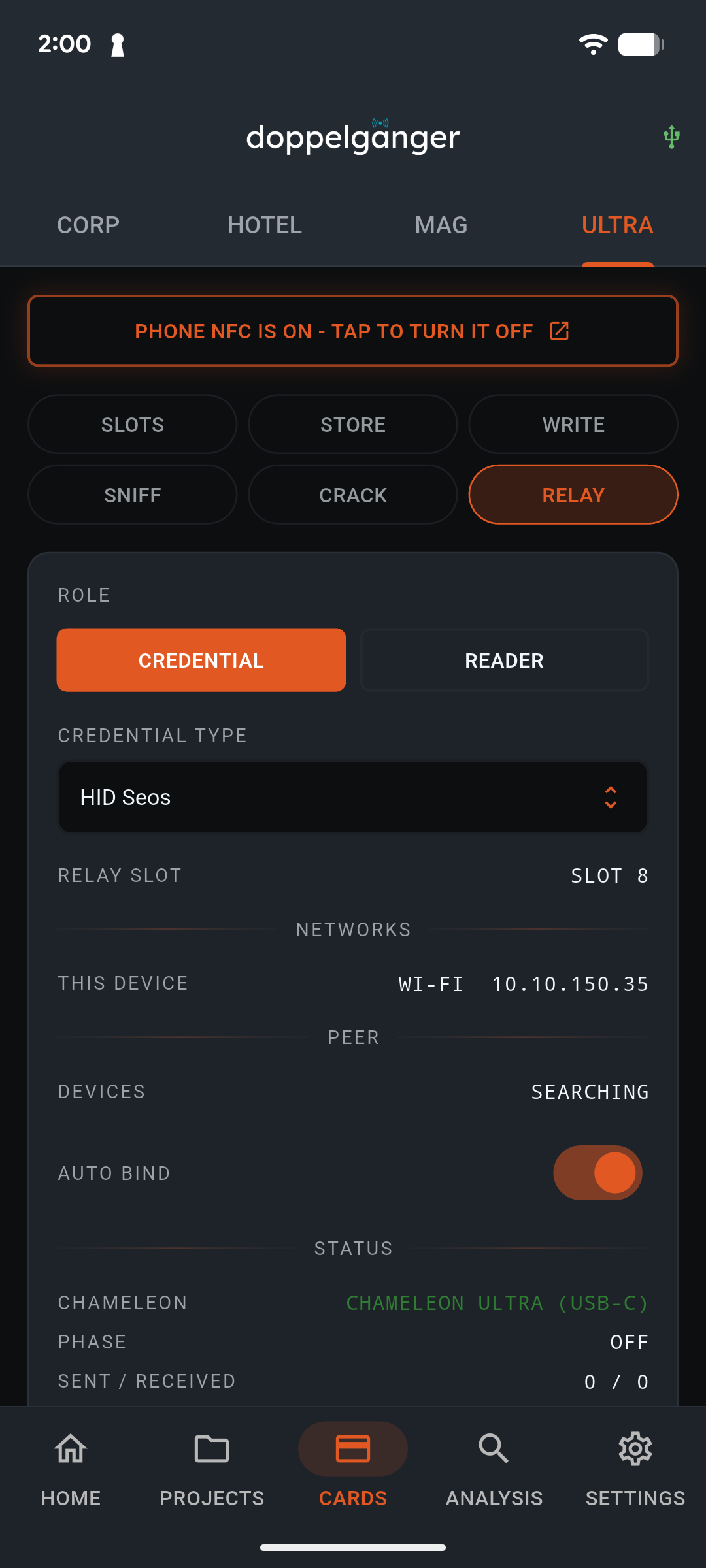
- PHONE NFC IS ON - TAP TO TURN IT OFF.
- RELAY, the only chip that shows it.
- Use NFC. Switch it off, then go back.
- No banner. The chips move up.
- RELAY.
With no ATLAS Chameleon Ultra connected, the banner reads NO CHAMELEON ULTRA DEVICE CONNECTED instead, as it does on every chip.
Where to go next
Section titled “Where to go next”| You want | Page |
|---|---|
| Why a relay is the test that matters on a modern credential | ATLAS Chameleon Ultra |
| To find out what the reader accepts first | Sniff and reader fingerprint |