
Vulnerability reference
A client report is built out of this page. Everything else in Field Operations records what a site has. This records what is wrong with it, and a client report is built out of these entries rather than out of the inventory around them.
They are collected here for two reasons. On a job you want to know what the list contains before you are standing in front of the door, because a weakness you did not know the app could record is one you will write into a free text note and lose. And when the report is written, the taxonomy is what makes two assessments of the same site comparable, and two assessors comparable to each other.
Ninety three entries across four asset types.
| Asset | Entries | Where it is recorded |
|---|---|---|
| Entry points | 42 | Entry points |
| Cameras | 33 | Security cameras, OSINT cameras |
| Security personnel | 11 | Security personnel |
| Barriers | 7 bypasses | Barriers and perimeters |
Every list also takes a + Custom entry, so the taxonomy is a floor rather than a ceiling.
How they are recorded
Section titled “How they are recorded”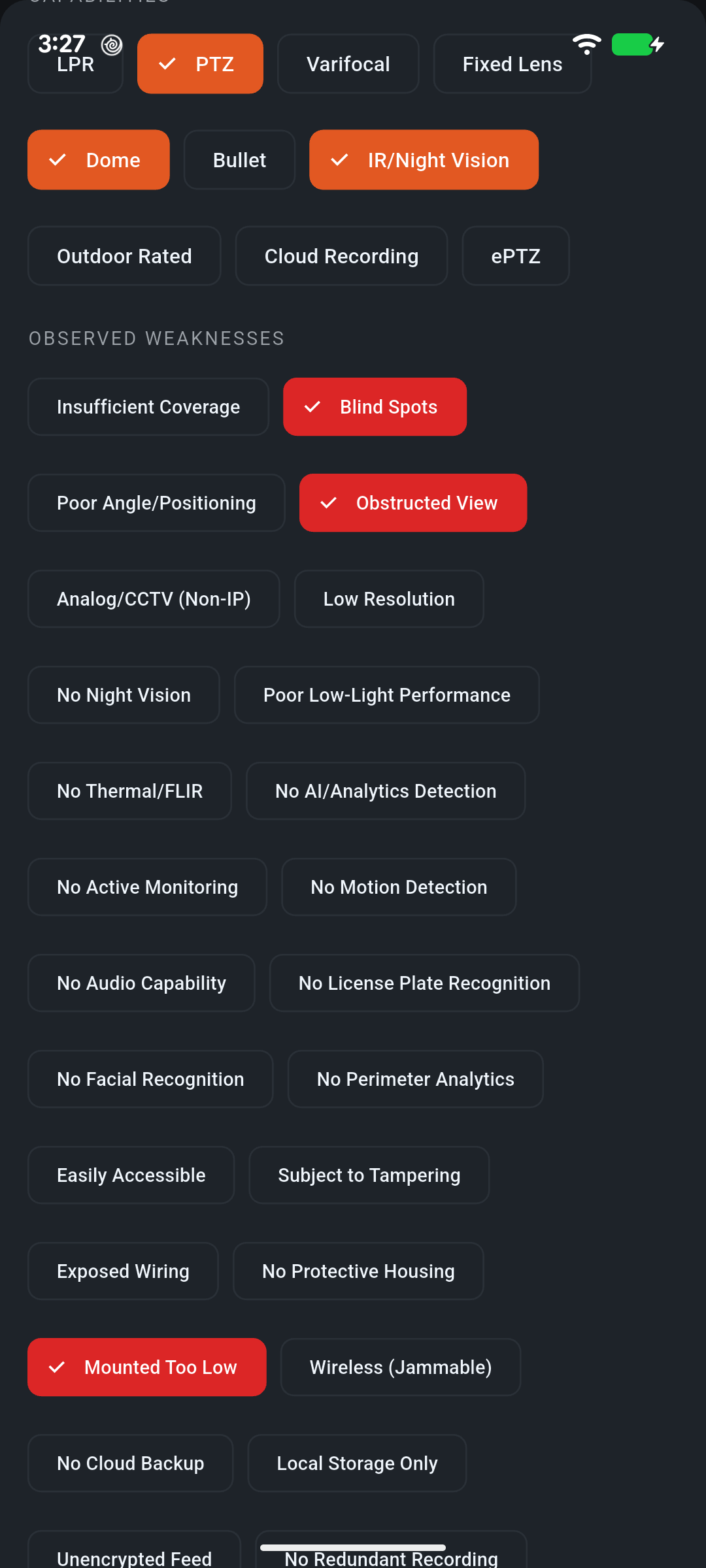
- Capabilities, in orange. These say what the asset is.
- OBSERVED WEAKNESSES, and the color changes deliberately.
- Red means a finding, which is a different kind of statement.
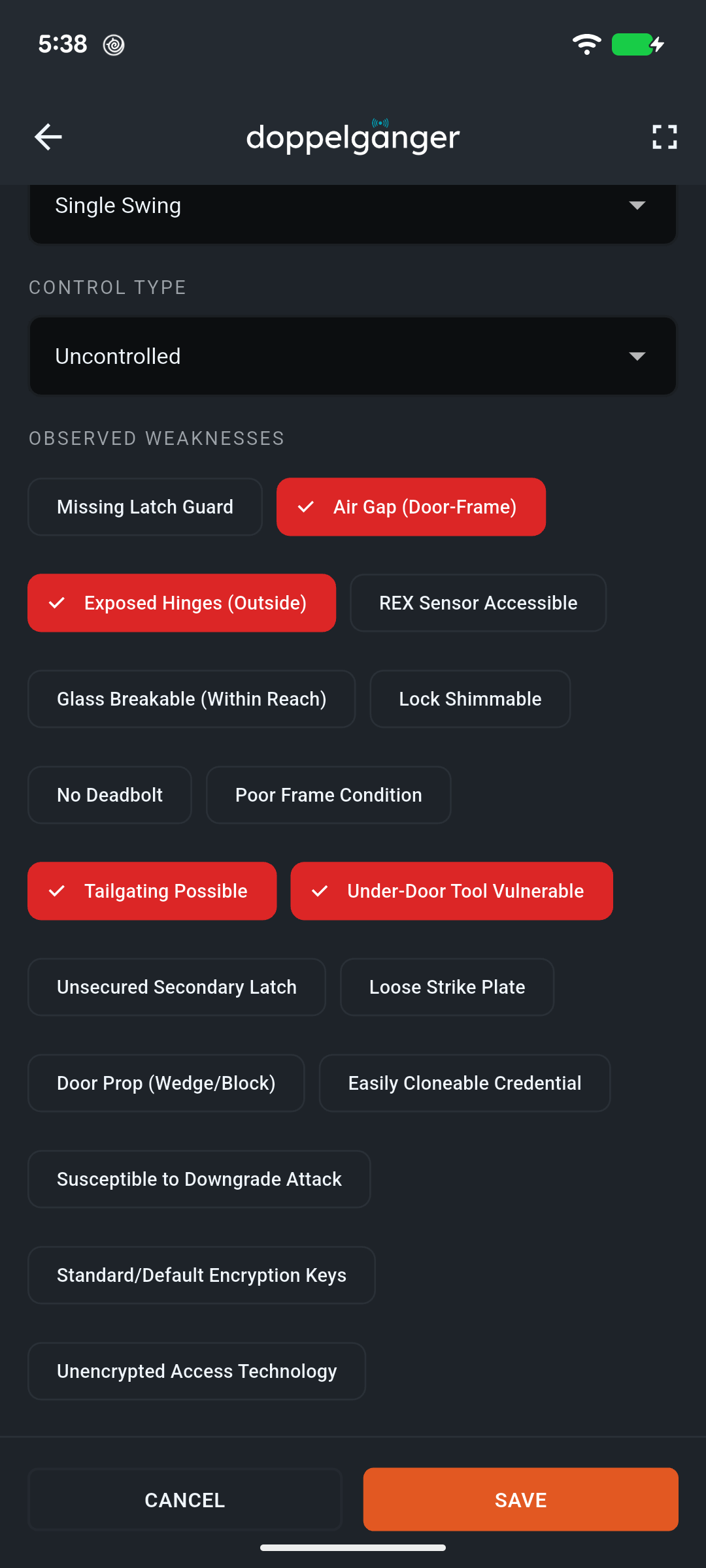
- The block, sitting under the two fields that describe the door.
- A selected weakness fills red and takes a check.
- Tailgating and the under-door tool, two findings on one door.
- The list runs on from the door into the credential it reads.
- Unencrypted access technology, which is a Proxmark finding, not a visual one.
Every asset editor carries an OBSERVED WEAKNESSES block near the bottom, as multi-select chips. A selected weakness draws red, which is not styling: on the same screens, chips that merely describe the asset draw in the accent color. The color is the difference between “this camera is a dome” and “this camera is in the wrong place”.
Entry points
Section titled “Entry points”The largest list, and it splits into four problems that are attacked with completely different tools.
Physical door and lock
Section titled “Physical door and lock”| Weakness | What it means |
|---|---|
| Missing Latch Guard | the latch is reachable from outside, so it can be slipped |
| Air Gap (Door-Frame) | a gap wide enough to work a tool into |
| Exposed Hinges (Outside) | the hinge pins are on your side of the door |
| REX Sensor Accessible | the request-to-exit sensor can be triggered from outside |
| Glass Breakable (Within Reach) | glass close enough to the hardware to matter |
| Lock Shimmable | the latch takes a shim |
| No Deadbolt | latch only |
| Poor Frame Condition | the frame will not hold the strike under force |
| Tailgating Possible | the door’s geometry and traffic permit following somebody through |
| Under-Door Tool Vulnerable | floor clearance allows an under-door tool to reach the lever |
| Unsecured Secondary Latch | the inactive leaf is not properly secured |
| Loose Strike Plate | the strike moves, so the latch does not seat |
| Door Prop (Wedge/Block) | observed propped, or trivially proppable |
RFID and credential
Section titled “RFID and credential”| Weakness | What it means |
|---|---|
| Easily Cloneable Credential | the technology copies with commodity tooling |
| Susceptible to Downgrade Attack | the reader accepts a weaker technology than the one issued |
| Standard/Default Encryption Keys | factory keys were never changed |
| Unencrypted Access Technology | the credential presents a number in the clear |
| Legacy Protocol (No Encryption) | the reader to controller link is unprotected |
| Credential Replay Vulnerable | a captured transaction can be replayed |
| No Mutual Authentication | the card proves itself to the reader and not the reverse |
| Weak Key Diversification | one key, or a predictable key, across the estate |
| Mobile Credential Spoofable | the phone based credential can be impersonated |
These nine are the ones ATLAS itself helps you prove. What the Proxmark reads and what the ATLAS Chameleon Ultra emulates is the evidence behind this group, which is why they are worth more in a report than the physical entries above them.
Padlock and chain
Section titled “Padlock and chain”| Weakness | What it means |
|---|---|
| Padlock Shimmable | the shackle takes a shim |
| Padlock Bypassed (Decode) | decoded rather than forced |
| Lockbox Bypassed (Decode) | the key safe was decoded |
| Cheap/Low-Security Padlock | the lock does not match what it is protecting |
| Chain/Cable Cuttable | the chain is the weak link, not the lock |
| Combination Guessable | a default or a predictable combination |
| Lock Body Exposed | the body can be attacked directly |
| Hasp/Staple Vulnerable | the mounting fails before the lock does |
Access control
Section titled “Access control”| Weakness | What it means |
|---|---|
| Keypad Visible/Shoulder Surfing | the code can be observed being entered |
| Master Key System Compromised | the master system is known broken or known leaked |
| Anti-Tailgating Sensor Blind Spot | the sensor misses a part of the opening |
| Mantrap Bypass (Both Doors Open) | the interlock can be defeated by timing |
| Interlock Defeated (Held Open) | holding one door defeats the sequence |
| Weight Sensor Calibration Off | the portal’s weight check does not discriminate |
| Guard Station Unmanned | the post exists and nobody is in it |
| Camera Blind Spot at Entry | the entry is not covered by its own camera |
| Emergency Override Accessible | the break glass or override is reachable from outside |
| Anti-Passback Not Enforced | a credential can be used twice in the same direction |
| Social Engineering Vulnerable | the process has a human bypass |
| Visitor Badge Abuse Possible | a visitor badge opens more than it should, or is not collected |
Cameras
Section titled “Cameras”Shared between Security cameras and OSINT cameras, because a weakness in a camera does not depend on who owns it.
| Group | Entries |
|---|---|
| Coverage, 4 | Insufficient Coverage, Blind Spots, Poor Angle/Positioning, Obstructed View |
| Technology, 4 | Analog/CCTV (Non-IP), Low Resolution, No Night Vision, Poor Low-Light Performance |
| High security gaps, 8 | No Thermal/FLIR, No AI/Analytics Detection, No Active Monitoring, No Motion Detection, No Audio Capability, No License Plate Recognition, No Facial Recognition, No Perimeter Analytics |
| Physical security, 5 | Easily Accessible, Subject to Tampering, Exposed Wiring, No Protective Housing, Mounted Too Low |
| Network and recording, 6 | Wireless (Jammable), No Cloud Backup, Local Storage Only, Unencrypted Feed, No Redundant Recording, Short Retention Period |
| Maintenance, 4 | Not Operational, Dirty/Obscured Lens, Damaged Housing, Outdated Firmware |
| Other, 2 | Decoy/Fake Camera, Wrong Type for Application |
The high security group is eight absences. None of them is a fault on an ordinary building. They are findings only where the site’s own risk profile called for the capability, and a report that lists all eight against a strip mall is a report nobody will read twice.
Security personnel
Section titled “Security personnel”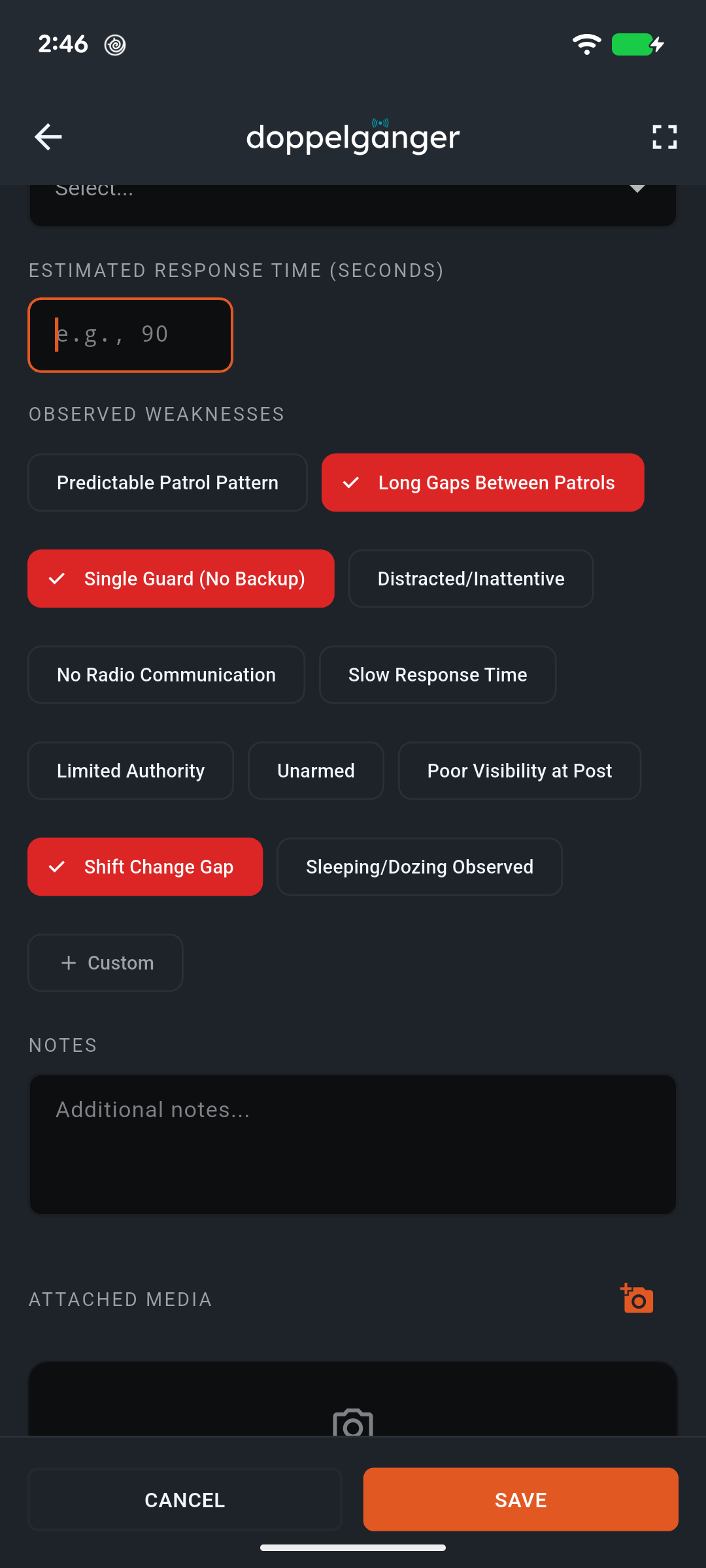
- The same red, on a different asset. The convention holds everywhere.
- Long Gaps Between Patrols, which should have a measured interval behind it.
- Shift Change Gap, often worth more than the other ten together.
- Custom, for anything the list does not name.
| Weakness | What you must have established |
|---|---|
| Predictable Patrol Pattern | the same route at the same times, more than once |
| Long Gaps Between Patrols | a measured gap |
| Single Guard (No Backup) | nobody else on shift, not just nobody else in view |
| Distracted/Inattentive | what the distraction was |
| No Radio Communication | no radio carried, or carried and not working |
| Slow Response Time | something happened and you timed it |
| Limited Authority | observe and report, confirmed rather than assumed |
| Unarmed | visibly, which is not the same as actually |
| Poor Visibility at Post | the post cannot see what it covers |
| Shift Change Gap | a measured window with nobody on post |
| Sleeping/Dozing Observed | exactly that, and photograph it or do not claim it |
Barriers, 7 bypasses
Section titled “Barriers, 7 bypasses”Barriers record a bypass rather than a weakness, because a fence does not have faults so much as ways through it.
| Bypass | What it means |
|---|---|
| Climb Over | the height and the surface permit climbing |
| Dig Under | the ground does not continue the barrier |
| Cut Through | the material yields to hand tools |
| Ram/Crash | the barrier is not rated for vehicle impact |
| Gap in Coverage | the barrier does not actually close its own line |
| Defeat Sensor | the detection on the barrier can be beaten without beating the barrier |
| Tailgate Vehicle | a vehicle gate closes slowly enough to follow through |
A barrier also records twelve separate controls on the line, from razor wire to fiber optic sensors, which is what a bypass is being claimed against. Those are on Barriers and perimeters.
Reading the whole set
Section titled “Reading the whole set”The four lists are not of equal weight in a report and should not be presented as if they were.
- The RFID and credential nine are the strongest, because ATLAS gives you the evidence for them rather than your opinion.
- The measured ones come next. A patrol gap with a time on it, a response time in seconds, a retention period in days.
- The observed ones after that. Exposed hinges, a propped door, a dirty lens.
- The absences last, and only where the site asked for the thing that is absent.
A report ordered that way reads as an assessment. The same ninety three entries dumped as a flat checklist reads as a scan, and the client can tell the difference.