
Security personnel
Every other control on a site is passive. A reader checks a credential, a camera records, a fence stands there. Guards are the only part of the security program that can see you, decide something about you, and act on it while you are still standing in front of them. They are also the part that changes hour to hour, which is why a camera position recorded once stays true for a year and a patrol pattern recorded once is worth about a week.
So this surface is not an inventory. It is a timing record. The thing a report is built from is not “there is a guard at the lobby”, it is “one unarmed guard, lobby desk, fixed route, thirty minute interval, no radio, and a four minute gap at shift change at 23:00.” That sentence is a finding. The first one is a photograph.
It is also the asset you record most carefully from the furthest away. You are standing in a lobby with a phone, looking at a person whose job is to notice people standing in lobbies with phones, so what you capture is what you can see in a single pass without lingering, and the notes get filled in from the car.
The short version
Section titled “The short version”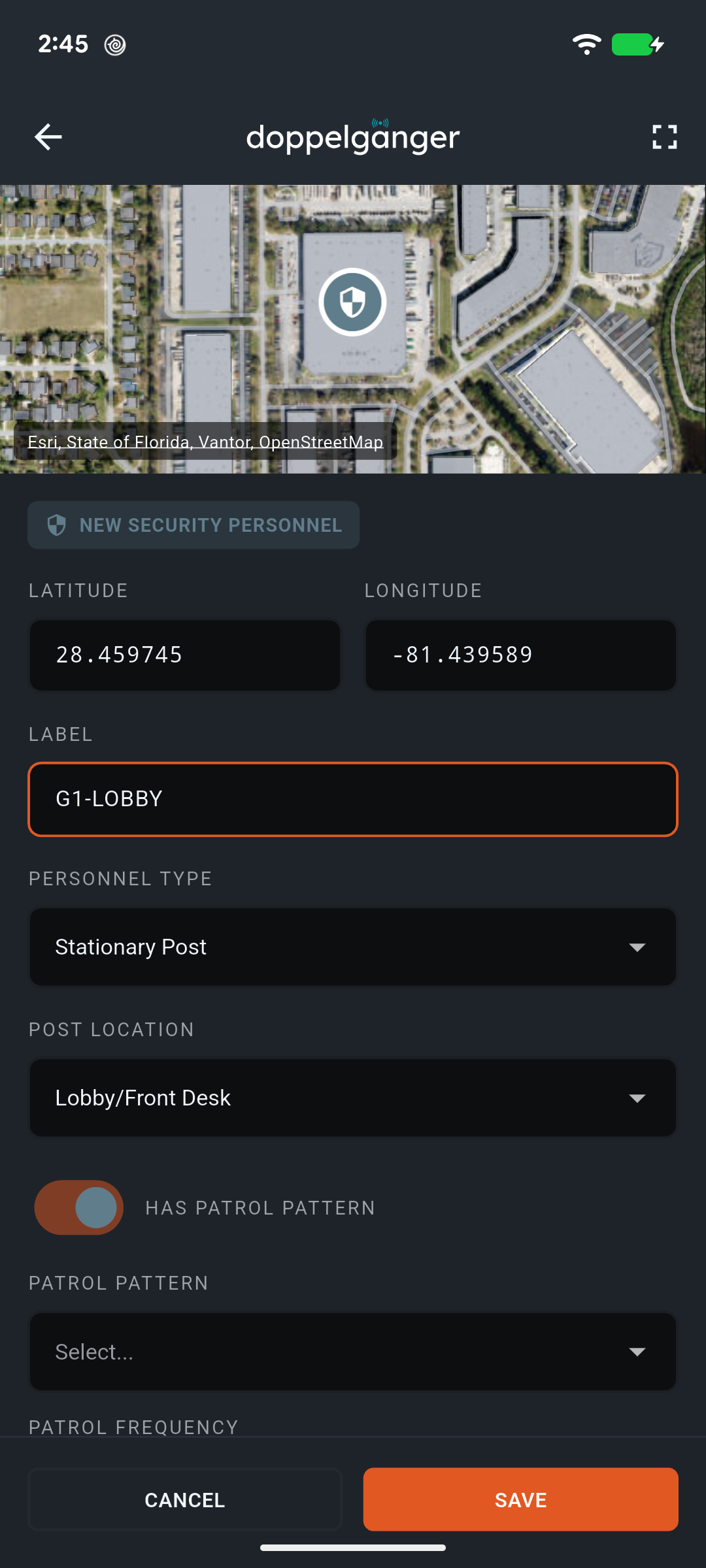
- The coordinates, seeded from the map above and editable by hand.
- A label you will recognize in a report. G1-LOBBY, not Guard 1.
- PERSONNEL TYPE, nine entries, and what the map marker will say.
- POST LOCATION. Always shown, and the most useful field on a fixed post.
- HAS PATROL PATTERN. Off, the patrol block does not exist at all.
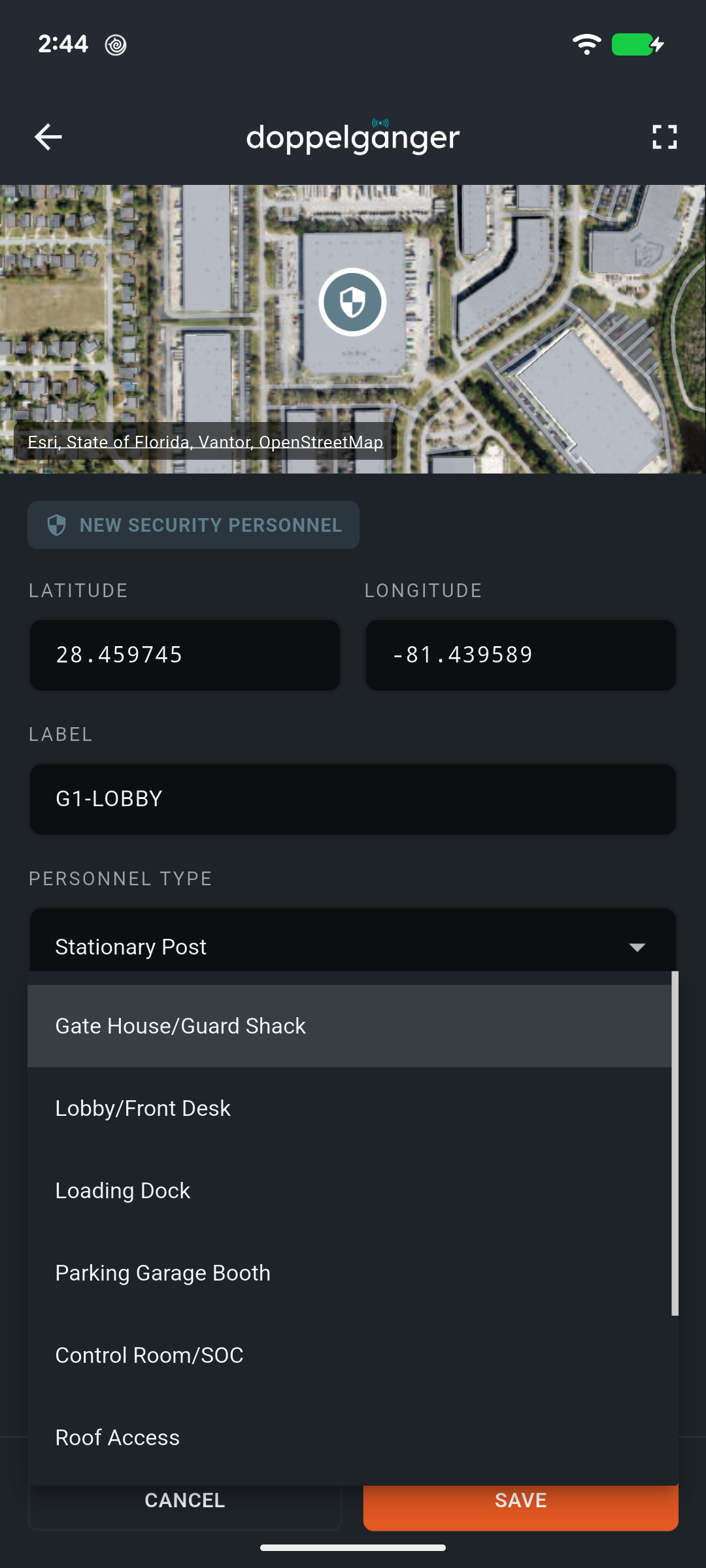
- The field you tapped, with the list drawn over the form.
- Eight posts, every one of them a different approach problem.
- The list scrolls. Custom Post Location at the end takes anything else.
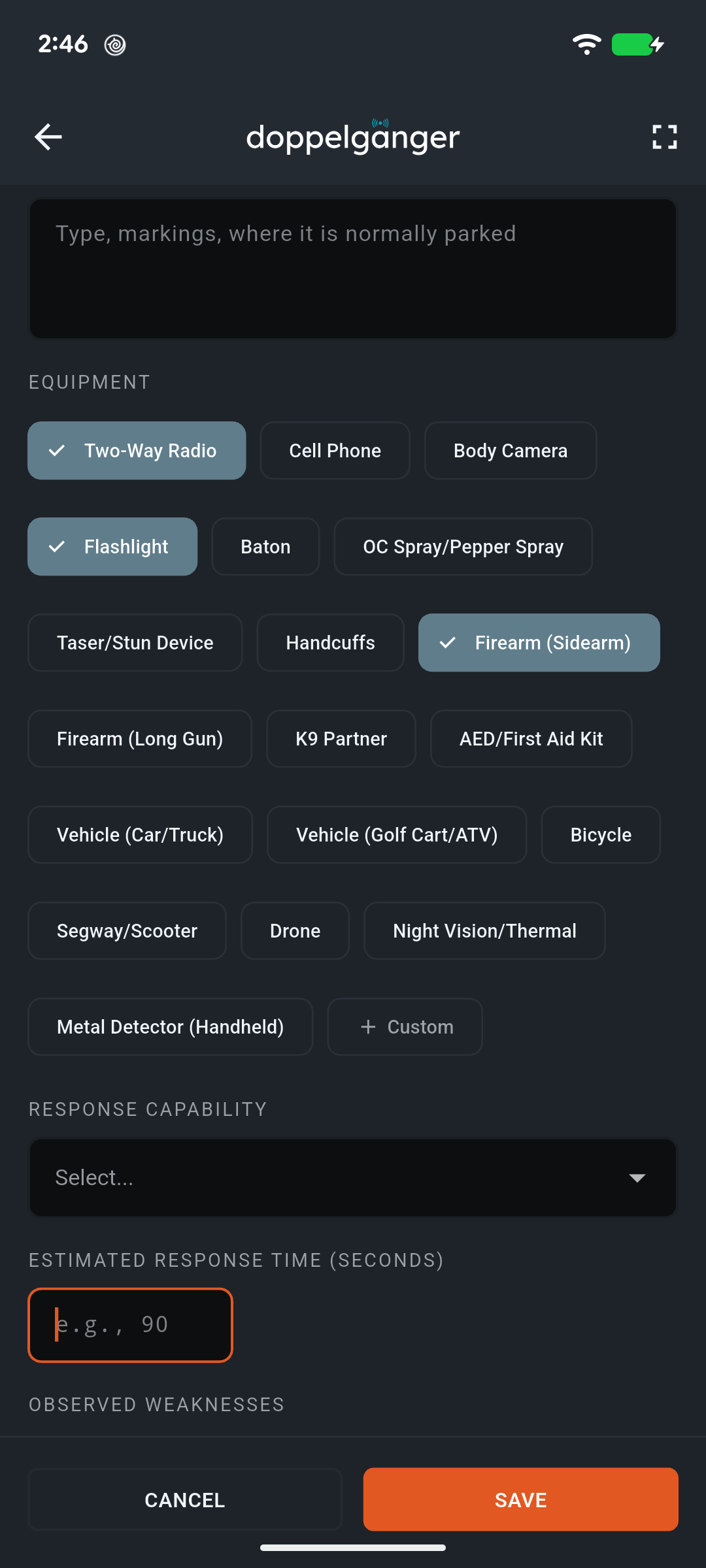
- EQUIPMENT. Multi select, so a guard carries as many as you saw.
- Selected chips fill and take a check. Tap again to clear one.
- RESPONSE CAPABILITY, which is authority rather than equipment.
- Response time in seconds, which is the number that decides your window.
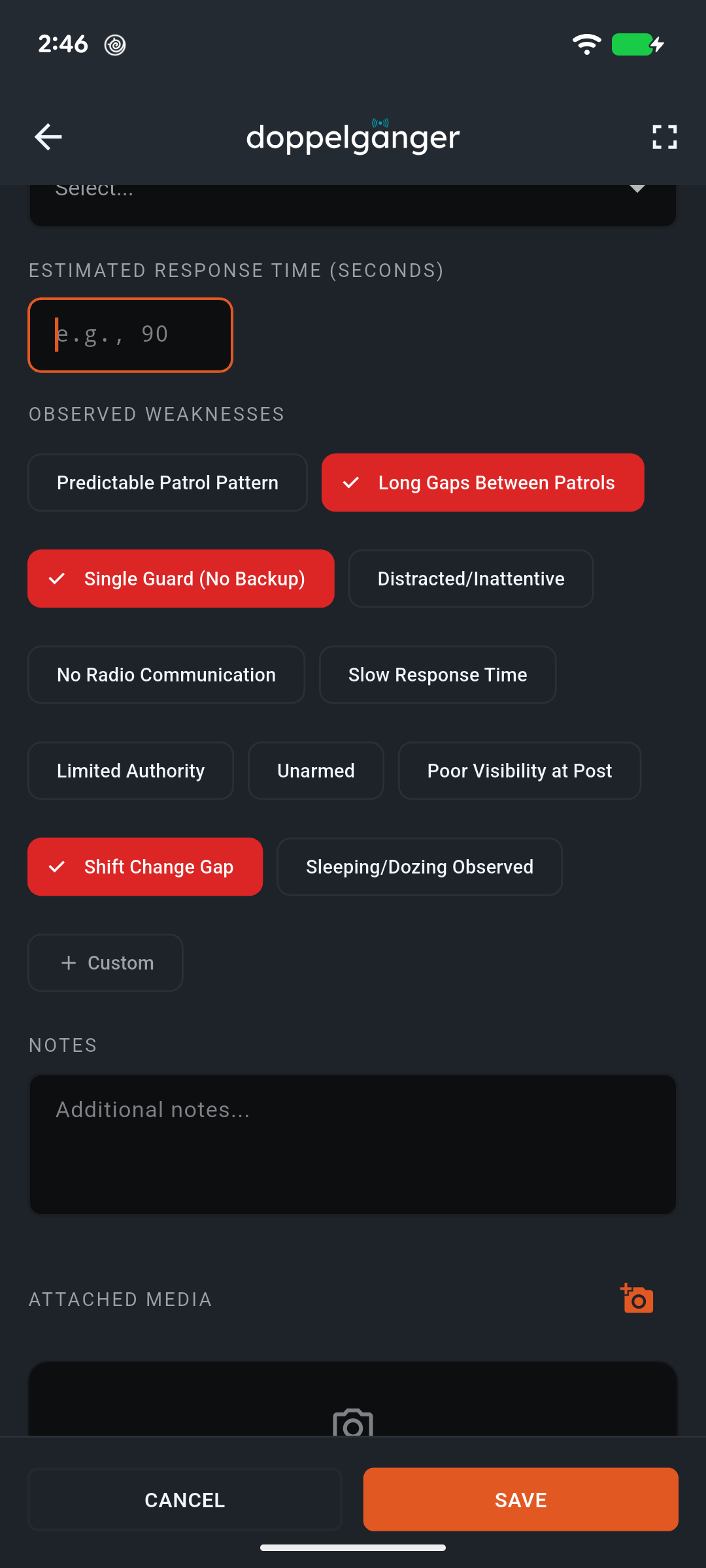
- OBSERVED WEAKNESSES, which is the part a client report is built from.
- A selected weakness fills RED, not the equipment blue. It is a finding.
- Eleven of them, and every one is something you watched happen.
- Shift Change Gap, the one most often worth more than all the others.
- Custom, for a weakness the list does not have a name for.
- On Home, tap Add Artifact, then Security Personnel.
- Tap the map so the pin sits on the post, or leave it where you are standing. Typing into LATITUDE or LONGITUDE places it too, and either one stops the pending GPS fix from overwriting the coordinate you set.
- Give it a LABEL you will recognize later, and set PERSONNEL TYPE.
- Fill what you actually observed. Everything is optional and blank means not observed.
- SAVE. It lands on the project and on the operational map.
Personnel type, which reshapes the form
Section titled “Personnel type, which reshapes the form”The first real decision, and the one the map marker and the report both lead with. Nine entries.
| Type | What it is | What it changes about your approach |
|---|---|---|
| Stationary Post | fixed position, does not leave it | you can plan around a known location, and the post has blind sides |
| Roaming/Foot Patrol | walks a route on foot | timing is everything, and the route has a far end |
| Vehicular Patrol | drives a route | covers more ground, sees less of it, and cannot follow you inside |
| Mounted | horseback | rare, slow indoors, high visibility over a crowd |
| K9 Unit | handler with a dog | the dog changes the risk of concealment, not of observation |
| Bike Patrol | bicycle | fast across a campus, useless in a stairwell |
| Receptionist/Desk Security | front of house, security function secondary | often the person who actually buzzes the door |
| Plainclothes/Undercover | not in uniform, by design | you cannot count them, so record the one you spotted |
| Executive Protection | assigned to a person, not a place | moves with their principal and escalates differently |
Receptionist and Plainclothes are the two people get wrong. A receptionist who buzzes a door is access control whether or not anyone calls them security, and recording them as nothing leaves a hole in the report where the actual decision maker was. Plainclothes is the opposite problem: you are recording someone you are not certain about, which is exactly why the entry exists.
Post location, shown for every type
Section titled “Post location, shown for every type”On a roaming patrol it is usually left blank, and on a fixed post it is the most useful single field on the form. Eight entries, and the list is a list of approach problems rather than a list of rooms.
| Post | Why it is on the list |
|---|---|
| Gate House/Guard Shack | first control, and usually the only one with vehicle authority |
| Lobby/Front Desk | the tailgating surface, and the one that signs you in |
| Loading Dock | the door most often propped, watched by the person least often trained |
| Parking Garage Booth | controls the approach rather than the building |
| Control Room/SOC | not a post you pass, the post that watches every other one |
| Roof Access | present only where roof entry is a known problem, which tells you it is |
| Executive Floor | a post that exists for one person, and escalates differently |
| Data Center | the post most likely to be armed, badged and logged |
The field also takes a Custom Post Location, which is the dialog at the end of the list.
The patrol block, which only exists if you switch it on
Section titled “The patrol block, which only exists if you switch it on”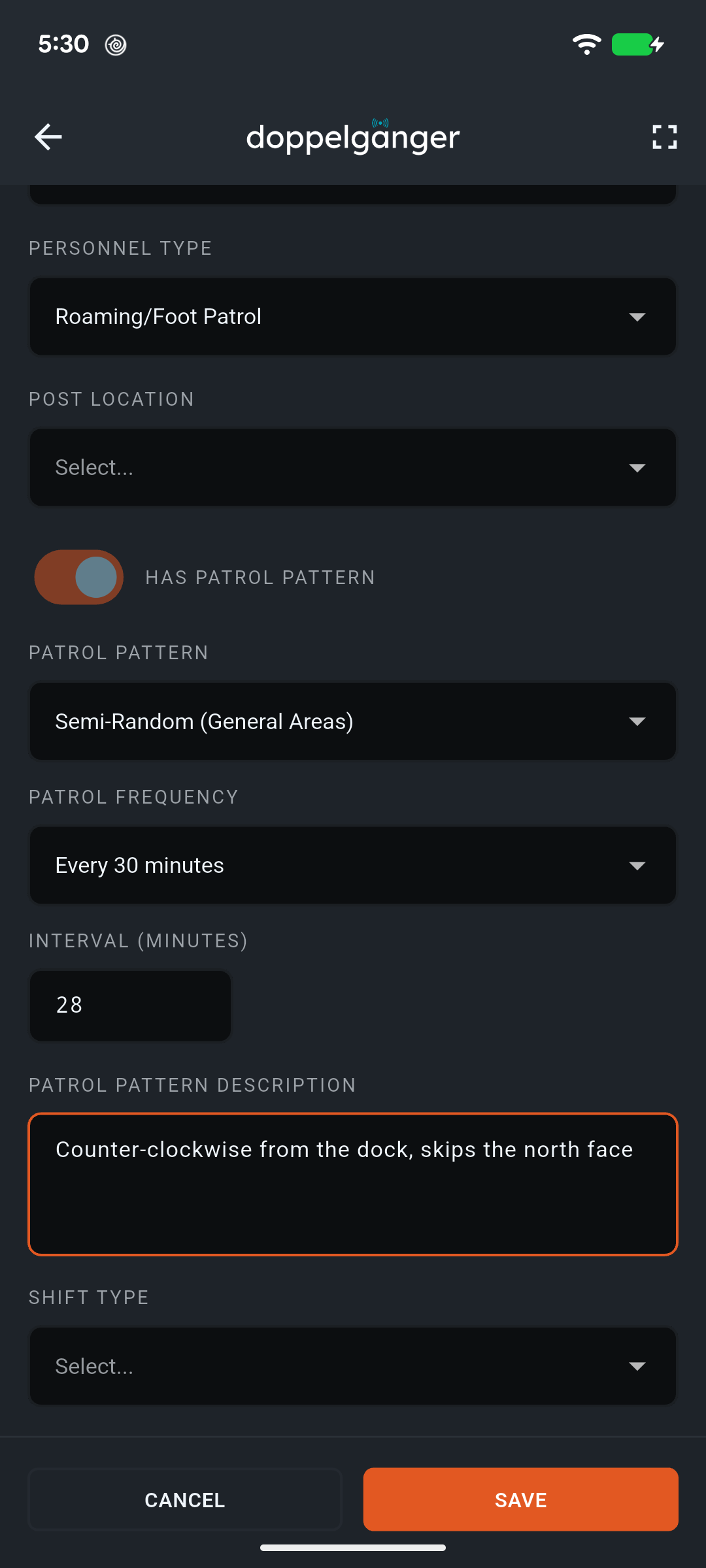
- HAS PATROL PATTERN. Off, none of the four below it is rendered.
- PATROL PATTERN, five entries, and this one is the common answer.
- PATROL FREQUENCY, the bucket, six entries.
- INTERVAL, the measured number, which beats the bucket.
- The description, where what makes them leave the route goes.
HAS PATROL PATTERN is a switch, and with it off the four fields below it are not rendered. That is deliberate. A stationary post with a blank patrol pattern and a roaming guard with a blank patrol pattern are different findings, and a form that showed both as empty boxes could not tell them apart.
With it on you get four fields.
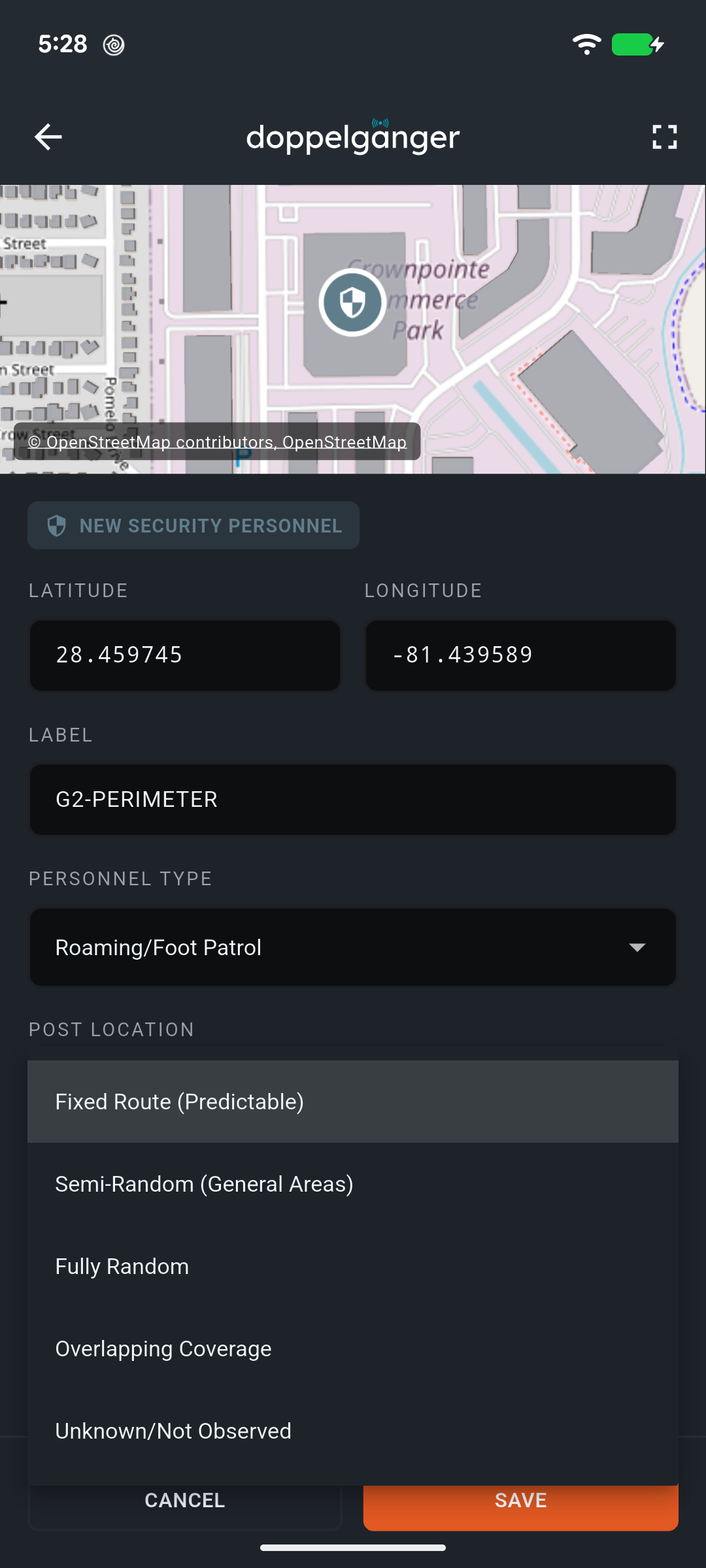
- A label you will recognize in a report. G2-PERIMETER, not Guard 2.
- Roaming on foot, which is the type this block exists for.
- Fixed Route. Time it once and you own the schedule.
- Fully Random. The finding is that they got this right.
- Unknown, for a patrol you saw and did not establish.
PATROL PATTERN, five entries, and they are ordered by how much they help you:
| Pattern | What it means for you |
|---|---|
| Fixed Route (Predictable) | the best case. Time it once and you own the schedule |
| Semi-Random (General Areas) | areas are known, timing is not. Plan for the area, not the clock |
| Fully Random | no timing to exploit. The finding is that they got this right |
| Overlapping Coverage | two or more patrols covering each other, so a gap in one is not a gap |
| Unknown/Not Observed | you saw a patrol and did not establish the pattern. Say so |
PATROL FREQUENCY, six entries: Constant (Always Present), Every 15 minutes, Every 30 minutes, Hourly, Every 2 hours, Irregular/Unpredictable.
INTERVAL (MINUTES) takes a number, and it exists alongside the frequency list because a measured thirty one minutes is worth more than the bucket it falls in. Fill it when you timed it.
PATROL PATTERN DESCRIPTION is free text, hinted Route, timing and what triggers a deviation. The last clause is the useful one. A route is a line on a map, but what makes a guard leave it, a door alarm, a phone call, a delivery, is what you will actually use.
Shift, which is where the gap lives
Section titled “Shift, which is where the gap lives”SHIFT TYPE, seven entries:
| Shift | Where the opportunity is |
|---|---|
| 24/7 Coverage | at the handovers, not in the hours |
| Day Shift Only | after it ends, and the building knows it |
| Night Shift Only | during the day, when nobody is watching the back |
| Business Hours Only | the two hours either side, when staff are present and guards are not |
| Weekend/Holiday Only | the inverse, and often a different contractor |
| Split Shifts | two handovers a day instead of one |
| On-Call/As Needed | there is no guard, there is a phone number. Response time matters more than anything else on this form |
SHIFT ROTATION NOTES is free text, hinted Handover times, overlap, who covers gaps. On most sites this field carries the single most valuable sentence in the record.
What they look like and what they carry
Section titled “What they look like and what they carry”UNIFORM DESCRIPTION, hinted Colors, markings, visible credential or badge. Record the credential, not just the shirt. A guard wearing a visible badge on a lanyard has told you what the site’s badges look like, which is a different finding filed under Badge intel.
VEHICLE DESCRIPTION, hinted Type, markings, where it is normally parked. Where it is parked is the part that matters, because a parked patrol vehicle is a patrol that is not happening.
EQUIPMENT is a multi select of nineteen chips, and a selected one fills and takes a check. Tap it again to clear it.
| Group | Chips |
|---|---|
| Communications | Two-Way Radio, Cell Phone |
| Recording | Body Camera |
| Light and tools | Flashlight, Metal Detector (Handheld), Night Vision/Thermal |
| Less lethal | Baton, OC Spray/Pepper Spray, Taser/Stun Device, Handcuffs |
| Lethal | Firearm (Sidearm), Firearm (Long Gun) |
| Partner | K9 Partner |
| Medical | AED/First Aid Kit |
| Mobility | Vehicle (Car/Truck), Vehicle (Golf Cart/ATV), Bicycle, Segway/Scooter |
| Airborne | Drone |
Two-Way Radio is the chip that changes your plan most. A guard without one is a guard who has to walk to report you, and that walk is your window. A + Custom chip at the end takes anything the list does not carry.
Response, which is the number that sizes your window
Section titled “Response, which is the number that sizes your window”RESPONSE CAPABILITY, six entries, and this is authority rather than equipment. An armed guard with observe and report orders is a different problem from an unarmed one who will detain you.
| Capability | What it means when you are caught |
|---|---|
| Observe and Report Only | they call someone. Your window is their phone call plus the drive |
| Detain Until Police Arrive | they will physically stop you and hold you |
| Armed Response (Lethal) | treat the whole site accordingly, and say so in the brief |
| Armed Response (Non-Lethal) | taser or OC, and a willingness to use it |
| Escort/Access Control Only | no authority beyond the door. Often contract reception |
| Medical/First Aid Response | not a security function at all, which is itself the finding |
ESTIMATED RESPONSE TIME (SECONDS) takes a number, hinted 90. Seconds, not minutes, because the difference between 45 and 120 is the difference between two very different plans and a minutes field would round both to the same answer.
Observed weaknesses
Section titled “Observed weaknesses”Eleven chips, and a selected one draws red rather than the blue the equipment chips use. That color difference separates them: equipment is description, a weakness is a finding, and the two are not the same kind of statement.
| Weakness | What you must have actually seen to claim it |
|---|---|
| Predictable Patrol Pattern | the same route at the same times, more than once |
| Long Gaps Between Patrols | a measured gap, with the interval recorded above |
| Single Guard (No Backup) | nobody else on shift, not just nobody else in view |
| Distracted/Inattentive | phone, conversation, television. Say which in the notes |
| No Radio Communication | no radio carried, or carried and not working |
| Slow Response Time | something happened and you timed the response |
| Limited Authority | observe and report, confirmed rather than assumed |
| Unarmed | visibly, which is not the same as actually |
| Poor Visibility at Post | the post cannot see what it is supposed to cover |
| Shift Change Gap | a measured window with nobody on post |
| Sleeping/Dozing Observed | exactly what it says, and photograph it or do not claim it |
A + Custom chip takes a weakness the list does not name.
Notes and attachments
Section titled “Notes and attachments”NOTES is free text, hinted Additional notes…, and it is where the sentence that does not fit a chip goes. ATTACHED MEDIA takes photos and video through the camera glyph at the right of its heading.
Attaching a photograph of a person is the most sensitive capture on this entire surface. It is almost always the right call for a uniform or a vehicle and almost never the right call for a face, and the decision belongs in the rules of engagement rather than in the moment. See Photos and attachments.
Where it goes afterward
Section titled “Where it goes afterward”A saved entry lands on the project and draws on the operational map under the Security Personnel layer. The map marker carries the label, so the label is what you will be reading at a distance, which is the argument for G1-LOBBY over Guard 1.
Everything on this form is editable afterward. Open the entry from the project’s AWARENESS tab, or tap its marker on the map, and the same editor opens with EDIT SECURITY PERSONNEL at the top instead of NEW.