
Diagnostics
The worst way to find out the app cannot write to storage is after a card read, standing at the door, with the credential already gone. The second worst is at the write-up, when the file you expected is not there.
Diagnostics is the check that costs one tap before you leave. Settings, then Diagnostics. The row reads Self-audit of storage writes and the NFC radio, and that is the whole scope.
It runs on open and reports a line per check. Nothing here changes anything, so it is safe to run at any point, including mid-engagement.
A real audit
Section titled “A real audit”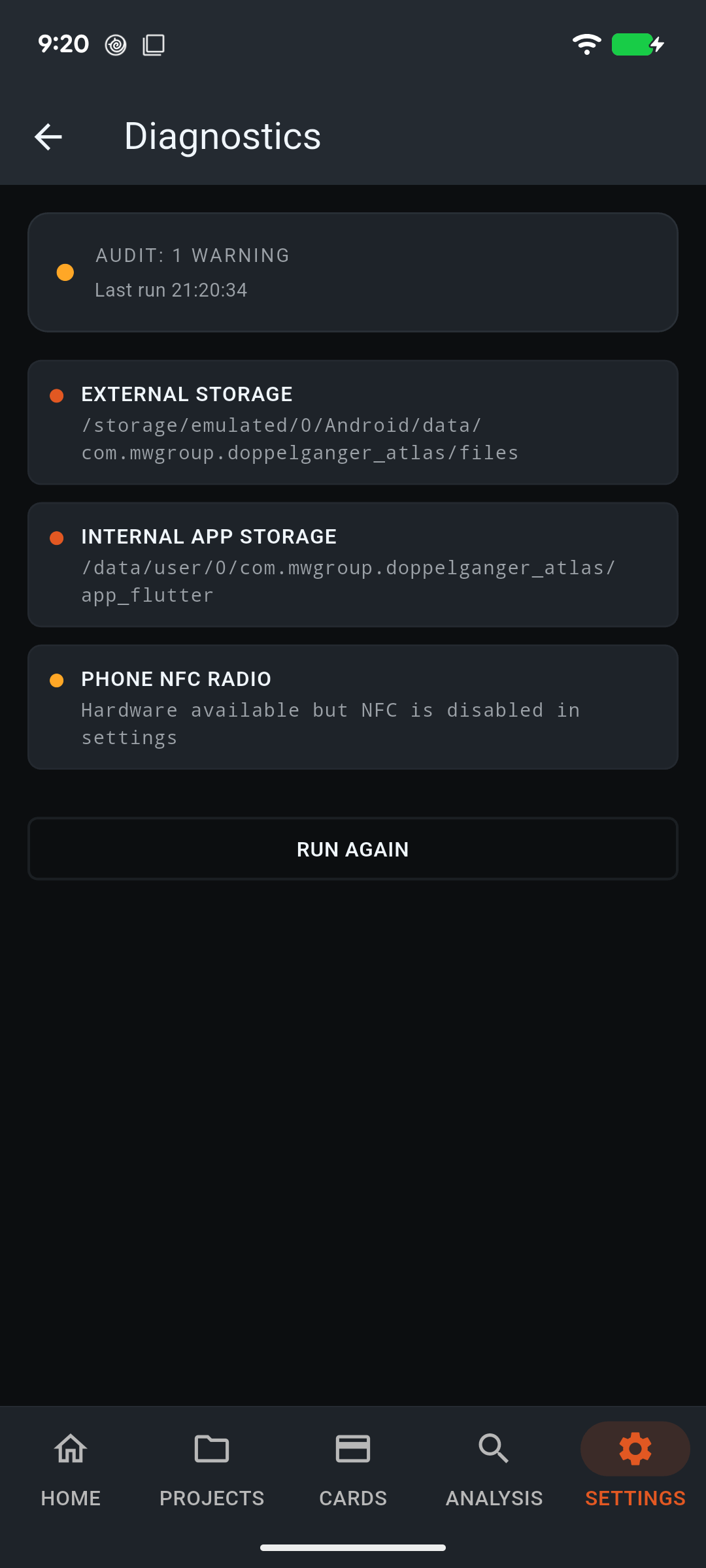
- The headline is a count, with the time the audit last ran.
- EXTERNAL STORAGE, with the real path rather than a tick.
- INTERNAL APP STORAGE, the directory everything the app owns lives under.
- The warning, stated as a condition and not an error code.
- RUN AGAIN re-runs every check against the device as it is now.
Reading the dots
Section titled “Reading the dots”Three severities, not two. The audit above only produced the first two.
| Dot | Severity | Headline it produces |
|---|---|---|
| Accent orange | pass | AUDIT: ALL PASS when every row is this |
| Amber | warn | AUDIT: N WARNINGS, and AUDIT: 1 WARNING for one |
| Red | fail | AUDIT: N FAILURES, and AUDIT: 1 FAILURE for one |
The headline takes the worst state below it, and failures outrank warnings, so a report with both reads as failures and the warning count is not shown.
What it checks
Section titled “What it checks”Three checks, and that is the whole list.
| Check | What it does |
|---|---|
| EXTERNAL STORAGE | probe-writes to the scoped external path under Android/data |
| INTERNAL APP STORAGE | probe-writes to the private directory holding dumps, media, logs and the databases |
| PHONE NFC RADIO | reports whether the handset has NFC hardware and whether it is switched on |
Every outcome the audit can produce
Section titled “Every outcome the audit can produce”Three checks, ten outcomes between them, and this is all of them.
External storage
Section titled “External storage”| Dot | What it reports |
|---|---|
| pass | the path the probe wrote to |
| warn | Not available on this Android profile |
| warn | Probe failed: <error> (dump services fall back to internal) |
A failed external probe is a warning rather than a failure because the dump services fall back to internal storage. You keep working, your files land somewhere else, and the row tells you so.
Internal app storage
Section titled “Internal app storage”| Dot | What it reports |
|---|---|
| pass | the path the probe wrote to |
| fail | Probe failed: <error> |
This one is a failure, because there is nowhere to fall back to. A red line here means the app cannot write its own dumps, media, logs or databases, and nothing that captures anything is going to work until it is resolved.
Phone NFC radio
Section titled “Phone NFC radio”| Dot | What it reports |
|---|---|
| pass | Available and enabled |
| warn | Hardware available but NFC is disabled in settings |
| warn | Native channel did not respond within 1s |
| warn | Probe error: <error> |
| fail | No NFC hardware reported |
The one second ceiling is deliberate. The audit is a page the operator is waiting on, so a channel that does not answer is reported as a warning rather than holding the page open.
When to run it
Section titled “When to run it”- Before a job, as a one-tap check that storage is where you expect.
- When a file is missing. The paths here are the ground truth that File Manager renders.
- When a radio-dependent surface misbehaves, to confirm the phone’s own NFC state before blaming a reader.
The audit runs automatically when the page opens, so what you see on arrival is current. RUN AGAIN re-runs it, and so does pulling down on the list. The last run time is there to tell the two apart after you have been sitting on the page.