
Setup and placement
A Doppelgänger Stealth is a reader you leave in place. It looks like the access control reader next to it, it reads badges presented to it, and it stores every read on itself.
It carries no network of its own to join. The Stealth makes the network and the phone joins it, which is the opposite of a longrange reader, and it is the thing to have straight before you touch anything.
Stealth mode
Section titled “Stealth mode”A reader on a wall that is broadcasting a WiFi network is a reader that can be found. Present the stealth card and the reader switches its own access point off, along with its serial debugging. Present it again and they come back.
While it is dark the reader is still reading and still storing. It is simply not on the air.
Stealth mode survives a power cycle. Presenting the card writes the state into the reader’s own filesystem, and the reader reads it back on every boot, so a Stealth that was dark when it lost power comes back dark. It brings up no access point and no web server, and the power on, power off, power on sequence this page mandates returns nothing to join. A reader coming out of storage gets the card presented first, not a network scan.
The sequence on a plant:
- Power it up and confirm it works, with the access point on. No access point means the reader is still in stealth mode from a previous plant, so present the stealth card and start again.
- Present the stealth card. The access point drops.
- Mount it and walk away. It keeps reading and storing.
- Come back, present the stealth card again, and the access point returns. A reader that held power the whole time is fully back at this point.
- Join it, import, and wipe.
Where to put one
Section titled “Where to put one”A decoy works because nobody questions a card reader. The placement decides whether it gets used, and the ones that work are the places a reader looks ordinary and a badge gets presented anyway.
| Placement | Why it works |
|---|---|
| The adjacent side of a controlled entry point | there is already a reader at that door. A second one beside it reads as a second door, a replacement, or an upgrade in progress, and people present to whichever is in front of them |
| A door that is always unlocked and has no reader | nothing to compare it against. A reader appearing on a door that never had one reads as the door being brought under control, and people badge it because that is what you do at a reader |
| Outside restrooms | repeatedly successful. High traffic, everybody goes, and a reader there is unremarkable |
Those are starting points rather than a list. The common thread is a reader that is plausible where it is, in a place people already walk through.
Concealed installs
Section titled “Concealed installs”A Stealth can go inside something rather than on a wall. The PPE clipboard installation kit puts one in a clipboard, which is carried rather than mounted.
Mounting
Section titled “Mounting”Two ways, both supplied.
| Mount | When |
|---|---|
| Magnets, embedded in the case | any steel surface. A door frame, a strike plate, a metal jamb. Goes on and comes off in seconds |
| 3M Command strips, provided | drywall, glass, painted masonry. Anything the magnets will not hold, and they come off without marking it |
Which reader you get
Section titled “Which reader you get”A decoy is a real reader housing with a Doppelgänger board inside it, so the housing on the front is what the site sees and what decides what it captures.
They are sold in every MFAS and Stealth variant. On the Signo side, the Signo 40TKS and Signo 40KTKS are also available and are not currently listed on the store, so ask for them.
The housing decides what you get back
Section titled “The housing decides what you get back”The board does not read cards. The reader in the housing does, and it hands the board whatever it would have handed the door controller. So what lands in ATLAS depends on what that reader is able to open.
| What the reader does with the card | What you get |
|---|---|
| reads the credential | the credential the door acts on: its format, its facility code and its card number |
| sees the card but cannot open it | the card’s UID and nothing else, filed as PIV/MiFare/FASC-N |
A Signo reads the credential out of a DESFire card. It supports DESFire EV1 with SIO and DESFire EV3 with SIO, so a decoy in a Signo housing does not stop at the UID of either. It opens the card, reads the SIO, and returns the credential inside it, the same one the site’s own Signo would send to the panel.
WiFi or Bluetooth: decide before it goes on a wall
Section titled “WiFi or Bluetooth: decide before it goes on a wall”A decoy is the reader you leave behind, so what it puts on the air matters more than it does for anything you carry.
On WiFi a Stealth is its own access point. It broadcasts a network named doppelgänger_XXXX from the wall it is mounted on, all day. That name is in the WiFi list of every phone that walks past, it is logged by any wireless monitoring the site runs, and its factory password is published. Anything that joins it can open the reader’s page and read what it has captured. You can rename it, hide it and change the password, and it is still an access point that was not there yesterday.
On Bluetooth there is no access point. The reader sends a short, unnamed Bluetooth advertisement under an address that changes every 15 minutes, and it answers only a phone it was paired with. Nothing names it, nothing can be joined, and no page is served.
| WiFi | Bluetooth | Stealth mode | |
|---|---|---|---|
| What the reader transmits | an access point named doppelgänger_XXXX | an unnamed advertisement, address changing every 15 minutes | nothing |
| Who can see it | anyone with a WiFi list, and wireless monitoring | someone running a Bluetooth scanner, who sees an anonymous device | nobody |
| Who can talk to it | anything that joins the access point | only a phone you paired, with a card you presented at the reader | nobody, until the stealth card is presented |
| How the cards travel | plain HTTP inside that network | encrypted and authenticated end to end | they stay on the reader |
| Cards reach you | live, while your phone is joined to it | live, while your phone is in range, and caught up when it returns | when you bring it back out |
| Readers at once | one. The phone can join one access point | several, each its own link | |
| What your phone gives up | its WiFi. It is joined to a network with no internet | nothing | nothing |
Run Bluetooth, and use stealth mode when even that is too much. Bluetooth gets you live reads with no network on the wall and your phone’s own WiFi left alone. Stealth mode is for the site that sweeps for radios, and it works on a Bluetooth reader too: present the stealth card and the reader stops advertising altogether, present it again and it links to your phone by itself with everything it read in between.
The whole of it is on Bluetooth. The short version follows the WiFi steps below.
Connecting to it
Section titled “Connecting to it”The Stealth broadcasts its own WiFi network. You join it from the phone the way you would join any other WiFi, and then ATLAS can see it.
A reader in stealth mode broadcasts nothing at all, so there is no network in the list to join. Present the stealth card first. See Stealth mode for what a reader that booted dark needs on top of that.
| Network name | doppelgänger_XXXX, where XXXX is the last four hex digits of the reader’s MAC |
| Default password | UndertheRadar |
| The reader’s address | 192.168.4.1, always, on every Stealth |
| What the phone gets | an address on the reader’s own network, 192.168.4.2 on this one |
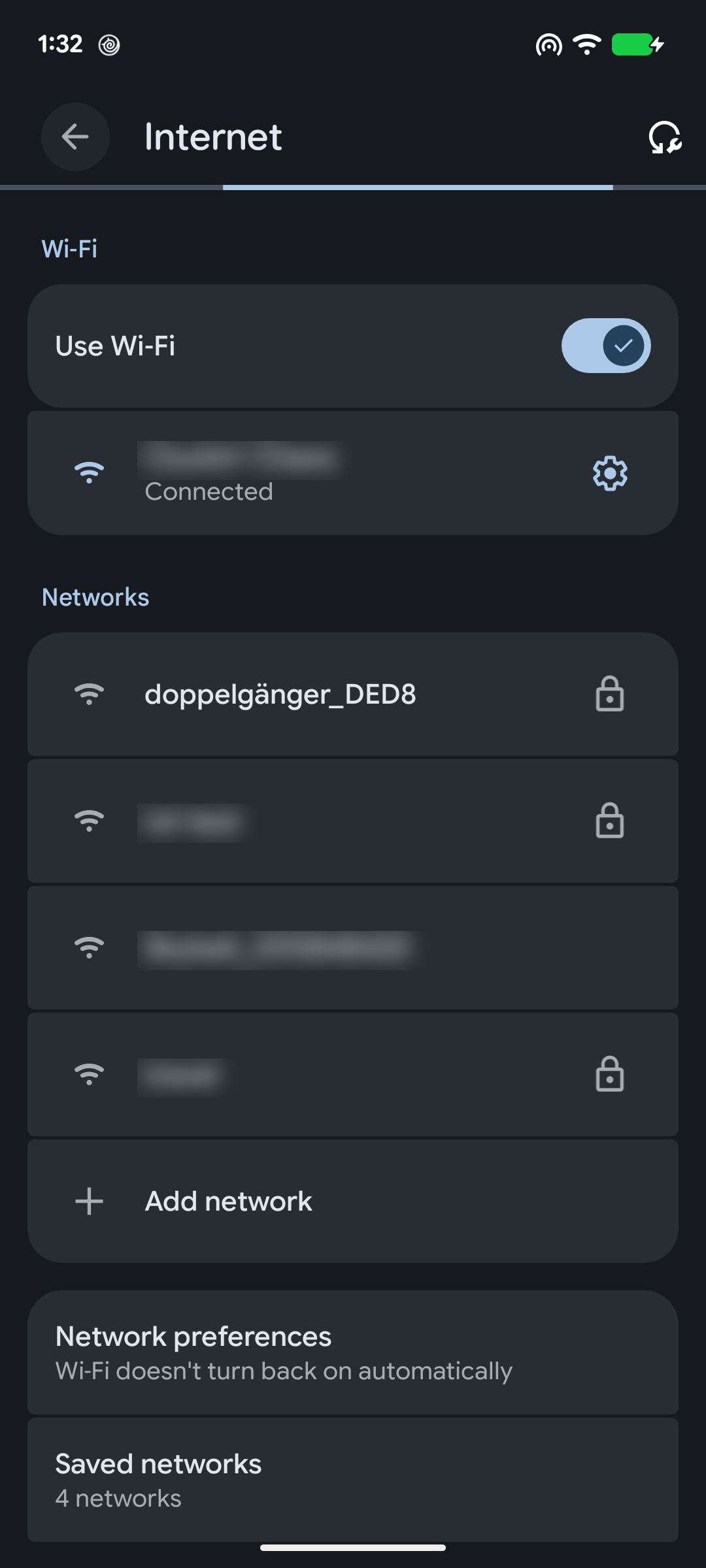
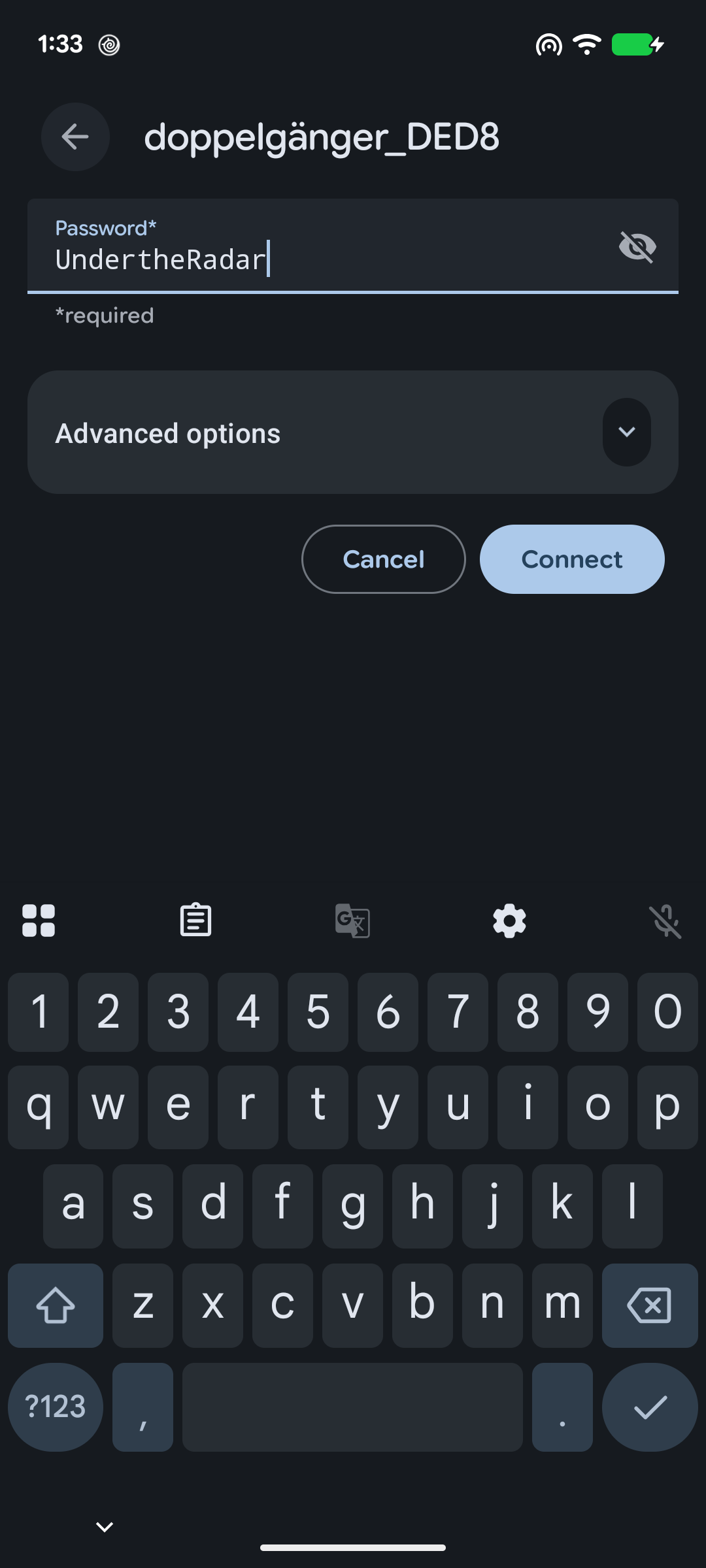
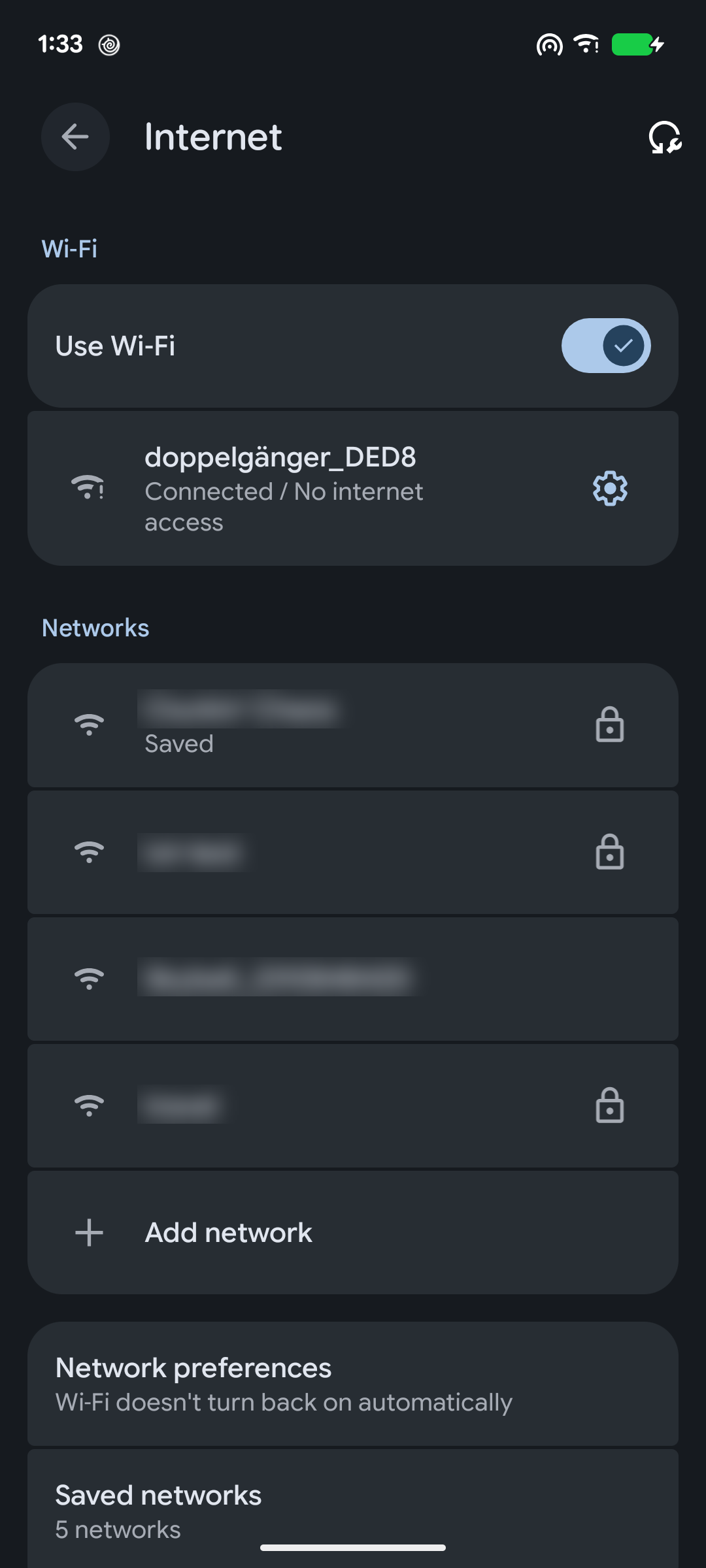
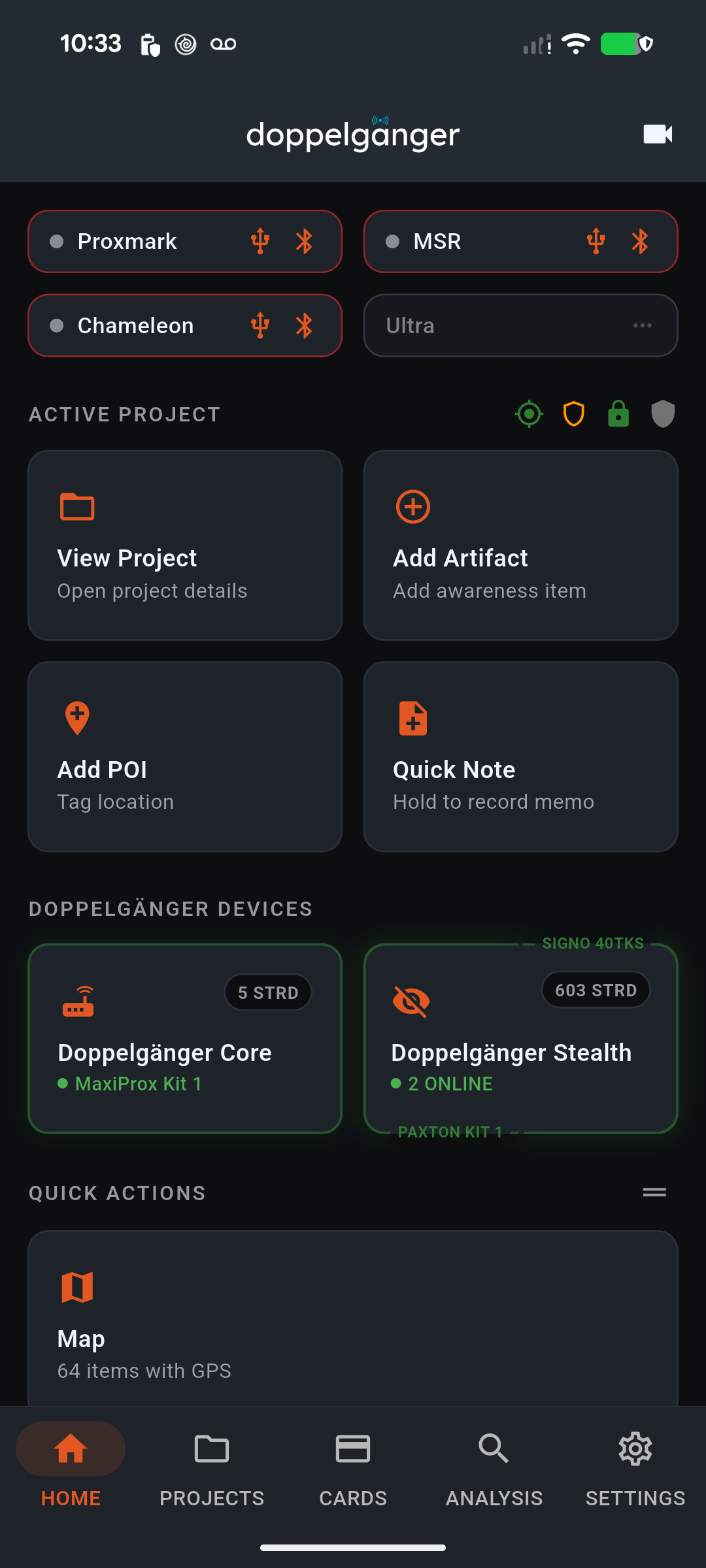
- Use Wi-Fi, on.
- Whatever the phone is on now. Joining the reader leaves this.
- doppelganger_DED8. The last four digits are this reader's MAC.
- The network name, so you know you are on the right one.
- UndertheRadar, the default, shown here with the eye control.
- Connect.
- doppelganger_DED8, Connected / No internet access.
- Everything else is now just a saved network.
- DOPPELGÄNGER DEVICES, with a Core and two Stealth readers connected at once.
- 603 STRD, what the two Stealth readers are holding between them.
- 2 ONLINE, and the edge is split in two with each reader named in its half. One reader shows its name here.
- Settings, Network and internet, Internet.
- Tap doppelgänger_XXXX.
- Type the password. The default is
UndertheRadar. - Connect.
- Answer the no internet prompt, below. Say yes.
- Open ATLAS. The reader is there.
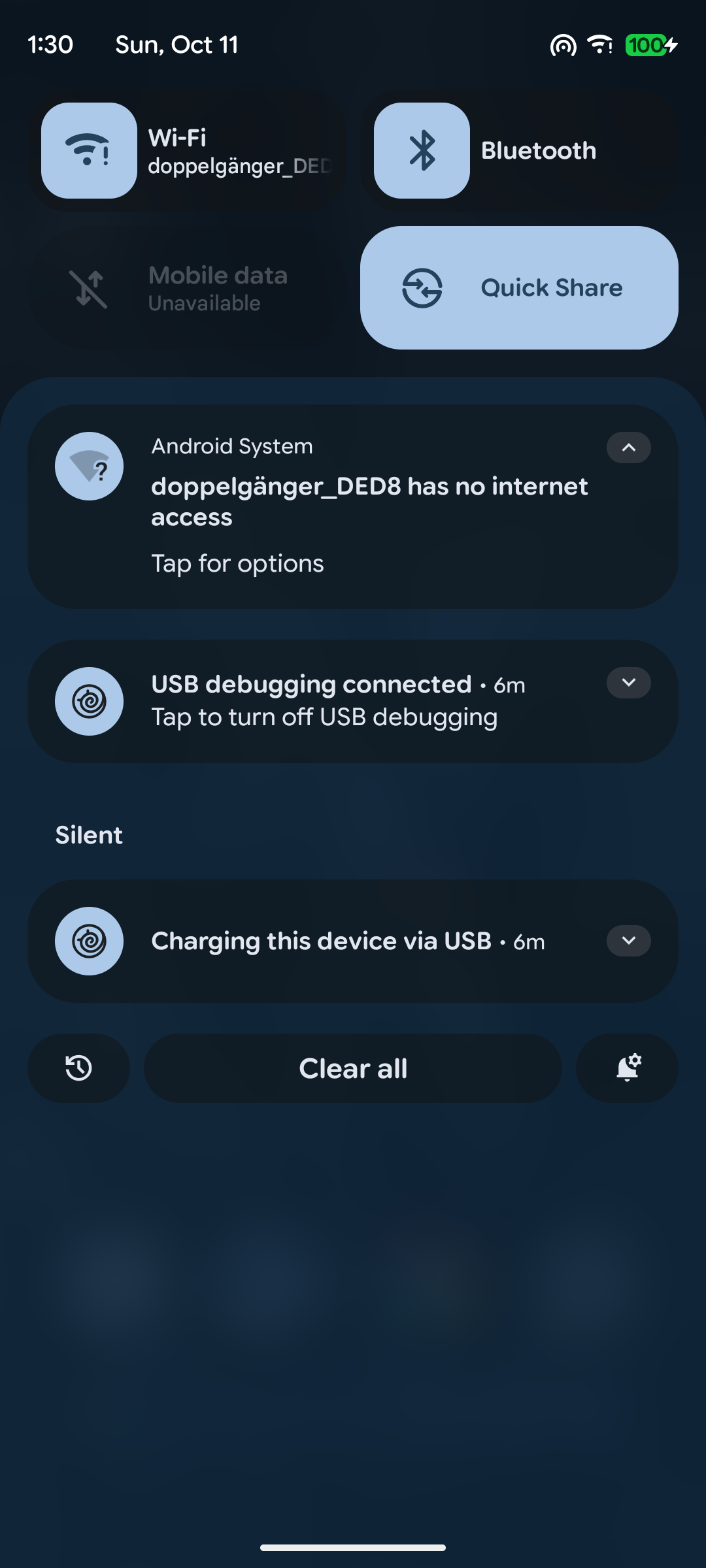
- The Wi-Fi tile carries a warning glyph while you are on the reader.
- doppelganger_DED8 has no internet access. Tap for options.
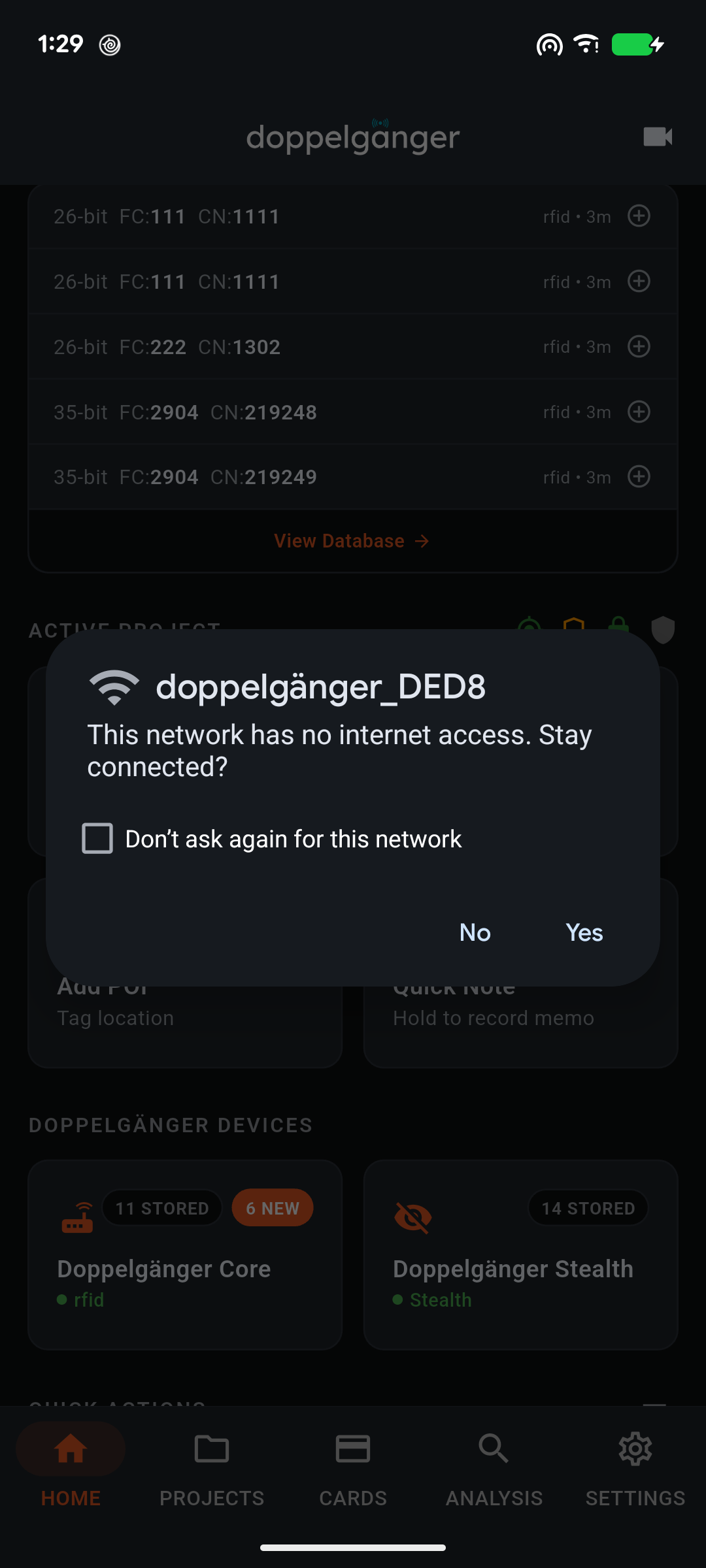
- This network has no internet access. Stay connected?
- Don't ask again for this network. Tick it.
- Yes. No drops you off the reader.
Moving it to Bluetooth
Section titled “Moving it to Bluetooth”The phone is joined to the reader and ATLAS can see it. Do this on the bench, before the reader goes on a wall.
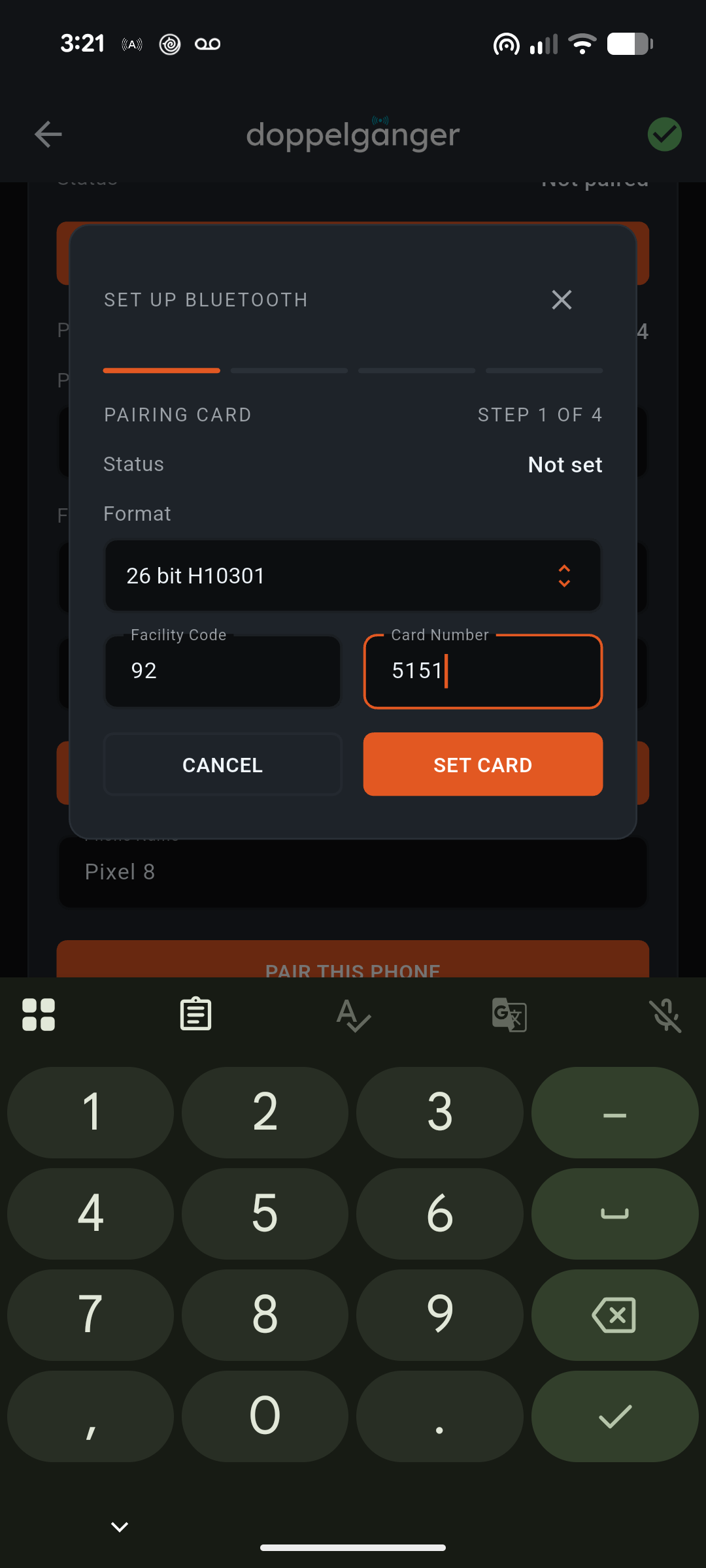
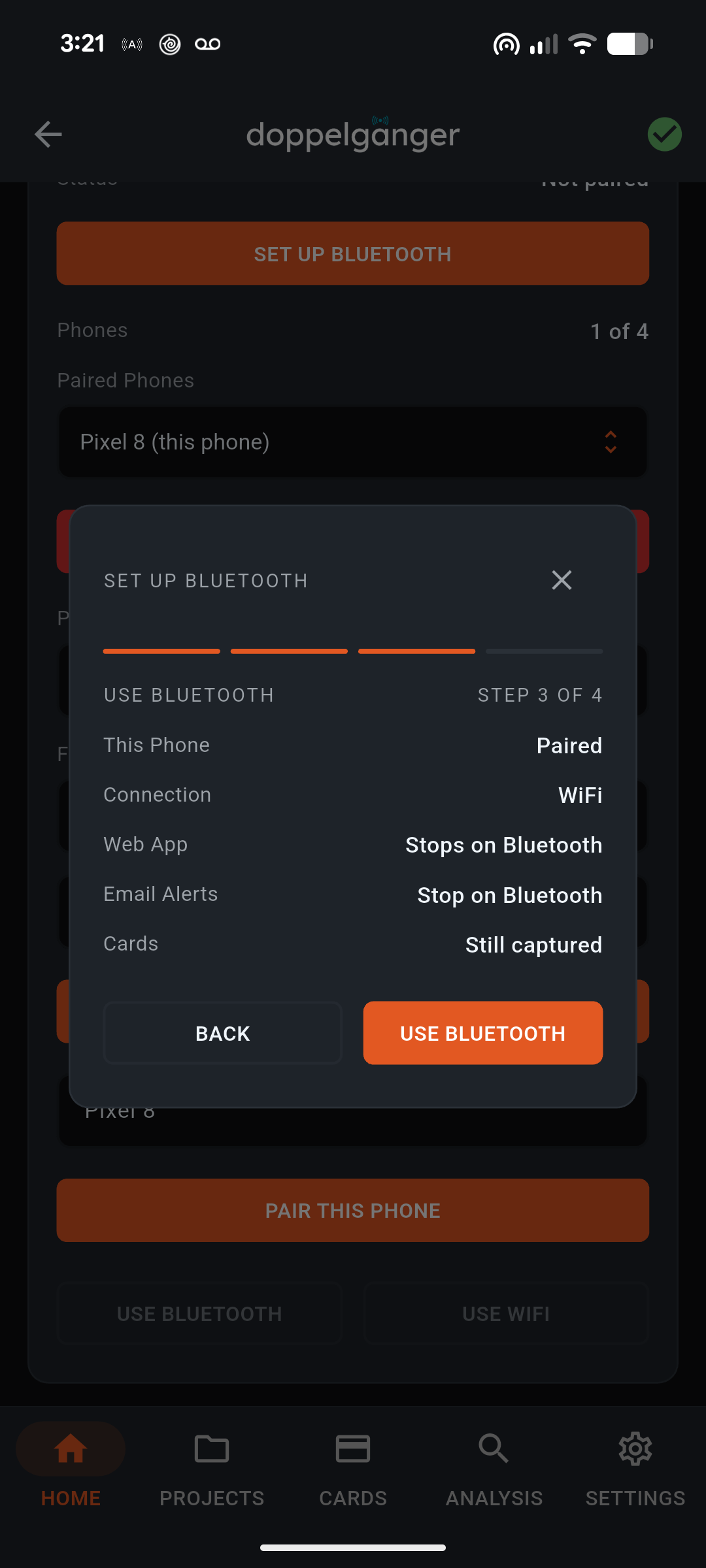
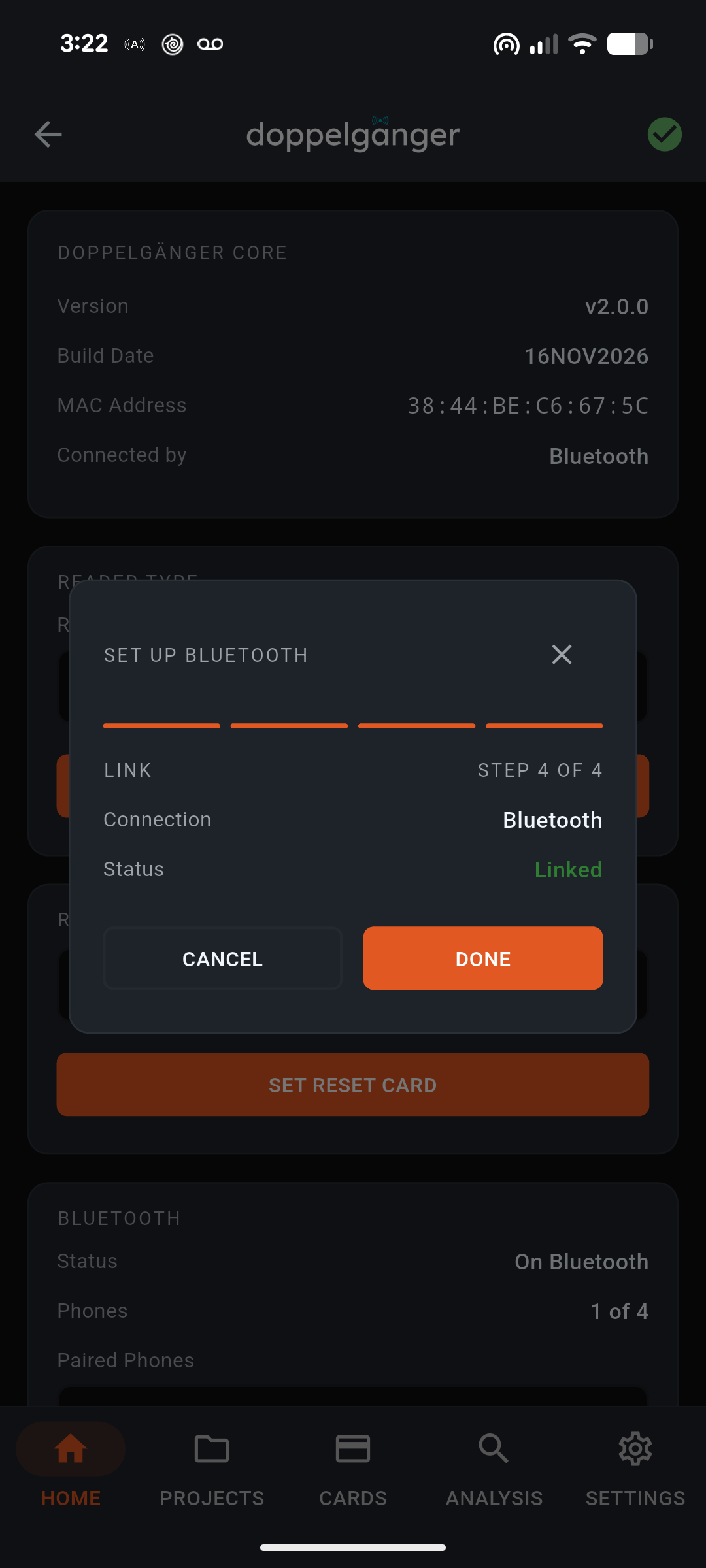
- PAIRING CARD, STEP 1 OF 4.
- Format, the kind of card you are going to carry.
- Facility Code 92 and Card Number 5151, typed.
- SET CARD sends it to the reader.
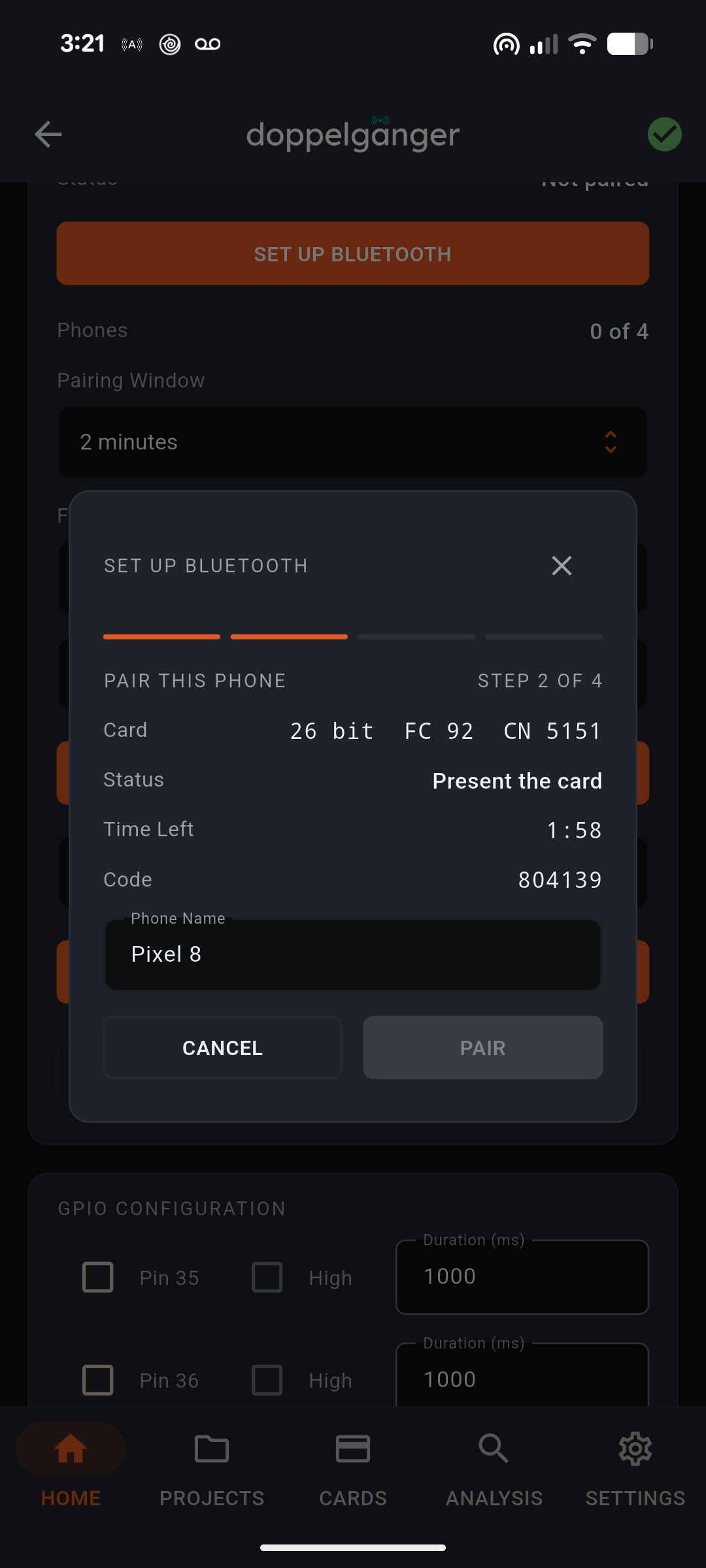
- PAIR THIS PHONE, STEP 2 OF 4.
- Present the card, with the time left under it.
- Code 804139, which the reader prints on its console too.
- Phone Name, what the reader will list this phone as.
- This Phone, Paired.
- Web App, Stops on Bluetooth.
- Cards, Still captured.
- USE BLUETOOTH restarts the reader on the other connection.
- LINK, STEP 4 OF 4.
- Status, Linked.
- DONE returns to the reader's settings, now over Bluetooth.
- Get the reader onto WiFi first, the way this page describes. Pairing happens over WiFi, once.
- In ATLAS, open the reader’s card and tap CONFIGURE, then SET UP BLUETOOTH in the BLUETOOTH section.
- Step 1, PAIRING CARD. Enter a card you will carry, tap SET CARD, and present that card at the reader. The reader keeps it only once it has read it.
- Step 2, PAIR THIS PHONE. Tap PAIR and present the same card again. The reader keeps the phone.
- Step 3, USE BLUETOOTH. Read what changes, then tap USE BLUETOOTH. A Stealth has no email alerts, so that row is not shown.
- Step 4, LINK. The reader restarts and the phone finds it. Linked is the end, about 15 to 20 seconds later.
The reader’s access point is gone the moment it restarts. Your phone drops off doppelgänger_XXXX and goes back to whatever WiFi it normally uses, and the reader shows in ATLAS as Bluetooth.
On a Paxton reader the pairing card is entered as HEX Value (10 chars) in place of a format, facility code and card number. Everything else is the same.