
Video capture settings
Video is the only thing ATLAS does that can fill a phone during a single walk-through. At the shipped settings a capture writes roughly 515 MB a minute, so a fifteen minute pass through a building is eight gigabytes, and the recorder stops when the disk does.
That is the whole reason this screen exists and the reason to visit it before a job rather than after. Every control on it is a trade between how usable a grabbed frame will be and how long you can keep recording.
Settings, then Video Capture under FIELD OPERATIONS. The tile’s subtitle shows the current settings, for example 4K at 60 fps, 0.67x.
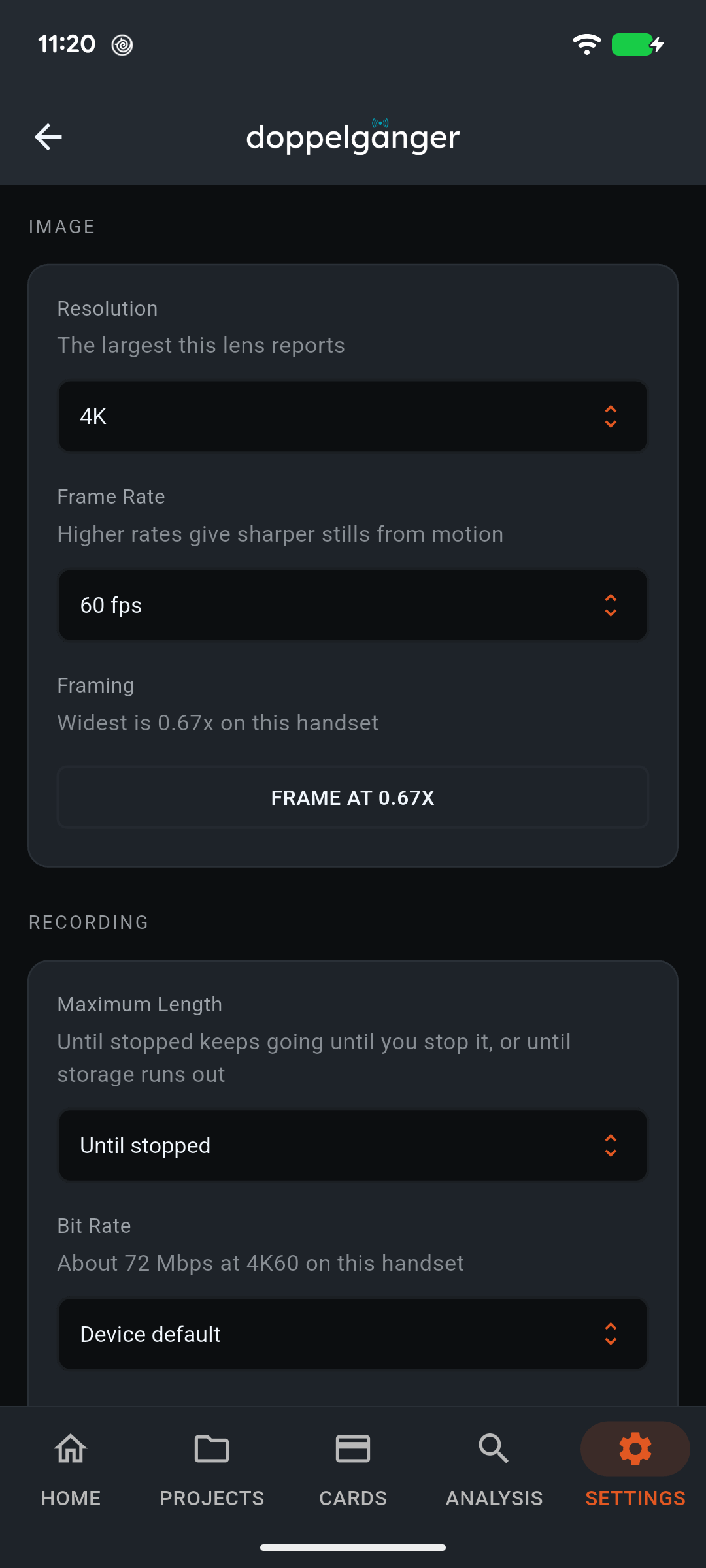
- Resolution, and the line under it says the largest this lens reports.
- Frame Rate. Higher rates give sharper stills from motion.
- Framing, which sets the zoom the capture starts at.
- Maximum Length. Until stopped runs until you stop it or the disk fills.
- Bit Rate, and the line above it is this handset's real number.
Resolution is described as The largest this lens reports, and the list is what the device actually offers rather than a fixed set. On a Pixel 7 that is 4K.
Frame Rate is described as Higher rates give sharper stills from motion, and that is the reason to care. A physical assessment rarely needs smooth video, it needs one usable frame of a badge, a keyway or a lock face as you walked past. 60 fps gives you twice as many chances at that frame as 30 does, and motion blur in each is halved.
Framing sets the zoom the capture opens at. The line reads Widest is 0.67x on this handset and the button is FRAME AT 0.67X. Widest is usually right. A concealed capture cannot be aimed, so the wider the field, the more likely the thing you wanted is somewhere in it.
RECORDING
Section titled “RECORDING”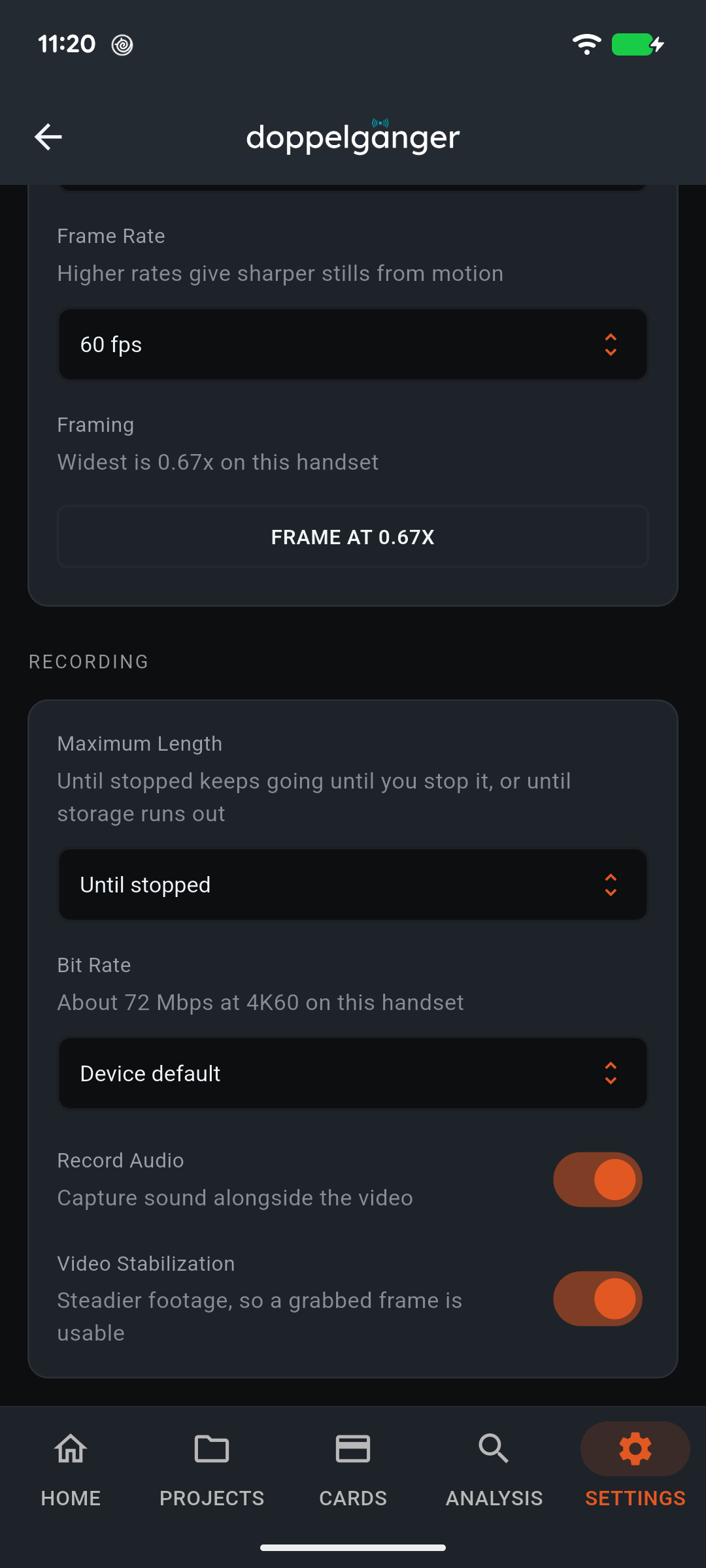
- Maximum Length, six values from one minute to an hour.
- Bit Rate, with the handset's real cost stated above the control.
- Record Audio, which is a legal question before it is a settings question.
- Video Stabilization, on, so a grabbed frame is usable.
Maximum Length, six values:
| Setting | Why |
|---|---|
| Until stopped | the default. Runs until you stop it or storage runs out |
| 1 minute | a single door, deliberately short |
| 5 minutes | one area |
| 15 minutes | a floor |
| 30 minutes | a building pass |
| 1 hour | the maximum |
A cap is a safety net rather than a plan. The honest use is on a capture you will start and then forget about, which on a clandestine recording is most of them.
Bit Rate, five values. The description line is the useful part, because it states the cost on this handset rather than in the abstract:
| Setting | What the screen says |
|---|---|
| Device default | About 72 Mbps at 4K60 on this handset, which works out at roughly 515 MB a minute |
| 16 Mbps | About 114 MB a minute |
| 24 Mbps | About 172 MB a minute |
| 35 Mbps | About 250 MB a minute |
| 50 Mbps | About 358 MB a minute |
Those four are the strings the screen prints, not a conversion done here. ATLAS divides by 1024 twice rather than by 1000 twice, so the figure it shows is a mebibyte count labeled MB, which is why 16 Mbps reads as 114 rather than 120. The same arithmetic puts the device default at 515 MB a minute.
Dropping to 24 Mbps is the single most effective change on this screen. It is a third of the storage, and for a frame grab of a badge or a lock it is usually indistinguishable from the default.
Record Audio is described as Capture sound alongside the video, and it ships on.
Video Stabilization is described as Steadier footage, so a grabbed frame is usable, and it ships on. That description is the argument. You are not making a film, you are trying to extract one sharp still from a handheld pass, and stabilization is what makes that still readable.
What to set, by job
Section titled “What to set, by job”| Situation | Resolution | Frame rate | Bit rate | Audio |
|---|---|---|---|---|
| Grabbing credential and lock detail | highest | 60 fps | 24 Mbps | off |
| Long covert pass, storage matters | highest | 30 fps | 16 Mbps | off |
| Evidence where sound is authorized and wanted | highest | 60 fps | device default | on |
| A single door, deliberately brief | highest | 60 fps | default, with a 1 minute cap | per authorization |
Resolution stays at the top in every row. It is the one setting where dropping it loses detail you cannot recover, while bit rate and frame rate both have a lot of slack before a frame grab suffers.
Where these settings are used
Section titled “Where these settings are used”Everything here applies to captures started from the camera glyph on Home, by tap or by hold, and from the viewfinder. See Recording from Home and Clandestine camera.
Changes take effect on the next capture. A recording already running keeps the settings it started with.